
A receipt seems harmless when you first get it. The real trouble starts when you need to find it six months later. For a freelancer, freelance bookkeeping software can help turn scattered receipts, email invoices, and digital purchase records into an organized expense trail that’s easier to review.
The goal isn’t just to store receipts. It’s to know which purchase they belong to, how the expense was recorded, and where to find the proof when you need it. A good system can take some of that work off your plate and make your books easier to manage.
With the right setup, receipt management becomes part of your normal bookkeeping instead of a task you have to tackle all at once at tax time. Here are seven ways software can make that process simpler and more reliable.
What You Will Learn From This Blog
- How freelance bookkeeping software can make receipt work easier
- Ways software can capture and sort receipt data
- Features to seek when picking the best bookkeeping software for freelancers
- How to set up a simple receipt workflow
- Common receipt errors that can cause bookkeeping issues
- How Meru Accounting can help with bookkeeping and receipt tracking
What Is Freelance Bookkeeping Software?
Freelance bookkeeping software is a digital tool that helps self-employed people track income, costs, bank activity, and other book data. It can also help manage receipts tied to business costs.
Instead of keeping each receipt in a paper file, you can often scan or upload it to the software. Some tools can read key data, such as the date, vendor, and total. You can then link that data to an expense in your books.
The goal isn’t just to store a pile of files. The goal is to make each receipt useful as part of your book records. When receipt data is tied to the right expense, it is easier to check your books and find support for a charge later.
The right freelance bookkeeping software may also connect with your bank or card feed. This lets you match a receipt with the related charge instead of keying the same data more than once.
How Freelance Bookkeeping Software Improves Receipt Management
It Captures Receipts in One Place
The first step in good receipt control is to get receipts out of scattered places. Freelance bookkeeping software can give you one spot for paper and digital receipts.
You may get a receipt by email, take a photo of a paper slip, or save a file from a web store. With a tool that lets you add these files to your books, you can keep them tied to the right cost.
This is much safer than keeping files in many spots. You don’t have to guess which folder holds a hotel bill from last year or search your inbox for a small work cost.
It Cuts Down on Manual Data Entry
Typing each receipt into a sheet can take a lot of time. It can also lead to small errors in dates, totals, or vendor names.
Many freelance bookkeeping software tools can read data from a receipt. You may be able to pull in the date, store name, total, and other key facts with less typing.
This does not mean every scan is right. A quick check is still smart. A faded receipt or poor photo may lead to a bad read. But even with a review step, less typing can mean less work and fewer keying errors.
It Helps Sort Business Expenses
A receipt is more useful when you know what the cost was for. Freelance bookkeeping software can help you place costs into the right account.
For example, a freelance designer may have costs for software, ads, office items, travel, and client work. A writer may have costs for web tools, research, office gear, and phone use.
Clear expense groups make your books easier to read. They can also help you spot costs that seem out of place. If a large charge lands in the wrong account, you can fix it before it affects your reports.
It Matches Receipts With Bank and Card Charges
A receipt and a bank charge are two parts of the same expense. If they are kept apart, it can be hard to prove what a charge was for.
With freelance bookkeeping software, you may be able to match a stored receipt with the related bank or card entry. This creates a cleaner link between the source file and the book entry.
For example, you might buy a laptop for work and see the card charge a few days later. The receipt can be tied to that charge, which makes the entry easier to review.
This step can also help find gaps. A bank charge with no receipt can be flagged for review, while a receipt with no matching charge may need a closer look.
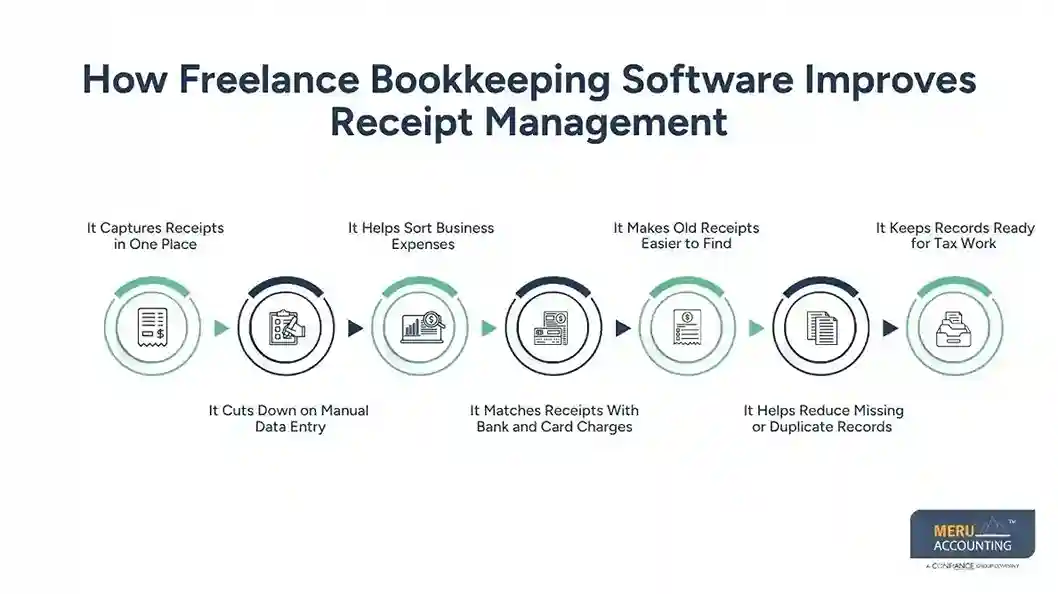
It Makes Old Receipts Easier to Find
A good receipt system should help you find a file when you need it. Freelance bookkeeping software can make this much easier than a box full of paper or a folder with files named “receipt1” and “receipt2.”
Search tools may let you look by vendor, date, amount, or expense type. This can save time when you need to check a past cost.
It can also help when your bookkeeper needs more detail. Rather than sending a long email thread or digging through old files, you can point to the receipt linked to the entry.
It Helps Reduce Missing or Duplicate Records
Receipt work can break down in two ways: a receipt may be missing, or the same cost may be entered twice.
Freelance bookkeeping software can help you spot both issues. A bank feed may show a charge that has no receipt. A duplicate check may also flag two entries that look the same.
These tools are not a replacement for a human review. A pair of similar charges may be valid, and not every business cost will have the same type of receipt. Still, software can act as a first check.
That first check is useful for freelancers who handle their own books while also trying to win clients and finish paid work.
It Keeps Records Ready for Tax Work
Tax time is much easier when your expense records are clean all year. Freelance bookkeeping software can help keep receipts tied to the costs in your books.
When your records are up to date, you don’t have to start from scratch at year-end. You can review your expense accounts, check receipt files, and spot gaps before handing your records to a tax pro.
This also helps you answer basic questions about a cost. A clear receipt can show what you bought, when you bought it, and how much you paid.
Keep in mind that a receipt alone does not decide whether a cost is deductible. The business purpose and tax rules also matter. Your tax pro can help you decide how a cost should be treated.
optional anymore
on running the business
What to Look for When Choosing the Best Bookkeeping Software for Freelancers
The best bookkeeping software for freelancers should do more than track income and expenses. Look for features that make receipt work simple from day one.
Start with receipt capture. Can you take a photo, upload a file, or add a digital receipt with ease? Next, check if the tool can read receipt data and link the file to an expense.
Bank and card feeds are also useful. They can help you match costs and cut down on manual entry. Search tools matter too, since a large receipt file is not much help if you can’t find what you need.
Also look at reports, user access, data export, and the way the software handles files. A low-cost tool may not be the best fit if it takes too much time to use.
The best bookkeeping software for freelancers is the one that fits your work, keeps your records easy to check, and does not add more steps than it saves.
How Freelancers Can Build a Better Receipt Management Workflow
Even the best bookkeeping software for freelancers won’t help much if receipts are left untouched for months. A simple routine works better.
Capture receipts right away: Take a photo or save a digital copy when you make the purchase.
Add a clear note when needed: If the reason for a cost is not clear from the receipt, add a short note about its business use.
Match receipts to charges: Review your bank and card feeds and link each cost to the right receipt.
Review your books on a set schedule: A weekly or monthly check can catch missing files and odd charges before they pile up.
Keep your files in one system: Don’t let some receipts stay in email, others on your phone, and the rest in a paper box.
This routine makes freelance bookkeeping software far more useful. The software handles much of the sorting and storage, while you still make the calls that need human judgment.
Common Receipt Management Mistakes Freelancers Should Avoid
One common mistake is waiting until tax time to sort receipts. This can turn a small task into a long cleanup job.
Another mistake is keeping a receipt but not linking it to the right expense. A file that sits alone in storage may be hard to use when you need to review a charge.
Freelancers also make the mistake of assuming every receipt is enough on its own. A receipt may show the amount and vendor but not explain why the cost was for the business. A short note can help when the reason isn’t clear.
Don’t rely on software without review, either. Freelance bookkeeping software can scan and sort data, but it may not know the full story behind a purchase. Review key entries and fix errors as you find them.
Finally, avoid mixing personal and business costs. A clean split makes your books easier to manage and can make tax review much smoother.
Get More From Freelance Bookkeeping Software With Meru Accounting
Good receipt management is only useful when the information ends up in accurate books. At Meru Accounting, we look beyond simply storing receipts. With 12+ years of accounting experience, we help businesses use their existing freelance bookkeeping software as part of a complete bookkeeping process—so expenses are recorded, matched, reviewed, and reflected correctly in their financial records.
Our support can cover the areas that matter most to freelancers:
- Bookkeeping and expense tracking to keep income and spending records up to date
- Bank and credit card reconciliation to match recorded transactions with actual account activity
- Receipt and document organization to keep supporting records linked to business expenses
- Month-end bookkeeping to review account activity and keep the books current
- Financial reporting to give you a clearer view of income, expenses, and business performance
You don’t need to build a new system from scratch. We can work with the accounting software and workflow you already use, while handling the bookkeeping work that keeps your records accurate and ready for review.
Our Expert Insight
A receipt should answer more than “What did I buy?” When we review freelance books, we also look at the business purpose, payment method, and account used to record the expense. That extra check can catch issues that a stored receipt alone won’t show, such as a personal charge recorded as a business expense or a software cost placed in the wrong account.
This is where freelance bookkeeping software is most useful as part of a regular review. It can keep the records together and make unusual or missing items easier to spot, while proper bookkeeping helps make sure those records are classified correctly. For freelancers, that creates a cleaner set of books—not just a larger collection of receipts.
Key Takeaways
- Freelance bookkeeping software can bring paper and digital receipts into one place.
- Receipt capture can reduce manual entry and save time.
- Expense categories make receipt and book review easier.
- Matching receipts to bank and card charges can help keep records clean.
- Search tools make old receipts easier to find.
- Regular review can help catch missing and duplicate records.
- The best bookkeeping software for freelancers should fit the way you work and make receipt tasks easier.
- Software works best when paired with a clear bookkeeping process.
FAQs
Keep receipts and other records that show what you bought, when you bought it, the amount paid, and its business purpose. This is especially useful for larger purchases, travel, meals, equipment, and recurring business costs.
You can, but it’s better to keep business activity separate when possible. Mixing personal and business charges can make reconciliation harder and increase the risk of recording a personal expense as a business cost.
Start by checking your email, bank or credit card account, and the vendor’s online account for another record of the purchase. If you can’t recover the receipt, keep any other supporting documentation available and make a note of the expense and its business purpose.
A digital receipt can be part of your tax records if it clearly supports the expense. Store it with the related transaction and keep enough detail to show what the purchase was and why it was a business expense.
Don’t wait until tax season. A weekly or monthly review can help catch missing receipts, duplicate entries, and expenses that were placed in the wrong account while the details are still easy to verify.
optional anymore
on running the business



