A project can stay on schedule and still go over budget. Material costs rise, labor hours add up, subcontractor bills come in, and client payments may arrive later than planned. Without a clear view of these numbers, it can be hard to know what each project is really costing you. Home builder accounting software helps bring these costs, payments, and job records together so you can keep a closer eye on your finances.
The right system can help you track project costs, manage bills and payments, review budgets, and see how each job is performing. Accounting software for builders can also cut down on manual work and give you timely financial data to support better decisions. In this blog, we’ll look at how it can help you manage construction finances with less guesswork.
What You Will Learn From This Blog
In this blog, you will learn:
- What home builder accounting software does
- How it helps track job income and costs
- Which key tools builders should look for
- How it can help with project cost control
- Common accounting issues home builders face
- How to choose the right system for your needs
optional anymore
on running the business
What Is Home Builder Accounting Software?
Home builder accounting software is a tool made to help track the money side of home building work. It can help record sales, costs, bills, payments, vendor bills, client payments, and other key data.
Unlike basic tools that only track income and costs, a good system can help you link costs to each job. For example, a builder may have costs for wood, tile, labor, permits, site work, and sub work. Job-based tracking helps show where the money goes.
This gives a builder a better view of job profit and cash flow. It can also help keep books ready for tax work and year-end review.
The right home builder accounting software should fit the way you run jobs. It should not add more work or force you to use a process that does not fit your team.
How Accounting Software for Builders Helps Manage Construction Finances
Builders deal with costs that can change from one job to the next. A good system helps keep these costs in view.
Track income and costs by job
Job-based tracking is one of the key needs in home building. You can record sales and costs for each job and then compare them with the job plan.
This can help you see if a job is on track. If the cost of goods or labor starts to rise, you can spot the change sooner.
Keep bills and payments in one place
Builders may get bills from many vendors and subs. A good system can help track what is due, what has been paid, and what is still open.
This can lower the risk of missed bills and late payments. It also gives the team a clear view of short-term cash needs.
Track labor and sub costs
Labor can be a large part of a build cost. The same is true for work done by subs. Accounting software for builders can help track these costs and link them to the right job.
This makes it easier to check if labor and sub costs match the job plan.
Manage client bills and cash flow
A builder needs cash to pay for labor, goods, subs, and other costs. At the same time, client bills must be sent and paid on time.
Home builder accounting software can help track open bills, client balances, and due dates. This can help you spot unpaid bills and plan cash use.
Create useful financial reports
Reports can show more than the bank balance. A good system can help you review income, costs, profit, unpaid bills, unpaid client bills, and other key data.
These reports can help owners make better choices while a job is still in progress.
Key Features to Look for in Home Builder Accounting Software
Not every accounting tool is built for the same type of work. When you compare home builder accounting software, look for tools that match your job flow.
Job costing
Job costing lets you group income and costs by job. It can help you track labor, goods, sub work, permits, and other costs.
Budget tracking
Budget tools can help you compare planned costs with actual costs. This can help you see cost gaps before they grow.
Accounts payable
Accounts payable tools help track vendor bills, due dates, and payments. This can make bill work clearer and easier to manage.
Accounts receivable
Accounts receivable tools help track client bills, due dates, and open balances. This can help you stay on top of cash due to you.
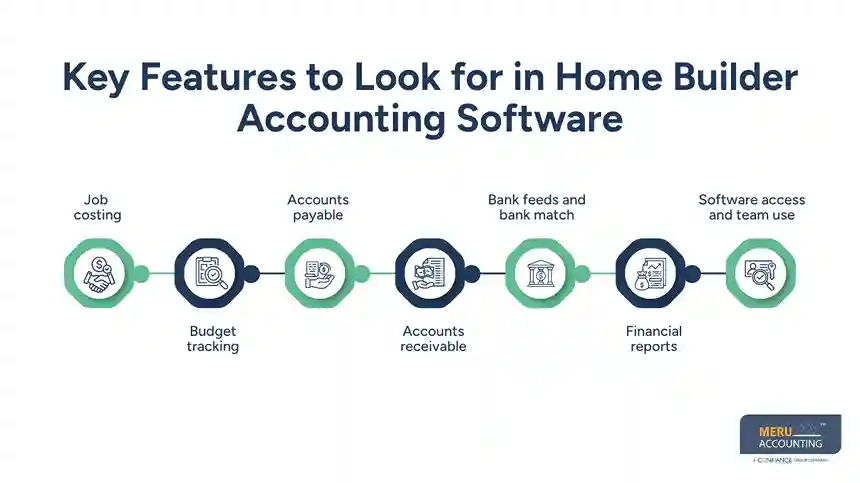
Bank feeds and bank match
Bank feeds can pull bank data into the system. Bank match tools can then help match bank data with book entries. This can save time and help keep records in sync.
Financial reports
Look for clear reports that show profit and loss, cash flow, balance sheet data, job costs, and open balances. These reports can help you see the full state of your books.
Software access and team use
Cloud-based access can let your team, bookkeeper, CPA, or other users view records based on their role. This can help keep work moving when people are in more than one place.
How Home Builder Accounting Software Helps Control Project Costs
Cost control is a key part of a healthy build. A small cost gap on one job may not seem large. But when the same issue happens on many jobs, it can cut into profit.
Home builder accounting software can help you track costs as work moves on. For example, a builder may set a $25,000 budget for site work. If the books show $21,000 spent early in the job, the team can check the open work and the cost still due.
The same idea can apply to labor, goods, sub work, and other job costs.
The goal is not just to store numbers. The goal is to use those numbers to spot issues and act before they hurt the job.
It also helps to keep job costs coded in a set way. If one type of cost is coded in many ways, reports may not give a true view of job spend. A clear chart of accounts and job cost setup can make the data more useful.
Common Accounting Challenges Home Builders Face
Home builders often face accounting issues that can make job cost data hard to trust.
Mixing costs from many jobs
When costs are not linked to the right job, it can be hard to know the true cost of a build. This can also make job profit hard to track.
Delayed data entry
If bills, receipts, and payments are added late, reports may not show the real state of a job. This can lead to poor cost and cash choices.
Poor cost coding
A bill may include costs for more than one type of work. If the cost is put in the wrong account or job, reports may be off.
Missed client payments
Late client payments can put stress on cash flow. Builders still need to pay vendors and subs even when client cash is late.
Lack of job-level reports
A total company profit report may look fine while one job is losing money. Builders need job-level data to see this gap.
Manual book work
Too much manual work can lead to data entry errors and take time away from job review and client work.
A good home builder accounting software setup can help reduce these issues, but the setup and bookkeeping process still matter. Software is most useful when the data is kept clean and up to date.
Accounting Services for Home Builders From Meru Accounting
Construction accounting takes more than keeping track of income and expenses. You need to know what each job costs, what you owe vendors and subcontractors, what clients still owe you, and how your projects are performing. Meru Accounting helps home builders keep these numbers organized with practical accounting support that fits their current workflow.
Our Home Builder Accounting Services
- Job costing and project-based bookkeeping
- Monthly bookkeeping and bank reconciliation
- Accounts payable and accounts receivable
- Vendor bills, client invoices, and payment tracking
- Payroll accounting support
- Monthly financial reports
- Book cleanup and catch-up services
- Tax-ready books and records
- QuickBooks, Xero, and Zoho Books support
Our team works with your existing software and processes, helping you keep accurate, up-to-date books without adding more work to your day.
Our Expert Insight
One issue we often see in construction books is that cash flow and job profit are not the same thing. A builder may have a healthy bank balance because a client just made a large payment, while the project still has unpaid subcontractor bills and costs left to incur.
For a better view, review each job beyond what has already been paid. Look at costs paid, unpaid bills, committed costs, and the revenue billed to date. This can help you spot a job that looks profitable on paper but may need more cash before it is complete. It also gives you a better basis for deciding when to bill, when to review costs, and where a project may need attention.
Key Takeaways
- Home builder accounting software can help track job income, costs, bills, and payments.
- Job costing helps builders see the true cost of each build.
- Accounting software for builders can help track labor, goods, subs, and other job costs.
- Budget and job reports can help spot cost gaps early.
- Bank feeds and reconciliations can help keep books up to date.
- Clear cost codes are key to useful job reports.
- Software works best when paired with a sound book process and regular review.
- Outsourced accounting support can help builders keep their books clean and ready for review.
FAQs
It depends on your job size, team, and needs. Look for job costing, project tracking, billing, bank feeds, and clear reports.
Yes. You can assign labor, materials, subcontractor bills, and other costs to each job. This helps you check actual costs against your budget.
It can track sub bills, payments, and job costs in one place. You can also see what is paid and what is still due.
Yes. When income and costs are linked to the right job, you can see the revenue, costs, and profit for each project.
It may be time when books fall behind, job costs are hard to track, or you need better reports. Outsourcing can also help as your business grows.
optional anymore
on running the business