
When a product is still on the production floor, its costs have not yet become the cost of a finished product. If you’re learning how to use QuickBooks for manufacturing, you need to know how materials, labor, and factory overhead should move through your books as production moves forward.
WIP accounting is a big part of that process. In this blog, we’ll walk through QuickBooks manufacturing accounting, including how to track WIP and production costs, move costs from raw materials to finished goods, and make sure your inventory and COGS stay accurate.
What You Will Learn From This Blog
- How QuickBooks manufacturing accounting works
- How to set up QuickBooks for a manufacturing business
- How to track WIP and production costs
- How to record WIP entries
- How to reconcile WIP and inventory
- When QuickBooks may need added manufacturing tools or support
How QuickBooks Manufacturing Accounting Works
Before learning how to use QuickBooks for manufacturing, it helps to understand the three main inventory stages:
- Raw materials: Items bought for use in production.
- Work in process: Materials, labor, and overhead tied to goods that are not yet complete.
- Finished goods: Products that have completed production and are ready to sell.
A sound QuickBooks manufacturing accounting process keeps these stages separate. This makes it easier to see how much cash is tied up in stock and how much production cost has moved through the business.
For example, a manufacturer may buy $20,000 of raw materials. As materials enter production, the related cost moves from raw materials into WIP. Direct labor and an assigned share of factory overhead may also be added to WIP. When the goods are complete, the cost moves from WIP to finished goods.
When those goods are sold, the related cost moves to cost of goods sold (COGS).
This flow matters because WIP is an asset until the related goods are completed and sold. Posting all production costs straight to an expense account can distort both inventory and profit.
How to Set Up QuickBooks for Manufacturing
A good setup is the first step in how to use QuickBooks for manufacturing. Your account structure should match how your plant buys materials, runs production, and sells finished goods.
Start with accounts for:
- Raw materials inventory
- Work in process inventory
- Finished goods inventory
- Cost of goods sold
- Direct labor
- Manufacturing overhead
- Production-related expenses
Your item list should also match the way you make and sell products. Use clear item names and units so purchases, usage, and finished goods can be tracked with less room for error.
If your business uses bills of materials (BOMs), standard costs, or job-based production, define how those records will connect with QuickBooks. QuickBooks may need help from a manufacturing add-on when production is complex.
The goal of QuickBooks manufacturing accounting is not just to enter transactions. It is to create a repeatable flow from purchasing through production and sale.
How to Track WIP in QuickBooks
WIP is one of the areas where manufacturers need more care. A WIP balance represents costs tied to goods that are still being made.
To track WIP, first define what costs should enter production. These may include:
- Direct materials
- Direct production labor
- Factory overhead
- Other costs that are directly tied to production
As materials are used, their cost should move out of raw materials and into WIP. Labor and overhead are then assigned based on the method used by the business.
For example, a plant may use labor hours to apply overhead. Another may use machine hours or a standard overhead rate. The method should be consistent and supported by the company’s production records.
At the end of the month, the WIP balance should reflect work that is still unfinished. This is a key part of how to use QuickBooks for manufacturing because the WIP account should not simply become a holding place for old or unclear entries.
A large WIP balance that does not match production records can point to timing issues, missed transfers, wrong item coding, or costs that were never cleared when production was finished.
How to Record WIP Accounting Entries in QuickBooks
The exact entry process can vary based on the QuickBooks version and the manufacturer’s workflow. Still, the accounting flow is usually similar.
Move materials into production
When raw materials are issued to production, the related cost moves from raw materials inventory to WIP.
Add direct labor
Direct production labor can be assigned to WIP based on the company’s time records or costing method.
Apply manufacturing overhead
Factory costs such as equipment use, indirect labor, utilities, and other production costs may be assigned to WIP using a set allocation method.
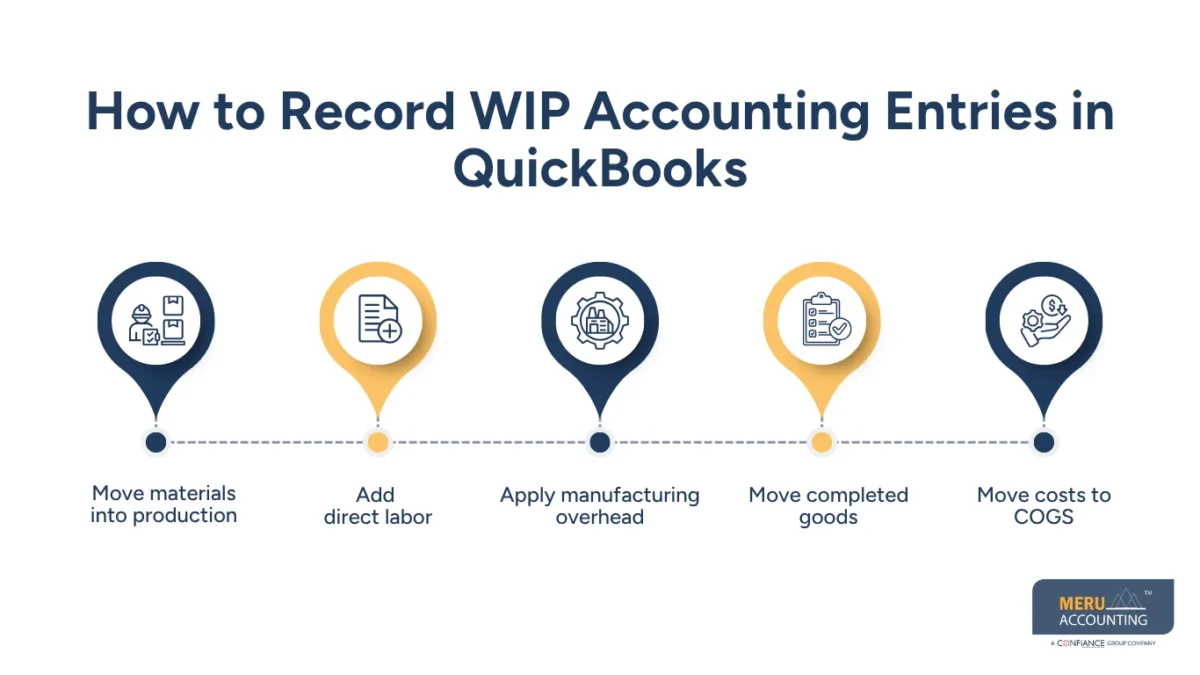
Move completed goods
When production is complete, the cost of the finished units moves from WIP to finished goods inventory.
Move costs to COGS
When finished goods are sold, the related inventory cost moves to COGS.
This process gives QuickBooks manufacturing accounting a clear cost trail. Each stage can then be reviewed against production records, inventory counts, and financial reports.
optional anymore
on running the business
How to Track Manufacturing Costs in QuickBooks
Understanding how to use QuickBooks for manufacturing also means knowing which costs belong to production.
Direct material is usually easier to trace because it can be tied to a product or production run. Direct labor can be tracked through hours worked on production. Overhead is less direct and needs a reasonable allocation method.
Common manufacturing overhead can include:
- Factory rent
- Utilities
- Equipment depreciation
- Indirect production labor
- Repairs and maintenance
- Factory supplies
The right method depends on how the business operates. A small plant with a simple product line may use a basic allocation rate. A larger operation with several production lines may need more detailed costing.
Do not mix office costs with factory costs just because they happen in the same month. Keeping production costs separate gives management a better view of product margins.
How to Reconcile WIP and Inventory in QuickBooks
Reconciliation is where QuickBooks manufacturing accounting becomes much more useful for management.
At month-end, compare QuickBooks balances with production records. Review raw materials, WIP, and finished goods separately. Look for items that have moved through production but were not recorded correctly.
A basic WIP review should ask:
- What was the beginning WIP balance?
- What production costs were added?
- What goods were completed?
- What goods were still in production?
- Does the ending WIP balance match production records?
You should also review unusual changes from one month to the next. A sharp increase in WIP may be valid if production is underway, but it can also point to incomplete transfers or costs sitting in the wrong account.
Inventory counts can help catch quantity differences, while cost reviews can help find pricing or allocation errors.
Knowing how to use QuickBooks for manufacturing means treating reconciliation as a regular part of the close, not a task saved for year-end.
Manufacturing Accounting Services With QuickBooks
Meru Accounting provides manufacturing accounting services that work with QuickBooks and your existing production processes. We help keep your books aligned with how you track raw materials, work in process (WIP), finished goods, production costs, inventory, and other manufacturing expenses.
Our manufacturing accounting services can include:
- QuickBooks bookkeeping and monthly close support
- Raw material, WIP, and finished goods accounting
- Inventory and COGS reconciliation
- Production and job cost tracking
- Bank and credit card reconciliation
- Accounts payable and accounts receivable support
- Monthly financial reporting
- QuickBooks cleanup and correction
- Tax-ready financial records
If you use separate production or inventory software, we can work with those systems alongside QuickBooks. This helps keep production records and financial records in sync while fitting the accounting process around the way your manufacturing business already operates.
Our Expert Insight
One area we pay close attention to in QuickBooks manufacturing accounting is the timing of cost transfers. A production batch may be completed, but the related material, labor, or overhead costs may not reach the right accounts at the same time. That can leave WIP overstated or finished goods understated at month-end.
Instead of making a large adjustment after the fact, review recent production completions against inventory movements and cost entries in QuickBooks. If the same difference keeps showing up, the issue may be in the workflow rather than the account balance itself.
For manufacturers, a reliable QuickBooks setup depends on keeping production activity and accounting entries in sync.
Key Takeaways
- WIP represents production costs tied to unfinished goods.
- Manufacturers should separate raw materials, WIP, and finished goods.
- Direct materials, direct labor, and manufacturing overhead may enter WIP.
- Completed production should move from WIP to finished goods.
- Sold inventory moves to COGS.
- Regular reconciliation can catch production and accounting differences early.
- QuickBooks manufacturing accounting works best when production records and financial records follow the same process.
- More complex manufacturers may need a manufacturing add-on or specialized accounting support.
FAQs
It depends on your inventory, users, reporting needs, and integrations. Manufacturers should also confirm that their production software works with the QuickBooks version they choose.
Yes. A manufacturer can use QuickBooks for accounting while separate software handles production, inventory, or shop-floor data.
Common causes include unrecorded transactions, incorrect quantities, damaged inventory, timing differences, or incorrect inventory adjustments.
Review the related inventory transactions, purchases, sales, and adjustments first. Correct the source transaction when possible rather than making an unsupported adjustment.
Consider professional support when inventory won’t reconcile, month-end adjustments keep recurring, or your financial reports don’t match your production records.
optional anymore
on running the business



