Selling products through multiple channels can help a business reach more customers, but it also makes stock control and financial tracking harder. A product sold through an online store, a marketplace, and a physical shop must be tracked in each place. If stock levels don’t sync, businesses may sell items they no longer have, miss sales, or hold more stock than they need.
This is where inventory and accounting software can help. It brings stock data and financial records together, so businesses can track product movement, record sales, monitor costs, and keep their books up to date. With the right setup, teams can manage stock across sales channels without relying on separate spreadsheets or manual entries.
In this blog, we’ll explain how inventory and accounting tools work together, which features matter, and how businesses can connect their sales channels to keep stock and financial data in line.
What You Will Learn From This Blog
- What inventory and accounting software does and how it works.
- Why stock control gets harder as sales channels grow.
- How connected tools help track orders, stock, costs, and sales.
- Which features to look for when choosing software.
- How to link inventory and accounting data across sales channels.
- How sound inventory accounting helps improve financial control.
What Is Inventory and Accounting Software?
Inventory and accounting software helps businesses track the goods they buy, store, and sell while keeping the related financial records in order. Inventory tools track stock counts, product details, purchase orders, sales, and stock moves. Accounting tools record sales, costs, payments, bills, and other business activity.
When these tools work together, a sale can update stock data and send the right details to the books. For example, when a customer buys a product, the system may lower the stock count, record the sale, and update the cost of goods sold (COGS), based on how the software is set up.
Some platforms offer both sets of tools in one system. Others link an accounting system to a separate inventory app. The best fit depends on the size of the business, the number of sales channels, its stock needs, and how much control it needs over reports.
optional anymore
on running the business
Why Is Inventory Management Across Sales Channels Challenging?
Selling through more than one channel creates more places where stock data can change. A business may sell the same item on its own website, Amazon, eBay, and at a retail store. If each channel keeps its own stock count, the numbers can soon fall out of sync.
Here are some common issues businesses face:
- Overselling the Same Product
If two channels show the same item as in stock, both may accept an order before the stock count is updated. This can lead to canceled orders, late shipments, and unhappy buyers.
- Inaccurate Stock Counts
Manual updates take time and can lead to errors. A return, damaged item, or stock transfer may not be logged in every system, which makes it hard to know how much stock is on hand.
- Poor View of Sales and Costs
Each sales channel may charge its own fees, process refunds in a different way, or send payouts on a set schedule. A bank deposit may not match the full sale amount, so teams need to track sales, fees, refunds, and payouts with care.
- Hard-to-Track Inventory Costs
A business needs more than a stock count to know what its goods are worth. It must track the cost of items bought, stock on hand, and the cost of goods sold. Poor cost data can lead to errors in profit reports and tax records.
How Inventory and Accounting Software Helps Manage Multiple Sales Channels
Connected systems help businesses keep stock data and books in sync. Here’s how inventory and accounting software can support day-to-day work across sales channels.
1. Centralizes Inventory Data Across Sales Platforms
A shared stock record gives teams one place to check product counts across channels. When a business sells an item online or in a store, the system can use that data to update the stock view for other channels.
For example, a shop has 50 units of a product. It lists 20 units on its website and 15 on a marketplace. A shared system helps the team track sales from both sources against the same stock pool, rather than treating each listing as a separate supply.
2. Updates Stock Levels as Orders Are Placed
Stock levels need to change as orders come in, not just at the end of the day. Linked tools can send order data from each sales channel to the inventory system and reduce the available count.
This helps teams avoid selling more units than they have. It also gives them a better view of which products need to be restocked. The update speed depends on the channel link and the software settings, so businesses should check how often data syncs.
3. Syncs Sales Transactions With Accounting Records
A sale affects more than stock. It also affects revenue, payment balances, fees, and tax records. When sales data flows into the accounting system, teams can record each sale with less manual work.
For example, a $100 order may have a $3 payment fee, leaving a $97 payout. The books should show the full sale and the fee as separate entries, rather than treating the $97 bank deposit as the full sale. This helps keep revenue and costs clear.
4. Tracks Inventory Costs and Cost of Goods Sold (COGS)
Stock has a cost, and that cost must be tracked as goods are sold. Inventory tools can store item costs and help calculate the value of stock on hand. The accounting system then uses the cost data to record COGS.
This gives owners a better view of gross profit. If the cost of a product rises but its sale price stays the same, the business can spot the change and review its pricing or buying plan.
5. Manages Returns, Refunds, and Stock Adjustments
Returns can affect both stock and the books. When a buyer sends an item back, the business must check if it can be sold again. A damaged item may need to be marked as a loss, while a good item can go back into stock.
Linked systems help teams record the return, update stock, and post the right refund or sales reversal. Staff should still review the item and confirm the reason for each stock change.
6. Provides Accurate Inventory and Financial Reports
A connected system can help teams view stock on hand, sales by channel, low-stock items, inventory value, and gross profit. These reports help owners see which products sell well and where cash is tied up in stock.
They can also help spot slow-moving goods, stock gaps, and large changes in costs. For sound reports, teams must keep item costs, returns, fees, and stock counts up to date.
Key Features to Look for in Accounting Software With Inventory Management
Not all tools offer the same stock and accounting features. When choosing accounting software with inventory management, look for features that match the way your business buys, stores, and sells goods.
- Multi-Channel Inventory Sync: The tool should link with the sales channels you use and share stock data across them.
- Real-Time or Frequent Stock Updates: Check how fast orders, returns, and stock changes appear in the system.
- Order and Sales Integration: The tool should bring in order details, sales tax, discounts, and refunds with clear records.
- Inventory Valuation and Cost Tracking: Look for support for stock value and a suitable costing method, such as FIFO or weighted average, based on your needs and accounting rules.
- Automated Accounting Entries: Sales, fees, refunds, and COGS should flow into the right accounts with a clear audit trail.
- Low-Stock Alerts and Reorder Points: These tools help teams spot items that may run out and plan new orders in time.
How to Connect Inventory and Accounting Across Different Sales Channels
Setting up connected systems takes more than linking apps. Product data, stock counts, and account settings must match across each tool.
Follow these steps:
Step 1: List Your Sales Channels
Make a list of all the places where you sell, such as your website, online marketplaces, and retail stores. Note how each channel handles orders, fees, refunds, and stock updates.
Step 2: Set Up a Central Product List
Give each product a clear SKU, name, size, and variant. Use the same SKU across all channels so the system can match each sale to the right item.
Step 3: Pick the Right Stock and Accounting Tools
Choose tools that work with your sales channels and support your stock needs. Check how they handle multiple stores, warehouses, bundles, returns, and inventory costs.
Step 4: Link Sales Channels and Set Sync Rules
Connect each sales channel and decide how often stock and order data should sync. Set rules for which location supplies an order and how stock is held for open orders.
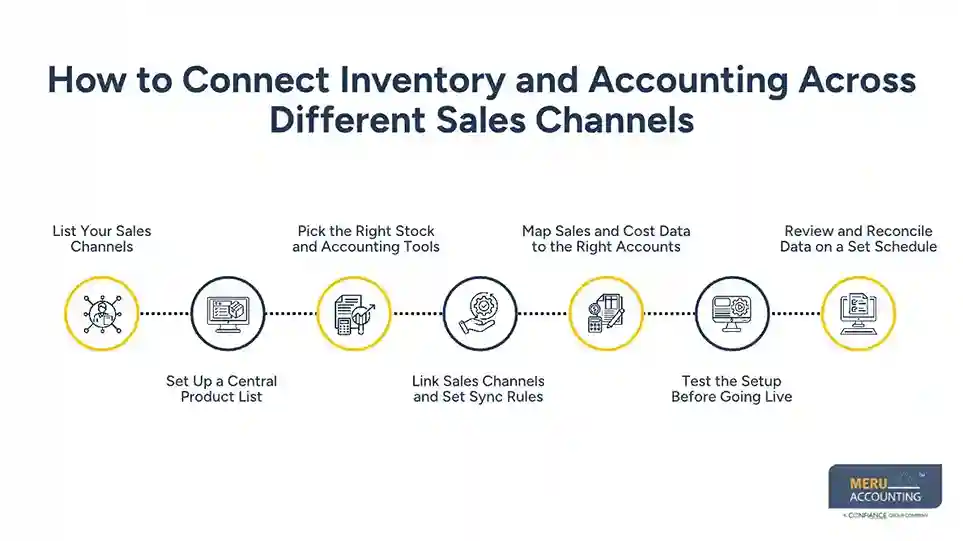
Step 5: Map Sales and Cost Data to the Right Accounts
Set up the right accounts for sales, fees, refunds, sales tax, inventory, and COGS. This helps each sale post to the right place in the books.
Step 6: Test the Setup Before Going Live
Place a test order, process a refund, and check a stock change. Make sure each action shows up in the right sales, inventory, and accounting records.
Step 7: Review and Reconcile Data on a Set Schedule
Check stock counts against a physical count and match sales reports to payment and bank records. Fix errors before they affect month-end reports.
How Meru Accounting Helps Businesses Manage Inventory and Financial Records
Managing inventory across sales channels requires accurate cost tracking, sales reconciliation, and financial reporting. Meru Accounting provides outsourced inventory accounting services to help businesses manage these tasks with support from an experienced accounting team.
Our services include:
- Inventory Valuation: Track stock value, purchase costs, and inventory adjustments.
- Sales Reconciliation: Match sales across marketplaces, online stores, and bank deposits.
- COGS Accounting: Track the cost of goods sold and keep product costs accurate.
- Inventory Cleanup: Review stock discrepancies, missing entries, returns, and damaged goods.
- Financial Reporting: Maintain inventory records and prepare reports that show sales, costs, and gross profit.
With multi-industry experience, our team understands the accounting needs of businesses selling across different channels. We provide reliable accounting support to help you maintain accurate records and make better business decisions.
Our Expert Insight
A common issue in multi-channel businesses is using sales growth as a sign of better performance without checking how much profit each product actually earns. A product may sell well across Amazon, Shopify, and retail stores, yet rising purchase costs, storage fees, and returns can cut into its margin.
We recommend reviewing gross margin by product and sales channel, not just total sales. Also, make sure the inventory costing method is applied consistently. Changes in purchase costs, freight, and stock write-offs can affect inventory value and COGS. If these costs are missed or recorded in the wrong period, reported profit may not reflect actual performance.
This level of review helps business owners see which products and channels are truly profitable before making pricing, purchasing, or expansion decisions.
Key Takeaways
- Selling through more channels makes stock control and accounting harder.
- Connected tools help keep stock counts, sales, and books in sync.
- Each product should have a clear SKU across all sales channels.
- Sales fees, refunds, and bank payouts must be tracked as separate items.
- Accurate item costs and COGS help show the true gross profit.
- Regular stock checks and account reviews help catch errors early.
FAQs
Inventory value is based on the cost of goods still on hand at the end of the reporting period. This includes eligible purchase and freight costs, less any required write-downs.
The difference should be investigated before making an adjustment. Common causes include unrecorded sales, damaged goods, returns, theft, and data entry errors.
FIFO and weighted average are common methods. FIFO assigns the cost of older stock to sales first, while weighted average uses the average unit cost. The right choice depends on the business and its reporting needs.
No. Marketplace commissions and payment processing fees are generally recorded as selling or processing expenses, not COGS. Product costs belong in COGS when the related goods are sold.
Businesses should review inventory value at least at each month-end. High-volume sellers may benefit from more frequent cycle counts to catch stock errors and changes in value early.
optional anymore
on running the business