
Law firm payroll software deserves careful attention because a single pay error can lead to staff complaints, extra work, and tax issues. Consider a firm where an attorney receives a fixed salary, a paralegal works overtime, and a legal assistant takes unpaid leave. Each pay record needs different checks, and a small mistake can affect the final amount.
The right law firm payroll software brings these tasks into one system, from wage calculations to pay slips and payroll reports. Yet, a tool that suits a five-person practice may not meet the needs of a firm with several offices and varied pay terms. The choice should reflect staff size, local tax rules, current accounting tools, and the skills of the team handling payroll.
Some firms may also consider Payroll services for law firms when internal staff lacks the time or knowledge to manage each pay cycle. The key is to compare both options based on actual needs, costs, and the level of control the firm wants to retain.
What You Will Learn From This Blog
- What law firm payroll software does and which tasks it can manage.
- Why correct payroll records matter to staff, partners, and tax reporting.
- Which features deserve attention before buying a payroll tool.
- How to compare price, data safety, system links, and vendor support.
- How Payroll services for law firms differ from payroll software.
- What to check before moving payroll to a new system.
What is Law Firm Payroll Software?
A System for Staff Pay
Law firm payroll software records wages, pay rates, deductions, and payment dates in one place. It can calculate gross and net pay from the details entered, reducing the need for repeated manual calculations.
Payroll for Different Legal Roles
A legal practice may have salaried attorneys, hourly paralegals, assistants, and temporary staff. The right law firm payroll software can handle different pay types, while partner draws and owner income may need separate accounting treatment.
Tax and Pay Records
Many systems calculate payroll taxes, record deductions, and prepare relevant reports. Firms must still check employee details, tax settings, and filing rules because software cannot correct inaccurate data on its own.
Time and Attendance Tracking
Hours, overtime, and leave can affect the amount paid to staff. Software with time-tracking features can bring approved hours into payroll and reduce errors caused by late or repeated data entry.
Payroll Reports
Payroll reports show wages, deductions, employer taxes, and total staff costs. Partners can review these figures to understand monthly spending and spot changes that need further review.
Why Accurate Payroll Management Matters for Law Firms
Correct Pay on Time
A delayed or incorrect payment can affect staff confidence in the firm’s internal processes. Law firm payroll software can reduce calculation errors, provided the team checks hours, pay rates, and approved changes before payment.
Tax and Legal Compliance
Payroll duties depend on the firm’s location and employment terms. US firms must follow applicable federal and state rules for wages, tax withholding, and records, while firms elsewhere must follow their own local laws.
Clear Staff Records
A clear record of pay rates, leave, deductions, and salary changes makes payroll queries easier to resolve. It also gives the firm a record to review when an employee questions a payment or an audit requires evidence.
Better Cost Planning
A new hire, a rise in overtime, or a change in benefits can affect monthly costs. Payroll reports show these changes, allowing partners to compare staff expenses with the firm’s budget and available cash.
Lower Risk of Payroll Errors
Wrong tax details, missing hours, and duplicate entries can lead to overpayments or underpayments. A set review process and clear approval rules can catch many such issues before the firm releases payment.
optional anymore
on running the business
Essential Features to Look for in Law Firm Payroll Software
Automated Pay Calculations
Choose law firm payroll software that calculates wages, deductions, overtime, and net pay based on the firm’s pay rules. Check how it handles bonuses, salary changes, and different pay periods before making a choice.
Tax Filing and Payment Options
Some providers calculate taxes, prepare forms, or file returns as part of their service. Confirm which tasks are included, which require separate fees, and which duties remain with the firm.
Time, Leave, and Overtime Tracking
The system should record approved work hours, leave, and overtime where relevant. A link to the firm’s timekeeping tool can reduce duplicate entry and make payroll checks less time-consuming.
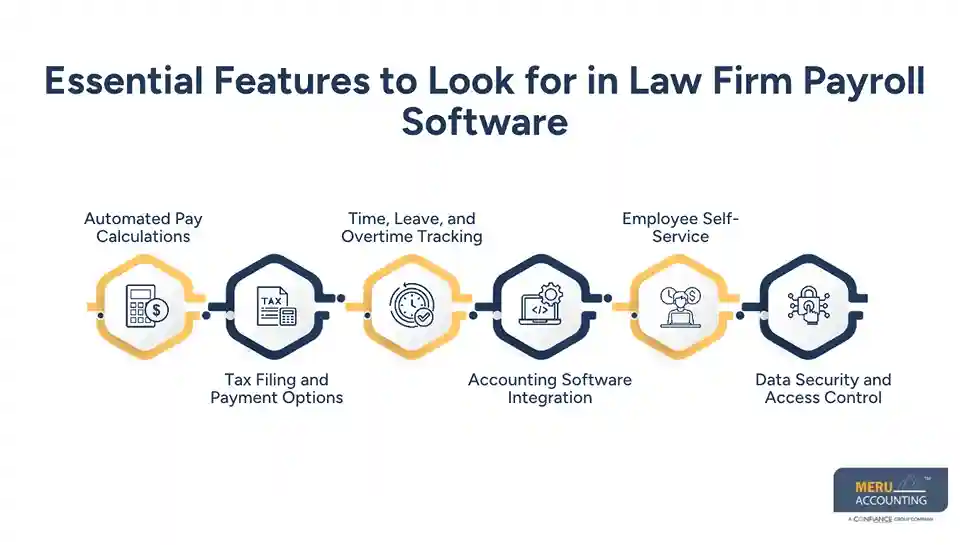
Accounting Software Integration
Payroll data should transfer to the accounting system through a direct link or a secure export. This makes it easier to record wages, employer taxes, and payroll liabilities in the correct general ledger accounts.
Employee Self-Service
A staff portal lets employees view pay slips and update certain personal details. Firms should set approval rules for changes to bank details, tax data, and other information that affects payment.
Data Security and Access Control
Payroll records contain private salary, tax, and bank details. Look for encryption, multi-factor authentication, access controls, and secure backups, and ask how the provider handles a data breach or system failure.
How to Choose the Best Law Firm Payroll Software
Assess Your Firm’s Payroll Requirements
Start with the number of employees, pay types, work locations, and pay schedules. A small firm with fixed salaries may need fewer features than a practice with hourly staff, overtime, and several offices.
Compare Software Features, Pricing, and Ease of Use
Compare monthly fees, per-employee charges, setup costs, and tax filing fees. Ask for the full price and test whether the payroll team can complete routine tasks without paying extra for basic functions.
Evaluate Integration and Data Security
Check whether the system connects with your accounting, HR, and timekeeping tools. Ask who can access payroll data, how information moves between systems, and how records can be transferred if you change providers.
Check Customer Reviews, Vendor Expertise, and Technical Support
Read recent reviews from firms with similar payroll needs, paying attention to complaints about errors and delayed replies. Confirm support hours, response times, and access to a qualified payroll expert when a pay issue needs urgent attention.
Test the Software Before Making a Decision
Use a demo or trial to run sample cases involving overtime, leave, deductions, and salary changes. Compare the results with verified figures and ask the staff who will use the tool whether each step is clear.
Law Firm Payroll Software vs. Payroll Services for Law Firms
Comparison Factor | Law Firm Payroll Software | Payroll Services for Law Firms |
Control Over Daily Payroll | Gives in-house staff control over payroll tasks and approvals. | Transfers agreed payroll tasks to an external provider. |
Cost and Staff Time | May cost less with an experienced in-house team. | Reduces internal workload but adds service fees. |
Knowledge of Payroll Rules | Applies rules based on system settings and entered data. | Provides access to payroll professionals, depending on the service. |
Data and Responsibility | Requires the firm to manage access and payroll checks. | Requires clear terms for data security, filings, and corrections. |
Choosing the Right Option | Suits firms with simple payroll needs and in-house staff. | Suits firms that need expert help or less administrative work. |
Best Practices for Implementing Law Firm Payroll Software
Clean Existing Payroll Data
Before migration, check employee details, pay rates, tax data, leave balances, and year-to-date totals. Fix errors before transferring records so the new system does not carry old mistakes into future pay runs.
Set Roles and Approval Rules
Decide who enters hours, reviews changes, and approves payments. Where possible, keep these duties separate so payroll errors or unauthorised changes are less likely to go unnoticed.
Test Before the First Live Pay Run
Run sample calculations and compare them with verified records from the old system. Check taxes, deductions, overtime, and accounting entries before using the new tool for actual staff payments.
Train the Payroll Team
Show staff how to enter hours, review pay slips, approve changes, and read reports. Keep written steps for routine tasks so another team member can take over when the usual payroll handler is absent.
Review Each Pay Cycle
Before approval, check unusual wage changes, missing hours, duplicate payments, and unexpected tax amounts. Save payroll reports and payment records under the firm’s record-retention policy.
Keep Software and Records Current
Update employee details and payroll settings when changes take effect. Review access rights regularly, apply vendor updates, and remove access when a staff member leaves or changes roles.
Why Law Firms Choose Meru Accounting for Payroll and Financial Reporting
Payroll figures affect more than staff payments. They also flow into wage expenses, tax liabilities, cash balances, and monthly reports. At Meru Accounting, we provide accounting and bookkeeping services that give law firms a clearer view of these figures and their effect on financial results.
Payroll Entries and General Ledger Review
Our accounting team can review payroll entries and their classification in the general ledger. This allows firms to check whether wages, employer taxes, benefits, and other staff costs appear in the right accounts.
Payroll Reconciliation
Payroll reconciliation compares payroll reports with accounting entries and related bank transactions. We review these records to identify differences that need attention before the firm closes its monthly accounts.
Expense and Cash Flow Review
A rise in payroll costs can leave less cash for rent, insurance, software, and other expenses. Our accounting services provide clear financial reports that help partners review spending patterns and plan for upcoming payment needs.
Financial Reporting for Partners
We prepare financial reports that present key costs and balances in a clear format. Partners can use these figures to review business results, track staff expenses, and make decisions based on recorded financial data.
Accounting Coordination
Law firms should define who handles payroll processing, tax filings, payment approval, and accounting review. Our accounting services can fit into this process while the firm retains control of staff decisions and payroll approvals.
Our Expert Perspective
The best law firm payroll software is not always the one with the longest feature list. A small practice may gain more from simple pay runs and clear reports than from costly tools it rarely uses. Before buying, test a sample payroll with different pay types and compare the results with verified calculations.
Firms should also review payroll as part of their monthly financial checks. Differences between payroll reports, bank payments, and general ledger entries can point to errors that need attention. When in-house staff lack the time or skills to manage these tasks, Payroll services for law firms may be worth comparing with a software-only plan.
Key Takeaways
- Match law firm payroll software to staff size, pay types, and local rules.
- Check tax features, time tracking, accounting links, reports, and data security.
- Compare the full cost, including setup fees and extra services.
- Test sample payroll cases before the first live payment.
- Set clear roles for payroll entry, review, and approval.
- Compare Payroll services for law firms when in-house time or expertise is limited.
- Review payroll reports and accounting entries each month.
- Use accurate staff cost records to plan budgets and cash needs.
FAQs
The best law firm payroll software for small law firms offers easy pay processing, tax calculations, employee records, and clear pricing.
Payroll software costs vary by provider, employee count, and features, so firms should compare monthly fees, tax filing charges, and setup costs.
Yes, payroll software can process salaries, hourly wages, overtime, and deductions for attorneys, paralegals, and other legal staff.
Law firm payroll software lets staff manage payroll through a system, while payroll services for law firms assign agreed payroll tasks to an external provider.
Law firms should check data encryption, multi-factor authentication, access controls, backup policies, and the vendor’s process for handling security issues.
optional anymore
on running the business