The list of accounting software available today gives businesses many ways to manage finances with speed and accuracy. Cloud tools have changed how companies track income, control costs, and prepare reports.
A clear list of accounting tools helps business owners compare features, pricing, and usability before choosing the right system.
Modern businesses, especially those in manufacturing, need tools that support inventory, production costs, and compliance.
This blog explains how cloud-based solutions fit these needs and why selecting from a well-structured list of accounting software is important.
Cloud accounting is now widely used by businesses for real-time access, automation, and secure financial data management.
A well-structured list of accounting tools helps decision-makers compare options and choose the right solution, especially in manufacturing, where financial tracking is more detailed and time-sensitive.
What You Will Learn From This Blog
- Importance of choosing from a reliable list of accounting software
- Key features required for manufacturing accounting
- Differences between cloud and on-premise systems
- Cost factors and expected returns from accounting tools
- Benefits of using cloud-based accounting software
- How Meru Accounting supports businesses in software selection
Introduction To The Manufacturing Accounting Software
Meaning Of Manufacturing Accounting Software
Manufacturing accounting software is designed to handle production costs, inventory, and supply chain transactions efficiently.
It goes beyond basic bookkeeping and standard accounting functions, as seen in many accounting software examples built for manufacturing needs.
Role In Business Operations
It connects finance with production data across multiple operational levels, which is a key feature highlighted in any list of accounting software for manufacturers. This helps businesses track raw materials, labor, and finished goods accurately.
Importance Of Industry-Specific Tools
Generic tools may miss key features required for manufacturing processes, which becomes clear when comparing accounting software examples designed for different industries. Manufacturing-focused systems provide better cost tracking and detailed financial reporting.
Integration With Other Systems
These tools often connect with ERP and inventory management systems smoothly. This ensures smooth data flow across departments without manual errors.
Real-Time Financial Visibility
Businesses can view financial data instantly through cloud-based dashboards and reports. This helps in quick decision-making and better financial control.
The Growing Need For Advanced Accounting In Manufacturing
Increased Production Complexity
Manufacturing processes have become more detailed and highly interconnected across operations. This requires accurate cost tracking at each stage of production.
Demand For Accurate Costing
Incorrect costing can reduce profits and affect pricing decisions significantly. Advanced systems help calculate precise production costs with better accuracy, as seen in leading accounting software examples.
Regulatory Compliance Needs
Manufacturers must follow tax and reporting rules set by authorities. Cloud tools help maintain proper records and ensure compliance with regulations, which is a key feature highlighted in any reliable list of accounting software.
Global Supply Chain Management
Many businesses deal with international suppliers and global distribution networks. Accounting software helps manage multi-currency transactions and supplier payments.
Data-Driven Decision Making
Accurate data support better planning and operational strategies for growth. This reduces risks and improves overall financial control.
Why Manufacturing Accounting Software Is Essential For Modern Manufacturing Businesses
Better Cost Control
Manufacturing software tracks every cost element across production activities in detail, which is a common capability found in a well-curated list of accounting software. This helps reduce waste and improve overall profit margins.
Improved Inventory Tracking
It monitors stock levels in real time across warehouses and production units, as seen in practical accounting software examples. Businesses can avoid shortages and prevent excess overstocking issues.
Faster Financial Reporting
Reports are generated quickly using automated systems and real-time data inputs, which is a key feature in many accounting software examples. This supports timely and well-informed business decisions.
Enhanced Accuracy
Automation reduces manual errors in calculations and data entry processes. This ensures reliable financial data for reporting and analysis.
Support For Growth
As businesses expand, accounting systems scale with increasing operational demands. This avoids frequent system changes and disruptions.
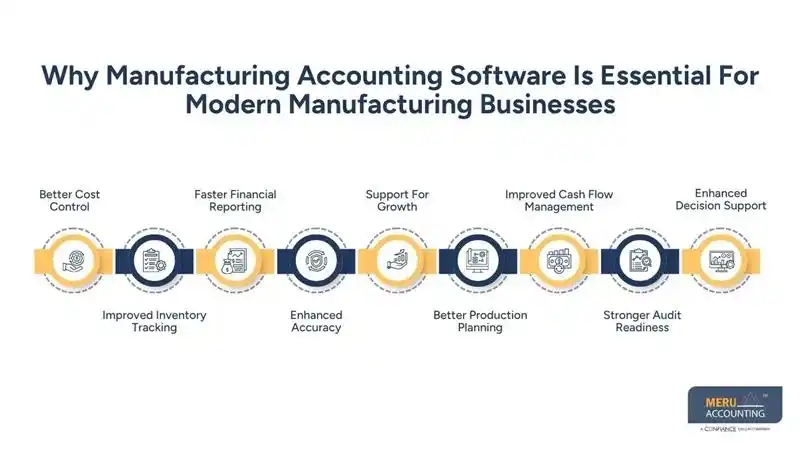
Better Production Planning
The software links financial data with production schedules and demand forecasts. This helps businesses plan resources more effectively.
Improved Cash Flow Management
It provides clear visibility into receivables, payables, and ongoing expenses. This helps maintain steady cash flow and avoid shortages.
Stronger Audit Readiness
Accurate and organized records make audits easier and faster to complete. This reduces compliance risks and improves transparency.
Enhanced Decision Support
Detailed reports and analytics provide insights into cost trends and performance. This helps management take informed strategic decisions.
Key Features Of Manufacturing Accounting Software
Inventory Management
Tracks raw materials and finished goods across multiple locations and warehouses. It ensures accurate stock records and reduces the risk of stock mismatches. It also helps in maintaining reorder levels and avoiding production delays.
Job Costing
Calculates costs for each project or order with detailed cost breakdowns. This helps in pricing decisions and profit analysis for every job. It also tracks labor, materials, and overhead costs more precisely.
Financial Reporting
Generates balance sheets and profit reports with real-time financial data updates. These are essential for planning, audits, and compliance requirements. It also provides custom reports for better business insights.
Integration Capabilities
Connects with ERP and CRM systems to share data across departments smoothly, which is often compared in a list of accounting software.
This improves overall efficiency and reduces manual data transfer errors. It also supports integration with payroll and inventory tools.
Automation Features
Reduces manual data entry through automated workflows and system-generated entries, as highlighted in several modern accounting software examples.
This saves time and improves accuracy in financial records. It also minimizes the risk of human errors in repetitive tasks.
How A List Of Accounting Software Helps Businesses Choose The Right Solution
Easy Comparison Of Tools
A list of accounting software allows side-by-side comparison of multiple tools and features. This helps identify the best fit based on business needs and size. It also saves time during the evaluation process.
Understanding Features
Businesses can review features in detail before making any investment decision by analyzing different accounting software examples.
This avoids wrong choices and ensures the software meets operational requirements. It also helps in identifying missing or extra features.
Budget Alignment
Different tools have different pricing models and subscription plans available. A list helps match software with budget and expected returns. This ensures cost-effective decision-making without overspending.
Industry Suitability
Some tools are built specifically for manufacturing and production-based businesses. A proper list of accounting software highlights these options clearly. This helps businesses choose industry-relevant solutions.
Better Decision Making
With clear and structured information, businesses can choose confidently and quickly. This reduces risks related to wrong software selection. It also improves long-term financial management outcomes.
Top Benefits Of Using Manufacturing Accounting Software
Improved Financial Accuracy
Automation ensures fewer errors in calculations and financial entries across systems. This leads to reliable financial data for reporting and decision-making. It also improves consistency in records over time.
Time Savings
Manual tasks are reduced through automated workflows, a feature commonly seen in every reliable list of accounting software.
Teams can focus on analysis instead of repetitive data entry work. This improves overall productivity and efficiency.
Better Compliance
Software helps maintain records as per tax laws and reporting regulations. This reduces audit issues and ensures proper documentation at all times. It also supports timely filing and compliance tracking.
Real-Time Insights
Managers can access updated financial data anytime through dashboards, a capability often emphasized in a list of accounting software.
This supports faster decisions based on current business performance. It also improves planning and forecasting accuracy.
Scalability
Cloud systems grow with the business and adapt to increasing operational needs, which is evident from scalable accounting software examples available today.
This makes them suitable for long-term use without major system changes. It also supports business expansion smoothly.
Cloud-Based Vs On-Premise Manufacturing Accounting Solutions
Aspect | Cloud-Based Accounting Solutions | On-Premise Accounting Solutions |
Accessibility | Cloud systems can be accessed from anywhere using internet-enabled devices. | On-premise systems are limited to specific locations or office networks. |
Cost Structure | Cloud tools follow subscription-based pricing with lower upfront costs. | On-premise systems require high initial investment in hardware and setup. |
Maintenance Requirements | Cloud providers handle updates, backups, and system maintenance regularly. | On-premise systems require internal IT teams for maintenance and upgrades. |
Data Security | Cloud platforms use advanced security protocols and data encryption methods. | Security depends on local infrastructure and internal system management. |
Flexibility | Cloud solutions easily adapt to business changes and scaling needs. | On-premise systems are less flexible and harder to scale quickly. |
Cost Considerations And ROI Of Accounting Software
Initial Investment
Cloud tools listed in a modern list of accounting software require lower upfront costs compared to traditional systems and setups.
This makes them suitable for small and growing businesses with limited budgets. It also reduces financial risk during the initial stage.
Subscription Costs
Monthly or yearly fees apply based on features, users, and service levels chosen. These costs are predictable and easier to manage in financial planning. It also allows businesses to scale plans as needed.
Implementation Costs
Setup, customization, and training may involve additional one-time expenses initially. Proper planning helps control these costs and avoid unexpected spending. It also ensures smooth system adoption across teams.
Return On Investment
Better accuracy, automation, and efficiency lead to measurable cost savings over time. This improves profitability and reduces unnecessary financial losses. It also enhances decision-making through reliable data.
Long-Term Value
Cloud systems, often featured in a list of accounting software, reduce manual work, errors, and system maintenance costs significantly.
This ensures steady returns and improved operational efficiency over time. It also supports sustainable business growth.
Meru Accounting’s Support For Your Accounting Needs
Expert Software Selection
Meru Accounting helps businesses choose from a trusted list of accounting software based on their needs. This ensures the right fit for operations and future growth. It also reduces the risk of selecting unsuitable tools.
Implementation Support
The team assists in setup, configuration, and system integration processes. This reduces errors during transition and improves system performance. It also ensures smooth adoption across teams.
Migration Services
Data is safely moved from old systems to new accounting platforms with proper checks. This ensures continuity and prevents data loss during migration. It also maintains accuracy in financial records.
Ongoing Support
Regular assistance and system monitoring are provided to handle issues quickly. This helps maintain smooth operations and system reliability. It also ensures consistent performance over time.
Custom Solutions
Services are tailored to match specific business needs and industry requirements. This improves overall efficiency and financial control. It also supports long-term operational goals.
Our Expert’s Perspective
Our experts have observed that the real issue for manufacturing businesses is not the shortage of available tools, but the difficulty in selecting the most suitable one. Many businesses make decisions without reviewing a proper list of accounting software, which often results in gaps in financial reporting and inaccurate cost tracking. With a structured evaluation approach and the right guidance, businesses can choose systems that align with their operations, improve financial visibility, and support long-term stability and growth.
Key Takeaways
- A structured list of accounting software helps in better decision-making
- Manufacturing businesses need specialized accounting tools
- Cloud solutions offer flexibility and real-time access
- Cost planning is important before choosing software
- Expert support improves implementation and results
FAQs
The best list of accounting software includes tools that offer invoicing, reporting, and real-time access. The right option depends on your business size, needs, and budget.
Start by identifying your needs like inventory, billing, or reporting features. Then compare pricing, ease of use, and support from the list of accounting tools.
Choose software that supports inventory tracking, job costing, and production management. A good list of accounting tools will include tools built for manufacturing needs.
Cloud software gives real-time access to data and reduces manual work. It also improves accuracy and keeps your financial data secure.
Cloud software is easier to access and has lower setup and maintenance costs. On-premise systems offer control, but cloud tools are more flexible for most businesses.