

A production order rarely starts with a machine. It often starts with a stock question: Do we have enough material to make this order on time? If the answer takes several calls, spreadsheet checks, or a trip to the warehouse, inventory control has become a production problem. That is where manufacturing software for small businesses can change the way a plant works.
Instead of checking separate records for raw materials, open purchase orders, production jobs, and finished stock, teams can work from connected data. Manufacturing business software can also show when a shortage is likely to affect a job before the issue reaches the shop floor.
For example, a small manufacturer receives an order for 1,000 units. Finished stock covers 300 units, raw material covers another 500, and 200 units of material are due from a supplier next week. A useful system should make that picture clear without forcing the production manager to build it by hand.
What You Will Learn From This Blog
- How manufacturing software for small businesses fits into day-to-day inventory control.
- Which features matter when comparing manufacturing business software.
- How inventory data connects with production, purchasing, and sales.
- Where software can reduce common stock and material issues.
- How accounting data fits into the inventory process.
- What to test before choosing a system for a small manufacturing firm.
Why Small Manufacturers Need Better Inventory Management
Raw Material Shortages
A production line can have capacity and staff ready to work, yet still sit idle because one small part is missing. Manufacturing software for small businesses can show material needs against stock on hand and stock already ordered.
Excess Inventory
More stock is not always safer. Slow-moving parts can take up space and tie up cash for months. A clear record of usage, open orders, and stock age gives buyers more facts before placing the next order.
Work-In-Process Visibility
Once material leaves the warehouse, it should not disappear from the inventory record. Manufacturing business software can track material as it moves through cutting, assembly, machining, testing, or packing.
Multiple Storage Locations
A business may keep the same item in a main store, production area, and finished-goods section. A single quantity figure does not show where the item is. Location-level stock records give warehouse staff a more useful picture.
Changing Material Costs
A product that cost $8 to make last month may cost more this month because a supplier raised the material rate. Manufacturing software for small businesses can retain purchase and production data that can be used when reviewing product cost.
Key Features to Look For in Manufacturing Software for Small Business
Inventory Tracking and Stock Levels
Look beyond a simple “quantity available” field. Manufacturing software for small business should show what is available, reserved for an order, already on a purchase order, or being used in production.
Bill of Materials (BOM) Management
A BOM turns a finished product into a list of required inputs. If one unit needs three brackets and six screws, the system should calculate the material needed when production quantity changes.
Work Orders and Production Scheduling
A work order gives the production team a specific job to complete. It should show the quantity, due date, required material, and current status rather than leaving operators to work from separate notes.
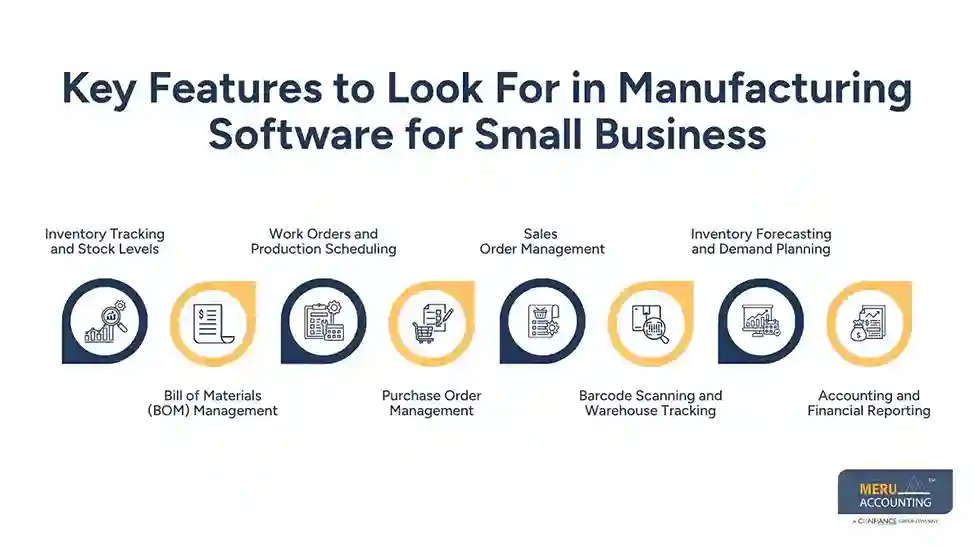
Purchase Order Management
A buyer using manufacturing software for small business should be able to see what has already been ordered before placing another order. Manufacturing business software can connect purchase orders with stock needs, supplier details, expected dates, and outstanding quantities.
Sales Order Management
Sales demand often drives production. When a customer orders more units than are available, the system should make that gap visible so sales and production can agree on a realistic delivery date.
Barcode Scanning and Warehouse Tracking
Barcode scanning is most useful when stock moves often. Staff can scan an item at receipt, move it to a bin, issue it to a job, and scan it again when finished goods are shipped.
Inventory Forecasting and Demand Planning
Forecasting should not mean trusting one sales chart. Past demand is useful, but you should also consider open orders, supplier lead times, seasonal demand, and planned production.
Accounting and Financial Reporting
Inventory has a financial effect, not just a warehouse effect. Manufacturing software for small businesses should provide the data needed to review purchases, stock value, sales, production cost, and related financial records.

How Manufacturing Business Software Supports the Production Process
From Sales to Production
The production cycle can start with a customer order rather than a stock count. Manufacturing business software can compare the order with finished goods and show whether new production is required.
From BOM to Material Issue
Once a product is selected for production, the BOM sets the expected material needed. The warehouse team can then issue material against the work order instead of relying on a handwritten list.
From Work Order to Finished Goods
Production status matters as much as stock quantity. Manufacturing software for small businesses can show whether a job is planned, active, waiting for material, under inspection, or complete.
From Purchase to Stock
If the BOM shows a shortage, the buyer can place an order for the missing material. Once it arrives, the receipt can increase stock and remove the gap from the material plan.
From Shipping to Accounts
Shipping changes more than the warehouse count. It also creates the next financial step. A connected system can pass order and shipment information into the accounting workflow.
From Data to Daily Decisions
A production manager may need to answer simple questions: What can we make today? Which order is waiting for material? What should we buy this week? Manufacturing business software is useful when it can answer these questions without manual data gathering.
Common Inventory Management Challenges Manufacturing Software Can Solve
Stockouts
A missing $2 component can delay a $2,000 order. Manufacturing software for small businesses can flag low stock and show open purchase orders before the material becomes a production blocker.
Overstock
A buyer may order extra material to avoid shortages, but repeated overbuying can create another problem. Stock-use data can show which items move often and which have been sitting unused.
Poor Stock Visibility
If warehouse, sales, and production teams keep different stock records, disagreements are almost certain. A shared system gives teams the same quantity and transaction history.
Wrong Stock Counts
Physical stock and system stock can differ because of damage, scrap, missed receipts, or incorrect issues. Barcode scans and regular stock checks can make these differences easier to find.
Late Purchase Orders
The issue is not always a poor supplier. Sometimes the order was placed too late. Manufacturing business software can show required dates alongside supplier lead times, making purchase timing easier to review.
Unclear Job Cost
A finished product may use more material than its BOM says. Manufacturing software for small businesses can record actual material use and allow managers to compare planned quantities with what the job consumed.
optional anymore
on running the business
How Manufacturing Software Integrates With Accounting and Business Systems
Inventory and General Ledger
Inventory records and financial records should tell the same story. When stock changes, the related accounting treatment should also be considered rather than treating the warehouse system as a separate island.
Purchase and Accounts Payable
A purchase order shows what the business intended to buy. A receipt shows what arrived, while the supplier bill shows what was charged. Connecting these records gives accounts payable a better audit trail.
Sales and Accounts Receivable
The same principle applies to sales in manufacturing software for small businesses. A customer order, shipment, and invoice should relate to one another, so finance staff can check what was sold and what remains due.
Inventory Valuation
Inventory valuation can affect financial statements and tax reporting. For U.S. businesses, the IRS provides rules covering inventory, cost of goods sold, and the treatment of manufacturing costs.
Financial Reporting
When operational and accounting data connect, management can review stock value, purchases, sales, and production costs with fewer gaps. Manufacturing software for small businesses should make this information easy to trace back to the underlying transaction.
How Meru Accounting Handles Manufacturing Accounting Needs
Bookkeeping and Reconciliation
Manufacturing businesses deal with frequent purchases, supplier bills, customer payments, and other transactions. Meru Accounting provides bookkeeping services to keep these records organized and reconcile accounts on a regular basis.
Accounts Payable
Raw materials and components managed through manufacturing software for small businesses can create a steady flow of supplier bills. We maintain accounts payable records and track bills, payments, and outstanding balances.
Accounts Receivable
Once finished goods are sold, customer invoices and payments need to be recorded correctly. We maintain accounts receivable records and track unpaid customer balances.
Inventory-Related Entries
Inventory transactions can affect both stock records and financial accounts. At Meru Accounting, we review purchase, sales, and other related entries so the accounting records reflect the underlying business activity.
Financial Reporting
Manufacturing owners need more than a stock count to understand business performance. At Meru Accounting, we prepare financial reports that show revenue, expenses, account balances, and other financial data.
Accounting Software Integration
The value of manufacturing business software also depends on how well its data connects with the accounting system. Meru Accounting can work with accounting records and system data to keep financial reporting more consistent.
Our Expert Perspective
Do not choose manufacturing software based only on its feature list; test it with a real customer order from start to finish, including the sales order, finished stock, BOM, material shortage, purchase order, material issue, production status, finished goods receipt, shipment, invoice, and accounting entry.
This practical test can reveal gaps that a product demo may not show, such as strong stock reports but poor BOM controls or good production tools with weak accounting links. It is also important to involve warehouse staff, buyers, production managers, sales teams, and accountants during the test because each group will use the system in a different way.
If routine tasks such as receiving stock require too many steps, staff may delay entries and reduce data quality. Manufacturing software for small business should therefore be assessed from both the production and accounting sides, since purchases, material use, finished goods, sales, and stock adjustments can all affect the financial records.
Key Takeaways
- Manufacturing software for small businesses should show what is available, reserved, ordered, and in production.
- A BOM should connect directly with material planning and work orders.
- Purchase orders should be visible when production teams check material availability.
- Barcode tools are useful when stock moves often between bins, jobs, and shipping areas.
- Demand planning should consider actual orders and supplier lead times, not only past sales.
- Manufacturing business software should connect operational records with accounting data where possible.
- Test software with a real production order before making a purchase decision.
- Choose a system based on the firm’s production process, inventory needs, reporting needs, and staff capacity.
FAQs
The best manufacturing software for small business is one that manages inventory, BOMs, work orders, purchasing, sales, and accounting based on the company’s production needs.
Manufacturing software tracks raw materials, work-in-process, finished goods, stock movements, purchase orders, and available quantities in one system.
Key features include inventory tracking, BOM management, work orders, purchase orders, sales orders, barcode scanning, demand planning, and accounting integration.
Manufacturing business software gives teams a real-time view of stock levels, material needs, open orders, and inventory movements to reduce shortages and excess stock.
Choose inventory management software based on your production process, inventory volume, BOM needs, integrations, reporting requirements, user access, and total cost.
optional anymore
on running the business




