



Choosing the right accounting software is an important decision for every business. MYOB and Saasu are two well-known cloud accounting solutions used by businesses across Australia. Both platforms manage daily financial tasks, but they differ in features, pricing, reporting, payroll, and business suitability. Selecting the right software depends on your business size, industry, future plans, and accounting requirements.
Selecting accounting software is an important step in managing business finances effectively. This blog covers the features, functionality, ease of use, scalability, and reporting options that businesses should evaluate before making a choice. The information provided will help you identify a solution that suits your operational and accounting requirements.
What You Will Learn From This Blog
By reading this guide, you will learn:
- The important factors to consider when selecting accounting software.
- How do different accounting platforms compare in terms of features and functionality.
- Which solution may be more suitable based on business size and operational needs.
- The role of pricing, payroll, reporting, inventory, and integrations in software selection.
- Common mistakes businesses should avoid before investing in an accounting solution.
- How professional accounting support can improve software implementation and financial management.
Overview of MYOB and SAASU
MYOB is an Australian accounting software provider designed for businesses of different sizes. It offers bookkeeping, payroll, invoicing, inventory management, tax reporting, and financial reporting in one platform. Australian businesses often use cloud-based accounting solutions to manage financial records, monitor cash flow, and meet reporting obligations.
On the other hand, Saasu is a cloud-based accounting solution mainly designed for small businesses, consultants, freelancers, and service providers. It focuses on simple bookkeeping, online invoicing, bank feeds, and financial reporting while keeping the interface easy to manage.
Who Uses These Platforms?
Businesses across retail, construction, manufacturing, hospitality, wholesale, and professional services often rely on accounting software to manage daily financial activities. The right solution depends on factors such as business size, transaction volume, payroll requirements, inventory management, and reporting needs.
Why Businesses Compare Them
Both accounting solutions manage daily bookkeeping, GST reporting, invoicing, expense tracking, and bank reconciliation. The main differences lie in pricing, payroll functions, inventory management, reporting options, and the range of features available for different business needs.
Why Software Selection Matters
Accounting software affects daily bookkeeping, tax preparation, payroll processing, financial reporting, and decision-making. Selecting software that fits your business today and in the coming years reduces unnecessary software changes later.
MYOB VS SAASU: Key Features Compared
Let’s compare the main accounting tools available in both software solutions. Although they share many core features, there are notable differences in functionality.
BASIS | MYOB | SAASU |
Invoices |
|
|
Bank Compliance |
|
|
Dashboard |
|
|
Cashflow |
|
|
Customer management |
|
|
Payroll |
|
|
Inventory |
|
|
Both accounting platforms offer valuable features for different types of businesses. Evaluate your reporting needs, employee management, business size, and budget before making a final decision.
Pricing Plans: Which Software Offers Better Value?
Price is key when small firms pick a tool. Both tools offer tiered plans.
MYOB Pricing
- Starter Plan: For sole traders
- Essentials Plan: With payroll and bills
- AccountRight: Advanced reports and job control
MYOB gives more with higher plans, but at a higher cost.
SAASU Pricing
- Base Plan: Basic invoicing
- Medium Plan: More users and features
- Large Plan: Multi-currency and stock
This platform offers affordable subscription plans with the essential accounting features needed by startups, freelancers, and small businesses, making it a practical choice for businesses with straightforward accounting requirements.
User Experience: Interface and Ease of Use
Let’s compare the user interface and overall experience of both accounting platforms. Each solution is designed to make daily accounting tasks simple and easy to manage.
Ease of Use with MYOB
- Simple menu for fast access
- Templates to make bills and quotes
- Easy to add GST and payroll
Some users find MYOB a bit slow with older systems. Still, it suits those who like desktop tools.
Ease of Use with SAASU
- Light and fast screen
- Easy to link banks
- Clean views for reports
Its cloud-based design allows business owners and accountants to work from anywhere while keeping financial data up to date.
Integrations and Add-ons: Boosting Business Productivity
Software that integrates with commonly used business applications can make daily accounting more efficient. Before making a decision, compare the available integrations to ensure they match your current and future business requirements.
MYOB Integrations
- Works with Shopify, PayPal, Stripe
- Link with POS tools
- Payroll and tax tools
SAASU Integrations
- Strong with bank feeds
- Connect with CRMs
- Works with Zapier for more links
The cloud-based alternative is designed for online accounting and offers strong API connectivity. It works well for businesses that want to connect their accounting system with other business applications and automate data sharing.
Security and Data Backup: How Safe Are Your Financials?
All firms must keep financial data safe. Modern accounting platforms use security measures such as data encryption, user access controls, and regular backups to protect sensitive business information.
MYOB Security
- Two-factor login
- Cloud backup with AccountRight
- Data stored in AU servers
SAASU Security
- Secure with TLS
- Daily auto backups
- Real-time data lock
When it comes to security, both accounting solutions use strong measures to protect financial data. SAASU adds live backup, which helps avoid loss.
Common Mistakes To Avoid When Choosing Accounting Software
Support helps when tools fail or confuse users. Let’s check who offers better help.
MYOB Support
- Chat and phone
- Help guides and videos
- Paid support options
Some users say MYOB wait times are long during peak hours.
SAASU Support
- Email and live chat
- Online support docs
- Fast replies for small issues
Focuses on email-based support with prompt responses, making it a suitable choice for businesses that do not require regular phone assistance.
Key Features of Accounting Chatbots
Choosing Based Only On Price
Selecting software because it has the lowest monthly subscription may result in missing important accounting features later. Compare overall value instead of focusing only on cost.
Ignoring Future Growth
Business requirements change over time. Choosing software that cannot accommodate additional employees, inventory, or reporting needs may require switching systems later.
Not Reviewing Payroll Requirements
Payroll compliance is an important part of Australian business accounting. Review payroll functions before making a final decision.
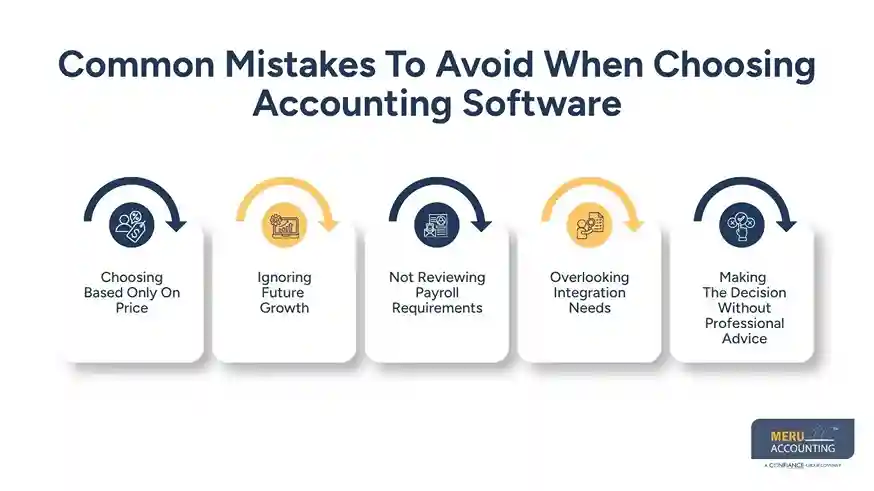
Overlooking Integration Needs
Many businesses use CRM software, eCommerce platforms, and payment gateways. Confirm that your accounting software integrates with existing business applications.
Making The Decision Without Professional Advice
Every business has different accounting requirements. Speaking with an experienced accounting professional can provide useful guidance before investing in new software.
Best Fit for Your Business Type: MYOB VS SAASU
Both tools work well, but which one suits your firm best?
Best for Service-Based Firms
SAASU may suit service-based firms better. It gives a quick cash view and works well for time-based billing.
Best for Trade or Retail Firms
MYOB is better for firms with staff and stock. It handles job cost and payroll well.
Best for New Firms
SAASU has simple setup steps. It works well for new and small firms with low budgets.
Best for Growing Firms
MYOB suits firms with more staff or complex needs. It can scale with your firm’s growth.
Why Choose Meru Accounting?
Selecting accounting software is only one part of effective financial management. Setting up accounts correctly, maintaining accurate bookkeeping, reconciling transactions, and preparing financial reports all require experience and attention to detail.
At Meru Accounting, our team works with businesses using myob, Saasu, and other leading accounting platforms. We assist with software setup, bookkeeping, payroll processing, GST reporting, financial reporting, and ongoing accounting support. Our experience allows businesses to use their accounting software efficiently while maintaining accurate financial records throughout the year.
Whether you are moving from another accounting system or selecting software for a new business, our professionals provide practical guidance based on your business requirements rather than recommending a one-size-fits-all solution.
Key Takeaways
- Selecting accounting software requires evaluating business requirements rather than focusing only on subscription costs.
- Payroll, reporting, inventory management, and integration capabilities should be assessed before making a decision.
- Businesses should choose a solution that can support future growth and changing operational needs.
- Cloud-based accounting platforms help improve financial visibility, collaboration, and record management.
- Professional guidance can simplify implementation and help maintain accurate financial records over time.
Our Expert Insight
From our experience working with businesses across various industries, choosing accounting software should focus on long-term operational efficiency rather than simply comparing features. Businesses benefit most from software that aligns with their reporting needs, transaction volumes, payroll requirements, and future growth plans. The right implementation, supported by accurate bookkeeping and expert accounting guidance, helps maximize the value of any accounting platform.
FAQs
SAASU gives a better live cash view with instant bank links. MYOB also tracks cash flow, but updates may be slower in desktop mode.
Consider your business size, industry, budget, payroll requirements, inventory management, reporting needs, and integration capabilities before selecting an accounting solution.
Look for invoicing, bank reconciliation, GST management, payroll processing, financial reporting, inventory tracking, automation, and secure cloud access to support daily business operations.
The best option depends on your business requirements. Small businesses often benefit from software that offers simple bookkeeping, affordable pricing, easy invoicing, and straightforward financial reporting.
Payroll functionality is essential if you have employees. Choose software that supports tax calculations, employee payments, compliance requirements, and payroll reporting.
optional anymore
on running the business


