A vendor invoice may look simple, but getting it from receipt to payment takes several steps. The AP team must check the bill, match it with the purchase order, get approval, and make sure the payment is sent on time. NetSuite accounts payable helps bring these steps together, making it easier to manage bills and keep track of vendor payments.
With NetSuite accounts payable software, businesses can record invoices, set approval workflows, track due dates, and manage payments in one system. But how much of this work can be automated, and where does the AP team still need to step in? Let’s look at how NetSuite handles invoice processing and vendor payments.
What You Will Learn From This Blog
- How NetSuite accounts payable works within the finance system.
- How to record, review, and approve vendor invoices.
- How NetSuite helps plan and record vendor payments.
- The key gains and limits of AP automation.
- How to improve invoice control and vendor account records.
- How expert accounting support can help manage AP tasks.
What Is NetSuite Accounts Payable and How Does It Work?
NetSuite accounts payable is the part of NetSuite’s finance system that helps a business record and manage the money it owes to vendors. It tracks bills from the time they are entered until they are paid and posted to the general ledger.
When a vendor sends an invoice, the AP team records the bill in NetSuite. The bill can include the vendor name, invoice number, date, due date, amount, tax, and the right expense or asset account. Once saved and approved, it becomes part of the company’s AP balance.
The system then helps the team track open bills, plan payments, and review vendor balances. When a payment is made, the record can be linked to the bill, which helps keep the vendor account and general ledger up to date.
For example, say a company gets a $4,000 invoice for office supplies with payment due in 30 days. The AP team records the bill, checks the amount and account code, and sends it for approval. Once approved, the bill appears in the list of unpaid bills. The team can then plan the payment before the due date.
This process gives the finance team a clear record of each bill and helps reduce the risk of missed payments.
How NetSuite Accounts Payable Software Streamlines Invoice Processing
Invoice processing involves more than entering bill amounts into an accounting system. The team must check invoice details, confirm the goods or services received, assign the right account codes, and get approval before payment. NetSuite accounts payable software helps bring these steps into a single workflow.
Here are the main ways it can help.
1. Capturing and Recording Vendor Invoices
The first step is to record each vendor invoice in the system. AP staff can enter bill details, such as the vendor name, invoice number, bill date, due date, and amount. They can also attach the source invoice for future review.
With supported invoice capture tools, some data can be read from uploaded bills and used to create records. Staff should still check key details before saving or approving them.
This helps reduce repeated data entry and keeps invoice records in one place. It also makes it easier to find a bill when a vendor asks about its payment status.
2. Automating Invoice Approval Workflows
Invoices often need approval from a manager, department head, or budget owner. If the approval process relies on emails or paper forms, bills can sit for days without action.
NetSuite lets businesses set approval rules based on factors such as amount, department, or other business needs. Once a bill meets the set rules, it can be sent to the right person for review.
For example, a company may require manager approval for bills over $2,500. Smaller bills may follow a simpler approval path. These rules help teams apply the same checks to each bill.
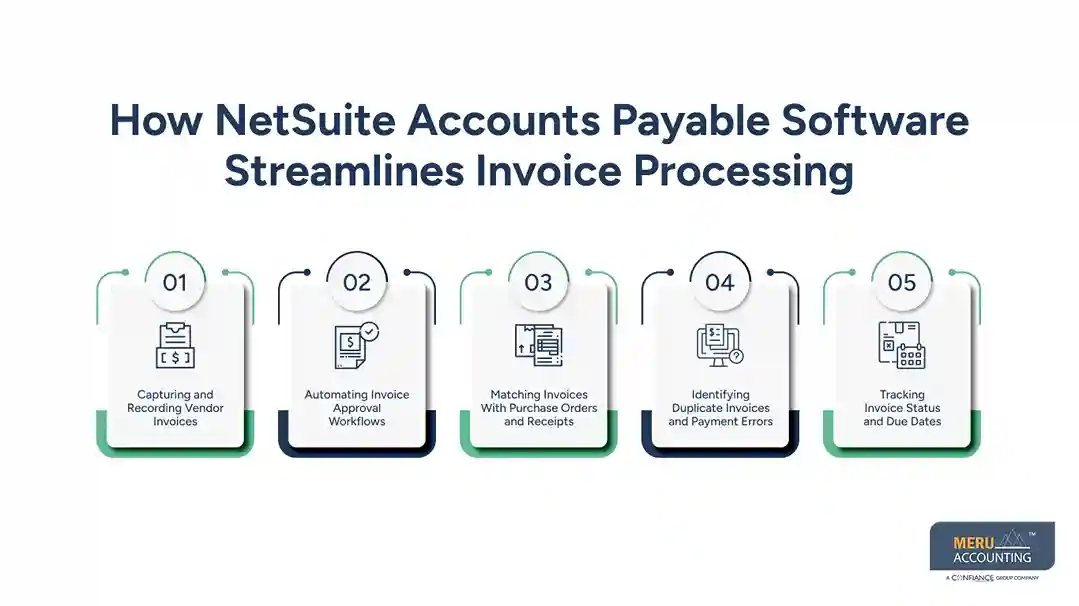
3. Matching Invoices With Purchase Orders and Receipts
A vendor invoice should match what the business ordered and received. Paying a bill without this check can lead to overpayments or charges for goods that never arrived.
NetSuite supports purchase order and receipt matching as part of the AP process. The team can compare the invoice with the purchase order and item receipt to check the price, quantity, and items billed.
For example, if a purchase order lists 100 units but the invoice shows 120, the difference needs review before payment. This check helps catch billing errors and avoid paying more than the business owes.
4. Identifying Duplicate Invoices and Payment Errors
Duplicate bills can lead to duplicate payments, extra work, and vendor disputes. They may occur when a vendor resends an invoice or when two staff members enter the same bill.
NetSuite can help flag possible duplicate vendor bills based on invoice details and system checks. AP staff should review these alerts, as valid bills may share some details.
A regular review of invoice numbers, vendor names, dates, and amounts can add another layer of control. This is an important part of managing NetSuite accounts payable, especially when a business handles a high volume of bills.
5. Tracking Invoice Status and Due Dates
AP teams need to know which bills are new, pending approval, approved, overdue, or paid. Without a clear view, they may miss due dates or spend too much time asking staff for updates.
NetSuite provides bill records, saved searches, and reports that can help teams track invoice status and due dates. Staff can use these views to review open bills and see which items need action.
This also helps managers plan work based on due dates rather than waiting for vendors to follow up.

optional anymore
on running the business
How NetSuite Simplifies Vendor Payments
Recording bills is only one part of the AP process. Businesses must also pay vendors on time, use the right payment method, and keep payment records in line with bank activity.
NetSuite helps manage these tasks through its vendor payment and bill management features.
1. Managing Payment Schedules and Due Dates
When a bill is entered, its payment terms and due date help the AP team plan when to pay it. NetSuite can show bills that are due or overdue, which helps staff set payment priorities.
For example, a vendor may offer a 2% discount if payment is made within 10 days, while the full amount is due in 30 days. The team can review the terms and decide whether early payment makes sense for cash flow.
2. Supporting Different Vendor Payment Methods
Businesses may pay vendors through checks, electronic payments, or other supported payment methods. NetSuite can help record and manage payments based on the company’s setup and payment tools.
The exact options depend on the payment service, bank connection, and system configuration. Before using a payment method, businesses should confirm that it fits their bank’s process and internal approval rules.
3. Recording Payments and Updating Vendor Balances
Once a payment is made, the AP team needs to apply it to the right bill. This helps show how much the business still owes each vendor.
NetSuite accounts payable records can link payments to bills and update the related open balance. The team can then review vendor activity and check whether a bill has been paid in full or still has an amount due.
4. Managing Early Payment Discounts and Payment Terms
Some vendors offer discounts for early payment, while others allow longer payment periods. Both can affect cash flow and the cost of doing business.
NetSuite helps teams record vendor terms and review bill due dates. AP staff can use this data to plan payments and check whether early payment discounts are worth taking.
The goal is to pay on time without putting too much pressure on available cash.
Key Benefits of Using NetSuite for Accounts Payable Management
A well-managed AP process can improve both daily work and financial control. NetSuite accounts payable can support these gains when the system is set up and used well.
- Less manual work: Invoice records, approval steps, and payment data are kept in one system, which can cut repeated data entry.
- Better invoice accuracy: Checks such as purchase order matching help staff find price and quantity gaps before payment.
- Clear approval control: Set rules help route bills to the right people and keep a record of review steps.
- Better cash flow planning: Due dates and open bill reports help teams see what they owe and plan payments.
- Stronger vendor records: A central record of bills and payments makes it easier to review vendor activity and answer payment queries.
- Easier month-end review: Up-to-date AP records help the finance team review unpaid bills and match balances during the close.
These gains depend on good setup and regular checks. Automation can speed up a task, but it cannot replace sound review of vendor bills, account codes, and payment details.
NetSuite Accounts Payable vs. Traditional Invoice Processing
Traditional AP work often relies on email, paper bills, spreadsheets, and manual approval. This can work for a small number of invoices, but it becomes harder to manage as the business grows.
NetSuite accounts payable brings bill records, approval steps, and payment data into one system. This gives staff a shared view of the AP process and makes it easier to track open items.
Area | Traditional AP process | NetSuite AP process |
Invoice entry | Manual entry in sheets or systems | Bills recorded in a central system |
Approvals | Email or paper-based review | Configured approval workflows |
Invoice checks | Manual comparison | Support for PO and receipt matching |
Due dates | Staff track dates in sheets | Bill records and reports show due dates |
Payment records | Separate files or bank records | Payments linked to vendor bills |
Reporting | Manual data gathering | Reports and saved searches |
NetSuite can improve control and visibility, but it still needs correct data, clear roles, and regular review. A system alone will not fix weak AP processes.
How Meru Accounting Supports NetSuite Accounts Payable Management
Getting AP right takes more than software. It takes accountants who understand vendor accounts, invoice controls, payment cycles, and the impact of AP on financial reporting. At Meru Accounting, we bring practical accounting experience and a detail-focused approach to help businesses get reliable results from their NetSuite setup.
Our NetSuite AP services include:
- Dedicated AP Accountants: Skilled accounting professionals to support your ongoing AP workload.
- Invoice and Vendor Review: Careful review of bills, vendor records, and account entries.
- Payment and Reconciliation Support: Accurate payment records and regular account checks.
- Month-End Accounting: Reliable AP records to support timely financial close and reporting.
With Meru, you get accounting professionals who take ownership of the work, follow your internal controls, and adapt to your business needs. We help you spend less time managing routine AP work and more time focusing on your business.
Our Expert Insight
One thing businesses should consider is how vendor payment terms affect cash flow. Paying every bill as soon as it’s approved isn’t always the best choice.
For example, a vendor may offer a 2% discount for payment within 10 days, while the full amount is due in 30 days. Taking the discount can save money, but only if the business has enough cash to cover other expenses.
We recommend reviewing payment terms alongside cash needs and upcoming expenses before scheduling payments. This helps businesses save on costs without putting pressure on daily operations.
Key Takeaways
- NetSuite accounts payable helps businesses manage vendor bills, approvals, and payments in one system.
- NetSuite accounts payable software can reduce manual data entry and support invoice checks.
- Purchase order matching helps find billing gaps before payment.
- Due date tracking helps teams plan payments and avoid late fees.
- Regular vendor balance reviews help keep AP records accurate.
- Expert accounting support can help businesses maintain clean records and manage daily AP tasks.
FAQs
It can be, but the cost, setup needs, and number of transactions should be weighed against the business’s AP workload.
Common causes include missing bills, unrecorded credits, unapplied payments, and timing differences. Regular vendor statement reconciliation helps find these gaps.
Yes. NetSuite OneWorld supports AP management across subsidiaries, with consolidated financial reporting based on the account structure and setup.
Review unpaid bills, vendor credits, unapplied payments, overdue balances, and transactions posted to the wrong period. These checks help keep AP balances accurate.
Outsourcing can help when the internal team lacks time or staff for routine AP work. An outsourced team can provide accounting support while the business retains control over payment approval and cash decisions.
optional anymore
on running the business