NetSuite inventory management software gives firms one place to track stock, fill orders, and record stock costs. It shows how much stock is on hand, where goods are kept, and when to buy more. But sound results need clear rules, clean data, and the right account setup.
A move to NetSuite takes more than copying item names and stock counts. Each record needs the right code, unit, cost, and site. The NetSuite Inventory Accounting Solution must also match the firm’s books. This blog covers system setup, data checks, stock moves, and tests to run before launch.
What You Will Learn From This Blog
- How NetSuite inventory management software tracks stock and costs.
- How to set up items, sites, units, and reorder points.
- How the NetSuite Inventory Accounting Solution links stock moves with accounts.
- How to clean and map old stock data before the move.
- How to load stock data and check the results.
- How to keep stock records right after launch.
Introduction to NetSuite Inventory Management Software
NetSuite inventory management software tracks stock that comes in, goes out, is sent back, or moves between sites. Each item has a name, code, unit, and cost. This lets staff track goods across sites and cut errors caused by separate sheets.
Firms can set reorder points based on sales, lead times, and stock costs. This helps staff know when to buy more and lowers the risk of running out of key goods.
The system also shows stock on hand, goods on order, and stock value. These reports help staff plan buys and track stock. The NetSuite Inventory Accounting Solution links stock data with the books, so the finance team can check costs and account totals.
When staff log each stock move on time and use the right item data, firms can keep sound records, check stock at each site, and plan moves based on need.
How to Set Up NetSuite Inventory Management Software
Review Company Settings
Check firm details, currencies, tax rules, account periods, and stock features. Agree on these settings with the finance and stock teams before you add live data.
Create Item Records
Add each item with a unique code, name, unit, and cost. NetSuite inventory management software works best when staff use the same naming rules and avoid duplicate records.
Add Warehouses and Locations
Add a record for each warehouse or stock site. Test stock moves between sites to check that the right item and amount show at both ends.
Set Units and Reorder Rules
Set units such as each, box, or case, and check how they convert. Set reorder points based on demand and lead times, not one fixed level for all goods.
Assign User Roles
Give each user access based on their role. Stock staff may log goods in and move stock, while finance staff check costs and account entries.
Test Before Launch
Test buys, sales, returns, stock moves, and stock changes with sample data. Check stock totals and account entries before staff use the live system.
How NetSuite Inventory Management Integrates With Accounting
Inventory Value in the Financial Records
Stock held for sale is often shown as an asset until it is sold or dealt with under the firm’s account rules. The NetSuite Inventory Accounting Solution must follow the firm’s approved rules and account setup.
Cost of Goods Sold
When goods are sold, their cost is usually logged as cost of goods sold. NetSuite inventory management software needs the right item costs and sales records to work out the correct amount.
Purchase and Receipt Entries
A purchase order shows what a firm plans to buy, while a receipt logs goods that have arrived. The finance team must check any gap between goods received and bills from suppliers.
Returns and Stock Adjustments
Customer returns, damaged goods, and stock count changes can affect stock value and account totals. Staff should log the reason for each change and keep proof for later checks.
Stock and Ledger Checks
Match stock reports with the related general ledger balance at each close. Check the NetSuite Inventory Accounting Solution for wrong account links, late entries, and gaps that lack a clear cause.
How to Prepare Inventory Data for Migration
Gather Old Inventory Records
Gather item lists, stock counts, unit costs, site details, and open orders before moving data to netsuite inventory management software. Keep copies of the old files so the team can trace each change made during the move.
Remove Duplicate Records
Look for repeat item codes, blank names, and goods no longer in use. Check that old items have no open orders or stock left that still needs action.
Check Units and Item Codes
Use the same code and unit for each item in all files. For example, a case of 12 units must not count as one unit in one file and 12 in another unless the unit rule is clear.
Confirm Stock Counts and Costs
Count goods at each site near the cut-off date. Match the count with old records and check unit costs before you set opening stock values.
Map Data Fields
Match old fields to the right fields in netsuite inventory management software, such as item code, unit, site, amount, and cost. The NetSuite Inventory Accounting Solution also needs approved account links to avoid errors in stock value.
Steps to Migrate Inventory Data to NetSuite
Set a Cut-Off Date
Pick the date when the old system will stop logging normal stock moves. Tell staff how to deal with urgent sales, goods in, and returns during the switch.
Back Up and Clean Files
Save a full copy of the old data before you edit it. Remove blank rows, fix bad codes, and check that each import file has the fields it needs.
Import Item Records
Load item records into netsuite inventory management software before you load opening stock and related orders. Check any rows that fail, fix the errors, and test the files again.
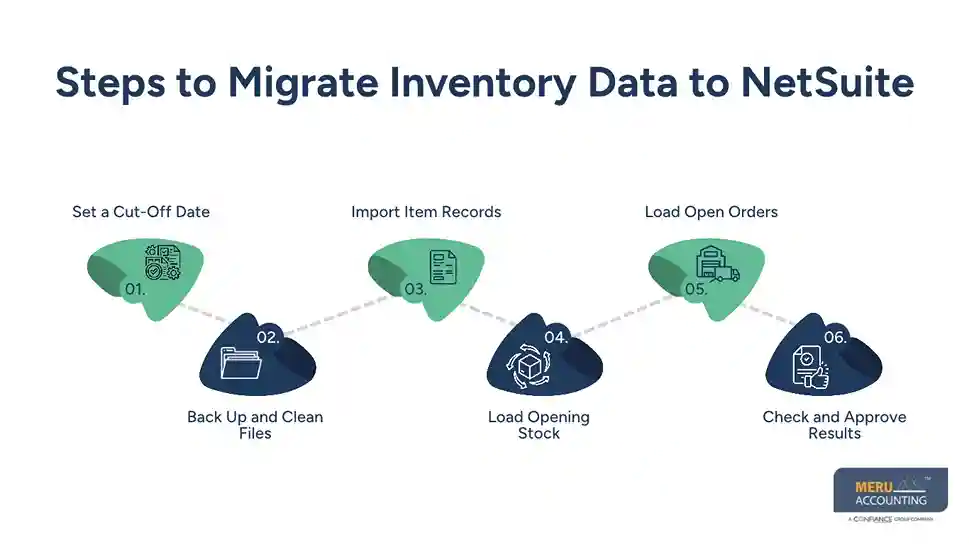
Load Opening Stock
Load opening stock amounts and values for each item and site using the agreed method. NetSuite inventory management software must start with balances that match the approved stock count and value.
Load Open Orders
Load open buy or sales orders if they form part of the move plan. Check item codes, amounts, sites, and order status to avoid wrong or repeat records.
Check and Approve Results
Match stock amounts, stock value, open orders, and ledger totals with the approved old records. Do not sign off until the NetSuite Inventory Accounting Solution passes the agreed finance checks.
Common NetSuite Inventory Setup and Migration Challenges
Poor Source Data
Old files may have repeat codes, blank fields, or wrong units. Fix these issues before the move, as bad data can lead to errors in stock reports and account totals.
Incorrect Account Mapping
A field linked to the wrong account can cause errors in stock value or costs. Before loading data into netsuite inventory management software, ask the finance team to check account links and test sample entries.
Stock Count Differences
Physical counts may not match the old system. Find the cause of each gap and log approved changes rather than using broad stock changes to hide errors.
Cost Method Errors
The old system may use a cost method that differs from the new setup. Agree on the right method with the finance lead, as it can change stock value and cost of goods sold.
Limited Staff Training
Staff may still use old sheets or log stock moves the wrong way. Train each team on daily tasks, such as goods in, stock moves, returns, and stock counts.
Best Practices for Accurate Inventory Data and Ongoing Control
Set Clear Data Rules
Use the same item codes, names, units, and site details in netsuite inventory management software. Limit who can add new items and check for repeat records on a set schedule.
Run Regular Stock Counts
Count key items each week or month based on value, demand, and risk. Log any gaps, find the cause, and approve each change to the system balance.
Review Stock Reports
Check low stock, slow-moving goods, negative amounts, and large changes in value. NetSuite inventory management software works best when staff check reports and act on the results.
Keep an Audit Trail
Log who changed a stock balance, why it changed, and what proof was used. This makes odd entries easier to check at month-end.
Reconcile Stock and Accounts
Match stock reports with the general ledger at each close. Check goods received but not yet billed, returns, and manual entries to explain any gaps.
Review Rules as Needs Change
New goods, sites, and suppliers may need new stock rules. Review reorder points, user access, and account links when business needs change.
How Meru Accounting Provides Inventory and Accounting Services
Meru Accounting provides accounting and bookkeeping services for firms that use netsuite inventory management software to track stock and accounts. Our services cover stock data checks, account mapping, stock value, and migration reviews to keep the books right.
Inventory Data Review
Our team checks item codes, stock counts, unit costs, and site records before the move. This review flags repeat entries, missing data, and gaps between physical stock and system records.
Inventory Accounting and Reconciliation
Stock values are checked against the general ledger, with entries for buys, sales, returns, and stock changes. Our team also checks cost of goods sold and stock value gaps during month-end reviews.
NetSuite Inventory Data Migration
We check source files, field links, and test imports in netsuite inventory management software against approved stock records. Errors in item data, amounts, or stock value are flagged before the final move.
Inventory Cost and Account Mapping
Our accounting services include checks on stock account links and cost rules. These checks can flag wrong links before they affect financial reports.
Ongoing Inventory Record Checks
Regular checks of stock reports and balances can reveal odd changes and gaps in records. Meru Accounting provides review services to give firms a clear view of stock value and related costs.
Our Expert Perspective
A sound move is not just about loading data into a new system. Stock amounts and values must match the approved source records. A test import, clear sign-off, and full check of opening balances are key steps before staff rely on the new data.
Key Takeaways
- Set up company details, item records, sites, and user roles in netsuite inventory management software before launch.
- Test stock receipts, sales, returns, and moves before launch.
- Check that stock values match the general ledger.
- Clean old files and check item units before the move.
- Set a cut-off date and keep a copy of old records.
- Load item records before opening stock balances.
- Check stock amounts, values, and open orders after the move.
- Count stock often and review reports after launch.
- Keep proof of stock changes and sign-off records.
- Review the NetSuite Inventory Accounting Solution as part of regular finance checks.
FAQs
Set up item records, warehouse sites, stock units, reorder points, and user roles, then test stock moves before launch.
Clean old stock records, map data fields, load item details and opening stock, then check amounts and values.
It links stock moves with asset accounts and cost of goods sold based on the firm’s account setup.
Prepare item codes, names, units, sites, stock amounts, unit costs, and open orders before the move; Meru Accounting can check these records for gaps.
Match physical counts, system amounts, stock value reports, and ledger totals to find and fix gaps; Meru Accounting provides stock data and account review services.