
If you run a small business, paying your team right and on time is important. But doing it by hand or with paper can take a lot of time and cause mistakes. A better way for online payroll management is by using software or a website that helps you pay your team, track hours, and handle taxes all in one place. Using an online tool makes small business payroll faster, error-free, and less stressful for you and your staff.
In this guide, we’ll explain online payroll management step by step. And what it means, why it is good for small business payroll, and how to pick the right tool.
What You Will Learn From This Blog
- What online payroll management is and how it simplifies payroll tasks for businesses.
- Why using online payroll software helps improve small business payroll accuracy and saves time.
- The key benefits of automating payroll, including tax calculations, payslips, and secure recordkeeping.
- A step-by-step process for setting up and running payroll using an online payroll system.
- Common payroll challenges and practical ways to reduce errors and stay compliant with UK payroll requirements.
What is Online Payroll Management?
Online payroll management means using a website or app to take care of all the steps to pay your workers. You don’t need paper or a calculator; the computer tool helps you do it all in one place. It is one of the easiest ways to manage small business payroll while reducing manual work.
Use a Tool or Website
You use a special website or app. It helps you pay your workers the right way and keeps track of their pay.
Add Hours and Pay
You type in how many hours each worker worked and what they earn per hour or week. The tool uses this to work out their total pay.
Tax Info Added Too
You also enter tax details like PAYE (Pay As You Earn). The tool uses this to take out the right amount of tax from each paycheck.
The Tool Does the Math
The online tool adds pay and subtracts tax. It tells you how much each person should get after all the numbers are done.
Payslips Are Made
The tool makes payslips. These are like small papers that show how much the worker earned, how much tax was taken out, and what they get in hand.
All Saved Online
All the pay info is saved online, in a safe place called the cloud. You can see it any time you want. You won’t lose the records because they’re stored safely.
Why You Should Choose Online Payroll Management
Saves Time
- When you use online payroll management, you don’t need to use a calculator or write by hand.
- You just type the info and click. The computer does the hard work.
- You save hours every week! This makes small business payroll much easier to manage every pay period.
Reduces Errors
- Sometimes people make mistakes when they count money or taxes.
- Online payroll tools do the math for you.
- That means less chance of paying too much or too little.
Easy Tax Filing
- At the end of the month or year, you need to send tax forms.
- Payroll tools can make these forms for you, like a PAYE or P45.
- It helps you send tax info to HMRC the right way and on time.
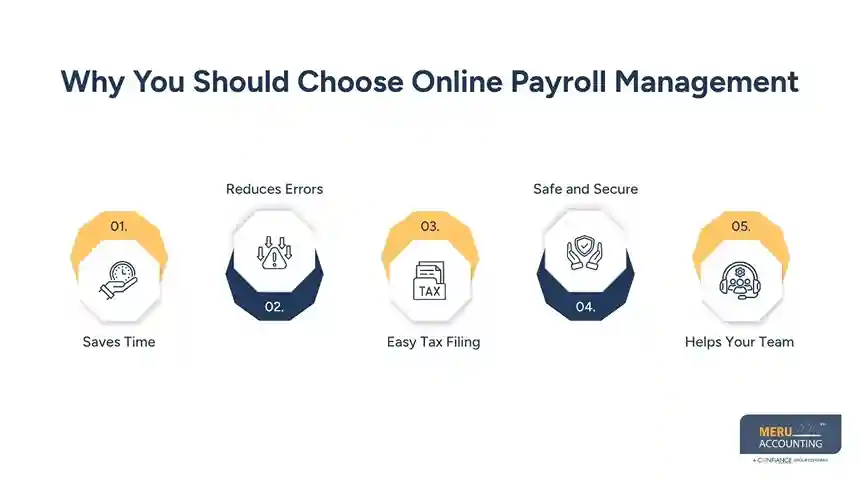
Safe and Secure
- If you keep putting papers in a box, they can get lost or wet.
- When you have online payroll management, all your info is saved on the internet with a strong password.
- Only you and the people you trust can see it.
Helps Your Team
- When workers want to see their payslip, they don’t need to ask you.
- They can log in and see it online.
- This saves time and makes them feel happy and trusted.
Online Payroll Management Process: Step by Step
Step 1: Pick Your Online Payroll Tool
Look for tools like Xero Payroll, QuickBooks Payroll, or others that let you handle online payroll management. Some tools may offer free trials. Choose one that fits your UK rules and supports small business payroll needs.
Step 2: Set Up Your Company and Tax Info
Sign up and add your business details:
- Company name and address
- Tax or PAYE reference
- Pay period dates (weekly or monthly)
This helps the system do taxes and pensions correctly.
Step 3: Add Worker Info
For each worker, include:
- Full name and contact info
- Pay rate (hourly or salary)
- Tax code, pension, and other deductions
- Bank info for pay
Step 4: Track Hours or Use Fixed Pay
If you pay hourly:
- Workers log in hours manually or with time tools
If salary: - Enter pay dates and the amount for each period.
The tool then computes how much each gets, after tax and deductions.
Step 5: Run the Payroll
At pay time:
- Click “Run Payroll”
- Choose the period
- Review payslip preview
The tool calculates tax and pension, and shows payslips for each worker. You can correct errors before finalizing.
Step 6: Pay Your Team
Once correct:
- Press “Submit” or “Pay”.
- It can send BACS instructions to your bank.
- Or you do it manually.
Payslips are emailed or available online for workers to view.
Step 7: File Tax Reports
Good tools help you send RTI to HMRC when you pay. Some even help you send pension info to your provider. This means no extra steps come tax time.
Step 8: Keep Records and Access Payroll History
All payroll runs are saved in the tool. You can view history and export it when needed. This helps if you ever need to explain payments or file taxes.
Challenges in Online Payroll Management
Here are some major challenges in online payroll management:
Internet Needed
For online payroll management, you need the internet. If your Wi-Fi is not working, you can’t log in. This means you may not pay workers on time.
Hard to Use at First
Some tools are tricky at the start. You may not know where to click or how to enter hours and pay. It takes time to learn.
Wrong Data Can Hurt
If you type in the wrong hours or pay, the tool gives the wrong results. This can make your workers sad or upset. You must check every detail.
Extra Cost
Many payroll tools cost money. Some ask for monthly fees. This may be hard for small shops that don’t make a lot of money yet.
Power Problems
If your laptop has no battery or the lights go out, you can’t use the tool. You have to wait until things work again.
Risk to Data
Online tools hold private info. If the tool is not safe, someone could try to see or take it. You must use strong passwords and safe tools.
Online payroll management is a smart and easy way for small business owners to take care of paying workers. When you use a good online payroll tool, you can save time and stop making mistakes. The tool helps you pay your team the right amount on time and keeps track of taxes too. This makes your workers happy and helps you avoid tax trouble. You can also use the tool to make payslips, count work hours, and file forms like PAYE.
If you use a tool like this and follow the steps, it makes things smooth and simple. You can even ask for help from experts like Meru Accounting if you ever feel stuck. We can help you set up your payroll, check the rules, and file taxes correctly.
Here are some major challenges in online payroll management:
Internet Needed
For online payroll management, you need the internet. If your Wi-Fi is not working, you can’t log in. This means you may not pay workers on time.
Hard to Use at First
Some tools are tricky at the start. You may not know where to click or how to enter hours and pay. It takes time to learn.
Wrong Data Can Hurt
If you type in the wrong hours or pay, the tool gives the wrong results. This can make your workers sad or upset. You must check every detail.
Extra Cost
Many payroll tools cost money. Some ask for monthly fees. This may be hard for small shops that don’t make a lot of money yet.
Power Problems
If your laptop has no battery or the lights go out, you can’t use the tool. You have to wait until things work again.
Risk to Data
Online tools hold private info. If the tool is not safe, someone could try to see or take it. You must use strong passwords and safe tools.
Online payroll management is a smart and easy way for small business owners to take care of paying workers. When you use a good online payroll tool, you can save time and stop making mistakes. The tool helps you pay your team the right amount on time and keeps track of taxes too. This makes your workers happy and helps you avoid tax trouble. You can also use the tool to make payslips, count work hours, and file forms like PAYE.
If you use a tool like this and follow the steps, it makes things smooth and simple. You can even ask for help from experts like Meru Accounting if you ever feel stuck. We can help you set up your payroll, check the rules, and file taxes correctly.
Our Expert Perspective
Managing payroll manually increases the risk of payment errors, missed tax deadlines, and unnecessary administrative work. A reliable online payroll management system helps businesses automate calculations, maintain accurate payroll records, and comply with HMRC requirements while reducing the time spent on routine payroll tasks. For small business payroll, choosing the right software is only the first step. Regular payroll reviews, correct employee data, and expert oversight ensure your payroll remains accurate as your business grows. At Meru Accounting, we help businesses implement efficient payroll systems, stay compliant with changing regulations, and create payroll processes that support long-term business success.
Key Takeaways
- Online payroll management automates payroll calculations, tax deductions, payslips, and payroll records.
- It reduces manual errors and saves valuable time for business owners and payroll administrators.
- An effective payroll system helps businesses meet HMRC reporting and tax filing requirements.
- Accurate employee information and regular payroll reviews are essential for reliable small business payroll.
- Secure cloud-based payroll software improves data protection and provides easy access to payroll history.V
FAQs
Yes, Most tools are simple. They are designed to make small business payroll easier, even for first-time users. But if you’re unsure, you can ask professionals like Meru Accounting to help set things up.
It depends on how you pay your team weekly, fortnightly, or monthly. Your tool will let you choose the pay schedule you use.
Yes. Good tools use strong security and GDPR rules. Only trusted staff or your accountant should have access.
Absolutely! Meru can help you set up, train you, or even handle payroll for you.
Payroll tools update when rules change. Meru Accounting also keeps you aware of any changes so you can stay compliant.
optional anymore
on running the business



