Choosing payroll software for construction company operations requires careful review of wage calculations, employee hours, labour classes, fringe benefits, and certified payroll reports. Construction contractors working on government-funded projects must maintain accurate wage records and meet specific reporting requirements. A payroll error can result in underpayment, correction requests, or delayed project payments.
The right payroll software for construction company operations should calculate wages, allocate labour costs, and prepare weekly certified payroll reports. However, basic payroll processing does not always include prevailing wage calculations or WH-347 reporting. Construction industry payroll solutions must also account for multiple job sites, subcontractor records, overtime, and project-specific wage rates.
This blog explains the features contractors should compare, the reporting errors they should avoid, and how to select a suitable payroll system.
What You Will Learn From This Blog
- Certified payroll reporting requirements under the Davis-Bacon Act.
- The role of WH-347 forms in construction payroll.
- Important features of payroll software for construction company operations.
- Ways to compare reporting accuracy and wage calculations.
- Differences between cloud-based and desktop systems.
- How Meru Accounting manages construction accounting records.
What is Certified Payroll Reporting in the Construction Industry?
Definition and Purpose of Certified Payroll Reporting
Certified payroll reporting records the wages and working hours of employees on covered construction projects. It includes employee names, labour classes, hourly rates, overtime, deductions, and fringe benefits.
Contractors use payroll software for construction company operations to record these details and show that workers received the wages required by the project contract.
Understanding the Davis-Bacon Act and Prevailing Wage Requirements
The Davis-Bacon Act applies to covered federal construction contracts above the applicable threshold. It requires contractors to pay workers at least the prevailing wage specified in the project wage determination. This includes the basic hourly rate and applicable fringe benefits.
Weekly Certified Payroll Reports and WH-347 Forms
Covered contractors generally submit certified payroll information every week in which covered work takes place. WH-347 is an optional US Department of Labor form used for this purpose. It records employee hours, wages, deductions, and fringe benefits with a signed Statement of Compliance.
Contractor and Subcontractor Payroll Reporting Responsibilities
Prime contractors and subcontractors must maintain accurate payroll records for their respective workers. Subcontractors prepare their employee wage details, while prime contractors collect and review the required reports. Both parties must use payroll software for construction company payroll management to ensure that reported hours and wages match actual payroll records.
optional anymore
on running the business
Key Features to Compare in Payroll Software for Construction Company
Certified Payroll Report Generation and WH-347 Compliance
Payroll software for construction company operations should prepare WH-347 reports using existing employee and wage records. Check whether it includes project details, worker information, hours, deductions, and fringe benefits. Ask the vendor to demonstrate a complete weekly report.
Prevailing Wage Calculations and Labour Classifications
Construction workers receive different wage rates based on their labour classes and project wage determinations. For example, an electrician and a general labourer may have different hourly rates on the same site. Payroll software for construction company use should assign the correct rate to each class.
Job Costing and Project-Wise Labour Allocation
A contractor may assign one employee to multiple projects during a pay period. The software should allocate hours to the correct project and cost code. For example, 24 hours on Project A and 16 hours on Project B should appear as separate labour costs.
Time Tracking and Employee Attendance Management
Compare mobile attendance, daily time entry, overtime tracking, and supervisor approval. Each timesheet should record the employee, date, project, labour class, and hours worked. Construction industry payroll solutions should transfer approved hours into payroll without repeated manual entry.
Overtime, Fringe Benefit, and Union Payroll Calculations
Check whether the software records overtime, cash payments in place of fringe benefits, and qualifying employer benefit contributions. Union contractors should also review features for union dues, wage rates, and benefit deductions. All calculations must match the applicable contract terms.
Multi-State Payroll Tax Calculations and Deductions
Contractors working across state lines may face different tax and withholding requirements. Check whether payroll software for construction company operations can apply the correct tax settings based on employee work locations. It should also show gross pay, deductions, and net pay.
Payroll Record Storage and Audit-Ready Reporting
The system should retain approved timesheets, wage records, payroll reports, and correction history. Users should be able to retrieve records by employee, project, or reporting week. Access controls and change logs are important during payroll audits.
How to Compare Certified Payroll Reporting Capabilities
Automated WH-347 Form Preparation and Submission
Check whether the system transfers payroll data into the correct WH-347 fields. It should identify missing information before the report is prepared. Also confirm whether it offers direct agency submission or only PDF and spreadsheet exports.
Employee-Level Wage and Fringe Benefit Reporting
Review whether payroll software for construction company operations records each employee’s regular hours, overtime hours, wage rate, and fringe benefits correctly. If a worker performs two types of work during one week, the system should record separate hours for each labour class.
Project-Wise and Contractor-Wise Payroll Reports
Construction industry payroll solutions should generate separate reports for projects and subcontractors. A contractor managing four public projects should be able to review each project’s weekly wages without mixing employee hours or contract details.
Error Detection and Payroll Validation Features
Compare checks for missing employee details, incomplete timesheets, incorrect wage rates, and unusual deductions. The system should also identify differences between approved hours and payroll hours before payroll software for construction company operations is finalised. Staff must verify that each worker’s classification matches the actual work performed.
Report Customisation and Government Portal Compatibility
Ask whether the system can export reports in the format required by the contracting agency. Some agencies accept WH-347, while others use electronic reporting systems with specific data fields. Confirm the required format before purchasing.
Historical Payroll Data Access and Audit Trails
Check whether users can retrieve earlier reports and identify changes to wage rates, employee details, and working hours. An audit trail should record the date, user, and nature of each change. This information is useful when an agency requests clarification.
Construction Industry Payroll Solutions: Cloud-Based vs. Traditional Systems
Cloud-Based Payroll Software for Construction Companies
Cloud-based payroll software for construction company operations allows authorised users to access payroll records online. Site supervisors can enter hours while office staff reviews payroll from another location. Check mobile access, backups, user permissions, and data security.
Desktop-Based Payroll and Accounting Systems
Desktop systems store payroll information on local computers or office servers. They may suit smaller contractors with one payroll team and fewer job sites. However, sharing updated records across locations may require manual transfers or separate remote-access tools.
Integrated Construction Payroll and Workforce Management Platforms
Integrated platforms combine payroll, attendance, workforce records, and job costing. These Construction industry payroll solutions reduce repeated data entry between departments. Check whether certified payroll reporting is included or requires an additional module.
Factors to Consider When Comparing Deployment Options
Compare employee numbers, active projects, user access, monthly charges, and integration needs. A contractor managing several public projects may need shared access and detailed reports. A smaller firm may prefer a basic system with lower maintenance costs.
Common Certified Payroll Reporting Challenges and How Software Addresses Them
Incorrect Employee Labour Classifications
A worker may perform different tasks during the same week. Recording all hours under one labour class can cause incorrect wage calculations. Payroll software for construction company operations should allow separate entries for each class and project.
Prevailing Wage and Fringe Benefit Calculation Errors
Using an outdated wage determination or incorrect fringe benefit amount can result in underpayment. Construction industry payroll solutions should store project-specific wage rates and show basic wages and fringe benefits separately. Payroll staff must verify these details against the contract.
Missing or Inaccurate Employee Time Records
Paper timesheets, missed entries, and late approvals can cause differences between actual work and reported hours. Digital time tracking creates dated records that supervisors can review before payroll processing. Final hours should match approved site records.
Delayed Weekly Certified Payroll Submissions
Late timesheet submissions and incomplete employee details can delay weekly payroll reporting. Payroll software for construction companies should identify missing information and establish a clear review process before payroll processing. Payroll teams should also track submission dates and maintain confirmation records for reference.
Payroll Discrepancies Across Multiple Job Sites
Workers may move between projects during one pay period. If their hours are assigned to the wrong site, project costs and certified payroll reports may not match. Construction industry payroll solutions should allow daily project allocation and review before payroll approval.
How to Evaluate Payroll Software for Construction Company: A Step-by-Step Checklist
Identify Federal, State, and Local Reporting Requirements
List prevailing wage rules, contract terms, reporting dates, and agency requirements for each project. Identify whether the work falls under federal, state, or local wage rules. This creates a clear list of payroll software for construction company requirements.
Review Certified Payroll Reporting Capabilities
Ask the vendor to prepare a sample weekly report using actual project data. Check worker details, labour classes, wage rates, hours, deductions, and fringe benefits. Do not rely only on a sales presentation.
Test Wage Determination and Fringe Benefit Calculations
Enter sample workers with different labour classes, overtime hours, and benefit arrangements. Compare payroll software for construction company calculations with the applicable wage determination. Include an employee who performs two types of work during the same week.
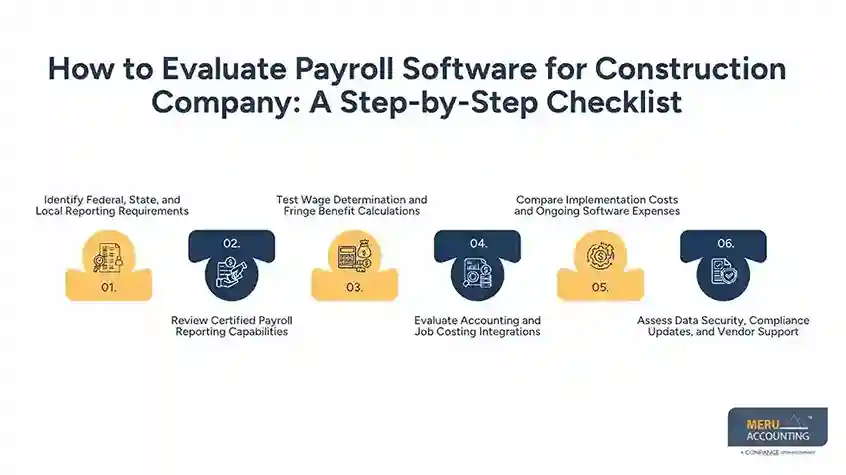
Evaluate Accounting and Job Costing Integrations
Check whether payroll entries transfer into the accounting system with the correct project and cost codes. This reduces duplicate entry and gives the finance team a clear view of labour expenses. Test the integration before purchasing.
Compare Implementation Costs and Ongoing Software Expenses
Review setup fees, monthly charges, employee-based pricing, training costs, and additional reporting modules. Ask about data migration and upgrades. Compare the total annual cost of payroll software for construction company operations instead of considering only the starting price.
Assess Data Security, Compliance Updates, and Vendor Support
Check user permissions, backup policies, data export options, and security controls. Ask how the vendor updates wage and tax settings when rules change. Confirm how quickly its service team responds to payroll reporting issues.
Why Choose Meru Accounting?
Meru Accounting provides bookkeeping and accounting services for construction businesses, including transaction recording, bank reconciliation, accounts payable, accounts receivable, payroll, and financial reporting.
Our construction accounting work covers:
- Payroll Expenses: We record wage expenses, employee payment entries, and payroll transactions generated through payroll software for construction company operations under the correct accounting categories.
- Project Cost Records: At Meru Accounting, we organise labour costs, material purchases, equipment expenses, and subcontractor payments for project-wise review.
- Accounts Payable: Our team of certified experts records supplier invoices, subcontractor bills, payment dates, and outstanding amounts.
- Bank Reconciliation: We compare bank statements with recorded transactions to identify missing entries and payment differences.
- Financial Reporting: Our skilled professionals prepare reports showing business income, operating expenses, project costs, and cash flow.
Our Expert Perspective
Before selecting payroll software for construction company operations, test it with actual project data. Include different labour classes, overtime, fringe benefits, and workers assigned to multiple sites. This shows whether the system can handle real payroll conditions rather than basic salary processing alone.
Construction industry payroll solutions should retain past reports and provide a clear record of corrections. Software can prepare reports, but contractors remain responsible for checking wage determinations, employee classifications, and payroll details before signing the Statement of Compliance.
Key Takeaways
- Certified payroll reports record worker hours, wage rates, labour classes, deductions, and fringe benefits.
- The Davis-Bacon Act sets prevailing wage requirements for covered federal construction contracts.
- WH-347 is an optional form for reporting weekly certified payroll information.
- Compare payroll software for construction company operations based on wage calculations, time tracking, job costing, and report preparation.
- Construction industry payroll solutions should provide project-wise reports, audit trails, and historical records.
- Automated reports require review before certification and submission.
- Check software costs, accounting links, data security, and vendor service before purchasing.
FAQs
Contractors should look for WH-347 reporting, prevailing wage calculations, labour classification, job costing, overtime tracking, and project-wise payroll reports.
It collects employee hours, wage rates, labour classes, deductions, and fringe benefits through payroll software for construction company operations to prepare weekly certified payroll reports in the required format.
Yes, software with certified payroll features can populate WH-347 forms using employee and project payroll data for review and submission.
It uses project-specific wage determinations, employee labour classes, working hours, and applicable fringe benefit rates to calculate required payments.
Cloud-based software offers online access across job sites, while desktop software stores records locally; the better option depends on project size, reporting needs, and access requirements.
optional anymore
on running the business