
A manufacturing business can track every unit that leaves the production line, but can it account for every hour its workers put in? Between machine operators, floor supervisors, warehouse staff, and rotating shifts, payroll has a lot of details to keep straight. Payroll software for manufacturing helps bring these moving parts together, so each employee’s time and pay are recorded with care.
The challenge is finding a system that does more than cut checks. Manufacturers need clear wage records, reliable overtime tracking, and reports that show what labor really costs. The right features can make payroll easier to manage while giving business owners better control over their workforce expenses.
What You Will Learn From This Blog
- Why factory payroll is more complex than payroll in many other sectors.
- Which features matter most in payroll software for manufacturing.
- How payroll tools help track hours, overtime, and labor costs.
- What to check before you choose a payroll system.
- Which setup errors can lead to wrong pay and tax issues.
- How expert payroll support can help your team manage payroll with less strain.
Why Is Payroll More Complex in Manufacturing?
Manufacturing payroll has more moving parts than a basic pay cycle. A plant may have workers on fixed shifts, rotating shifts, night shifts, and weekend schedules. Each group may have its own pay rules, work hours, and overtime needs.
Here are some key issues that make factory payroll hard to manage.
1. Multiple Shifts and Work Schedules
Many plants run for more than eight hours a day. Some run around the clock. This means payroll teams must track day, night, and rotating shifts with care. They must also account for shift changes, missed punches, and extra hours.
A good system should link shift data to time records so each worker is paid for the hours worked.
2. Overtime and Shift Differentials
Factory workers may earn extra pay for hours worked beyond set limits or for shifts that fall at night. These rates can vary by role, site, and pay policy.
In the US, the Fair Labor Standards Act (FLSA) sets key rules for overtime. Most covered nonexempt workers must receive at least 1.5 times their regular rate for hours worked over 40 in a workweek. Some pay items, such as shift premiums, may affect the regular rate used to work out overtime.
Payroll teams must use the right pay rules for each worker. Manual math can raise the risk of errors.
3. Time, Attendance, and Leave Records
A plant may have hundreds of workers clocking in and out at set times. Late punches, missed shifts, sick leave, and paid time off can all affect payroll.
If time data is kept in one system and pay data in another, teams may need to match records by hand. This can slow down each pay cycle.
4. Different Pay Rates Across Roles
A plant may employ machine operators, packers, welders, line leads, and floor managers. These roles may have different rates of pay. Some workers may also earn bonuses or piece-rate pay based on output.
Payroll teams must track these pay terms and apply them to the right hours or work units.
optional anymore
on running the business
Key Features to Look for in Payroll Software for Manufacturing
The best payroll software for manufacturing should match the way your plant runs. It should cut manual work, keep pay data in sync, and give your team a clear view of each pay run.
Here are the key features to check.
1. Automated Wage and Overtime Calculations
Look for a system that can apply pay rates based on hours worked, job roles, and shift rules. It should also flag overtime and help apply the right rates.
This can cut the time spent on manual math and help reduce errors in worker pay.
2. Shift Scheduling and Attendance Tracking
Your payroll tool should link with time clocks, shift plans, or attendance systems. This helps your team check hours worked against the planned shift.
It should also flag missed punches, late clock-ins, and unapproved extra hours before payroll is run. These checks help teams fix time records early.
3. Time Tracking and Job-Based Labor Reports
Some plants need to know how much labor time goes into each job, line, or work order. A payroll tool that links with time and job data can help show where labor hours are spent.
This is useful for plant leads who need to check labor use against output and plan future shifts.
4. Payroll Tax and Compliance Support
Payroll systems should help track federal, state, and local tax rules that apply to the business. Look for tools that can work out tax withholdings, track tax payments, and help with payroll tax forms.
For US firms, check how the tool handles tax updates, W-2 forms, and year-end reports. Keep in mind that software does not take away the need to review records or meet filing dates.
5. Employee Self-Service
A worker portal lets staff view pay stubs, tax forms, leave balances, and key pay details. This can cut the number of basic pay queries sent to HR or payroll teams.
Workers may also be able to update some personal details, based on the firm’s access rules.
6. Payroll Integration With HR and Accounting Systems
Payroll data should link with time, HR, and accounting tools where needed. This helps cut repeat data entry and keeps wage costs in line with the books.
For example, wage costs may need to be split across plant sites, teams, or cost centers. A good system should support this flow and make payroll reports easier to use.
7. Multi-Location Workforce Support
A firm with more than one plant may have staff in states with different tax rules. The system should let payroll teams manage each site while keeping key records in one place.
This makes it easier to review payroll across the firm and spot gaps in pay data.
How Payroll Software Helps Control Manufacturing Labor Costs
Labor is a major cost for many plants. But cutting labor costs does not mean cutting staff or asking workers to do more. It means using labor data to plan shifts, track hours, and spot waste.
Payroll software for manufacturing can help in four key ways.
1. Track Labor Costs by Team and Site
When wage data is split by site, shift, or cost center, managers can see where labor spend is high. They can then review the cause before making changes.
2. Spot High Overtime Spend
Reports can show which teams or shifts rely on overtime most often. Plant leads can use this data to review staff levels, shift plans, and work demand.
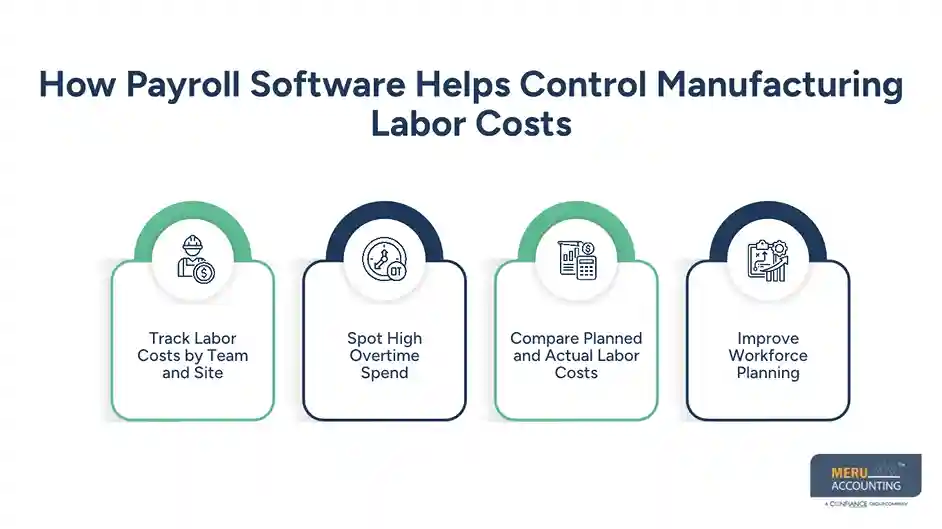
3. Compare Planned and Actual Labor Costs
A plant can set labor budgets for each job or line. It can then compare actual pay costs with the plan. This helps managers spot gaps and ask why they arose.
4. Improve Workforce Planning
Past payroll data can help show busy periods, staff needs, and common overtime trends. Managers can use these patterns to plan shifts and avoid last-minute staff gaps.
These reports do not fix labor issues on their own. They give plant leads better data to make sound choices.
How to Choose the Right Payroll Solutions for Manufacturing Businesses
The right system depends on your plant size, pay rules, staff count, and current tools. Before you buy, review these points.
- Check your payroll needs: List all pay types, shift rules, overtime terms, and worker groups that the system must support.
- Review time system links: Make sure it can link with your time clocks and attendance tools.
- Check tax support: Confirm that it can handle the federal, state, and local tax needs of your sites.
- Review reports: Check if it can show wage costs by site, shift, team, and cost center.
- Check data safety: Ask how it keeps worker data safe, sets user access, and stores payroll records.
- Compare full costs: Review setup fees, monthly costs, user fees, and charges for added services.
- Test before you switch: Run a test pay cycle and compare the results with your old system.
Do not pick a tool based on its feature list alone. The best payroll solutions for manufacturing are those that fit your pay rules and daily workflow without adding more steps for your team.
Common Payroll Software Implementation Mistakes Manufacturers Should Avoid
Even a good tool can fail if the setup is poor. These are some common errors to avoid.
1. Moving Old Data Without Review
Old worker records may have wrong pay rates, tax details, or leave balances. Check these records before you move them to a new system.
2. Ignoring Shift and Overtime Rules
A system may use the wrong shift rates or overtime terms if these are not set up well. Review each worker group and test pay cases before the first live run.
3. Not Linking Time and Payroll Data
If the time clock and payroll tool do not share data, staff may still need to enter hours by hand. Test all key links before launch.
4. Skipping Staff Training
Payroll teams and plant leads must know how to review time records, fix errors, and approve hours. Give each user clear steps and access based on their role.
5. Failing to Review the First Pay Runs
Do not assume that the first pay run will be right. Check hours, pay rates, tax withholdings, and total wages. Fix any gaps before the next cycle.
Meru Accounting: Payroll Solutions for Manufacturing Businesses
Meru Accounting helps manufacturing businesses manage payroll tasks through dedicated accounting and payroll support. We can work with your existing payroll setup and help keep employee pay, tax records, and wage reports in order.
Our manufacturing payroll services include:
- Shift and wage data review: Check approved work hours, hourly rates, overtime entries, and shift-based pay before payroll is processed.
- Payroll processing: Handle regular wage calculations, deductions, employee payments, and pay records based on your payroll schedule.
- Payroll tax support: Assist with tax withholdings, payroll tax records, and related reporting requirements.
- Payroll reconciliation: Match payroll reports with bank transactions and accounting entries to identify differences and correct errors.
- Labor cost reporting: Organize payroll expenses by department, location, or cost center to help management review workforce spending.
- Payroll cleanup and catch-up: Review past payroll records, resolve missing entries, and bring overdue or incomplete records up to date.
Whether you need help with regular payroll runs, payroll reconciliation, or labor cost reports, Meru can provide ongoing support that fits your manufacturing operations. You get access to trained accounting professionals at a fraction of the cost of building a comparable in-house team.
Our Expert Insight
Manufacturers should pay close attention to how shift premiums and production bonuses affect overtime. Simply paying 1.5 times an employee’s base hourly rate may not meet federal wage rules.
Under the Fair Labor Standards Act (FLSA), most covered, nonexempt employees must receive overtime at 1.5 times their regular rate of pay. This rate may include shift premiums and certain production bonuses, not just base wages.
For example, an employee earns $20 per hour plus a $2 night-shift premium. If the employee works 45 hours, the regular rate may be $22, making the overtime rate $33 instead of $30. The same rule can apply to certain production bonuses.
Manufacturers should check all pay components when setting up overtime rules in their payroll system. Our advice is to review shift premiums, bonuses, and other eligible pay before each payroll run. This helps prevent underpayments, avoid compliance issues, and keep payroll records accurate.
Key Takeaways
- Factory payroll is complex due to shifts, overtime, hourly wages, and varied pay rates.
- Payroll software for manufacturing can cut manual work and help keep wage data in order.
- Time tracking, tax support, and payroll reports are key features to check.
- Labor reports can help managers review overtime and plan staff needs.
- Test pay rules, time links, and worker data before you move to a new system.
- Expert payroll support can help keep pay records clear and reduce the load on in-house teams.
FAQs
Look for features that support hourly pay, shift premiums, piece-rate wages, bonuses, and overtime. Time clock integration, tax filing, labor reports, and multi-location support are also important. Choose a system that fits your current pay rules and can grow with your workforce.
It uses the number of units produced and the agreed rate per unit to calculate gross pay. Employers must also account for minimum wage and overtime rules. For eligible workers, piece-rate earnings may affect the regular rate used to calculate overtime.
Use a payroll system that keeps employee records and pay runs in one place while tracking each location separately. It should support different state tax rules, pay groups, and location-based labor reports.
Pricing depends on the number of employees, pay frequency, and features you need. Some providers charge a monthly fee plus a per-employee cost. Setup, time tracking, tax filing, and support may cost extra, so compare the full price before choosing a plan.
Outsourcing may be a good choice if your business has complex pay rules or limited in-house payroll staff. A provider can handle payroll processing, tax support, reconciliation, and wage reports. Your team can then focus more on production and workforce planning.
optional anymore
on running the business



