
A pharmacy can have hundreds of medicines on its shelves and still run out of a drug that patients need most. A delayed order, an overlooked expiry date, or a stock count that does not match the records can turn a routine day into a costly problem. Pharmacy inventory software gives staff a clearer view of what is available, what needs attention, and what must be ordered.
But not every system fits every pharmacy. A small chemist shop may need simple stock alerts, while a chain with several branches may need shared records and detailed cost reports. The right choice should also connect stock data with pharmacy inventory accounting, so purchases, sales, and stock values agree with the financial records. The aim is simple: fewer stock errors, less waste, and better control over daily costs.
What You Will Learn From This Blog
- What pharmacy inventory software does and where it fits into daily pharmacy work.
- Which features matter most when tracking medicines, batches, and expiry dates.
- How stock control affects costs, cash flow, and financial records.
- What to check before choosing a system for your pharmacy.
- How to measure results after the software is in use.
What is Pharmacy Inventory Software and Why Does it Matter?
Pharmacy inventory software records medicines and other products as they move from suppliers to shelves and then to customers. It tracks quantities, batch numbers, expiry dates, purchases, and sales. Pharmacy inventory software can also connect with billing tools and accounting systems to keep related records in sync.
Consider a pharmacy that sells 12 packs of a medicine during the morning shift. Staff should not have to wait until closing time to find out how much stock remains. A suitable system updates the balance as sales occur and records new deliveries when staff enter the received goods. This gives the owner a clearer view of stock needs, product costs, and money tied up in unsold goods.
optional anymore
on running the business
Essential Features to Look for in Pharmacy Inventory Software
Real-Time Inventory Tracking and Stock Visibility
Imagine a customer asks for a medicine, but the shelf looks empty. Before placing an urgent order, staff need to know whether stock is available in the storeroom or another branch. Pharmacy inventory software should show current quantities and record sales, purchases, returns, and approved adjustments without delay.
Expiry Date Monitoring and Batch Tracking
Two packs of the same medicine may have different expiry dates and batch numbers. If staff track only the total quantity, older stock can remain unnoticed until it is too late to use. The system should flag short-dated products and retain batch details so staff can act in time and trace affected stock during a recall.
Automated Reordering and Low-Stock Alerts
Running out of a fast-selling medicine can mean lost sales and an unhappy customer. Pharmacy inventory software can send alerts when an item’s quantity falls below a set level. Staff should set these limits using past sales, supplier delivery times, and demand changes rather than relying on the same reorder level for every product.
Prescription and Point-of-Sale Integration
A sale should update the stock balance without requiring staff to enter the same details twice. Integration with billing and point-of-sale tools can link each transaction to the correct product and sales record. Prescription features must also follow the rules that apply to dispensing, patient data, and medicine records.
Supplier and Purchase Order Management
A supplier may deliver fewer packs than ordered or charge a price that differs from the agreed rate. The software should let staff compare purchase orders, delivery notes, and supplier invoices before accepting the record as complete. Keeping these details in one place also gives the accounts team a clear trail for checking bills and payments.
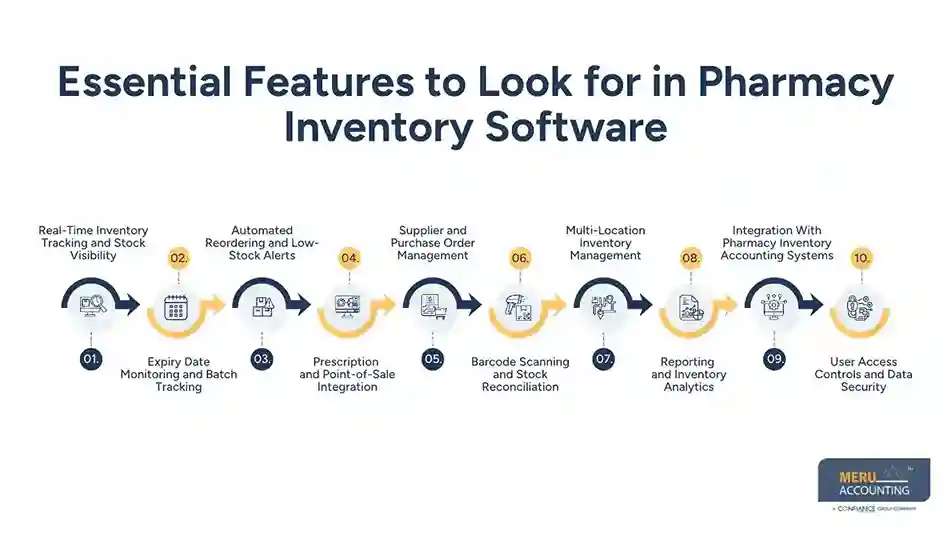
Barcode Scanning and Stock Reconciliation
Manual entry can lead to wrong product codes or missed quantities, especially during busy shifts. Barcode scanning speeds up stock entry and counting, while reconciliation shows where physical quantities differ from system balances. Staff should still review unusual gaps because a scanned item can be recorded against the wrong product or quantity.
Multi-Location Inventory Management
A medicine may be out of stock at one branch while another branch has more than it needs. Pharmacy inventory software should show branch-level quantities, record transfers, and keep each location’s movements clear. This allows managers to review available stock before buying more and avoid needless orders across the business.
Reporting and Inventory Analytics
A long list of figures is not useful unless it answers a clear question. Managers should be able to find slow-moving products, near-expiry stock, purchase costs, sales trends, and current quantities in a few steps. These reports can guide order planning and waste checks, provided staff review the date range and the basis of each figure.
Integration With Pharmacy Inventory Accounting Systems
Stock figures and financial records can disagree when purchases, sales, or returns are entered in only one system. Pharmacy inventory accounting connects stock movements with purchases, sales, cost of goods sold, and inventory value. Choose software that transfers the right data to the accounting system and allows staff to check errors before finalizing the accounting records.
User Access Controls and Data Security
Not every employee needs permission to change costs, approve orders, or view sensitive records. The system should offer role-based access, secure sign-in, audit trails, and regular backups. Pharmacy owners should also check data protection duties and make sure staff know how to handle business and patient information.
How Pharmacy Inventory Software Improves Stock Control and Financial Accuracy
Reducing Expired, Damaged, and Obsolete Inventory
A box of medicine that expires before sale ties up cash and may add to disposal costs. Expiry reports let staff spot such stock early and review lawful return options where available. They can also use past loss records to adjust future orders, while ensuring expired or damaged medicines are never dispensed.
Preventing Stockouts and Overstocking
A pharmacy may order too much of a slow-selling product while underestimating demand for a common medicine. Sales history and reorder alerts give buyers a better starting point for setting quantities. Staff should account for seasonal demand, supplier delays, and changes in use before approving each order.
Tracking Inventory Costs and Stock Valuation
The number of packs on a shelf does not show how much money the pharmacy has tied up in them. Pharmacy inventory software records quantities and purchase costs, while Pharmacy inventory accounting links these details to stock valuation and cost of goods sold. The finance team should check that the chosen valuation method fits the applicable accounting rules.
Improving Purchase Planning and Cash Flow Visibility
Buying more stock than a pharmacy can sell in time leaves less cash for rent, wages, and supplier payments. Stock reports show which products move quickly and which remain on shelves for longer periods. Owners can use this information to plan orders around actual demand, supplier terms, and available funds.
Maintaining Accurate Inventory and Accounting Records
A physical count may reveal fewer packs than the system shows, or an invoice may not match the recorded purchase. Staff should trace each difference to its source, such as a missed sale, return, damaged item, or data entry error. Regular pharmacy inventory accounting checks keep stock balances and financial reports aligned.
How to Choose the Right Pharmacy Inventory Software for Your Business
Assessing Pharmacy Size and Inventory Requirements
Start with the work your pharmacy does each day. Count the number of products, branches, users, and transactions, then list the main stock problems staff face. A small shop may need expiry alerts and billing links, while a multi-branch business may need stock transfers and central reports.
Comparing Features, Pricing, and Scalability
The lowest monthly fee may not be the lowest total cost. Ask about setup charges, training, data transfer, extra users, upgrades, and paid integrations. Pharmacy inventory software should meet current needs and allow the business to grow without forcing an early switch to another system.
Checking Integration With Existing Pharmacy Systems
Before buying, confirm the software works with the tools you already use for billing, purchasing, and accounts. Ask how it handles returns, failed data transfers, and stock adjustments. Test common transactions with sample data so the team can spot gaps before the system goes live.
Evaluating Vendor Expertise, Training, and Technical Support
A vendor should explain how the system handles routine pharmacy tasks, data migration, and common errors. Check training options, support hours, response times, and update policies. During a trial, ask staff to record a delivery, process a sale, and run a stock report to see how well the system fits their work.
Reviewing Data Security and Regulatory Requirements
Ask where business data is stored, how backups are protected, and who can access sensitive records. Check whether the vendor’s controls meet the rules that apply to your pharmacy and location. Buying software alone does not ensure compliance, so the owner must review the full process.
Common Mistakes to Avoid When Selecting Pharmacy Inventory Software
- Choosing on Price Alone: When evaluating pharmacy inventory software, compare subscription fees, reporting features, training costs, and integration charges before making a final decision.
- Ignoring Expiry and Batch Controls: A total stock count cannot show which batch needs attention first. Check that the system tracks dates and batches at the level your pharmacy requires.
- Overlooking Accounting Integration: Separate records can lead to duplicate entries and mismatched balances. Test how purchases, sales, returns, and adjustments reach the accounting system.
- Skipping Staff Training: Even well-designed pharmacy inventory software can produce inaccurate records if staff enter incorrect details. Train users on deliveries, returns, stock counts, and access rules before launch.
- Failing to Test Reports: A report may look detailed but still miss the information needed for a buying decision. Check quantities, costs, dates, and branch totals using sample records.
How to Measure the Effectiveness of Pharmacy Inventory Software
Inventory Accuracy Rate
Choose a sample of products and use pharmacy inventory software to compare the physical count with the system balance. Divide the number of items that match by the total number checked, then multiply by 100. For example, if 92 out of 100 items match, the accuracy rate is 92%. Repeat the check to track changes.
Stockout and Expiry Loss Rates
Record how often key medicines run out and how much stock is lost through expiry or damage. Compare results across similar periods and check why each loss occurred. A drop in expiry losses may show better ordering, but only if the pharmacy records all losses correctly.
Inventory Turnover Ratio
Divide the cost of goods sold over a period by the average inventory value for that period. The result shows how often stock is sold and replaced. Compare similar months or product groups, since a high turnover rate can still hide shortages of essential items.
Reordering Efficiency
Check whether orders arrive on time, match the requested quantities, and meet actual demand. Review alerts that lead to urgent orders or leave the pharmacy with excess stock. Adjust reorder levels when sales patterns or supplier lead times change.
Inventory Reconciliation Accuracy
At month-end, use pharmacy inventory software to compare stock reports with physical counts, purchase records, sales data, and the general ledger. Track the number and value of differences that remain after approved adjustments. Pharmacy inventory accounting should identify why balances differ, not just change figures to make them match.
Why Choose Meru Accounting for Pharmacy Accounting Services?
Pharmacies need accurate financial records to track operating costs, supplier payments, stock purchases, and business income. At Meru Accounting, we provide accounting and bookkeeping services that give pharmacy owners a clearer view of their financial position.
Accurate Financial Record-Keeping
We record and review financial transactions to keep income, expenses, and supplier balances up to date. Our goal is to maintain clear financial records that make it easier for pharmacy owners to review costs and prepare reports.
Inventory Cost and Expense Review
Pharmacy stock purchases affect inventory value and the cost of goods sold. Our accounting team reviews relevant financial entries to identify missing costs, duplicate entries, and differences that need further checks.
Accounts Payable Management
Timely supplier payment records help pharmacies track outstanding bills and payment dates. We provide accounts payable services to maintain clear records of supplier invoices, payments, and due balances.
Bank and General Ledger Reconciliation
Regular reconciliation helps identify differences between bank statements, transaction records, and ledger balances. Our reconciliation services keep financial data consistent and make errors easier to trace.
Our Expert Perspective
A pharmacy can lose money even when its shelves are full and sales remain steady. Slow-moving medicines, missed expiry dates, rising purchase costs, and stock records that do not match supplier bills can quietly reduce profit. The real value of pharmacy inventory software lies in turning daily stock activity into clear decisions about what to order, what to review, and where money is tied up. Regular stock counts and month-end account checks help pharmacy owners spot these issues early and make better buying decisions.
Key Takeaways
- Pharmacy inventory software tracks medicine quantities, batches, expiry dates, purchases, and sales.
- Choose features that fit your pharmacy’s size, stock range, and daily tasks.
- Use expiry alerts and reorder rules to cut waste and avoid stock gaps.
- Link stock data with pharmacy inventory accounting to keep costs and financial records aligned.
- Compare physical stock with system balances at regular intervals.
- Track accuracy, expiry losses, stockouts, turnover, and reconciliation results to judge performance.
FAQs
Pharmacy inventory software should include real-time stock tracking, batch tracking, expiry alerts, automated reordering, barcode scanning, and inventory reports.
Pharmacy inventory software tracks batch numbers and expiry dates, flags short-dated medicines, and allows staff to review stock before products expire.
Pharmacies can use sales data, reorder alerts, supplier lead times, and stock reports to plan purchases based on actual demand.
Pharmacy Inventory Accounting connects stock costs, purchases, sales, and inventory valuation to maintain accurate financial records and simplify reconciliation.
A pharmacy should compare stock tracking features, accounting integration, pricing, data security, ease of use, and vendor support before making a choice.
optional anymore
on running the business