QuickBooks inventory management lets small firms track stock, log sales, and record item costs. But firms with many items, online sales, or more than one store may need extra tools to manage stock well. A link between QuickBooks Online and an inventory app can bring sales, stock levels, and cost data into one view.
Effective QuickBooks inventory management also plays a key role in cash flow. Too much stock can tie up cash, while low stock can lead to lost sales. The right app can track stock changes and send key data to your books. QuickBooks inventory accounting records stock value, the cost of goods sold, and other stock costs based on your setup.
This blog covers app options, how to pick the right tool, setup steps, common errors, and ways to use stock data to plan cash needs.
What You Will Learn From This Blog
- Why QuickBooks inventory management matters to small firms.
- Which stock apps link with QuickBooks Online.
- How to pick an app for shops, online sales, or firms that make goods.
- How stock records affect cash flow and working capital.
- How to set up and test an app link.
- How to find and fix errors in stock and account records.
Why QuickBooks Inventory Management Matters for Small Businesses
Better Stock Control
QuickBooks inventory management gives owners a clear view of stock on hand when stock tracking is set up. Teams can check item counts, spot low stock, and plan new orders before key items run out.
Clear Product Costs
Each item has a cost that affects profit. QuickBooks inventory accounting tracks stock value and the cost of goods sold when the right tools and accounts are in place. Correct costs make profit reports more useful.
Fewer Manual Errors
Manual entry can lead to missed sales, wrong counts, or duplicate records. QuickBooks inventory management linked to a stock app can cut repeat work. Staff must still check failed syncs and odd entries.
Better Sales Planning
Past sales can show which items sell well and which sit on shelves for months. QuickBooks inventory management gives owners stock data to check against sales trends before they place new orders.
More Useful Reports
Stock reports and finance reports show two sides of the firm. QuickBooks inventory accounting tracks the cost side in the books, while stock reports show item counts and stock flow. Both sets of records must match to aid sound choices.
Why Integrate QuickBooks Online With Inventory Management Software?
Track Daily Stock Changes
Basic QuickBooks inventory management may suit firms with few items and simple sales. A stock app can track goods as orders are placed, packed, shipped, or sent back, based on its tools and setup.
Keep Sales and Books in Line
An app link can send sales, refunds, fees, and other set entries to QuickBooks Online. QuickBooks inventory accounting then logs the data in the right accounts. Test the link to make sure no entry is missed or sent twice.
Manage More Sales Channels
A seller may take orders through a site, a shop, and an online market. QuickBooks inventory management linked to a stock app can give staff one view of goods on hand across all sales channels.
Plan Stock Purchases
Stock reports show which items need to be bought and which can wait. Owners can check this data against cash on hand, unpaid bills, and supplier terms before they place new orders.
Keep Records Ready for Review
QuickBooks inventory accounting must match the stock costs and sales entries in the books. A clear link between stock and account records makes it easier to find gaps and check the value of goods on hand.
QuickBooks Inventory Management: Integration Options Explained
Native Inventory Features in QuickBooks Online
QuickBooks Online has built-in stock tools in some plans, but features vary by plan and region. Native QuickBooks inventory management may suit a small firm with few items and basic stock needs. Check the latest plan details before you choose.
Third-Party Inventory Management Apps
Stock apps may offer barcode scans, order forms for new stock, low-stock alerts, and stock reports. Check how each app sends item costs and stock changes to QuickBooks inventory accounting. Also, check how it handles returns and sales.
E-Commerce Inventory Integrations
Online sellers may need a link between their store, stock app, and books. These links can send order data and update stock counts. QuickBooks inventory management should also track refunds, discounts, shipping fees, and payment fees based on your setup.
Warehouse and Order Management Integrations
Firms that ship many orders may need tools to pick, pack, ship, count, and track returns. These apps can track each order step and send set records to QuickBooks Online. Check if the app sends each order or one daily total.
Manufacturing and Multi-Location Integrations
Firms that make goods may need to track raw stock, parts, finished goods, and costs. Firms with more than one site may need stock moves and site-level counts. Pick an app that meets these needs and sends the right cost data to QuickBooks inventory accounting.
Best Inventory Management Integrations for QuickBooks Online
The best app depends on how a firm buys, stores, and sells goods. QuickBooks inventory management should fit the team’s daily work and not add tasks that staff cannot keep up with.
Features to Compare Before Choosing an Integration
Compare stock updates, order forms, barcode tools, returns, reports, and sales links. Check the price, user limits, sync rules, and setup needs. A trial with real items can show if the app fits your QuickBooks inventory management needs.
Integration Options for Retail and Wholesale Businesses
Retail shops may need barcode scans, low-stock alerts, and store-level counts. Wholesale firms may need bulk orders, price tiers, and set terms for each buyer. Check how the app tracks these tasks and sends stock costs to QuickBooks inventory accounting.
Integration Options for E-Commerce Stores
Online stores should check links with their sales site, payment tool, and shipper. The app must track refunds, discounts, fees, and payouts. Sales totals may not match the cash paid into the bank.
Integration Options for Manufacturers and Distributors
Firms that make goods may need parts lists, work orders, and raw stock records. Distributors may need lot tracking, order plans, and stock control. Check if these tools are built in or need extra apps before linking them to QuickBooks inventory management.
Integration Options for Businesses With Multiple Sales Channels
A firm that sells in a shop and online needs one clear view of stock. The app should set rules for stock updates, order imports, and returns across each sales channel. Test each channel and check how its entries reach QuickBooks inventory accounting.
optional anymore
on running the business
How QuickBooks Inventory Integrations Affect Cash Flow
Understanding Inventory, Working Capital, and Cash
Stock uses cash before it brings in sales. A firm may hold goods worth thousands of dollars but still lack funds for rent, wages, or supplier bills. QuickBooks inventory management gives owners stock data to check against bank funds and unpaid bills.
Avoiding Excess Stock and Slow-Moving Inventory
Goods that sit too long tie up cash and may lose value. Check sales by item and stock age before you place new orders. QuickBooks inventory management reports can show which items need action and which do not need more stock yet.
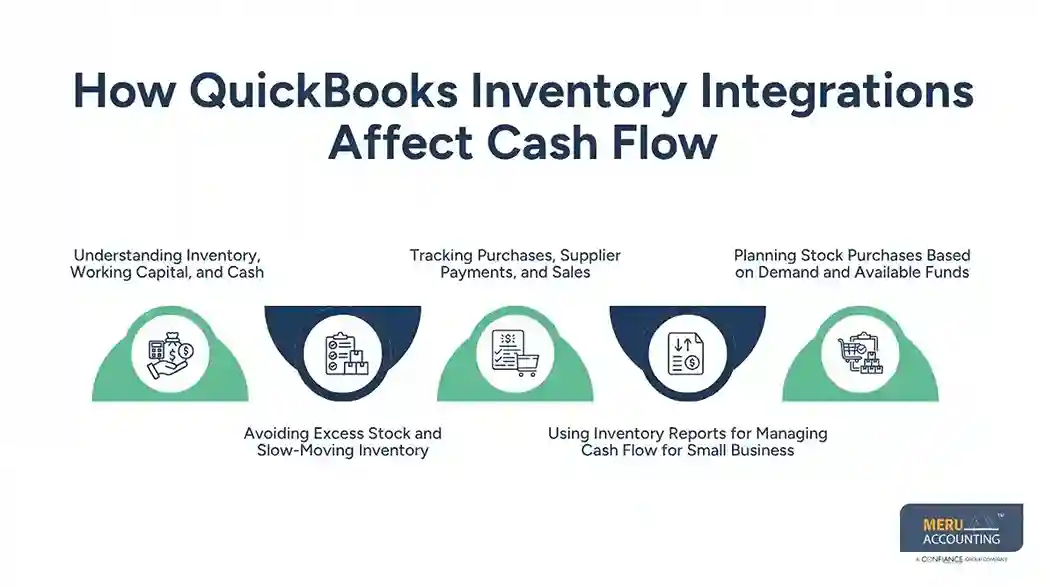
Tracking Purchases, Supplier Payments, and Sales
Log stock buys, supplier bills, sales, and payments in the right accounts. QuickBooks inventory accounting should track stock costs and sales entries based on your setup. Buying stock, paying a bill, and selling an item are three separate events and must be logged as such.
Using Inventory Reports for Managing Cash Flow for Small Business
Stock reports can show items with low sales and high holding costs. Owners can use these facts for managing cash flow for small businesses by setting order limits and checking slow-moving goods. Compare stock reports with bank and bill records before making choices.
Planning Stock Purchases Based on Demand and Available Funds
Set order levels based on past sales, supplier lead times, and likely demand. Then check how much cash will remain after planned bills and other costs. QuickBooks inventory management reports can guide the buy plan, but owners should also weigh peak-season demand and sudden sales shifts.
How to Integrate Inventory Management Software With QuickBooks Online
Review Your Current Inventory and Accounting Setup
List your items, stock sites, sales channels, and current tools. Check item counts, stock value, open orders, and account balances. Fix known errors before you move data to the new QuickBooks inventory management setup.
Select a Compatible Inventory Management Application
Check the app’s link with QuickBooks Online, its tools, price, and sync rules. Ask how it handles refunds, stock costs, and past records. Pick a tool that fits your needs rather than pay for tools you will not use.
Connect the Application to QuickBooks Online
Follow the app’s approved steps to link it and grant the access it needs. Check which data will move and how often it will sync. Save copies of key records before you make major changes to QuickBooks inventory management.
Map Products, Accounts, Taxes, and Transaction Types
Match item names, stock codes, sales accounts, cost accounts, and tax rules. Set how the app logs sales, refunds, fees, and stock changes. Correct mapping is key to sound QuickBooks inventory accounting.
Test Inventory Updates and Accounting Entries
Test a small set of orders or one test sale. Check stock counts, sales totals, tax, fees, and cost entries in both systems. Fix any gaps before you send large amounts of data.
Reconcile Inventory Balances and Review Reports
Compare the app’s stock value with the stock account in QuickBooks Online. Trace each gap to a sale, buy, return, or setup rule. Log the checks and repeat them at set times to keep QuickBooks inventory accounting in line with stock records.
Common QuickBooks Inventory Integration Problems and How to Fix Them
Duplicate Transactions and Mismatched Inventory Quantities
Duplicates may occur when two apps send the same sale or a manual entry repeats an imported record. Check order IDs and sync rules, then fix the issue with care. Do not delete entries until you know how they affect stock and the books.
Incorrect Product and Account Mapping
An item linked to the wrong account can distort sales, costs, and stock value. Check item codes, sales accounts, cost accounts, and tax rules. Test each change to confirm that QuickBooks inventory accounting logs each entry in the right place.
Delayed or Failed Data Synchronization
A broken link, expired access, or app limit may delay updates. Check sync logs, link status, and error notes from the app. Once you fix the cause, check which entries need to be sent again.
Differences Between Inventory Valuation and Accounting Records
Stock value may differ from the books due to missed buys, wrong costs, timing gaps, or manual changes. Compare item-level reports with the stock account and trace the cause. Do not post a large change just to force the figures to match.
Missing Sales, Returns, or Purchase Transactions
Some entries may fail due to sync rules, order status, or a link error. Compare the sales site, stock app, and books for the same date range. Resend only verified missing entries to avoid duplicates in QuickBooks inventory accounting.
How Meru Accounting Provides Inventory and Accounting Services
- Meru Accounting provides bookkeeping and accounting services for US firms that need sound stock records and clear financial reports.
- Our team checks stock entries, sales records, supplier bills, and account links to find gaps between stock activity and the books.
- We check QuickBooks inventory accounting, review stock balances, and verify item costs and sales entries to keep finance records sound.
- For firms that use stock apps, we check how data flows into QuickBooks Online and find errors that may affect finance reports or cash flow.
- Our team checks stock balances against the books to find gaps in stock value and fix errors in finance data.
- We review stock buys, supplier payments, sales, and returns to check if each entry is logged in the right account.
- Our services fit your stock tools, sales channels, and current books, giving you a clear view of item costs, unpaid bills, and cash needs.
- We review stock reports and finance data so owners can make sound choices about stock buys and cash plans.
Our Expert Perspective
Effective QuickBooks inventory management is about more than getting the stock count right. Each sale, return, supplier bill, and item cost must also reach the right place in all linked systems. We advise firms to test these tasks before launch and check stock value against the books each month. This can catch small errors before they affect profit reports or cash plans.
Key Takeaways
- QuickBooks inventory management lets small firms track stock, sales, and item costs.
- Built-in tools may suit simple needs, while larger firms may need a stock app.
- The right link depends on item types, sales channels, warehouse needs, and budget.
- QuickBooks inventory accounting must match stock records, sales, buys, and item costs.
- Stock reports can show where cash is tied up in excess or slow-moving goods.
- Test key entries before launch and check sync errors on a test plan.
- Check stock value against the books to find gaps early.
- Meru Accounting provides bookkeeping and account review services for firms that need clear stock and finance records.
FAQs
The main QuickBooks inventory management options are built-in tools, third-party apps, online store links, warehouse systems, and tools for firms that make goods.
Pick a compatible app, link your QuickBooks Online account, map items and accounts, and test stock updates before live sync.
Yes, compatible stock apps can sync goods and orders across sales channels, based on their tools and setup.
The link should sync key item data, stock levels, sales, buys, returns, and stock costs based on your needs.
Correct item mapping, regular stock checks, and checks of sales, buys, and stock value help keep the books in line with stock data.
optional anymore
on running the business