
QuickBooks helps people take care of money for their business. There are two kinds: QuickBooks Online and QuickBooks Desktop. Both help you track money, but they work in different ways. Understanding the differences between these options can help you choose the right accounting solution for your business.
The online version can be accessed from anywhere using any computer or supported device with an internet connection. The desktop version stays on a single computer and can work without an internet connection for most tasks.
Both options offer different advantages. Some businesses prefer the flexibility of cloud access, while others value locally installed software with advanced features. The right choice depends on your business requirements, work style, and operational needs.
What You Will Learn From This Blog
- The difference between QuickBooks Online and QuickBooks Desktop
- The features of both QuickBooks versions
- The advantages and limitations of each option
- Which QuickBooks version suits different business types
- Factors to consider before selecting accounting software
- How professional bookkeeping support can help you get better results from QuickBooks
- Mistakes To Avoid When Choosing Between QuickBooks Online and QuickBooks Desktop
- How Meru Accounting helps businesses implement and manage QuickBooks efficiently
What is QuickBooks Online?
QuickBooks Online is a money tool you use on the internet to help run a business. You can use it from anywhere and can access it on any computer. It helps you keep track of how much money you make and spend.
You don’t have to install it because it works through a web browser. Many people like it because they can check their business money from anywhere.
- Track income and expenses
- Create invoices and send them to customers
- Pay bills and manage vendors
- Run reports on your business
- Sync with your bank for faster work
- Use apps to add more features
QuickBooks Online is great for people who want to work from anywhere and need easy access at all times.
What is QuickBooks Desktop?
QuickBooks Desktop is an installed accounting software that runs directly on your computer. Unlike the cloud version, it stores your financial data locally, giving businesses greater control over their accounting environment. It is often preferred by companies that require advanced accounting features and manage complex financial records.
Key features include:
- Advanced job costing and inventory management
- Detailed financial and industry-specific reports
- Support for larger company files
- Customizable accounting workflows
- Industry editions for contractors, manufacturers, wholesalers, retailers, and nonprofits
- Stronger support for complex accounting requirements
QuickBooks Desktop is a good option for businesses that primarily work from one location and require advanced accounting capabilities, detailed reporting, and greater control over their financial data.
QuickBooks Online vs QuickBooks Desktop: What’s the Difference?
When choosing between QuickBooks Online vs Desktop, it’s smart to look at how they are different. Here are some key things to think about:
Feature
Online Version
Desktop Version
Conclusion
Access
Works on any device with an internet connection, including phones, tablets, and laptops.
Can only be accessed on the computer where the software is installed.
If you work from different locations or need remote access, the online version offers greater flexibility.
Updates
Updates automatically, so you always have the latest features and security improvements.
Requires manual updates whenever a new version is released.
Automatic updates save time and reduce maintenance.
Storage
Stores financial data securely in the cloud, protecting it even if your computer is damaged.
Saves data locally on your computer, making regular backups necessary.
Cloud storage provides better data protection and easier access.
Price
Requires a monthly subscription with predictable recurring costs.
Usually involves a one-time purchase, depending on the licensing option.
Businesses that prefer avoiding monthly payments may find the desktop option more cost-effective over time.
Users
Supports multiple users working at the same time without extra setup.
Additional users may require extra licenses or added costs.
The cloud-based option is better suited for teams that need shared access.
Mobile App
Includes a mobile app for checking accounts, sending invoices, and recording expenses on the go.
Does not provide the same mobile experience without additional tools or remote access solutions.
Mobile access is ideal for business owners who travel frequently or work outside the office.
Best For
QuickBooks Online is ideal for businesses that need flexibility, remote access, and easy collaboration.
QuickBooks Desktop is suitable for businesses that prefer advanced features while working from a single computer.
Select the cloud-based option if remote access and flexibility are important for your business. Choose the desktop-based solution if you need advanced features and mainly work from a single location.
Which One Should You Choose?
If you are still unsure which option is right for your business, these simple points can make your decision easier.
Choose QuickBooks Online if:
- You travel or work from different places
- You want to use QuickBooks on your phone or tablet
- You like having your data backed up in the cloud
- You want to share files with your bookkeeper quickly
- You need real-time access to your financial information from anywhere
- You want automatic software updates without installing them yourself
Choose QuickBooks Desktop if:
- You work from one place, such as an office
- You want more features and detailed reports
- You don’t need to work online or use the internet regularly
- You prefer to pay one time instead of every month
- You manage large amounts of inventory or complex job costing
- You want greater control over where your company data is stored
Both options offer reliable accounting features. The best choice depends on your business requirements, daily operations, and long-term goals.
Mistakes To Avoid When Selecting Accounting Software
Choosing Based Only on Price
Lower cost does not always provide the best value. Compare features, future business needs, and support before making a decision.
Ignoring Future Growth
A business may expand faster than expected. Selecting software that fits both current and future requirements reduces the need for costly migrations.
Not Consulting an Accounting Professional
Experienced accountants understand reporting, tax preparation, and bookkeeping workflows. Their advice often prevents expensive mistakes.
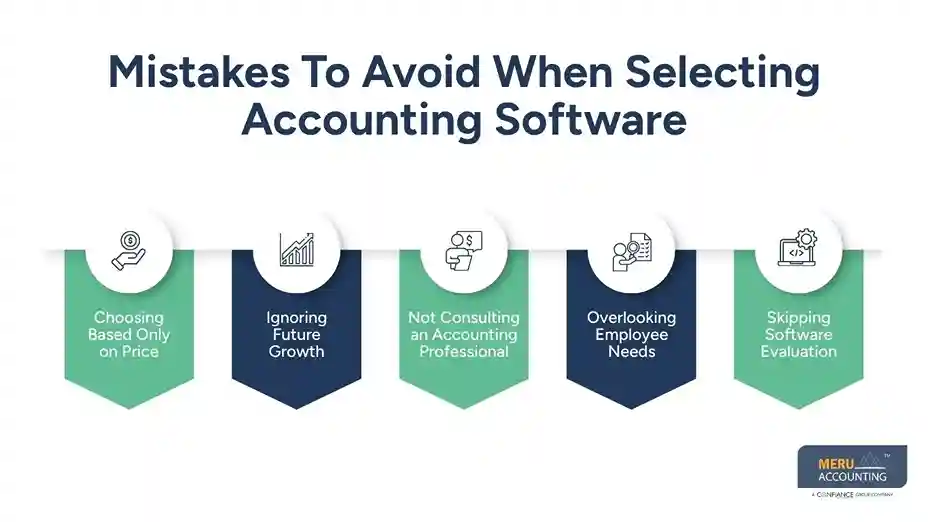
Overlooking Employee Needs
The accounting team should find the software comfortable to use. A system that fits daily work increases efficiency and accuracy.
Skipping Software Evaluation
Take advantage of product demonstrations or trial periods whenever available. Testing real business workflows provides a better understanding than feature lists alone.
How Meru Accounting Helps Businesses Choose the Right QuickBooks Solution
Selecting the right accounting software is only the first step. Proper setup, bookkeeping, and financial management are equally important for maintaining accurate business records. At Meru Accounting, we help businesses choose the QuickBooks solution that best fits their operations and long-term goals.
Our experienced bookkeeping professionals work with both versions of QuickBooks. We help businesses set up company files, organize charts of accounts, manage bank reconciliations, record daily transactions, prepare financial reports, and maintain accurate bookkeeping records.
Whether your business prefers the flexibility of QuickBooks Online or the advanced capabilities of QuickBooks Desktop, our team ensures your accounting system is organized, accurate, and easy to manage.
Our QuickBooks services include:
- QuickBooks Online and Desktop setup
- Bookkeeping and transaction recording
- Bank and credit card reconciliation
- Accounts payable and receivable management
- Payroll bookkeeping support
- Financial reporting
- Data migration between QuickBooks versions
- Ongoing bookkeeping and accounting support
With Meru Accounting managing your bookkeeping, business owners can focus on growth while maintaining reliable financial records.
Our Expert Perspective
Choosing between QuickBooks Online and QuickBooks Desktop should be based on your business goals rather than simply comparing features or pricing. From our experience at Meru Accounting, businesses achieve better long-term results when they select accounting software that matches their daily operations, reporting needs, and future growth plans. A careful evaluation today can save both time and money while keeping financial records accurate and well organized.
Key Takeaways
- QuickBooks Online provides cloud-based access from anywhere.
- QuickBooks Desktop offers advanced accounting and reporting features.
- Online automatically updates the software and stores data securely in the cloud.
- Desktop provides greater control over local company files.
- Businesses with remote teams often prefer QuickBooks Online.
- Companies requiring advanced inventory management and job costing may benefit from the desktop version.
- Selecting the right version depends on your business operations, budget, and accounting requirements.
- Professional bookkeeping support helps businesses maximize the benefits of either QuickBooks version.
FAQs
QuickBooks Online is cloud-based and can be accessed from anywhere using the internet.
QuickBooks Desktop is installed on a computer and is primarily designed for local use with advanced accounting features.
Yes. You can move your data from the desktop to Online. It may take some time, but QuickBooks and Meru Accounting can help
QuickBooks Online is generally better for remote work because users can access financial information from different locations using computers, tablets, or smartphones.
Multiple team members can work with company records at the same time. User access depends on the plan or license chosen, making it important to select an option that matches your team size and collaboration needs.
Yes, the desktop version offers advanced inventory management and job costing features, making it a good choice for businesses with complex inventory requirements.
optional anymore
on running the business



