Ever had to check employee hours in one app, review pay details in another, and then make sure everything matches in QuickBooks? For many small businesses, payroll involves more than running a pay cycle. The right QuickBooks payroll integrations can connect these tasks, reduce manual work, and help keep payroll records in sync with the books.
From time tracking to payroll processing, the right tools can make payday easier to manage. But not every integration offers the same features or fits every business. Let’s look at the best options for small businesses, what each one does, and how outsourced QuickBooks payroll accounting can help keep payroll records accurate.
What You Will Learn From This Blog
- What QuickBooks payroll integrations do and how they work.
- Why small firms link payroll, time, and accounting tools.
- Which payroll and time-tracking tools work with QuickBooks.
- How to connect payroll software with QuickBooks.
- Common sync issues and ways to fix them.
- When to seek help with payroll accounting and month-end records.
What Are QuickBooks Payroll Integrations?
QuickBooks payroll integrations link QuickBooks with other tools that help manage pay, staff hours, HR data, and employee costs. They help move key data between systems, so you don’t have to enter the same details by hand in more than one place.
For example, a time-tracking tool can send approved work hours to a payroll system. Once pay is run, payroll data may flow into QuickBooks as a summary or set of entries. This can help record wages, employer taxes, and other pay costs in the right accounts.
The level of sync can vary by tool. Some apps send data in real time, while others need a review or manual step before the data moves. Some links may also need a third-party app or connector.
It’s worth checking what each tool can sync before you choose one. A link that sends staff hours may not also send tax data, benefits, or job costs.
Why Do Small Businesses Need QuickBooks Payroll Integrations?
Small firms often have fewer staff to manage payroll and books. A good link between these tools can cut repeat work and help keep records in line. Here are some key gains.
- Less manual data entry
When payroll and accounting tools share data, you don’t need to enter the same pay details twice. This can save time and lower the risk of typos or missed entries.
- Better wage cost tracking
Payroll data can help you track gross pay, employer taxes, benefits, and other staff costs. When these costs reach the right accounts in QuickBooks, your profit and loss report can give a clearer view of labor costs.
- Easier time and pay review
Time-tracking tools can help managers review staff hours before payroll runs. This is useful for firms that pay hourly staff, use shifts, or bill clients based on time worked.
- More up-to-date books
A well-set link can send payroll entries to QuickBooks soon after each pay run. This helps keep the books current and makes month-end review easier.
- Better control over payroll data
A set sync process can help reduce gaps between payroll and accounting records. Still, each pay run should be checked for missing staff, wrong account codes, or duplicate entries.
optional anymore
on running the business
Best QuickBooks Payroll Integrations for Small Businesses
The best tool depends on what your firm needs. Some firms need full payroll and HR support, while others only need a way to track staff hours. Here are some options to review.
1. QuickBooks Time – Best for Employee Time Tracking
QuickBooks Time helps firms track staff hours and review work time before payroll. It can be a good fit for teams with hourly staff, field workers, or staff who work across sites.
Key features:
- Staff clock-in and clock-out tools.
- Mobile time tracking.
- Timesheet review and approval.
- Job and task time tracking.
- Links with QuickBooks payroll and accounting tools.
Its main value is time data. Managers can review hours before they are used for pay or job cost records. This can help firms that need to track labor by client, site, or task.
2. Gusto – Best for Payroll and HR Management
Gusto is a payroll and HR tool for small and growing firms. It can help manage pay runs, staff records, tax tasks, and some employee benefits.
Key features:
- Payroll run tools.
- Tax filing support.
- Employee self-service.
- Benefits management.
- Links with QuickBooks Online.
Gusto may suit firms that want payroll and HR tasks in one place. Its QuickBooks link can help send payroll data to the books. Before setup, check which data fields and sync steps are part of your plan.
3. ADP – Best for Growing Teams
ADP offers payroll and workforce tools for firms of many sizes. It may suit a small business that expects to hire more staff or needs more control over payroll and HR tasks.
Key features:
- Payroll processing.
- Tax filing support.
- Staff data management.
- Time and attendance tools.
- QuickBooks data links through supported plans or connectors.
ADP has several products, so the exact features and QuickBooks link can vary. Ask which version supports your needs and how payroll entries will reach your QuickBooks account.
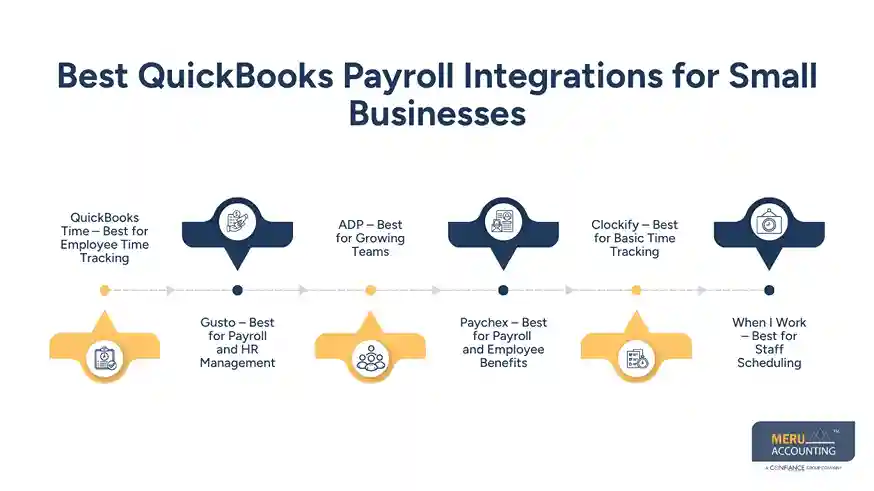
4. Paychex – Best for Payroll and Employee Benefits
Paychex offers payroll, HR, and staff support tools. It may suit small firms that want help with pay runs and staff benefits as their team grows.
Key features:
- Payroll processing.
- Tax services.
- Employee benefit options.
- Staff records and reports.
- Links with QuickBooks through supported products.
Paychex can help bring payroll tasks into one system. Check how it sends pay data to QuickBooks and whether the link covers the accounts and reports you need.
5. Clockify – Best for Basic Time Tracking
Clockify is a time-tracking tool that helps teams log work hours by task or project. It can be useful for firms that bill by the hour or need to review staff time before payroll.
Key features:
- Staff time logs.
- Project and task tracking.
- Timesheet reports.
- Team hour review.
- Data export and links through supported tools.
Clockify is not a full payroll system. You may need to send approved hours to your payroll tool before pay is run. Check the available connector or export method before you set up the workflow.
6. When I Work – Best for Staff Scheduling
When I Work helps firms plan shifts and track staff hours. It may suit shops, food service firms, and other small teams with set shifts or changing work hours.
Key features:
- Staff shift plans.
- Time clock tools.
- Timesheet review.
- Team schedule updates.
- Payroll data export and supported links.
It can help managers spot missed shifts or extra hours before payroll. Check whether its QuickBooks workflow meets your needs or if you need an added connector.
Quick comparison
Tool | Best suited for | Main use |
QuickBooks Time | Hourly teams | Time tracking |
Gusto | Small firms | Payroll and HR |
ADP | Growing firms | Payroll and staff data |
Paychex | Small and mid-sized firms | Payroll and benefits |
Clockify | Project-based teams | Time logs |
When I Work | Shift-based teams | Staff scheduling |
The best choice is not always the tool with the most features. Pick one that fits your pay cycle, team size, and accounting needs. Also, check current plan limits, sync options, and fees before you sign up.
How to Connect Payroll Software With QuickBooks
The setup steps may vary by tool, but most links follow a similar process.
Step 1: Check compatibility
Confirm that your payroll tool works with your version of QuickBooks. Check if it supports QuickBooks Online or Desktop, as the setup may differ.
Step 2: Review your account setup
Make sure your chart of accounts has the right wage, tax, benefit, and payroll liability accounts. This helps payroll entries reach the right place.
Step 3: Link both tools
Use the app’s setup page or approved connector to link your accounts. Follow the access steps and grant only the data access needed for the sync.
Step 4: Map payroll accounts
Match wage costs, tax dues, benefits, and other pay items to the right QuickBooks accounts. Do not skip this step, as poor mapping can lead to wrong reports.
Step 5: Test the sync
Run a test or review a small pay cycle. Check that staff data, pay totals, and account entries match the payroll report.
Step 6: Review each pay run
Once the link is live, check each pay run in QuickBooks. Match the payroll report to the entries and bank records before closing the month.
Common QuickBooks Payroll Integration Problems and How to Fix Them
Even well-set QuickBooks payroll integrations can face sync issues. Most can be fixed with a few checks.
Common issue | What to check |
Sync failure | Check account access, app status, and network links. |
Duplicate payroll entries | Review sync history and remove repeat entries with care. |
Wrong wage accounts | Check account mapping in the payroll tool. |
Missing staff hours | Review timesheet approval and date ranges. |
Payroll totals don’t match | Compare the payroll report with QuickBooks entries. |
Tax dues are not in the right account | Check tax item mapping and payroll settings. |
If the same issue keeps coming back, review the sync setup with your payroll tool’s support team. Also, avoid making changes to posted payroll entries without checking how they affect tax and bank records.
How Meru Accounting Supports QuickBooks Payroll Accounting
Payroll doesn’t end with processing employee pay. Your books also need accurate records of wages, tax withholdings, employer taxes, and employee benefits. Meru Accounting provides outsourced QuickBooks payroll accounting to help small businesses manage these records and keep payroll expenses properly accounted for.
Our Payroll Accounting Services Include:
- Payroll Journal Entries: Record wages, deductions, and employer payroll taxes.
- Payroll Reconciliation: Match payroll reports with QuickBooks records and bank transactions.
- Tax Liability Tracking: Review payroll tax withholdings and outstanding liabilities.
- Benefits Accounting: Record health insurance, retirement contributions, and other employee benefits.
- Payroll Expense Tracking: Review salaries, overtime, bonuses, and labor costs.
- Month-End Review: Check payroll accounts and correct posting errors.
Support That Works With Your Existing Setup
Our team works with QuickBooks, Xero, and Zoho Books and can adapt to your current payroll and accounting workflow. You get hands-on accounting support from a team that understands payroll entries, expense tracking, and financial reporting without having to switch software.
Our Expert Insight
One payroll detail that’s easy to miss is the timing difference between recording payroll and paying related taxes or benefits.
For example, a business may run payroll on December 30, while the related tax payment clears the bank in January. If these transactions aren’t recorded in the right periods, year-end expenses and liabilities may be off.
When reviewing QuickBooks payroll integrations, don’t just check whether the data synced. Make sure payroll expenses are recorded on the correct pay date and unpaid taxes or deductions remain in the right liability accounts until paid. This small check can make a real difference in year-end financial reporting.
Key Takeaways
- QuickBooks payroll integrations can link payroll, time, HR, and accounting tools.
- QuickBooks Time, Gusto, ADP, and Paychex serve different payroll needs.
- Clockify and When I Work can help track hours and staff shifts.
- Check sync options, plan limits, and account mapping before setup.
- Review each pay run to catch wrong or missing entries.
- Outsourced QuickBooks payroll accounting can help keep payroll records and books in line.
FAQs
Yes. QuickBooks Online offers its own payroll plans in the US. Features can include direct deposit, payroll tax calculations, tax filing, and employee pay management. Availability depends on the plan.
Yes. Supported integrations can transfer payroll data to QuickBooks, reducing manual entry. You may still need to review account mapping and confirm that payroll totals match before closing your books.
Some integrations support time tracking, overtime records, and approved timesheets. Tools such as QuickBooks Time can help businesses collect employee hours before payroll is processed.
Payroll totals may differ because of employee withholdings, employer taxes, benefit deductions, and payment timing. Compare the payroll summary, tax payments, and bank withdrawals to identify the difference.
Yes. You can keep using QuickBooks Payroll while outsourcing the accounting work. This may include payroll journal entries, liability tracking, account reconciliation, and month-end reviews.
optional anymore
on running the business