Shopify accounting software integration lets store owners track sales, stock, fees, and profit in one place. A Shopify store may get daily orders paid by card, digital wallet, or other means. If these records do not match the books, owners may miss costs, count sales twice, or report the wrong profit.
The right accounting software for Shopify stores links the store to an accounting tool and sends key data to the right accounts. It can log sales, refunds, tax, fees, and stock costs with less manual work. The data sent will vary by app, setup, and stock method.
For example, a store may sell 100 items but earn less than it had hoped due to shipping costs, ad spend, refunds, and fees. Shopify accounting software integration helps the owner track these costs and make sound choices.
What You Will Learn From This Blog
- How Shopify accounting software integration works and why it matters.
- Which tools suit stores of all sizes.
- What to check when you link sales, stock, fees, and tax data.
- How to set up an app and test the data it sends.
- How to fix errors in sales, stock, and payout data.
- How an expert review can make store reports more sound.
Introduction to Shopify Accounting Software Integration
What Is Shopify Accounting Software Integration?
Shopify accounting software integration links a Shopify store with an accounting tool. It sends sales, refund, tax, and payment data to the books based on the app’s setup. Some accounting software for Shopify stores can also sync stock levels, item costs, and cost of goods sold (COGS).
How Does the Data Flow?
When a buyer places an order, Shopify logs the sale and order data. The app then sends the data to the accounting tool, either at once or at set times. Owners must check if the app sends each order, daily totals, or payout data.
Why Data Mapping Matters
Each type of data needs the right account in the books. Sales go to income accounts, fees go to cost accounts, and tax due may go to a tax liability account. The right setup keeps reports clear and cuts the risk of errors.
How Inventory Data Connects With Accounts
Stock records show how many items are on hand, while COGS shows the cost of items sold. Some apps sync both, but others only send sales data. Store owners must check the stock tools before they rely on the data to track profit.
Real-Time Sync Versus Daily Sync
Real-time sync sends data soon after an event. Daily sync groups data into one entry or batch. Daily totals may suit stores with many small orders, but give less detail for each order. The best choice rests on order volume and the level of detail needed.
Why Shopify Stores Need Accounting Software Integration
Fewer Manual Entries
Shopify accounting software integration cuts the need to enter each sale by hand. This saves time and cuts the risk of typing errors. Owners must still check failed syncs and odd entries.
Clear Sales and Profit Reports
Sales totals alone do not show how much a store earns. Owners must also track item costs, shipping costs, refunds, fees, and other costs. A well-set system gives a clear view of gross profit and net income.
Better Stock Control
Shopify accounting software integration can link sales and stock data to show which items sell fast and which stay in stock. When stock data is right, owners can plan new orders with less guesswork and spot gaps between the store and the books.
Easier Payment Checks
Shopify orders and bank payouts may show a gap due to refunds, fees, holds, or pay delays. Accounting software can group these entries, making it easy to trace each payout and find missing items.
More Reliable Tax Records
Tax rules vary by place, item, and sale type. An app can bring tax data into one system, but it cannot confirm each tax duty or prove that a tax return is right. Owners should check the setup against the rules that apply to their store.
Best Accounting Software for Shopify Stores: Features and Comparisons
The best accounting software for Shopify stores depends on order volume, stock needs, sales sites, and the reports a firm needs. Before you choose a tool, check its Shopify link, app fees, sync limits, and country-based features.
QuickBooks Online
QuickBooks Online suits Shopify stores that need to track income, costs, bank records, and profit as the firm grows. A Shopify accounting software integration can sync sales and payouts based on the app’s features.
Xero
Xero suits stores that need online books, bank matching, and clear finance reports. Check if the Shopify accounting software integration logs fees, refunds, and tax in the right way.
Zoho Books
Zoho Books suits small firms that need to track sales, bills, costs, and cash flow. Check app access, plan limits, and sync tools before you link it to Shopify.
NetSuite
NetSuite suits large stores with complex stock, order, and finance needs across sales sites. Setup can take more time and cost more, so small firms should weigh their needs before they choose it.
How to Choose the Right Tool
When you choose a Shopify accounting software integration, compare tools based on stock tracking, sales volume, bank matching, tax needs, and the number of sales sites. A store with 50 orders a week may need a basic setup, while one with thousands of orders may need more tools. Test the app with sample orders before you commit.
Key Features to Look for in Accounting Software for Shopify Stores
Automated Sales and Payment Syncing
Accounting software for Shopify stores should send order and payment data in a clear, set way. Check how it treats paid, pending, and void orders, as well as gift cards and other payment types. A clear sync log makes errors easy to find.
Inventory and Cost of Goods Sold (COGS) Tracking
Shopify accounting software integration should track stock on hand and the cost of items sold if these tools are part of the setup. For example, if a mug costs $8 and sells for $20, the gross profit before other costs is $12. The profit will fall once you add fees, packing, shipping costs, and other costs.
Tax Calculation and Reconciliation
The app should send tax amounts to the right accounts and keep a clear record of each sale. Owners should check whether tax data comes from each order, the sales site, or a payout report. Tax reports must still be checked against the store’s tax duties.
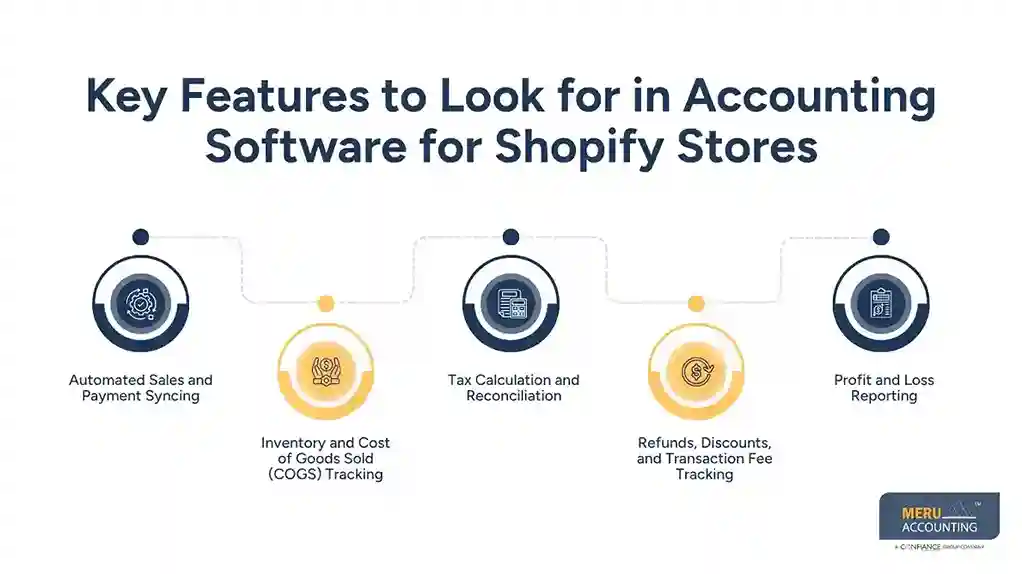
Refunds, Discounts, and Transaction Fee Tracking
The system should log refunds and discounts without counting them as new sales. It should also show fees as costs and log chargebacks where needed. These entries matter because the amount paid by a buyer may not match the amount that reaches the bank.
Profit and Loss Reporting
A good profit and loss report groups income and costs over a set time. Owners should be able to check sales, refunds, COGS, fees, shipping costs, and other costs. The report is only as sound as the data and rules behind it.
optional anymore
on running the business
How to Set Up Shopify Accounting Software Integration Step by Step
Step 1: Choose Accounting Software Based on Business Needs
Before you choose a tool for Shopify accounting software integration, list the reports you need, your order count, and how you track stock. Check the tool’s features, app fees, and country limits.
Choose accounting software for Shopify stores that meets your needs now and can handle more orders as your store grows.
Step 2: Connect Shopify With Your Accounting Platform
Install a suitable app from the app store or follow the software maker’s setup guide. Sign in to the right accounts and grant only the access the app needs. Check the sync status before you send live data.
Step 3: Map Sales, Taxes, Fees, and Payment Accounts
Choose where sales, refunds, discounts, tax, and fees should appear in the books. Link each payment gateway to the right clearing or bank account. If you are unsure how to log tax or gift cards, ask a skilled accountant before you sync all data.
Step 4: Configure Inventory and COGS Tracking
Set the stock method and item costs in the system that tracks stock. Check item names, stock codes, opening stock, and buy costs. If another app tracks stock, pick one main system to avoid clashes in stock counts.
Step 5: Test Transactions and Reconcile Balances
After you set up Shopify accounting software integration, test sample sales, refunds, discounts, and payouts before you rely on the data. Match Shopify order totals with book entries and bank deposits. Fix any gaps, then check the first full month before you treat the reports as final.
Common Shopify Accounting Integration Problems and How to Fix Them
Duplicate Sales and Missing Transactions
Duplicate entries may occur when more than one app sends the same order. Failed syncs may also leave gaps in the books. Check sync logs, remove duplicate rules, and match order IDs with book records.
Incorrect Inventory Quantities
Stock gaps may result from returns, bundles, manual edits, or more than one app that can change stock. Set one main stock system, check item codes, and match stock counts on a set basis.
Payment Gateway and Payout Mismatches
Bank payouts may be lower than Shopify sales due to fees, refunds, or holds. Shopify accounting software integration should match gross sales, fees, refunds, and net deposits without counting payouts as new sales.
Errors in Tax, Refunds, and Shipping Records
Wrong account rules may place tax, refunds, and shipping fees in the wrong accounts. Check the app rules, test sample orders, and match tax reports with the source data.
Shopify Accounting Software Integration Services From Meru Accounting
Review of Your Current Setup
Meru Accounting reviews your Shopify accounting software integration to check how Shopify connects with accounting tools, payment gateways, and stock apps. This review can find double entries, missing data, and gaps in account setup before they affect monthly reports.
Sales and Payout Reconciliation
We provide bookkeeping services to match Shopify sales with fees, refunds, and bank deposits. The aim is to keep the books in line with source data and make gaps easy to trace.
Inventory and Profit Review
Meru Accounting checks item costs, stock records, and COGS entries to see if your accounting software for Shopify stores shows the right stock costs and gross profit. If another app tracks stock, the review can also check which system sets item counts and costs.
Tax and Account Mapping Checks
Our certified experts check sales tax data, discounts, shipping fees, and refund entries. Tax rules vary by place, so store owners should check filing duties with a tax expert who knows the rules that apply.
Monthly Reporting and Expert Insight
Meru Accounting can prepare and check monthly accounts, income and cost reports, and bank match records. These reviews give store owners a clear view of profit, cash flow, and items that need review.
Our Expert Perspective
A common issue in Shopify bookkeeping is that sales totals do not match the cash paid into the bank. For example, payment fees and refunds can lower a payout, while stock costs may not be logged at the time of sale. We recommend matching Shopify sales reports with payment records, bank deposits, and stock costs each month. This gives store owners a clearer view of gross profit and helps them spot errors before closing the books.
Key Takeaways
- Shopify accounting software integration links store sales with the books.
- Choose a tool based on order volume, stock needs, pay types, and reports.
- Check that sales, refunds, tax, discounts, and fees go to the right accounts.
- Use a clear stock method and the right item costs to track COGS.
- Test sample orders and payouts before you rely on synced data.
- Check bank balances, stock records, and profit reports on a set basis.
- Seek expert review when entries do not match, or tax rules are unclear.
FAQs
QuickBooks Online, Xero, and Zoho Books are options for accounting software for Shopify stores. Stock and profit tools vary by plan and app.
Shopify accounting software integration can sync stock levels, item costs, and sales data to track stock changes and cost of goods sold (COGS).
The best app logs sales, item costs, refunds, discounts, shipping costs, and fees to show more accurate profit margins.
Install a compatible app, link Shopify to your accounting tool, map accounts, set stock rules, and test sales and payout data.
Shopify stock and accounting records may differ due to sync errors, double entries, wrong item codes, returns, or more than one app that can change stock.
optional anymore
on running the business