
Meru Accounting

How to Choose Small Manufacturing Accounting Software Based on Cost, Inventory, and Features

Contents
Want to learn more?

Subscribe for business tips, tax updates, financial fundamental and more


    How to Choose Small Manufacturing Accounting Software Based on Cost, Inventory, and Features

    A manufacturer can have strong sales and still struggle to see where the money is going. Raw materials, labor, overhead, inventory changes, and production costs all affect the final numbers. Small manufacturing accounting software should make these costs easier to track while keeping your financial records accurate and up to date.

    The right system should also fit how your business actually works. You’ll want to compare the price, inventory tools, reporting, manufacturing features, and ease of use before you commit. Manufacturing cost accounting software can be especially useful when you need a clearer view of what it costs to make each product and how those costs affect your margins.

    What You Will Learn From This Blog

    • What small manufacturing accounting software does
    • Which accounting and manufacturing features to look for
    • What can affect software costs
    • How to check inventory and costing tools
    • How to judge ease of use
    • When a small manufacturer may need more advanced software
    • How accounting support can fit with your software
    •  

    What Is Small Manufacturing Accounting Software?

    Small manufacturing accounting software combines core accounting with tools that help track production and inventory. It can record sales, purchases, expenses, payments, and other financial data while also helping a business track the items used to make its products.

    This matters because manufacturing has more moving parts than a basic service business. A manufacturer may buy raw materials, move them into production, create finished goods, and then sell those goods to customers. Each step can affect inventory, costs, and financial reports.

    A good system should make it easier to connect these activities. For example, if material costs rise, you should be able to see how that change affects product costs and margins.

    The level of detail you need will depend on your business. A small shop with a few products may need simple inventory and cost tracking. A growing manufacturer with many products, warehouses, or production steps may need stronger tools for bills of materials, work in progress, and cost reports.

    What Should Small Manufacturing Accounting Software Include?

    Before you compare small manufacturing accounting software, make a list of the features your business needs now. Then think about what you may need as production grows.
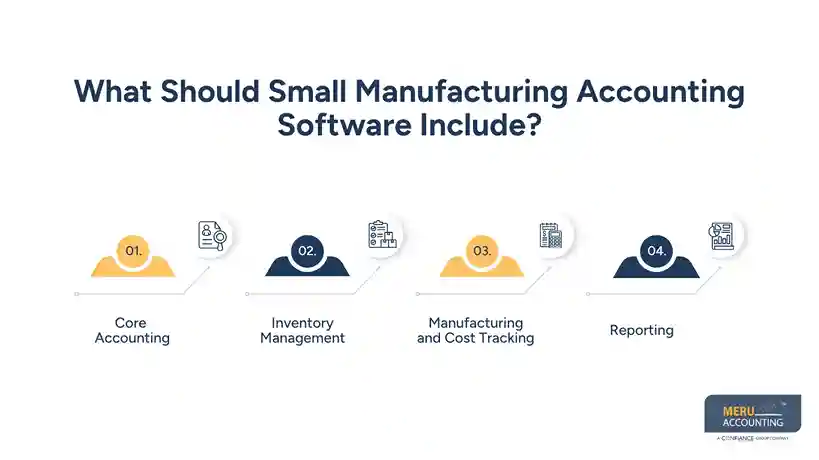
    What Should Small Manufacturing Accounting Software Include?

    Core Accounting

    At a minimum, the system should handle:

    • General ledger
    • Accounts payable
    • Accounts receivable
    • Bank feeds and bank reconciliation
    • Invoices and bills
    • Financial statements
    • Sales and expense tracking

    These basic tools form the accounting side of the system. They should also work well with the inventory and production data.

    Inventory Management

    Inventory is one of the biggest areas to review. Look for tools that can track raw materials, work in progress, and finished goods.

    Depending on your business, you may also need:

    • Inventory quantities by location
    • Purchase orders
    • Stock adjustments
    • Inventory transfers
    • Inventory valuation
    • COGS tracking
    • Low-stock alerts
    • Product-level cost records

    The system should make it easy to compare inventory records with the accounting books. If those numbers do not match, your team may spend extra time finding errors.

    Manufacturing and Cost Tracking

    This is where manufacturing cost accounting software can differ from standard accounting software.

    Look for support for bills of materials, production costs, direct materials, direct labor, and manufacturing overhead. Some manufacturers may also need job costing or product-level margin reports.

    The goal is not to collect more data just for the sake of it. The goal is to know what it costs to make and sell each product.

    Reporting

    Useful reports can include:

    • Profit and loss
    • Balance sheet
    • Cash flow
    • Inventory valuation
    • COGS
    • Product margins
    • Job costs
    • Inventory movement

    Reports should be easy to filter and review. If your team has to export data into several spreadsheets each month, the software may not be doing enough of the work.


    How Much Does Small Manufacturing Accounting Software Cost?

    The cost of small manufacturing accounting software can vary a lot. A basic plan may have a low monthly fee, while a system with advanced inventory and manufacturing tools may cost much more.

    Do not compare plans by subscription price alone. Review the full cost of using the system.

    Monthly or Annual Fees

    Most software providers charge a monthly or yearly fee. Check what is included in the base plan and what requires an upgrade.

    A low-cost plan may limit users, inventory items, reports, integrations, or other features.

    Add-On Costs

    Some systems charge extra for:

    • Advanced inventory
    • Manufacturing tools
    • Additional users
    • Payroll
    • Premium support
    • Extra integrations
    • More storage or data

    These costs can change the total price quite a bit.

    Setup and Training

    There may also be costs for moving data, setting up products, building workflows, or training staff. Ask about these costs before you choose a system.

    Compare Total Cost

    A better way to compare manufacturing cost accounting software is to look at the total cost over a year. Include the subscription, add-ons, setup, support, and any tools you still need outside the system.

    Also consider staff time. A cheaper system that requires hours of manual work each week may not be the cheaper option in practice.

    Good financial management isn't
    optional anymore
    Meru Accounting handles the accuracy, so you can focus
    on running the business

    Evaluate Inventory Features Before Choosing Manufacturing Software

    Inventory should be one of the first areas you test. It affects both your books and your view of product costs.

    Raw Materials, WIP, and Finished Goods

    Your system should fit the way materials move through your shop.

    For example, a manufacturer may start with raw materials, move those items into production, and then record finished goods. The accounting system should support this flow instead of treating every item as a simple sale or purchase.

    Inventory Valuation

    Ask how the software handles inventory valuation and COGS. The method used should fit your accounting process and reporting needs.

    You should also be able to review inventory records and find unusual changes or adjustments.

    Inventory Reconciliation

    Inventory records and the general ledger should be checked against each other on a regular basis. Differences can come from timing issues, missing entries, incorrect quantities, damaged stock, or other errors.

    The best small manufacturing accounting software makes these checks easier by giving you clear reports and a useful audit trail.

    Multiple Locations

    If you keep stock at more than one warehouse or site, check whether the system can track inventory by location. You may need to see what is on hand at each site rather than one combined number.

    Product and BOM Changes

    Manufacturing changes over time. Material prices may rise, products may change, and bills of materials may be updated.

    Your manufacturing cost accounting software should let your team keep product and cost data current. This is especially useful when you need to review how a BOM change affects the cost of a finished product.

    How Easy Is the Software for a Small Manufacturing Business to Use?

     A system can have many features and still be a poor fit if your team cannot use it with ease.

    When testing small manufacturing accounting software, use real examples from your business. Enter a purchase, receive materials, update inventory, record production, and review the related reports.

    Look at how many steps each task takes.

    Also check whether the software offers:

    • Clear dashboards
    • Simple navigation
    • User roles and permissions
    • Easy report access
    • Accountant access
    • Automated bank feeds
    • Data import and export
    • Good customer support

    Ask your accounting staff and production team to test the system if both groups will use it. Their needs may be different.

    The right manufacturing cost accounting software should reduce manual work, not move it into a new set of spreadsheets.

    Manufacturing Accounting Services by Meru Accounting

    Choosing the right accounting system is only the first step. Once it is in place, the books still need to reflect what is happening across purchasing, production, sales, and cash flow. Meru Accounting works with manufacturers on the ongoing accounting work behind those records, using the client’s existing process and software rather than forcing a new workflow.

    Our Manufacturing Accounting Support Includes

    • Monthly bookkeeping and account reconciliation
    • Purchase and vendor transaction recording
    • A/P and A/R management
    • Bank and credit card reconciliation
    • Inventory accounting and reconciliation
    • COGS and expense tracking
    • Monthly financial statements and management reports
    • Catch-up and cleanup bookkeeping
    • Tax-ready financial records
    • Accounting support within QuickBooks, Xero, Zoho Books, or the client’s established workflow

    We can also work with businesses that have different levels of production and inventory complexity. The accounting process can be set around how transactions are recorded, how inventory data is provided, and what the owner or management team needs to see each month.

    That hands-on approach matters because manufacturing books often require more than simply entering transactions. Purchases, inventory records, vendor bills, customer payments, and monthly results need to stay consistent so the financial records remain useful for both day-to-day decisions and year-end work.

    Our Expert Insight

    In manufacturing, a clean-looking P&L does not always mean the underlying records are clean. We often look more closely at inventory balances, unusual cost changes, unreconciled accounts, and transactions posted to the wrong accounts. Small errors in these areas can affect COGS and reported margins.

    When reviewing small manufacturing accounting software, we look for tools that make these checks easier. The software should give the accounting team clear records and useful reports without creating more manual work. That practical fit often matters more than having the longest list of features.

    Key Takeaways

    • Choose software based on your production and accounting workflow, not price alone.
    • Check how the system handles raw materials, WIP, and finished goods.
    • Review inventory valuation, reconciliation, and COGS features.
    • Look for manufacturing cost tools that fit your level of production.
    • Compare the full yearly cost, including add-ons and setup.
    • Test the software with real business transactions before buying.
    • Make sure reports are useful for both accounting and management.
    • Consider future growth before choosing a system that may soon become too limited.

    FAQs

    Yes, QuickBooks can work for manufacturers with fairly simple inventory and production needs. More complex operations may need added manufacturing or inventory tools.

    Pricing varies by users, features, inventory needs, and add-ons. Setup, integrations, and support can also affect the total cost.

    It may be time to upgrade when inventory is hard to track, product costs are unclear, or too much work depends on spreadsheets.

    Check inventory, production, costing, reporting, and data migration features. Test the system with your actual workflow before making the switch.

    It can be worthwhile when manual tracking takes too much time or basic accounting tools no longer fit the business. The right system should make daily accounting easier, not add more work.

    Good financial management isn't
    optional anymore
    Meru Accounting handles the accuracy, so you can focus
    on running the business

