Subcontractor accounting software shows trade firms how much each job earns and costs. A job may bring in high sales but earn little profit if labor costs rise, supplies cost more than planned, or work takes extra hours. Without clear records, owners may miss these gaps until the job ends.
Plumbers, roofers, electricians, and other trade firms often run many jobs at once. Each job has its own budget, labor needs, supply costs, and payment terms. Subcontractor accounting software links these records to each job. Owners can then compare planned costs with actual costs and see where money goes.
This blog explains job costing, how accounting software for small subcontractors tracks job profit, and what to check before you choose a tool. It also covers common errors and ways to keep costs in check.
What You Will Learn From This Blog
- How subcontractor accounting software tracks costs for each job.
- Why job costing matters when you set prices and check profit.
- How to compare planned costs with actual labor and supply costs.
- How accounting software for small subcontractors tracks sales, bills, and cash flow.
- Which tools and features suit each trade and team size.
- How to spot job cost errors before they cut into profit.
What Is Subcontractor Accounting Software?
Think of each job as a small business. It has a price, a budget, bills to pay, work to do, and cash to collect. Subcontractor accounting software tracks these details and links them to the right job. This gives owners a clear view of each job’s costs and profit.
Job Cost Records
A single job may have many bills and time logs. Job cost records group them by job or cost code. Owners can then see where the money went without sorting through each entry.
Labor Cost Tracking
A crew may take 40 hours to finish work that was set to take 30. When staff log hours for the right job, owners can check the extra cost and find out if it came from delays, rework, or a poor estimate.
Material and Supply Costs
The price of wire, wood, or roof sheets can change a job’s final profit. When supplier bills and orders link to each job, owners can spot price rises and check how much they spend on supplies.
Bills and Customer Payments
Finishing a job does not mean the cash is in the bank. Accounting software for small subcontractors tracks supplier bills, customer invoices, and due dates. This helps owners plan for the gap between cash owed and cash received.
Project Cost Reports
A job report shows planned costs, actual costs, and sales in one place. Owners can use it to check if a job is on track. The report is only as good as the data entered.
Why Job Costing Matters For Subcontractors
Two jobs can have the same price but earn very different profits. One may stay within budget, while the other needs more labor and supplies. Job costing shows why the results differ and gives owners facts to use when they bid on new work.
Set a Clear Job Budget
Before work starts, set a budget for labor, supplies, tool hire, and other costs. Subcontractor accounting software stores these figures so owners can check them as the job moves ahead.
Price Each Job With Care
A low bid may win a job but leave little profit. Past job records show the true cost of similar work. Owners can use these figures to price new jobs with care.
Find Cost Gaps Early
Say a paint job has used 70% of its labor budget, but only half the work is done. This gap calls for a review of hours, work pace, and site delays before costs rise further.
Protect Profit Margins
A $20,000 job with $16,000 in direct costs earns $4,000 in gross profit, or 20% of sales. If extra costs rise by $1,500, profit drops to $2,500. This shows why small cost gaps matter.
Plan Labor and Supplies
Past job costs may show that a task often takes more time than planned. Accounting software for small subcontractors gives owners past cost data to set crew hours, order supplies, and plan new jobs.
How Subcontractor Accounting Software Improves Job Costing
Job costing works best when owners check costs while work is still in progress. Subcontractor accounting software links cost records to each job. This makes it easier to spot gaps and act before the final bill comes in.
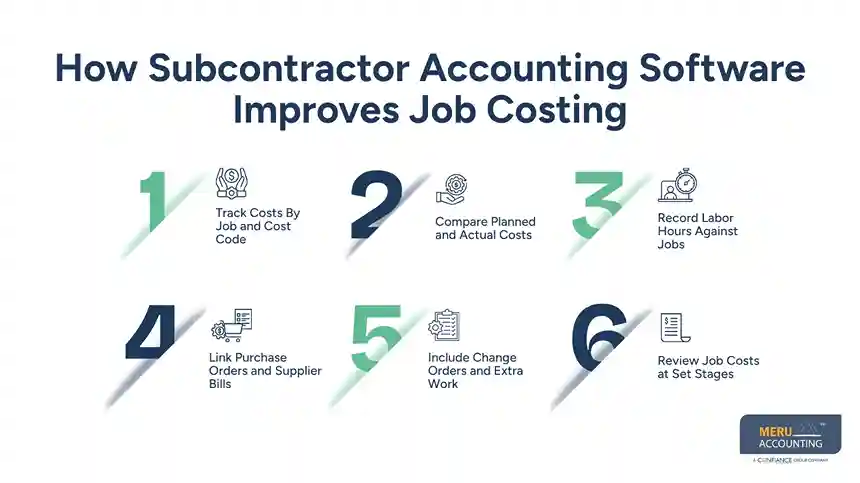
Track Costs By Job and Cost Code
A general cost list may show how much a firm spent but not which job used the money. Cost codes for labor, supplies, and tools show where each cost belongs and which part of the budget needs a check.
Compare Planned and Actual Costs
A budget report shows the gap between the first estimate and current costs. If a wiring job has a $4,000 cable budget but costs have hit $3,200 halfway through the work, the team can check if the rest of the budget will cover the job.
Record Labor Hours Against Jobs
Extra hours may point to a wider issue, not just a high wage bill. Subcontractor accounting software can link approved time logs to jobs. Owners can then check if delays, rework, or poor plans drove labor costs up.
Link Purchase Orders and Supplier Bills
A purchase order shows what the team agreed to buy. The supplier bill shows what the firm must pay. A check of both can spot price rises, repeat charges, or costs billed to the wrong job.
Include Change Orders and Extra Work
A client may ask for extra parts, work in one more room, or a change to the plan. Add the cost and agreed price to the job budget. The report will then show the new work, not just the first quote.
Review Job Costs at Set Stages
A cost check on the last day leaves little time to fix a problem. Weekly reviews let owners ask why costs have changed, update the final cost estimate, and bill the client for valid extra work.
optional anymore
on running the business
How Accounting Software For Small Subcontractors Helps Track Project Profit
A firm may finish many jobs in a month and still not know which ones made the most profit. Accounting software for small subcontractors brings sales and cost records together, so owners can compare job results with ease.
Check Revenue Against Job Costs
Start with the agreed job price, add approved extra work, and compare the total with costs on record. Subcontractor accounting software makes this check easier when all sales and costs link to the right job.
Track Gross Profit by Project
Take direct job costs away from job sales to find gross profit. For example, a roof job with $15,000 in sales and $11,000 in direct costs earns $4,000 before overhead and tax.
Spot Jobs With Low Margins
A job with high sales may earn less than a small job. Compare labor hours, supply use, and work not yet billed across similar jobs. This can show why one job earns less than another.
Check Cash Flow and Unpaid Bills
A firm may owe a supplier today but get paid by its client next month. Accounting software for small subcontractors tracks unpaid bills and invoices due. This helps owners plan cash needs and avoid treating money owed as cash in the bank.
Review Profit Forecasts During the Job
The final cost may not be clear at the start. Check costs to date and the cost still needed to finish the job. Then update the forecast when labor, supply prices, or work plans change.
Use Past Jobs to Set Better Bids
When a job ends, compare its first budget with the final cost. Subcontractor accounting software keeps these records for future bids. Owners can use the actual costs of past jobs to price similar work with care.
How To Choose Software Based On Your Trade And Business Size
The best system is not always the one with the most features. Accounting software for small subcontractors should fit the firm’s daily work, budget, and report needs without making tasks harder.
Match Features to Your Trade
An electrician may need clear crew hours and wire costs, while a roofer may track roof sheets, nails, and tool hire. Choose subcontractor accounting software that tracks the costs that matter most to your trade.
Check Ease of Use
If staff find it hard to log time or bills, records may be late or lack key facts. Ask the vendor to show how to set up a job, add costs, and make a report.
Review Software Costs
Look past the monthly fee. Check setup fees, user limits, training costs, and paid add-ons. Then compare these costs with the time the system may save.
Check Payroll and Bank Links
Links to payroll and bank tools can cut repeat data entry. Check that the system moves the right data and find out which steps still need a manual check.
Look For Clear Job Reports
Ask to see a report with the budget, actual costs, sales, and expected cost to finish. Subcontractor accounting software should show these figures in a clear way, so owners can read the report and act on it.
Common Job Costing and Profit Tracking Mistakes to Avoid
Subcontractor accounting software cannot fix every error on its own. Missing bills, wrong job codes, and late time logs can make a good job look weak or hide a job that is losing money.
Mixing Costs From Different Jobs
A supplier bill linked to the wrong job can spoil both job reports. Use clear job codes and check each entry before the month-end close.
Missing Small Costs
Fuel, delivery fees, tool hire, and waste removal can add up over time. Log each cost under the right job when it relates to that work, rather than leaving it in a general cost list.
Using Old Labor Estimates
A labor estimate from last year may not fit current pay rates or site needs. Check past hours and current costs before you set a new budget.
Forgetting Extra Work
Extra work costs money even if the first quote stays the same. Log approved changes, update the budget, and bill the client under the agreed terms.
Checking Profit Only at the End
Late checks show what went wrong but leave little time to act. Set weekly checks for long jobs and stage-based checks for short jobs.
Treating Revenue as Cash In Hand
An invoice shows money due, not money received. Subcontractor accounting software tracks due dates and unpaid bills, so the firm can plan supplier payments and avoid cash gaps.
Why Choose Meru Accounting For Subcontractor Accounting?
- Meru Accounting keeps sales, cost, bill, and payment records in order, making job costs and profit easy to review.
- We track income and costs in subcontractor accounting software, so owners can compare actual costs with budgets.
- Regular account checks help spot missing bills, wrong entries, and extra costs before they affect job results.
- Our services use tools such as QuickBooks, Xero, and Zoho Books based on each firm’s needs.
- Meru Accounting tracks bills, payments, and unpaid invoices to help owners plan supplier payments and manage cash needs.
- Clear records make it easier to check job results, review profit, and plan future work.
- Meru Accounting keeps job cost data in order, so owners can use past results to plan future budgets.
Our Expert Perspective
Good job costing needs timely records and regular checks. Higher labor costs, missing supply costs, or extra work that has not been billed can cut profit. Subcontractor accounting software helps track these changes, but results depend on the data entered and how often owners review job reports.
Key Takeaways
- Subcontractor accounting software links sales and costs to each job.
- Job costing shows if a job stays within budget and earns the planned profit.
- Labor hours, supplies, tool hire, and extra work must be logged under the right job.
- Regular cost checks give owners time to act before small gaps grow.
- Accounting software for small subcontractors should fit the trade, team size, budget, and report needs.
- Correct and timely entries matter as much as the software.
- Meru Accounting provides bookkeeping services that keep records in order and help firms review job results.
FAQs
Subcontractor accounting software tracks labor, supplies, and other job costs so owners can compare actual costs with the budget.
Subcontractors can take direct job costs away from sales and review overhead costs on their own.
It should track job costs, labor hours, budgets, bills, invoices, and profit by job.
Accounting software for small subcontractors compares planned and actual costs, helping owners spot overspending before a job ends.
Past job cost reports show the true cost of labor, supplies, and other items, helping owners price new jobs with care.
optional anymore
on running the business