A lost receipt, a card charge logged twice, or a cost posted to the wrong account can add hours to month-end work. White label expense management lets accounting firms offer expense tools under their own brand. When linked to accounting systems, these tools bring receipts, claims, approvals, and payment data into one clear flow.
Think of a firm with 30 staff who travel, buy goods, and pay for online tools. If each staff member sends receipts by email, the accounts team must sort files, check costs, and enter data by hand. With the right link, staff can send claims in one place, managers can check them, and approved costs can flow to the books.
The main gain comes after each payment. Every cost needs the right code, proof, approval, and ledger entry. A sound setup can cut routine work, while accountants keep control of checks, odd items, and final reports.
What You Will Learn From This Blog
- How white label expense management works and why firms use it.
- How linked tools track receipts, claims, approvals, and account entries.
- Which links can improve expense record checks.
- How firms can offer branded expense tools to clients.
- What can go wrong during setup and how to avoid such issues.
- How Meru Accounting provides expense review and accounting services.
What Is White Label Expense Management?
White label expense management lets an accounting firm offer an expense tool under its own name, even when another firm builds the software. Clients use the branded tool to send receipts, log costs, and track claims. The firm sets the rules for checks and entry into the books.
For example, a firm that serves many small firms could give each client a branded expense portal. Staff send claims, managers approve them, and the accounts team checks each record before it enters the books.
Tools vary by vendor. Some offer receipt scans, card feeds, approval rules, and links to accounting tools. Others only track basic costs. Before a firm picks a tool, it should check its features, data access, fees, and safety rules.
How White Label Expense Management Integrations Enhance Accounting Workflows
Automated Expense Data Entry and Categorization
Accountants should not have to type the same data from each receipt into more than one tool. White label expense management can send the seller’s name, date, total, and tax data to accounting software. Some tools can also suggest an expense code.
For example, a paper bill may be filed under office supplies. The accountant must still check odd costs and fix wrong codes before posting them.
Faster Receipt Capture and Expense Reconciliation
Receipts can go missing when staff save them for later or send them in separate emails. A linked tool lets staff upload a photo at the time of sale and match it to the right card charge or claim.
This cuts the time spent chasing files at month-end. Unmatched costs, refunds, and unclear receipts still need a check before the books can close.
Real-Time Expense Tracking and Financial Reporting
Business owners need to know where their money goes before month-end. Based on the link and its sync rate, new expense data may show up in reports soon after it is logged.
For example, a manager who sees travel costs rise mid-month can check why before they approve more spend. Reports must still show the gap between approved costs, pending claims, and unverified charges.
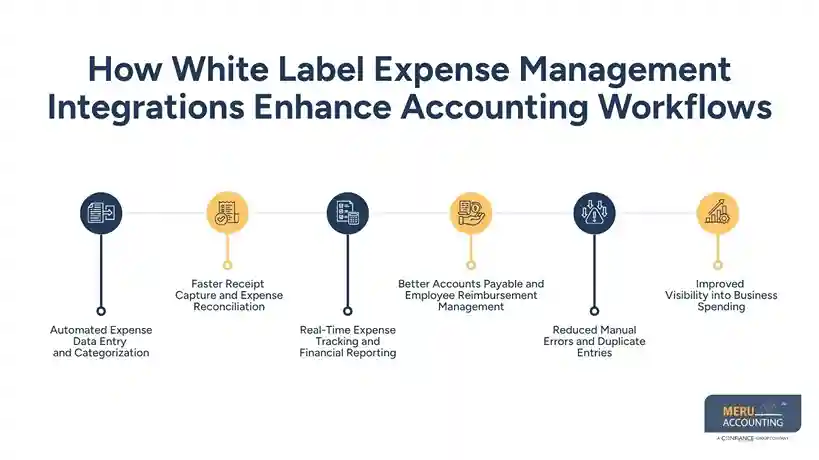
Better Accounts Payable and Employee Reimbursement Management
An expense claim may pass through many people before it is paid. The right setup sends each claim to the right manager, logs the choice, and sends approved data to the finance team.
Staff can check claim status and spend less time asking when they will be paid. Firms should set clear approval limits and keep payment rights under control.
Reduced Manual Errors and Duplicate Entries
Errors can arise when a card charge and a staff claim are logged as two costs. White label expense management links may check dates, amounts, seller names, or transaction IDs to flag costs that may be duplicates.
For example, a $120 meal charge may show up in both a card feed and a staff claim. The tool can flag the match for review. The accountant must check both records before deleting either entry.
Improved Visibility into Business Spending
Expense data is more useful when managers can view costs by team, job, site, or type. This can show rising travel costs, repeat software fees, or spend above a set limit.
White label expense management can bring these records into one client-facing tool. Good reports still rely on correct codes, timely updates, and clear rules for approval.
optional anymore
on running the business
The Role of Business Expense Management Software in Accounting Automation
Business expense management software brings cost data, receipts, and claim checks into one shared flow. When linked to accounting tools, white label expense management can cut repeat data entry and give accountants a clear record of each cost.
Connecting Expense Management Software With Accounting Systems
Business expense management software can link through a built-in tool, an application programming interface (API), or a third-party link. The best choice depends on the tools in use and the data they can share.
Before setup, firms should check if the link can send key data such as tax, currency, account codes, and receipt files. A link that sends only totals may not meet all record needs.
Syncing Transactions, Receipts, and General Ledger Entries
A good link can send payment data and approved costs to the right general ledger accounts. This cuts copy work and keeps source files linked to the right records when the tool allows it.
Firms should also set which tool holds the main record. For example, the expense tool may hold the claim and receipt, while the accounting tool holds the final ledger entry.
Automating Expense Approval and Reporting
Business expense management software can send claims for review based on cost, team, or job. Once approved, it may build a report or send the cost to the accounting tool.
A firm could ask one manager to approve claims below $500 and a second manager to check higher claims. Rules should match firm policy and allow extra checks when needed.
Supporting Multi-Entity and Multi-Location Accounting
Firms with many offices or legal entities must link costs to the right company, currency, tax rules, and ledger. Tools with entity and site fields can make this task easier.
Each entity needs the right account map and approval rules. Firms should test user access to make sure staff see only the records their roles allow.
Key Integrations That Strengthen White Label Expense Management
Accounting Software Integrations
Links with QuickBooks Online, Xero, and Zoho Books can send approved costs to the books. For white label expense management, firms should test account codes, tax data, receipt links, and duplicate checks before syncing all costs.
Corporate Card and Banking Integrations
Bank feeds and company card links bring payment data into the expense tool for matching. Firms should check how often data comes in and how the tool treats refunds, pending charges, and costs in other currencies.
Payroll and Employee Reimbursement Integrations
Payroll links may send approved claim totals to the right process. Before setup, firms should check if claims are paid through payroll or in a separate payment run.
ERP and Financial Reporting Integrations
Enterprise resource planning (ERP) systems can link expenses to budgets, jobs, cost centres, and finance reports. The setup must fit the firm’s account plan and report needs.
Receipt Scanning and Document Management Integrations
Receipt scan tools can read data from images, while file tools store records for later checks. Firms should test poor images, missing tax data, and broken file links before launch.
Benefits of White Label Expense Management for Accounting Firms
Delivering Expense Management Under Your Own Brand
A branded tool gives clients one place to send costs and check claims. Firms should state which features they provide and which come from the software vendor.
Expanding Accounting and Bookkeeping Service Offerings
With white label expense management, firms can add setup, receipt checks, cost reviews, and monthly reports to their service list. These tasks fit bookkeeping work when staff have the right skills and a clear scope.
Improving Client Reporting and Expense Visibility
Regular reports can show spend by type, job, or site. Accountants can flag missing receipts, odd costs, and gaps between planned and actual spend.
Managing More Client Accounts With Consistent Workflows
Clear rules for coding, approval, and checks make it easier to manage many client accounts. Each client still needs the right tax rules, account map, and user rights.
Creating Additional Revenue Opportunities
Firms can charge for setup, monthly cost reviews, and reports. Rates should cover software fees, staff time, training, and the cost of fixing sync errors.
Common Challenges in Expense Management Integration and How to Address Them
Inaccurate Data Mapping and Duplicate Transactions
Wrong account codes and repeat imports can harm finance reports. Map each cost type to the right ledger account, test common costs, and check duplicate alerts before posting entries.
Software Compatibility and Syncing Issues
Some tools may not share all data fields or may stop syncing after a software update. Check the vendor’s link details, review error logs, and set a clear process for failed imports.
Data Security and Access Control
Expense records may hold staff data, receipts, and bank details. Use role-based access, multi-factor authentication where offered, and remove access as soon as staff leave.
Employee Adoption and Workflow Changes
Staff may delay receipt uploads if the process is hard to follow. Give clear steps, show staff how to send claims, and state approval times before launch.
Incomplete Records and Compliance Risks
A payment alone may not prove why a cost was incurred or show the tax data needed. Set receipt rules, keep approval records, and check missing files before closing the books. Follow the tax and record rules that apply to each client.
Best Practices for Implementing White Label Expense Management Integrations
Review Existing Accounting Workflows
Map how staff send costs, who checks claims, and how accountants post entries. This shows where work slows down and which steps a white label expense management tool should handle.
Map Expense Categories and General Ledger Accounts
List cost types, tax codes, teams, and ledger accounts. Test routine buys, refunds, travel claims, and costs in other currencies to check that entries reach the right accounts.
Set Approval Rules and User Permissions
Set who can send, check, approve, edit, and pay each claim. Use limits that match firm policy and, where practical, keep payment rights apart from claim approval.
Test Data Syncing Before Full Implementation
Start with a small team and a few costs. Check the results against the accounting ledger, test receipt links, and fix errors before a wider launch.
Monitor Integration Performance and Reconcile Records
Check sync errors, unmatched costs, duplicate alerts, and pending claims on a set schedule. At month-end, match expense reports with bank and card records before issuing final reports.
How Meru Accounting Provides Expense and Accounting Services
Meru Accounting provides bookkeeping and accounting services for US firms that need clear expense records and sound reports. Our team checks expense entries, supplier bills, staff claims, and account codes within the agreed scope.
For clients using white label expense management, Meru Accounting can check how expense data flows into the accounting tool, find missing details, and match costs with bank or card data. This review can also flag duplicate entries and claims that need approval or proof.
Our work aims to keep records sound, checks clear, and reports useful. The scope depends on each client’s tools and needs. Any software fees should be agreed on as a separate cost.
Our Expert Perspective
In our experience, white label expense management works best when firms set clear rules before linking their tools. Firms should decide how costs are coded, checked, approved, and posted before they automate these steps. Accountants must still review odd charges, missing receipts, and errors that software may miss.
Key Takeaways
- White label expense management lets firms offer expense tools under their own brand.
- Links can cut manual entry and tie receipts to payment records.
- Business expense management software can route claims, track approvals, and send data to the ledger when the tools allow it.
- Bank, card, payroll, ERP, and receipt tools can extend the process, but each link needs a test.
- Clear account maps, access rules, and regular checks help keep records sound.
- Before offering white label expense management, firms should check software fees, data safety, and service scope.
FAQs
White label expense management links expense data, receipts, and approved claims with accounting tools such as QuickBooks Online, Xero, and Zoho Books.
Key benefits include less manual data entry, faster expense reviews, better receipt tracking, fewer duplicate entries, and clearer client reports.
Key integrations include accounting software, bank feeds, corporate cards, payroll tools, ERP systems, and receipt scanning tools.
Business expense management software records costs, links receipts to transactions, tracks claim approvals, and helps accountants match expenses with bank and card records.
Common challenges include incorrect account mapping, duplicate entries, failed data syncs, missing receipts, and data access risks.
optional anymore
on running the business