Adding payroll to your accounting services sounds simple until something goes wrong. A client’s employee gets paid the wrong amount, a tax payment is missed, or payroll data doesn’t match the books. Even when a third-party provider handles the processing, your firm may still have to answer client questions and help fix the issue. That’s why choosing white label payroll software for accountants requires more than comparing features and prices.
The right setup can help your firm offer payroll under its own brand without managing every task in-house. But unclear responsibilities, poor software integration, data errors, and slow support can affect both your work and client relationships. Let’s look at the common challenges and how your firm can avoid them.
What You Will Learn From This Blog
- What white label payroll software is and how it works for accounting firms.
- Common risks that can affect payroll accuracy, tax filings, and client trust.
- Ways to avoid errors, delays, and data security issues.
- What to check before you choose a white label payroll provider.
- How outsourced payroll accounting solutions can support your firm’s growth.
What Is White Label Payroll Software for Accountants?
White label payroll software for accountants is a payroll tool or service that an accounting firm can offer to clients under its own brand. A third-party vendor owns or runs the platform, while the firm may use its own name, logo, and client-facing process.
For example, an accounting firm may add payroll to its monthly service plans. Clients send employee hours, pay rates, new hire details, and leave data to the firm. The firm or its payroll partner then uses the software to work out gross pay, tax withholdings, and net pay. The client gets payroll reports and support through a service that carries the firm’s brand.
The exact setup depends on the provider. Some firms use the software to run payroll on their own. Others rely on a third party for data entry, payroll runs, tax forms, and reports. Before signing up, firms should know which tasks they will manage and which ones the vendor will handle.
How Does White Label Payroll Software Work for Accounting Firms?
The process starts when an accounting firm picks a provider and sets up the payroll service under its brand. The provider may help with account setup, client access, pay schedules, tax settings, and links to accounting tools.
A common workflow looks like this:
- Client setup: The firm gathers business details, employee records, pay rates, tax forms, and bank details.
- Payroll data entry: The client shares hours, bonuses, leave, and other pay changes for each pay period.
- Payroll review: The firm or provider checks the data, runs payroll, and reviews gross pay, tax, and net pay.
- Client approval: An approved contact checks the payroll summary and confirms that it can be paid.
- Pay and tax work: The assigned party sends pay and handles tax deposits or filings as set out in the service agreement.
- Reports and records: The firm shares pay stubs, payroll reports, tax records, and wage data with the client.
A key point is that software does not remove the need for review. The firm must know who checks the data, who approves each run, and who is in charge of tax deposits and filings. These roles should be set out in writing before the first pay run.
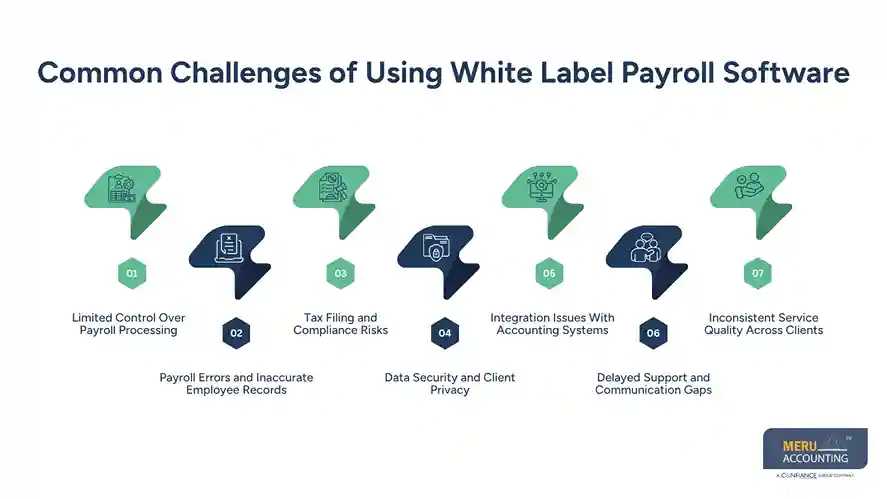
Common Challenges of Using White Label Payroll Software
White label payroll can help firms add new services, but poor setup or weak control can lead to costly issues. Here are the main risks to watch for.
1. Limited Control Over Payroll Processing
When a third party runs payroll, the firm may not have full control over each step. It may depend on the vendor to enter data, fix errors, or meet pay dates. This can be a problem when a client needs a quick change or an urgent payroll run.
How to avoid it: Set clear service terms before work begins. List who enters data, checks payroll, approves pay runs, and handles urgent changes. Ask for a clear view of each payroll stage so your team can track work and spot delays.
2. Payroll Errors and Inaccurate Employee Records
Wrong pay rates, hours, tax details, or worker records can lead to incorrect pay. A small data error may also affect tax reports, wage costs, and the client’s books. Errors can come from both client input and data entry by the firm or provider.
How to avoid it: Use a set checklist for each pay run. Check new hires, pay rates, overtime, leave, bonuses, and changes to employee status. Review payroll totals against the prior period and ask the client to confirm any large changes before approval.
3. Tax Filing and Compliance Risks
Payroll tax rules vary by state and can change over time. Firms must track tax rates, deposit dates, filing rules, and year-end forms. If the provider misses a tax date or uses wrong data, the client may face fees, notices, or extra work.
How to avoid it: Check which tax tasks the provider will handle. Confirm who is in charge of tax deposits, returns, W-2s, and other forms. Ask how the provider tracks rule changes and handles tax notices. Review filing proof and payment records on a set schedule. Do not assume that using payroll software makes every tax task automatic.
4. Data Security and Client Privacy
Payroll files hold private data such as Social Security numbers, pay rates, bank details, and tax records. If access is too broad or data is shared through unsafe channels, client data may be at risk.
How to avoid it: Check the provider’s data security steps before you sign up. Look for role-based access, multi-factor login, data encryption, backup plans, and a clear process for reporting a breach. Give each user only the access needed for their role. Also, set rules for how your team and clients share payroll files.
5. Integration Issues With Accounting Systems
Payroll data must flow into the client’s books in the right way. If the payroll tool does not link well with QuickBooks, Xero, or another accounting system, staff may need to enter data by hand. This can cause duplicate entries, missed wage costs, or wrong payroll liability balances.
How to avoid it: Test the link before moving live client data. Check how the system records wages, employer taxes, benefits, and payroll liabilities. Run a test period and compare the payroll reports with the general ledger. Fix account mapping issues before the first live run.
6. Delayed Support and Communication Gaps
Payroll has fixed deadlines. A slow reply from the provider can leave little time to fix errors before payday. This can harm the client relationship, even when the firm did not cause the delay.
How to avoid it: Ask about support hours, response times, and urgent case handling. Find out if you will have a named contact or a help desk. Set a clear cut-off date for client data and a deadline for payroll approval. Keep a record of open issues and who must resolve them.
7. Inconsistent Service Quality Across Clients
As firms add more payroll clients, it can become hard to keep the same level of service for all of them. Each business may have its own pay cycle, staff rules, benefits, and approval steps. Without a clear process, some clients may get more attention than others.
How to avoid it: Create a standard payroll process for all clients, with room for each client’s needs. Use a shared calendar for pay dates, tax dates, and data cut-offs. Review error rates, late runs, open issues, and client feedback each month. This helps your firm spot gaps before they grow.
How to Avoid Common White Label Payroll Challenges
Preventing payroll issues takes more than choosing good software. Accounting firms need clear work steps, trained staff, and a way to review each payroll run.
Here are some practices that can help:
- Set clear roles: Define what the firm, provider, and client must do at each stage.
- Use a payroll calendar: Track pay dates, tax deadlines, data cut-offs, and approval dates for every client.
- Review payroll reports: Check wages, tax withholdings, employer costs, and liability balances before closing each period.
- Keep client records up to date: Review employee details when pay rates, roles, bank details, or tax status change.
- Test software links: Check payroll entries against the general ledger to find missing or duplicate entries.
- Track provider performance: Review late runs, errors, response times, and unresolved issues on a regular basis.
These steps also help firms get more value from outsourced payroll accounting solutions. Instead of relying on the vendor for every decision, your team can keep oversight of the work and make sure each client gets the right level of service.
optional anymore
on running the business
How to Choose the Right White Label Payroll Provider
Choosing a provider is one of the most important steps when adding payroll to your accounting services. The right partner should fit your firm’s work process, client base, and service goals. Do not base your choice on software features or price alone.
Before you select a provider, check these points:
- Branding options: Can you use your firm’s name, logo, and client-facing details across the service?
- Payroll coverage: Does the provider support the pay cycles, worker types, and payroll tasks your clients need?
- Tax support: Ask who handles tax deposits, filings, year-end forms, and tax notices.
- Accounting links: Check whether the software works with QuickBooks, Xero, or the tools your clients already use.
- Data security: Review access controls, encryption, backup plans, and breach response steps.
- Support quality: Check support hours, response times, and how urgent payroll issues are handled.
- Pricing structure: Ask about setup fees, per-employee costs, monthly fees, and extra charges for tax forms or off-cycle runs.
- Reporting and access: Make sure your team can view payroll reports, track work, and review client records when needed.
Also, ask for a demo and test the platform with sample data. This helps you see how easy it is to add a client, run payroll, review reports, and fix errors. A provider may offer many features, but the system should be easy for your team and clients to use.
The best white label payroll software for accountants should support your firm’s work rather than add more steps. Check the service terms, data ownership rules, and exit process too. Your firm should know how it can access or move client records if the partnership ends.
Outsourced Payroll Accounting Solutions by Meru Accounting
Payroll accounting requires a clear understanding of how employee pay, employer contributions, deductions, and tax liabilities affect a company’s books. Meru Accounting brings practical experience in these areas, supporting businesses and accounting firms with the financial side of payroll.
Our outsourced payroll accounting services cover:
- Payroll Journal Entries: Recording gross wages, net pay, taxes, and deductions.
- Payroll Reconciliation: Reviewing payroll reports, bank activity, and ledger balances.
- Payroll Liability Management: Tracking outstanding payroll taxes and employee deductions.
- Payroll Expense Accounting: Reviewing salaries, overtime, bonuses, and employer contributions.
- Payroll Reporting: Maintaining records and reports for financial review and month-end close.
Our focus is on accurate records, proper account treatment, and reliable payroll reporting—not just entering payroll figures into the books.
Need accounting support for your payroll operations? Get in touch with Meru Accounting.
Our Expert Insight
A payroll run can be correct, yet the books may still show errors. One example is accrued wages. If a pay period ends on the last day of the month but employees are paid the following month, some wages may need to be recorded in the earlier month to match the correct reporting period.
We also recommend reviewing old payroll liability balances each month. Unpaid taxes, benefit deductions, or unposted payments can leave balances that no longer reflect what the business owes.
For firms using white label payroll software for accountants, it’s important to remember that payroll processing and payroll accounting are two different tasks. Paying employees correctly is only part of the job; the related financial records must also be accurate.
Key Takeaways
- White label payroll software for accountants lets firms offer payroll services under their own brand.
- Poor data, unclear roles, and missed tax dates can lead to payroll errors and client issues.
- Firms should review payroll reports, tax records, and accounting entries on a regular basis.
- Check software links, data security, support, and pricing before choosing a provider.
- Outsourcing payroll accounting can help firms manage workloads without building a larger in-house team.
- A reliable provider and clear review process help maintain payroll accuracy and client trust.
FAQs
Yes. Firms can partner with a third-party provider to handle payroll processing while offering the service under their own brand.
The business may face penalties and interest. The firm should confirm the filing status, review any tax notices, and address the missed deadline promptly.
Federal tax records related to employment taxes generally need to be kept for at least four years. Some state rules and other record types may require longer retention.
Costs vary by provider and may include setup fees, monthly charges, per-employee fees, and additional charges for tax filings or year-end forms.
Yes. However, the firm must transfer year-to-date wages, tax payments, employee details, and filing records to avoid gaps in payroll reporting.
optional anymore
on running the business