Xero bookkeeping has improved how small businesses manage their daily accounts. With its easy design and strong tools, it helps manage day-to-day finance tasks. If you’re new to Xero or if you’re looking to improve your records, this guide will help.
Bookkeeping is key to business health. When done right, it shows your money flow, profits, and losses. Xero bookkeeping makes this work smoother and faster. You can track cash, send bills, and see reports with a few clicks. This guide will show you how to start, what to expect, and how to get the most out of Xero.
What You Will Learn From This Blog
- Learn how Xero bookkeeping makes daily money tasks easier for small businesses.
- Understand how to set up Xero accounting software for clear and accurate financial records.
- Discover the main features, key benefits, common mistakes to avoid, and simple tips to keep your books organized.
Why Choose Bookkeeping with Xero Accounting Software
Xero bookkeeping can give your business a clear and simple way to handle finances. As Xero accounting software is cloud-based, you can work from any location. It has all the tools you need to save time and reduce mistakes. You can link your bank account, track expenses, and send invoices in just a few steps. Its smart features help you follow tax rules and reduce the stress of reporting.
With real-time data, you can view your income, costs, and cash flow at any moment. Xero also allows you to share access with your accountant or team members while keeping full control. This makes it easy to get help when needed and work as a team. When you use Xero, bookkeeping becomes smoother, faster, and more efficient.
Step-by-Step Guide to Xero Bookkeeping Setup
To enjoy Xero’s features, first you must set it upright. Starting your Xero bookkeeping journey is simple if you follow the setup path.
Create and Verify Your Account
Sign up on Xero’s website, input your business details, and verify your email. Once done, you can begin adding vital information about your business to ensure accurate records.
Add Your Business Details
After setting up, include your logo, contact info, and tax settings. These will show on your invoices and other reports, keeping things neat and professional.
Link Your Bank Account
Select your bank from Xero’s list and log in securely. This allows real-time syncing, so you don’t need to enter each transaction by hand.
Set Your Financial Year and Tax Details
Pick your business’s financial year and input GST or VAT settings. These settings help reports stay accurate for tax use.
Set Up Your Chart of Accounts
Use default or custom account types that fit your firm. This layout controls how your reports and records will show data.
Add Users and Set Roles
Invite the team or advisors with access levels. They can help with tasks or review work, without full control.
Benefits of Bookkeeping with Xero Accounting Software
Using Xero for your books gives you control and peace of mind. It cuts time on routine tasks and boosts accuracy.
Real-Time Financial View
Xero lets you see your financial data as it happens. This real-time view helps you make faster and better business decisions. You can track sales, costs, and cash flow without waiting for month-end reports. This gives you a clear picture of your business at any time.
Simple Tax Reporting
With Xero, tax reporting is much easier. It gathers your GST data and other key numbers, which helps reduce filing errors. Your tax records stay organized throughout the year. This makes it easier to file returns and prepare for tax reviews.
Smooth Team Access
You can invite team members or your bookkeeper to your Xero account. Each user gets their own login with the access level you choose. This helps your team work together without sharing passwords. It also keeps your financial data safe while making teamwork more efficient.
Key Features of Xero Bookkeeping
Xero has many built-in tools that support daily bookkeeping tasks. These features make bookkeeping with Xero accounting software fast, simple, and secure.
Bank Feeds and Reconciliation
Once your bank is linked, transactions appear each day. You can match them to invoices or receipts, keeping your books up to date with less work. This helps reduce manual entry and saves time.
Invoicing and Billing
Xero lets you create invoices, add due dates, and track payments with ease. You can also send reminders for overdue invoices to improve cash flow. This helps you get paid faster and stay organized.
Expense Tracking
Tracking business costs in Xero is simple. You can upload receipts, sort expenses by type or job, and see where your money goes in real time. This makes it easier to control spending and manage your budget.
Payroll and Employee Records
Xero helps you manage payroll and employee leave. It stores tax details, pay rates, and time-off requests in one place. This keeps payroll records accurate and easy to access.
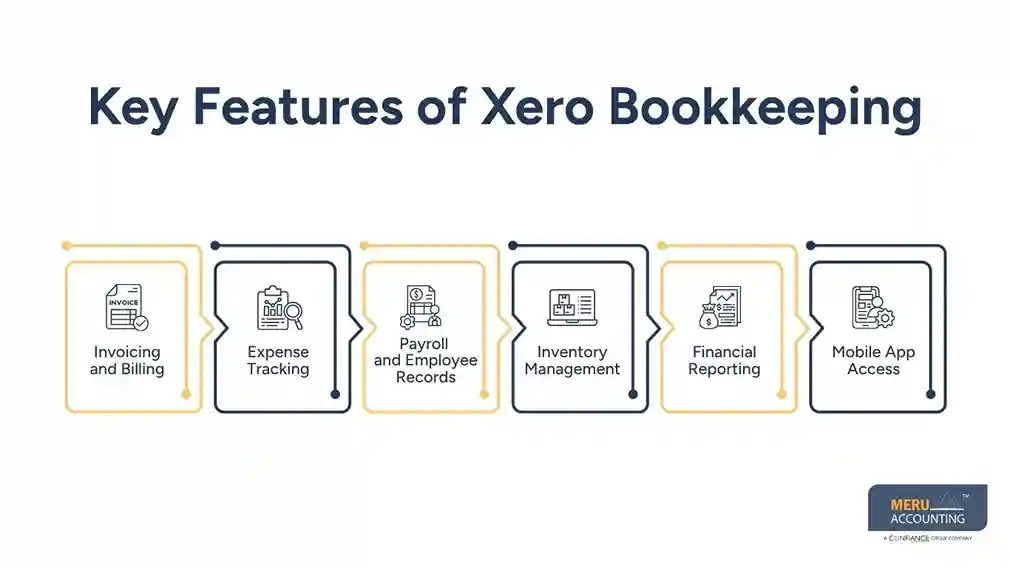
Inventory Management
You can manage products, track stock levels, and monitor inventory. This helps you know what is in stock and what needs to be reordered. It also helps prevent stock shortages and overordering.
Financial Reporting
Xero bookkeeping provides live reports for profit, loss, and cash flow. These reports help you spot trends and make smart business decisions. You can also use them to plan for future growth.
Mobile App Access
Xero’s mobile app lets you manage your finances from anywhere. You can scan receipts, check reports, and send invoices right from your phone. This gives you quick access to your business records whenever you need them.
Challenges to Avoid in Bookkeeping with Xero
Even the best tools need smart use. Bookkeeping with Xero Accounting Software is easy, but mistakes can happen.
Not Reconciling Often
If you delay checking your records, errors may build up. Reconciling often keeps your financial data clean and correct.
Wrong Account Setup
If you set up the wrong account types, your reports will not reflect the real business status. Take time to match your chart of accounts to your needs.
Ignoring Reports
Xero gives useful reports, but many users don’t check them. These reports highlight trends and risks and help you plan your next steps.
Delayed Data Entry
Late updates lead to poor reports. Entering data on time helps keep a real view of your business.
Poor Access Control
Giving too much access can risk errors. Set roles wisely for safety and good records.
No Backup of Documents
Though Xero is cloud-based, storing key files helps. Save digital receipts and contracts to avoid missing proof.
Tips to Improve Xero Bookkeeping Efficiency
To get the most from your Xero bookkeeping, use the software in smart ways. These tips help reduce time and boost results.
Use Bank Rules
Set up Xero to auto-match common payments with rules. This small step saves time and improves bookkeeping speed and accuracy.
Automate Recurring Tasks
Use repeating invoices and bills in Xero for services you pay for or provide each month. It lowers the chance of forgetting something important.
Check Reports Often
Xero’s live reports give insight into profits, cash flow, and trends. Checking them often lets you react early to any signs of trouble.
Keep It Updated
Don’t let records pile up. Enter data as it happens. Updated books give a clear view of your current finances and prevent errors later.
Meru Accounting's Xero Bookkeeping Services
Meru Accounting gives you full Xero bookkeeping support to keep your records clean, clear, and up to date. Our team handles the daily work, so you have more time to grow your business.
Xero Account Setup
We set up your Xero account the right way from day one. We add your tax settings, chart of accounts, bank feeds, and user access. A good setup helps keep your books clear and helps stop future errors.
Daily Bookkeeping
We record your sales, bills, and other daily entries. We also match your bank records on time. This keeps your books correct and gives you a clear view of your cash.
Invoice and Cost Tracking
We help you send bills, track payments, and record costs. We also sort each cost into the right account. This helps you stay on top of cash and keep your records neat.
Payroll and Reports
We help manage payroll and prepare easy-to-read reports. You can check your profit, costs, and cash flow at any time. These reports help you make better business plans.
Ongoing Xero Support
Our team is here to help as your business grows. We answer your questions, solve issues, and help you get more from Xero accounting software. With Meru Accounting, your books stay correct, current, and ready when you need them.
Meru Accounting offers full support for your Xero account, including setup, entry, review, and reporting. We help you use every feature and avoid costly mistakes. When we manage your books, you stay free to grow your business. Our Xero bookkeeping services help you follow rules and stay audit-ready all year.
Our Expert Insight
When bookkeeping is done efficiently, you get a complete view of your business. This helps you in making better business decisions. Xero bookkeeping software uses smart tools and features to reduce your manual work, improve accuracy, and save time. When you use Xero accounting software correctly, you can manage cash flow, stay tax-ready, and keep your financial records in a good shape.
Key Takeaways
- Xero bookkeeping helps in simplifying your daily accounting tasks with smart automation and cloud access.
- A proper setup, including bank feeds, tax settings, and the chart of accounts, helps keep records correct.
- Tools like invoicing, expense tracking, payroll, inventory, and reports make bookkeeping faster and easier.
- Regular review of accounts, timely updates, and frequent report reviews help reduce errors and improve financial control.
FAQs
Xero bookkeeping is the use of Xero software to manage daily business finances like bills, income, and expenses.
Yes, Xero works well for small and growing firms. It is simple, smart, and cloud-based.
Xero uses strong online security. Your data stays safe with backup and encryption.
Yes, but a bookkeeper helps you get the most out of it and avoid costly errors
- Yes. Xero tracks pay, leave, and super, all in one easy place.
optional anymore
on running the business