Small businesses grow best when they use smart tools. One powerful combo is using Xero with CRM integrations. With the right setup, you can manage customers and accounts in one place. The use of Xero helps track money, while a Xero CRM keeps client data and sales under control. When you combine both, you gain time, accuracy, and better customer care. There are a lot of benefits of using CRM for small businesses.
In this blog, we explore how Xero CRM integrations improve daily business. We will explore how the use of Xero CRM for small businesses improve their CRM features, how integration works, and what to look for when choosing a tool.
What You Will Learn From This Blog
- Learn how Xero CRM integrations simplify accounting and customer management for small businesses.
- Understand the key benefits of connecting CRM software with Xero, including automation and improved data accuracy.
- Explore popular CRM solutions that integrate seamlessly with Xero and their unique advantages.
- Discover the steps to set up a Xero CRM integration and avoid common implementation mistakes.
- Find out how integrated CRM and accounting systems improve cash flow, customer service, and business decision-making.
Why CRM Matters for Small and Growing Businesses
Small businesses often have limited staff and time. They need smart tools to manage leads, talk to clients, and track deals. Choosing the right CRM for small businesses helps them with all these tasks by storing customer data in one place. This helps teams work better and faster. Strong customer support helps every business grow. As a business grows, tracking customer details, calls, orders, and bills becomes hard. CRM software plays a big role, especially when it is Xero CRM integrations.
Key Benefits of CRM Tools:
- Track customer details with ease
- Follow up on leads without delay
- Get reminders for key follow-ups
- View reports on sales performance
- Help manage client needs in one place
Strong customer support helps every business grow. As businesses expand, tracking customer details, calls, orders, and bills becomes harder. CRM options make this easier, especially when they work with Xero.
What Does a CRM Do?
CRM tools keep emails, contact info, notes, and past purchases in one system. When integrated with Xero, you also get payment history, invoice status, and financial notes added to customer profiles. This creates a full picture for better service.
CRM with Xero Integration Helps You:
- See both sales and finance data at once
- Track client status and payment details
- Give better support and faster replies
- Work as one team across sales and accounts
Understanding the Use of Xero CRM Integrations in Business Operations
Xero is made for small firms that want simple, cloud-based accounting. It can handle sales, invoices, bank feeds, bills, and reports in one place when combined with CRM integrations.
Key Features of Xero CRM Integrations
- Send invoices: You can make and send an invoice in seconds. Your client gets it fast, and you’ll know when they see it.
- Track cash flow: Xero CRM integrations give a live view of your money in and out. It helps you track how your business is doing each day.
- Manage payroll: You can handle payslips, tax, and super with ease. Staff get paid on time with no errors.
- Match bank feeds: Xero CRM integrations connect to your bank. It pulls in data and matches it with your records to save hours.
- Create financial reports: Get clear, real-time reports to check profits, costs, and trends. It helps you make better plans in less time.
The use of Xero brings ease and speed to your accounting. It helps you keep your numbers clean and updated without long hours of data entry.
What Is Xero CRM?
Xero CRM is not a single tool. It means using CRM apps that link well with Xero. These apps pull your financial data and mix it with your customer data. When sales and finance work together, both teams save time. Sales sees who has paid. Finance sees what is in the pipeline. From the first chat to the final payment, CRM tools linked with Xero help you follow each step with ease. Your team can see live updates. This means better service and quicker replies to client questions.
Benefits of Xero CRM:
- Live updates on client activity
- One view of sales and payment status
- Fewer errors due to synced data
- Faster response to customer queries
Top Xero CRM Integrations
Choosing the right Xero CRM integration makes your team more efficient. These tools offer useful features to manage client data and boost productivity.
HubSpot CRM: HubSpot CRM offers invoicing insights inside the dashboard when integrated with Xero. It helps teams view contacts, deal status, and payment history in one place.
Zoho CRM: Zoho CRM tracks deals, automates tasks, and manages contacts. When paired with Xero, it shows invoice data, balances due, and contact status instantly.
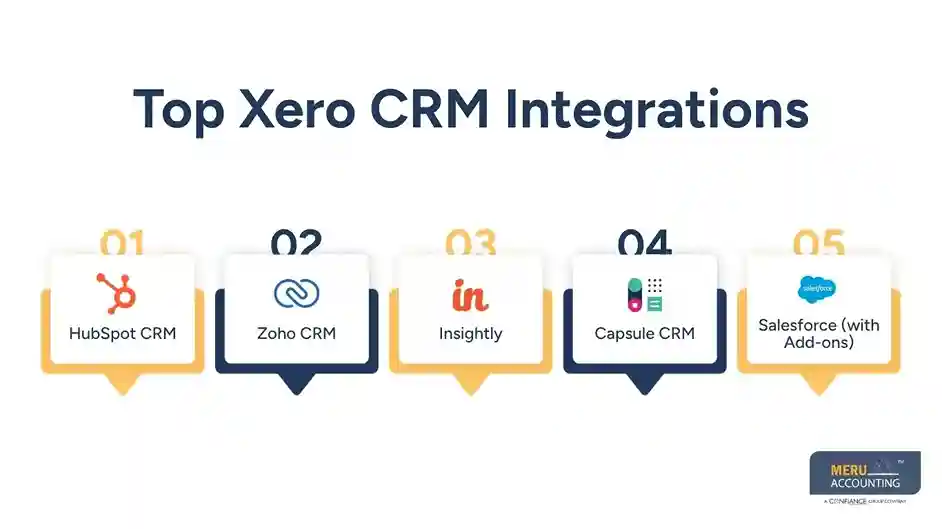
Insightly: Insightly supports service-based businesses by linking tasks, projects, and customer records. Xero integration adds financial visibility to CRM workflows.
Capsule CRM: Capsule is simple yet powerful. It pulls invoice and contact data from Xero into your CRM so teams can work faster and keep customer details updated.
Salesforce (with Add-ons): Salesforce connects to Xero through add-ons. It’s perfect for large companies needing strong CRM tools plus financial sync features.
Benefits of Using Xero CRM for Small Businesses
Using Xero CRM for small businesses boosts internal operations. It improves accuracy, saves time, and gives a clear view of customer and financial performance.
Save Time on Data Entry
Data auto-syncing reduces manual tasks. Once a lead is added to your CRM, their details sync with Xero, eliminating duplicate entry and ensuring consistency.
Improve Cash Flow
Teams get alerts for overdue invoices. CRM allows direct invoice follow-up, encouraging faster payments and keeping cash flow healthy.
Make Better Choices
With insights from CRM and Xero, you spot profitable clients, slow payers, and best-selling products. This helps refine your sales strategy.
Stronger Sales Process
Sales reps use financial history to focus on high-value leads. Linked records help prioritize efforts and close more deals with less effort.
Happier Clients
Client details, support history, and invoices are all in one place. You solve issues faster and serve better. Xero CRM integrations give teams a full view of the customer.
Less Admin Stress
Cut down the time spent on copying and fixing data. Automation with Xero reduces your admin load. Everyone saves time.
Setting Up Xero CRM Integrations in Easy Steps
Use the steps below to set up your Xero CRM without hassle. Most systems follow a simple process that works even for non-tech teams.
Step 1: Pick the Right Xero CRM Integration
Check your workflow needs and budget. Choose a CRM that offers a direct Xero connection with features that match your business size.
Step 2: Sign In and Connect
Log in to both platforms and authorize access. Your CRM will request access to Xero—once allowed, the data sync begins.
Step 3: Sync Your Data
Sync contacts, invoices, and past deals. Choose what data to pull and push between the tools.
Step 4: Set Rules and Alerts
Create triggers for overdue bills, follow-ups, or deal updates. These alerts keep teams informed and clients engaged.
Step 5: Train Your Team
Show team members how to use the Xero CRM setup. Simple walkthroughs or videos help them understand how to work efficiently.
Common Mistakes to Avoid When Using Xero CRM for Small Business
Even the best tools can cause problems if not used correctly. Here are some errors to watch out for when using Xero CRM for small businesses.
Don’t Skip Sync Settings
Review sync preferences before going live. Over-syncing slows down your system and may pull in unnecessary data.
Train All Users
Everyone using the system should know its functions. Training ensures all teams benefit from CRM and Xero integration.
Avoid Manual Data Fixes
Editing synced fields directly may cause data mismatch. Always update records within the connected systems to ensure proper sync.
Check Integrations Often
Tools update often. Check if the link between Xero and CRM is still working as expected.
Tips to Choose the Right CRM Options for Your Business Needs
Picking a CRM that fits your goals is key. Here are some points to help:
Start With a Goal
Go with a system that works toward your goal. Whether it’s more sales, smoother tasks, or better tracking.
Check Integration Ease
Some CRM tools work better with Xero than others. Choose one with strong, proven Xero syncing features.
Look at Your Budget
CRM tools come at all price points. Pick a tool that matches your size, not just the big names.
Test the Tool First
Always try the free version or demo. Make sure it feels easy to use before making a decision.
Check Reviews from Similar Users
Find reviews from businesses of your size or field. They’ll show if the tool suits your type of work.
Think About Team Use
Some CRM tools are great for solo users, while others suit teams. Pick one that fits how your team works each day.
optional anymore
on running the business
Real-Life Examples of Small Businesses Using Xero CRM Integrations
Each example below shows how the use of Xero with a CRM tool solved real problems for small businesses:
A Freelance Designer: Sarah used Capsule CRM and Xero. She linked client chats, project quotes, and bills. This saved time and helped her get paid faster.
A Small Coffee Supply Business: This firm used Zoho CRM and Xero. Their sales team tracked leads while the accounts team stayed in sync. It improved cash flow and reduced missed follow-ups.
A Local IT Services Firm: They used Insightly with Xero. Their support team got instant client data, payment history, and project status. It led to better service and happier clients.
How the Use of Xero Enhances CRM Integration
When your CRM and Xero work well together, you unlock great value.
Instant Updates Across Platforms
When a record changes in Xero or CRM, both update at once. No need to enter data twice or check errors.
Smart Lead to Client Flow
CRM turns leads into deals, and Xero sends the bill. You move from interest to income in fewer steps.
Easier Invoice Tracking
From the CRM, you see who was billed and who paid. No need to jump between tools or ask accounts.
Time Saved on Admin
You don’t waste time copying information. The use of Xero with CRM automates your data flow.
Stronger Planning Tools
The CRM shows leads; Xero shows revenue. Together, they help you plan sales goals with real data.
The use of Xero CRM integrations create better workflows. It makes your business faster, smarter, and more client-focused. Small businesses gain a strong advantage when they combine CRM and Xero.
Meru Accounting, we help small firms get the best from Xero and guide them to pick the best CRM options. We help set up the best options to keep your systems running smoothly.
Our Expert Insight
For small businesses, managing customer relationships and financial records in separate systems often leads to duplicated work, delayed follow-ups, and reporting gaps. Integrating Xero CRM bridges this divide by connecting sales, customer, and accounting data in one streamlined workflow. At Meru Accounting, we recommend selecting a CRM that aligns with your business processes, scales with your growth, and offers reliable Xero integration. A well-planned CRM and accounting setup not only saves time but also improves cash flow management, enhances customer service, and supports smarter business decisions.
Key Takeaways
- Xero CRM integrations connect customer management and accounting into one efficient workflow.
- Businesses can reduce manual data entry through automatic syncing of contacts, invoices, and payment information.
- Real-time financial and customer insights help improve decision-making and cash flow.
- Popular CRM options like HubSpot, Zoho, Capsule, Insightly, and Salesforce integrate effectively with Xero.
- Choosing the right CRM depends on your business goals, budget, team size, and integration requirements.
- Proper setup, user training, and regular integration checks help maximize the benefits of Xero CRM.
- Combining CRM with Xero enables small businesses to improve productivity, customer satisfaction, and long-term growth.
FAQs
Capsule and Zoho are great picks. They are simple, low-cost, and sync well with Xero.
Yes. Most top CRM tools use secure links. Just follow standard safety steps.
Yes. Many freelancers and small teams use this setup to improve their workflow and save time
Look for CRM options that match your goals, budget, and team size. Make sure it integrates well with Xero.
The cost depends on the CRM tool you choose. Many offer free trials or low-cost plans for small teams.