Xero for Beginners may seem complicated, but it is the best way to start managing your business finances. Xero gives you full control over your financial tasks without needing accounting knowledge. From sending your first invoice to tracking payments and running reports, it keeps your process clear and simple. This blog guides you step by step through everything you need to begin your journey with Xero.
What You Will Learn From This Blog
This blog explains how Xero for beginners helps businesses create a correct accounting setup. You will learn:
- How Xero helps beginners manage business finances easily.
- Why Xero is a suitable accounting solution for small businesses.
- How to set up business details and financial settings correctly.
- How to connect bank accounts and manage transactions.
- How to create invoices and track customer payments.
- How to organize expenses and generate financial reports.
- How to configure Xero software for accurate bookkeeping.
- How professional support can improve your Xero setup process.
Xero for Beginners
Xero for beginners is especially useful for small business owners, freelancers, and individuals who are learning how to manage their financial records. You don’t need to know accounting to use it well. Its design is clean, and the tools are easy to use. The dashboard shows your business status in real time.
With Xero, you can send bills, track payments, link bank feeds, and view basic reports. These tools help you stay in charge of your cash. Since it runs on the cloud, you can work from any place. If you’re just starting, Xero gives you the right tools to set a solid base for your books. Once you learn the steps, managing your records feels much easier.
Why Xero is Ideal for Beginners
Xero software offers beginner-friendly tools that guide users through setup, invoicing, bank connections, and reporting without requiring advanced accounting skills.
Easy to Use and Learn
Xero has an easy setup and simple features that make it beginner-friendly. You can quickly learn the steps and get started without confusion. Its tools are clear and built for ease of use.
Access from Anywhere
With Xero, you can access your account from any device with internet. For Xero for beginners, this flexibility makes it easier to manage records while working from different locations.
Free Support and Learning Tools
Xero provides free learning tools, videos, and articles. It also offers 24/7 support to help when you face issues.
Great for Small Teams
Small teams or freelancers can use Xero to stay organized. You can even share access with your accountant or team members.
Safe and Secure
Xero protects your data with strong security. It keeps your financial information safe with regular backups and encryption.
optional anymore
on running the business
Understanding the Basics of Xero for Beginners
When using Xero for beginners, start by understanding how money moves through your business and how each transaction affects your financial records. These initial steps give you a clear view of your finances.
Step 1: Explore the Dashboard First
Understand the Xero Dashboard
The first step in using Xero is to check the dashboard. It shows you key numbers like cash in, cash out, and what’s due.
Watch the Intro Video
Begin with Xero’s “Dashboard” video. It shows you how to read, navigate, and use features.
Track Cash Flow in Real-Time
The dashboard shows how money flows in your business. It gives real-time info on what needs action.
Step 2: Set Up Your Business Profile
Add Full Business Details
Enter your display name, legal name, and other contact info. Make sure everything matches your legal documents.
Go to Settings > Business Settings
Fill in business name, email, phone number, and website. Include your logo for branding.
Include Legal Information
Add your registration number, office address, and organization type. This info shows on invoices.
A core step in using Xero for beginners is making sure your business setup is accurate before sending invoices or running reports.
Step 3: Add Invoice Branding
Create a Custom Look
Set up invoice branding to show your logo, colors, and payment terms. A professional invoice creates a strong first impression and builds customer trust.
Improve Your Payment Terms
Go to Settings > Invoice Settings. Add due dates, payment terms, and footers. Clear payment instructions help customers pay on time.
Help Get Paid Faster
Clear terms help your customers pay on time. Well-branded invoices also boost trust and improve your business image.
Step 4: Reconcile Bank Transactions
Connect Bank to Xero
Once linked, Xero pulls in your bank data every day. This saves time and reduces manual data entry.
Approve Suggested Matches
Xero matches imported transactions with invoices or bills. Review and click “OK” to confirm the suggested matches.
Reconcile Weekly or Daily
Check transactions often to keep records updated. It prevents missed payments, duplicate entries, and accounting errors.
Step 5: Set Up Payment Methods
Link Online Payment Services
Add services like PayPal, Stripe, or GoCardless. Go to Settings > Payment Services to connect them.
More Ways to Get Paid
Adding multiple options makes it easier for customers. You get paid faster and improve the payment experience.
Automatic Matching for Payments
Once paid, Xero matches payments to invoices. This makes your process quick, simple, and accurate.
Step 6: Record and Track Expenses
Upload or Add Receipts
With Xero software, users can capture receipts digitally and keep expense records organized without relying on manual paperwork. Or enter them manually whenever needed.
Match Expenses to Bank Feeds
Xero helps find matching items for each cost. You just click to approve and complete the reconciliation.
Keep Your Books Clean
Record expenses daily or weekly when using Xero for beginners. Regular tracking keeps your reports accurate and gives you better control over business spending.
Step 7: Generate Basic Reports
Profit and Loss Report
Check what you’ve earned and spent. It helps plan future steps and measure business performance.
View the Balance Sheet
See how much your business owns and owes. It’s a key business tool for understanding financial health.
Use the Cash Flow Report
Understand how money moves in and out. Know when you can spend and plan your cash wisely.
Step-by-Step Guide to Setting Up Xero for Beginners
Create Your Xero Software Account
The first step is creating a Xero software account. During registration, choose the subscription plan that best matches your business size and accounting needs.
After registration, verify your email address and log in to begin setting up your accounting system.
Enter Business Information
Next, enter important business details, including:
- Business name
- Business address
- Industry type
- Financial year
- Contact information
- Tax registration details
Providing accurate information ensures financial reports and tax settings are configured correctly.
Set Up the Chart of Accounts
The chart of accounts organizes every financial transaction into categories such as:
- Sales
- Expenses
- Assets
- Liabilities
- Equity
- Bank accounts
A well-designed chart of accounts makes bookkeeping easier and improves financial reporting accuracy.
With the right setup approach, Xero for beginners can create a bookkeeping system that matches their business needs and supports accurate reporting.
Connect Bank Accounts
Connecting business bank accounts is one of the most valuable steps for Xero for beginners because it improves transaction tracking and reconciliation.
Bank feeds automatically import transactions into Xero software, reducing manual entry and improving reconciliation accuracy.
Businesses should connect all major operating accounts, including checking accounts, savings accounts, and credit cards.
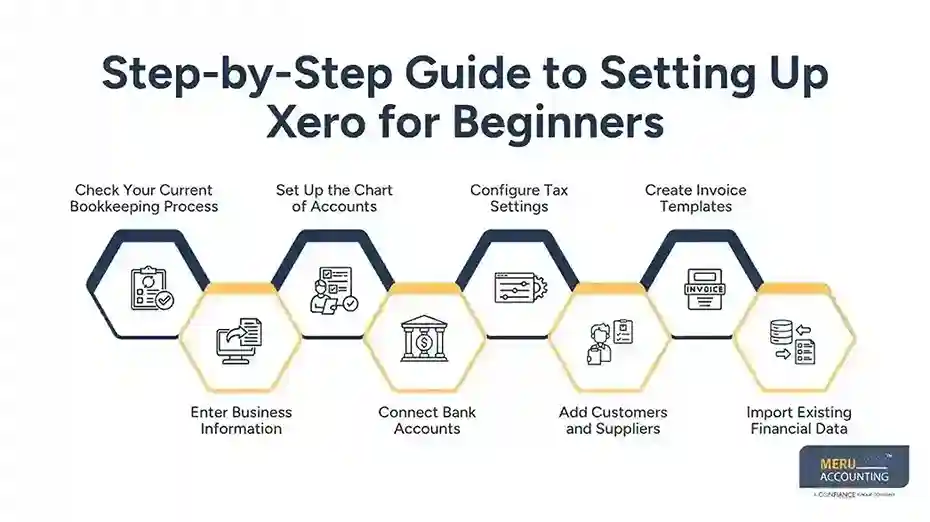
Configure Tax Settings
Tax settings should match local tax regulations before recording transactions.
Businesses should configure:
- Tax rates
- Sales tax codes
- Purchase tax codes
- Default tax settings
For Xero for beginners, setting up correct tax configurations early prevents reporting errors and makes future tax filing easier.
Add Customers and Suppliers
Adding customer and supplier information allows businesses to manage invoices and bills more efficiently.
Store important information such as:
- Business names
- Contact details
- Payment terms
- Email addresses
- Tax identification numbers
Maintaining complete records improves communication and payment tracking.
Create Invoice Templates
For Xero for beginners, creating professional invoice templates helps businesses maintain a consistent image and receive payments faster.
Businesses should customize invoice templates by adding:
- Company logo
- Payment instructions
- Due dates
- Business contact details
- Invoice terms
Consistent invoice formatting creates a professional appearance while supporting faster collections.
Import Existing Financial Data
Businesses switching from another accounting system should import previous financial records into Xero software.
Common imported data includes:
- Customer records
- Supplier lists
- Outstanding invoices
- Bank balances
- Chart of accounts
- Inventory information
For Xero for beginners, importing historical data provides a complete financial view and helps businesses generate accurate reports from the start.
Why Choose Meru Accounting?
Meru Accounting provides professional Xero accounting services that help businesses simplify their accounting journey with the right setup and support. Many small business owners choose Xero because it is easy to use, but setting up the account correctly is important for accurate financial management.
Our Xero experts provide services such as Xero software configuration, chart of accounts setup, bank feed connections, and reporting setup based on specific business requirements. With our Xero accounting expertise, businesses can avoid common setup mistakes and create a strong foundation for bookkeeping.
Our guidance makes Xero for beginners easier by helping new users learn important features and manage daily accounting activities with confidence. Our structured approach makes accounting more organized and reliable for businesses of all sizes.
Whether you are starting a new business or moving from another accounting system, Meru Accounting provides professional Xero setup and accounting services to make the transition smooth and accurate. With proper configuration, businesses can save time, maintain clean financial records, and make better financial decisions.
Our Expert Perspective
At Meru Accounting, our experts believe that a correct Xero setup creates a strong foundation for accurate financial management. Proper configuration of accounts, tax settings, and bank connections helps businesses avoid errors and maintain organized records. With the right setup approach, Xero for beginners becomes easier to manage and supports better reporting and decision-making.
Key Takeaways
- Xero for beginners provides simple tools for managing business finances.
- Proper account setup helps maintain accurate financial records.
- A customized chart of accounts improves reporting quality.
- Bank connections make transaction tracking faster and easier.
- Professional invoices help businesses receive payments on time.
- Regular reconciliation keeps books accurate and updated.
- Correct tax settings prevent future reporting issues.
- Meru Accounting helps businesses set up Xero software correctly and efficiently.
FAQs
Yes. Xero is built for beginners. Its tools are simple and easy to learn. You don’t need any accounting background to use it.
Absolutely. Xero offers a 30-day free trial, which is perfect if you want to explore the features covered in our Xero for Beginners setup steps.
Beginners should first set up business details, financial settings, chart of accounts, tax settings, and bank connections.
Go to the Bank section, choose “Add Bank Account,” and follow the steps. Xero will start importing transactions daily.
Xero offers profit and loss, balance sheet, cash flow, and more. These help you understand your business finances.