
Running a construction business is not easy. If you don’t stay organized, it’s easy to lose money or forget things. One great tool is called Xero. It is a computer program that helps you with money, projects, and time. Many people use Xero for construction companies because it helps them track costs and projects in a smart way. If you are building homes, fixing roads, or working on big projects, Xero can help you stay on top of it all.
In this “How to use Xero for construction business” guide, we’ll talk about how to use projects in Xero for construction management. You’ll learn what Xero is, how it helps builders, and why using it makes your business run better.
What You Will Learn from This Blog
- Learn how Xero for construction helps simplify daily accounting and construction management tasks.
- Understand how to set up and manage projects using Xero Projects.
- Discover how to track project costs, labor hours, and expenses in one place.
- See how Xero helps create invoices, monitor budgets, and measure project profits.
- Learn how real-time reports improve planning and support better business decisions.
What Is Xero for Construction Companies?
Xero is a smart software tool for construction companies that helps you manage your money, projects, and workers. It is used by many people in the building field.
Xero lets you:
- Track all your projects in one place
- See how much you spend on each project
- Send bills to clients fast
- Pay your team on time
- Check reports on profit and loss
You can use Xero for construction companies to see if a project is making money or not. This helps you make better choices. You won’t have to guess anymore—you’ll have real numbers in front of you.
How Projects Work in Xero for Construction Management
One of the best tools in Xero is called Projects. It helps builders and workers follow each project from start to end. This is why many people use Xero for construction management to make their work easier and faster.
Here’s what you can do with projects in Xero:
Add a New Project
When you begin a project, you can start a project in Xero. You type the name of the project, the client’s name, and the finish date. You can also write down the budget or total cost for the project. This keeps everything clear from day one.
Track Time and Costs
As you and your team work, you can enter how many hours were spent. You can also add the cost of tools, bricks, wood, or paint. This helps you see where your money is going. It’s one of the best parts of Xero for construction management.
Send Bills Easily
When the project (or part of it) is done, you can send a bill to your client. Xero makes the bill for you. It uses the time and cost you entered. This saves you time and helps you get paid fast.
See Reports Anytime
You can check your project reports on Xero whenever you want. These reports help you plan your next steps and avoid losses.
Work from Anywhere
Because Xero is online, you can use it at the project site, your home, or the office. You just need your phone or laptop. You can enter hours, check bills, and even send reports while you are working on-site.
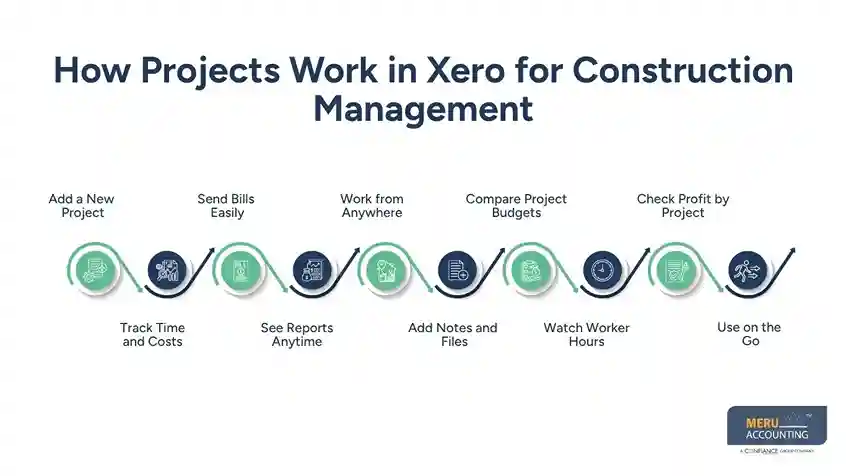
Add Notes and Files
You can upload project notes, photos, or papers right into the project. This helps you and your team stay on the same page. If a client asks for something later, you have it all saved in one place.
Compare Project Budgets
Xero lets you compare what you planned to spend and what you really spent. This helps you fix your budget for the next project.
Watch Worker Hours
If you have a big team, you can track who worked where and when. This helps with payroll and keeps your team honest and fair.
Check Profit by Project
You can look at each project and see how much profit it made. If one project goes in the loss, you can find out why. This helps you make better plans and choose the right projects in the future.
Use on the Go
Xero works on mobile. So if you’re at a project site, stuck in traffic, or on a lunch break, you can still log in and get work done. That’s why Xero is perfect for the management of construction projects for busy builders.
Why Xero Is Great for Construction Management
Xero is a great tool for construction management that helps builders and workers stay on top of their projects. If you work on many projects, it can be hard to track time, money, and people. But using Xero for construction companies makes it easy to keep everything in one place and stay on budget.
Here are more reasons why people who build homes, offices, and roads love using Xero:
Simple to Use
Even if you are not good with computers, it is easy to learn Xero for construction companies. The buttons and tools are clear and simple.
Safe Records
All your project notes, costs, and time sheets are saved online in the cloud. You won’t lose papers or forget numbers. This makes your business safer and more organized.
Better Planning
With Xero for construction management, you can check how much money each project makes. You will know if a project is going well or losing money. This helps you plan smarter for your next project.
Team Tracking
You can also track what your workers are doing. You can see who worked on which project, for how long, and how much they earned. It helps you know if your team is working on the right projects.
Less Stress
Guesswork can be stressful. But with Xero, you don’t have to guess. You get clear reports and numbers. You will always know how your business is doing. This helps you feel calm and make better choices.
Xero is like a smart helper for construction companies that works all day. It saves time, cuts stress, and helps your business grow strong
Best Practices for Using Xero for Construction Business
To get the most from Xero for construction, follow a few simple habits. These steps help improve construction projects, reduce mistakes, and keep every project on track.
Update Project Costs Daily
Record labor, materials, and other costs as they happen. Daily updates give you accurate numbers and prevent missing expenses.
Set a Budget Before Work Starts
Create a project budget before the first task begins. This makes it easier to compare planned costs with actual spending throughout the project.
Review Project Reports Every Week
Check project reports regularly instead of waiting until the job is complete. Weekly reviews help you spot issues early and make better business decisions.
Track Worker Time Correctly
Ask team members to record their hours for the right project each day. Accurate time tracking improves payroll, billing, and project costing.
Keep Project Files in One Place
Store contracts, photos, invoices, and notes inside the project. Having everything together saves time and makes project information easy to find.
Connect Xero with Expert Bookkeeping
Working with professionals like Meru Accounting helps you set up Xero for construction correctly, maintain accurate records, and improve management in construction business as it grows.
Using Xero for construction companies makes work easier, faster, and smarter. It helps you track projects, send bills, and plan for the future. With Projects in Xero, you can handle all your project sites from one place.
If you want help getting started, Meru Accounting is here for you. We are experts in Xero for construction management. We can set it up for your team, teach you how to use it, and help with your bookkeeping too.
With Meru Accounting and Xero, your construction business can grow strong. You will have more time to build and less time doing paperwork.
Our Expert Insight
Many construction businesses lose money because project costs, labor hours, and invoices are managed across different systems or spreadsheets. Using Xero for construction gives you one place to monitor every project, making construction management more accurate and efficient. At Meru Accounting, we help construction companies set up Xero the right way, customize project tracking, and maintain accurate financial records so business owners can focus on completing projects on time while improving profitability.
Our Expert Perspective
- Xero for construction helps manage project costs, invoices, budgets, and profits from one platform.
- Xero Projects lets you track time, expenses, and worker hours in real time.
- Real-time reports support better construction management and smarter business decisions.
- Mobile access lets you update project information from the office or job site.
- Comparing planned and actual project costs helps improve future budgets and profitability.
FAQs
Yes! Xero works great for small builders. You can track projects, costs, and send bills all in one place.
Yes. With Xero Projects, workers can log the hours they spend on each project. This helps track costs and time.
Yes, Xero has a mobile app. You can check or add project info even when you’re not in the office.
Xero is easy to use, works online, and gives real-time reports. It’s made for people who want clear numbers and easy tools.
Yes. Meru Accounting can help set up Xero, train your team, and manage your accounts so you can focus on building.
optional anymore
on running the business