
Shopify bookkeeping is more than entering online sales into QuickBooks or another accounting system. A Shopify store can have product sales, discounts, refunds, payment fees, shipping income, sales tax, inventory purchases, and bank payouts in the same month. If these items are not split and checked, your profit report may not show the true result of your store.
For example, a store may make $20,000 in customer sales but receive only $18,700 in bank payouts after refunds, payment fees, and other changes. That $18,700 should not simply be recorded as sales. Each part needs the right account and timing.
Good Shopify bookkeeping connects the order data to the accounting records, then checks those records against payment reports and bank activity. It also gives your CPA the data needed for tax work.
This blog explains how to handle sales, fees, refunds, payouts, inventory, COGS, sales tax, and CPA work without treating every Shopify transaction as one simple deposit.
What You Will Learn From This Blog
- How Shopify bookkeeping works from an order through to the bank deposit.
- How to record Shopify sales, discounts, refunds, payment fees, and payouts.
- Why a Shopify payout should not be treated as total sales.
- How to reconcile Shopify Payments with your bank account.
- How inventory and COGS affect the profit shown in your accounts.
- What to know about sales tax before filing or reviewing tax reports.
- When professional bookkeeping or CPA work may be needed.
- What to check before hiring a provider for your ecommerce accounting.
What is Shopify Bookkeeping and Why Does It Matter for Ecommerce Accounting?
Shopify bookkeeping is the process of recording, classifying, and checking the financial activity of a Shopify store in its accounting records. It covers sales, discounts, refunds, payment fees, payouts, shipping income, operating costs, inventory, COGS, and other business transactions.
The goal is to make sure each Shopify transaction reaches the right account and is recorded in the right period.
What Transactions Does Shopify Bookkeeping Cover?
A Shopify store can have many types of transactions in one day. Shopify bookkeeping tracks customer orders, refunds, discounts, payment gateway fees, shipping charges, taxes, supplier bills, and bank deposits.
For example, a $100 order may include a $90 product sale, a $10 shipping charge, and a separate sales tax amount. Each part may need different accounting treatment.
How Does Shopify Bookkeeping Work?
The process starts with sales and payment data from Shopify. These figures are then checked against the accounting system and bank activity.
For example, a customer may pay $100, but the store may receive $97 after a $3 payment fee. The sale and fee should be recorded separately rather than treating $97 as the total sale.
Why Does It Matter for Ecommerce Accounting?
Shopify bookkeeping matters because Shopify sales and bank deposits do not show the full financial result of a store. A business may have $20,000 in sales but receive less in the bank after refunds and payment fees.
Without proper records, the owner may see the bank deposit but miss the costs that reduced the store’s actual profit.
How Does It Affect Profit and COGS?
Ecommerce accounting also needs product cost data. If a store sells products worth $20,000 but the related product cost is $8,000, looking only at sales will give an incomplete view of the business.
Bookkeeping for Shopify stores should connect sales with COGS, inventory, refunds, and operating costs so the owner can see the actual margin.
Why Does It Matter for Taxes and Reports?
Clear records make it easier to prepare financial reports and review tax figures. The IRS expects businesses to keep records that support income, expenses, purchases, inventory, and other amounts reported on tax returns.
For bookkeeping for Shopify stores, this means keeping sales, expense, inventory, and payment records organized throughout the year rather than trying to rebuild them at tax time.
How to Record Shopify Sales, Fees, Refunds, and Payouts
Start With Gross Sales
Suppose your store sells $15,000 of products in one month. That amount should be reviewed against the Shopify sales report before you post the accounting entry.
Shopify sales reports can be filtered by factors such as product, sales channel, and time.
Record Discounts Separately
If customers receive $1,000 in discounts on $15,000 of listed sales, your accounting setup should show the discount clearly. This makes the real selling value easier to review.
This matters when you compare sales across months because a rise in orders does not always mean a rise in net sales.
Record Refunds and Returns
Refunds should not be hidden as a bank expense. They relate to earlier sales and may also affect taxes and inventory.
For bookkeeping for Shopify stores, the refund report should be checked against the accounting entry so a refunded order is not still counted as full revenue.
Record Payment Fees
Assume Shopify Payments processes $15,000 and deducts $450 in fees. Your books should show the $15,000 customer payment and the $450 fee as separate amounts.
This gives you a clear payment cost and avoids understating both revenue and expenses.
Record the Payout Correctly
If $14,550 reaches your bank after the $450 fee, the $14,550 is the payout, not the sales figure.
A strong Shopify bookkeeping process records the payment activity first and then clears the Shopify Payments balance when the payout reaches the bank.
Handle Other Payment Channels
If customers pay through PayPal or another gateway, those funds may follow a different payout cycle. Do not combine them with Shopify Payments without checking the source.
Bookkeeping for Shopify stores should keep each payment channel easy to trace from customer payment to final bank deposit.
How to Reconcile Shopify Payments With Your Bank Account
Match Each Payout
Start with the Shopify payout amount and date, then find the matching bank transaction. Shopify provides payout details that can include fees, refunds, adjustments, reserves, and the transactions included in a payout.
This is the base step in Shopify bookkeeping reconciliation.
Check The Gross Activity
Next, check what made up the payout. A payout may contain many customer payments rather than one order.
For example, a $9,800 payout could contain hundreds of orders, $250 in refunds, and $150 in payment fees. The bank sees $9,800, but the books need the full breakdown.
Investigate Timing Gaps
A Shopify sale made late on June 30 may not reach the bank until July. The two reports can therefore show different totals for the same date range.
Shopify lists payout timing and different report date ranges as common reasons for differences between reports and bank deposits.
Check Missing Deposits
If Shopify shows a completed payout but the bank does not show the money, check the payout date, bank account, currency, and payout status.
Do not create a fake deposit just to make the reconciliation balance. Shopify bookkeeping should trace the difference to a real transaction.
Review Refunds and Holds
Refunds, disputes, reserves, and adjustments can change the amount sent to the bank. Shopify’s activity report can show these types of balance activity separately.
For bookkeeping for Shopify stores, these items should be reviewed before marking a payout as reconciled.
How Shopify Bookkeeping Handles Inventory, COGS, and Sales Tax
Record Inventory Purchases
If you buy 500 units at $12 each, the purchase cost is $6,000. The accounting treatment should show that purchase in the inventory records rather than treating the full amount as the month’s product expense without review.
The IRS states that inventory records should show the amount paid and support the value of inventory.
Calculate COGS
If 300 of those 500 units are sold, the product cost tied to those units may be $3,600 when using a $12 unit cost. The remaining $2,400 relates to stock still on hand, subject to the inventory method used.
This is why Shopify bookkeeping needs product cost data, not just sales data.
Track Returns Back Into Stock
A returned product can affect both sales and inventory. If a usable product goes back into stock, its inventory record may need to be restored.
A return that is recorded only as a refund can leave the stock count and COGS wrong.
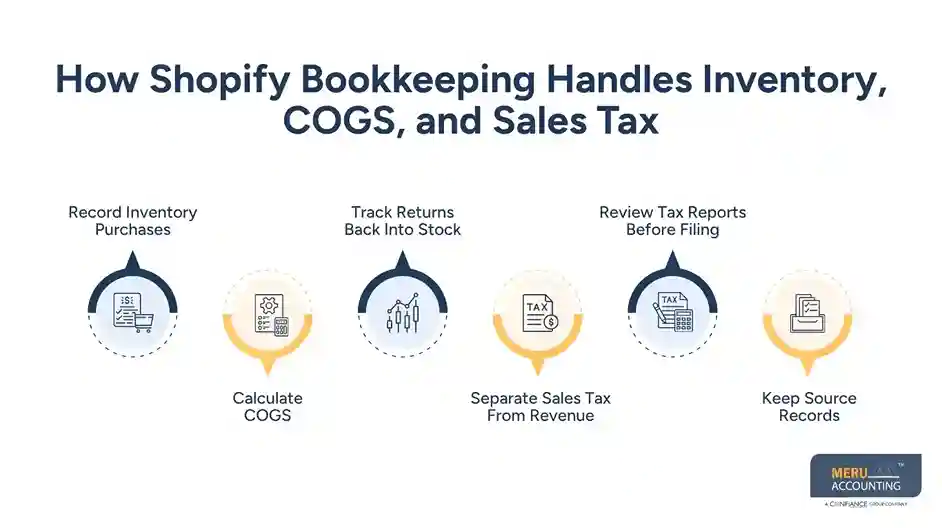
Separate Sales Tax From Revenue
Sales tax collected from customers should not automatically be treated as store income. The correct treatment depends on the tax rules that apply to the transaction and business.
IRS guidance says sellers generally do not include amounts collected for state and local taxes imposed on the buyer and turned over to the government in income.
Review Tax Reports Before Filing
Shopify can provide tax reports, but a report does not by itself decide whether your business must register, collect, or file in a particular state.
Shopify bookkeeping should keep the tax amounts clear so the CPA or tax professional can review the figures against the business’s filing duties.
Keep Source Records
Invoices, purchase records, receipts, sales records, and deposit data should be retained with the accounting records. The IRS says supporting documents should back the entries made in the books and tax return.
optional anymore
on running the business
When Do Shopify Stores Need Professional Bookkeeping and CPA Services?
When Orders Become Hard to Track
A store with 30 orders a month may manage basic records alone. A store with 3,000 orders, several refunds, and daily payouts has a very different workload.
At that point, Shopify bookkeeping needs a fixed monthly process rather than occasional data entry.
When There are Several Payment Channels
Using Shopify Payments, PayPal, and other gateways creates more payout accounts to check. Each can have different fees and payout dates.
Bookkeeping for Shopify stores becomes more useful when one person or team owns the full reconciliation process.
When Inventory is Material
If inventory is a large part of the business, errors in stock counts or product costs can change gross profit by thousands of dollars.
Professional review becomes more useful when there are many SKUs, bundles, returns, warehouses, or supplier changes.
When Sales Tax Gets Complex
Selling to customers in several states can create sales tax questions based on where the business has tax obligations. Registration, collection, filing, exemptions, and marketplace rules may all matter.
A CPA or tax adviser should review the actual facts rather than relying only on Shopify settings.
When the Business Needs Tax Planning
CPA services may be useful for entity tax work, estimated taxes, year-end tax preparation, deductions, inventory tax treatment, and major business changes.
Clean Shopify bookkeeping gives the CPA a better base for that work.
When the Owner Needs Reliable Reports
If the owner needs monthly profit, gross margin, cash flow, inventory value, and expense reports, professional bookkeeping can create a set process for those reports.
The IRS notes that good records can be used to prepare financial statements and tax returns and to support reported income and expenses.
How to Choose the Right Shopify Bookkeeping and CPA Service Provider
Check Shopify Experience
Ask the provider to explain how they record Shopify sales, refunds, fees, and payouts. A good answer should show that they understand the difference between sales activity and bank movement.
Do not hire based only on the claim that they “work with ecommerce.”
Ask How Reconciliation Works
Ask whether they reconcile every payout to the bank or only import transactions from the accounting software.
For bookkeeping for Shopify stores, the reconciliation method matters because an imported bank feed alone may show only the net deposit.
Ask About Inventory Accounting
Find out whether the provider records inventory purchases, reviews stock values, and calculates or checks COGS.
A provider that only records bank expenses may not be handling the full accounting needs of a product-based Shopify business.
Confirm CPA and Tax Scope
Bookkeeping and tax preparation are not the same service. Ask who handles federal tax returns, state filings, sales tax, tax planning, and CPA review.
The provider should also tell you when a tax issue needs a licensed tax professional.
Review Monthly Deliverables
Ask what you will receive each month. Useful reports may include profit and loss, balance sheet, bank reconciliation, payment reconciliation, sales summaries, and inventory or COGS reports.
The goal of Shopify bookkeeping is to give you records that can be checked and used.
Ask About Record Security
Your accounting records contain financial data, supplier details, customer-related information, and payment records. Ask how documents are stored, who can access them, and how files are shared.
The IRS also recognizes electronic accounting records as business records when they provide a complete and accurate record of the data.
Partner With Meru Accounting for Shopify Bookkeeping
Shopify Sales and Payment Records
Meru Accounting provides Shopify bookkeeping for stores that need sales, payment fees, refunds, and payouts recorded in a clear accounting system.
We review the flow from Shopify activity to the accounting ledger instead of treating every bank deposit as sales.
Payout and Bank Reconciliation
Our team can match Shopify payouts with bank activity and review differences caused by fees, refunds, timing, or adjustments.
This gives bookkeeping for Shopify stores a clear monthly control point.
Inventory and COGS
Meru Accounting can organize inventory purchases and COGS records so product costs are tied to the accounting reports.
This is especially useful when a store has many SKUs, regular stock purchases, or frequent returns.
Ecommerce Tax Records
We can organize sales and expense records that your tax professional needs for review. Sales tax decisions remain based on the rules that apply to your business and should be reviewed by the right tax professional.
Monthly Financial Reports
Meru Accounting can prepare monthly accounting reports that show sales, expenses, COGS, and profit in a format you can review.
Our Shopify bookkeeping process can be built around your payment methods, sales channels, inventory setup, and accounting software.
Our Expert Perspective
One issue we see often is a store owner checking the bank balance and assuming it shows business profit. It does not.
A $20,000 sales month can have $3,000 in product cost, $800 in payment fees, $1,200 in refunds, $2,000 in advertising, and other operating costs. The bank deposit alone cannot explain that result.
Accurate Shopify bookkeeping connects those numbers so the owner can see what the store actually earned.
Key Takeaways
- Shopify bookkeeping should separate sales, refunds, fees, payouts, inventory, COGS, and tax amounts.
- A bank payout is not the same as gross Shopify sales.
- Shopify’s Payments activity report shows payment balance movement rather than accounting revenue.
- Payment fees should be recorded separately so sales are not understated.
- Refunds can affect revenue, payment balances, taxes, and inventory.
- Inventory purchases and COGS should be reviewed as separate parts of product accounting.
- Sales tax should not be treated as normal profit without checking the tax rules that apply.
- Professional bookkeeping for Shopify stores becomes more useful as order volume, payment channels, inventory, and tax work grow.
- A CPA can handle tax planning and tax work that goes beyond routine bookkeeping.
- Meru Accounting provides ecommerce accounting and Shopify bookkeeping based on the needs of the store.
FAQs
Shopify bookkeeping is the process of recording and checking Shopify sales, fees, refunds, payouts, expenses, inventory, and taxes in your accounting records.
Record Shopify sales from the sales data, separate fees and refunds, and then match the net payout with the related bank deposit.
Match each Shopify payout with the bank deposit and check the included sales, refunds, fees, and other adjustments before closing the reconciliation.
Shopify bookkeeping tracks inventory purchases and assigns the related product cost to COGS when goods are sold, based on the accounting method used by the business.
You should consider a Shopify bookkeeper when your store has high order volume, several payment channels, large inventory, frequent refunds, or complex accounting and tax records.
optional anymore
on running the business