E commerce and accounting can look simple until an online store starts receiving payments from more than one channel. A single week may bring product sales, sales tax, refunds, payment fees, chargebacks, and several bank payouts. If all of these amounts are treated as one figure, the books may look neat but still tell the wrong story.
The real task in e commerce and accounting is to connect what the customer bought, what the platform charged, what tax was collected, and what finally reached the bank. QuickBooks and Xero can handle this process, but only when the underlying records are set up and checked in the right way.
What You Will Learn From This Blog
- How to manage ecommerce sales tax in QuickBooks.
- How e commerce and accounting connect e-commerce transactions with financial reports in QuickBooks.
- How to manage ecommerce taxes and reports in Xero.
- How ecommerce business accounting keeps sales, fees, refunds, and tax data in line.
- How to spot common errors before they affect financial or tax reports.
E commerce and Accounting: Managing Taxes and Financial Reports for E-commerce Businesses
Think of an ecommerce payout as the end of a calculation, not the sale itself. A store may make $10,000 in sales, collect $800 in tax, issue $200 in refunds, and pay $300 in fees. The bank may then show only the final amount deposited. That is where e commerce and accounting need a clear process. The sales platform, payment processor, bank, and accounting software should tell the same story.
Separate Gross Sales and Net Payouts
Gross sales show what customers bought. A net payout shows what remained after deductions. Keeping both figures visible gives e commerce and accounting records a much clearer view of revenue and cash.
Keep Sales Tax Separate
Sales tax collected from customers is generally not business income. It is usually recorded as a liability until it is paid to the relevant tax authority, based on the rules that apply to the business.
Record Fees and Refunds
A $5,000 payout does not mean the store made $5,000 in sales. Fees, refunds, and chargebacks may already have reduced that amount. Ecommerce business accounting should show these items instead of hiding them inside one net figure.
Match Sales With Payouts
Start with the ecommerce sales report, then work through refunds, fees, tax, and other adjustments until the final amount matches the payout. This creates a useful audit trail for e commerce and accounting records.
Reconcile Every Month
Monthly reconciliation turns a large year-end clean-up into a routine check. Ecommerce business accounting can then catch missing sales, duplicate entries, wrong tax amounts, or old payout balances while the source data is still easy to access.
How to Manage Ecommerce Taxes in Xero
Xero provides tax rates and tax reports for businesses, along with ecommerce integrations. Its guidance also notes that the Shopify integration does not include US sales tax data, so Shopify tax data may need separate review.
Set Up Tax Rates
Tax settings should match the business’s actual tax duties. Review rates and tax codes before transactions are imported so e commerce and accounting records do not need large corrections later.
Record Sales Tax
Apply the correct tax rate to taxable sales and keep the tax amount separate from product income. This makes the tax balance easier to trace from the sale to the tax report.
Handle Marketplace-Collected Tax
First, find out who collected the tax. If the marketplace collected it, compare its report with the accounting entry instead of recording the amount as cash received by the seller.
Track Tax Reports
Review Xero’s tax report for the same period covered by the ecommerce report. Ecommerce business accounting should not rely on one system alone when tax data is split between platforms.
Reconcile Tax Transactions
Compare sales, tax, refunds, and payments before closing the period. A small mismatch can grow if it is carried into several later reporting periods.
optional anymore
on running the business
How to Manage Ecommerce Taxes in QuickBooks
QuickBooks Online provides tools for sales tax rates, agencies, and taxable transactions. Its automated sales tax feature can calculate tax based on factors such as location and product tax treatment.
Set Up Sales Tax
Start with the places where the business has a tax collection duty. Add the required tax agencies and rates, then review product and customer tax settings before large volumes of transactions enter the books.
Record Tax Collected
Do not let collected tax blend into sales income. Post it to the correct tax liability account so e commerce and accounting records show what belongs to the business and what is owed to a tax authority.
Handle Marketplace Tax
A marketplace may collect and remit tax for certain orders. Check the marketplace report first, then record the transaction in a way that agrees with that report instead of assuming the seller received the tax.
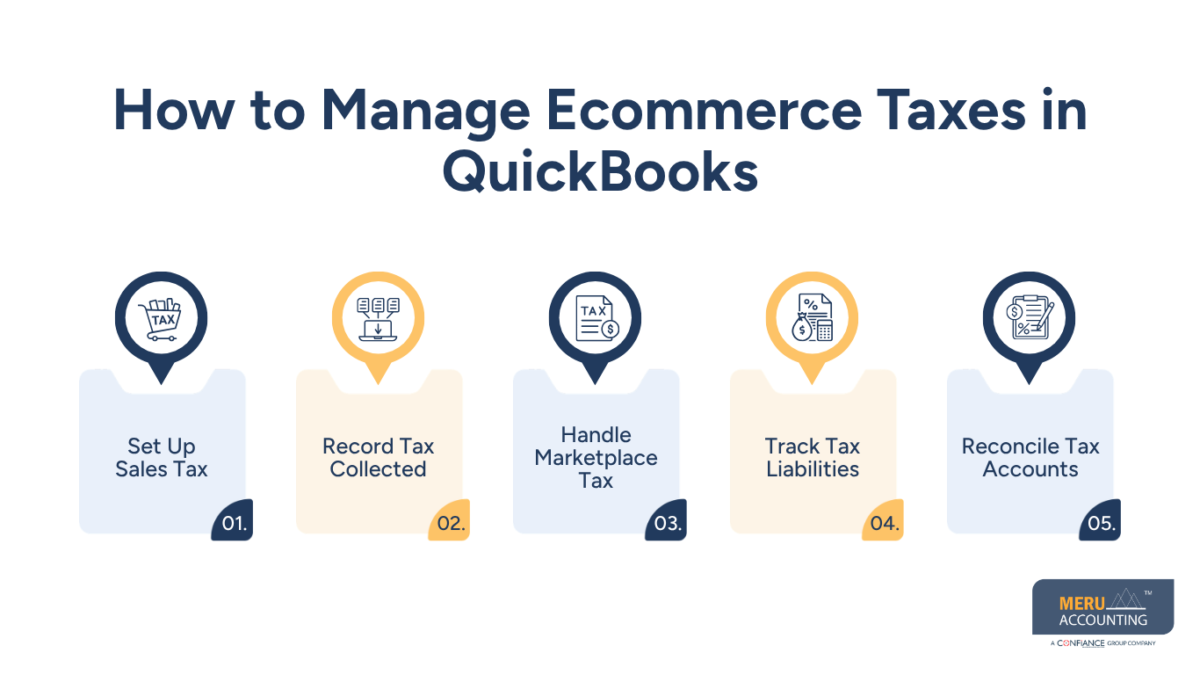
Track Tax Liabilities
Review tax balances by agency and period. Ecommerce business accounting should compare these balances with sales reports before a tax return is prepared.
Reconcile Tax Accounts
Tax accounts should not simply be carried forward each month. Compare tax collected, payments, refunds, and marketplace tax, then investigate any difference before closing the period.
How to Manage Ecommerce Financial Reports in QuickBooks
E commerce and accounting reports should answer more than “How much money reached the bank?” They should show where the money came from and what reduced it along the way.
Prepare Profit and Loss Reports
A useful profit and loss report brings together sales, refunds, cost of goods sold, fees, shipping, advertising, and other costs. This gives ecommerce business accounting a more useful view of actual business performance.
Review Balance Sheet Accounts
Look beyond income. Check cash, inventory, tax liabilities, loans, and other balance sheet accounts. An old balance may point to a payout or transaction that was never fully cleared.
Track Sales and Expenses
Clear account names make ecommerce reports easier to read. Sales, payment fees, marketplace fees, shipping, and other costs should not disappear into one broad expense account.
Record Refunds and Chargebacks
Refunds and chargebacks change the result of a sale. Recording them separately keeps e commerce and accounting records closer to what actually happened on the sales platform.
Reconcile QuickBooks Payouts
Take the payout report and work backward to the bank deposit. Sales, refunds, fees, tax, and other adjustments should explain the final amount shown in QuickBooks.
How to Manage Ecommerce Taxes in Xero
Xero provides tax rates and tax reports for businesses, along with ecommerce integrations. Its guidance also notes that the Shopify integration does not include US sales tax data, so Shopify tax data may need separate review.
Set Up Tax Rates
Tax settings should match the business’s actual tax duties. Review rates and tax codes before transactions are imported so e commerce and accounting records do not need large corrections later.
Record Sales Tax
Apply the correct tax rate to taxable sales and keep the tax amount separate from product income. This makes the tax balance easier to trace from the sale to the tax report.
Handle Marketplace-Collected Tax
First, find out who collected the tax. If the marketplace collected it, compare its report with the accounting entry instead of recording the amount as cash received by the seller.
Track Tax Reports
Review Xero’s tax report for the same period covered by the ecommerce report. Ecommerce business accounting should not rely on one system alone when tax data is split between platforms.
Reconcile Tax Transactions
Compare sales, tax, refunds, and payments before closing the period. A small mismatch can grow if it is carried into several later reporting periods.
How to Manage Ecommerce Financial Reports in Xero
E commerce and accounting in Xero should connect the sales platform with the wider financial picture. The aim is not just to make transactions appear in the ledger but to make sure they agree with the source data.
Prepare Profit and Loss Reports
Review sales against product costs, refunds, platform fees, payment fees, shipping, and other expenses. Ecommerce business accounting becomes more useful when these figures can be traced back to actual store activity.
Review Balance Sheet Accounts
Check bank accounts, inventory, tax liabilities, payment balances, and loans. An unexplained balance deserves attention before the report is used for business or tax decisions.
Track Ecommerce Income
Use clear accounts for ecommerce income and related costs. This lets e commerce and accounting records show the difference between what customers paid and what the business ultimately retained.
Record Fees and Refunds
A refund is not the same as a fee, and neither is the same as a tax payment. Recording these items with the right treatment keeps the profit report from becoming a simple reflection of bank deposits.
Reconcile Xero Payouts
Match Xero entries with ecommerce payout reports and bank deposits. Ecommerce business accounting should leave no major unexplained gap between the platform and the bank.
How Ecommerce Business Accounting Keeps Tax and Financial Reports Accurate
E commerce and accounting work best when the records are checked from both ends: start with the sale and end with the bank deposit. If either side does not match, something needs to be reviewed.
Reconcile Sales Platforms
Compare gross sales, refunds, fees, tax, and payouts with the payment processor. This gives ecommerce business accounting a complete view of what happened before cash reached the bank.
Match Bank Deposits
A bank deposit should tie back to a specific payout. If it does not, check for fees, refunds, reserves, timing differences, or missing entries rather than forcing the numbers to match.
Check Tax Balances
Compare the tax liability with the ecommerce tax report. Check the period and tax rate before changing an account balance simply to make the numbers agree.
Review Fees and Refunds
Fees and refunds reduce the cash received, but they should not simply erase the original sales record. Each item needs the right account and treatment.
Fix Differences Before Month-End
Do not leave known differences for year-end. Regular e commerce and accounting checks make it easier to find the source while transaction data is still fresh.
Common Ecommerce Tax and Financial Reporting Mistakes to Avoid
Most ecommerce reporting errors do not start with a complex accounting rule. They often begin with a simple assumption: the amount in the bank must be the amount of sales.
Recording Net Payouts as Sales
A $7,000 payout may come from $8,000 in sales after fees, refunds, and other deductions. Recording $7,000 as sales hides the activity that produced the payout and creates a gap between e commerce and accounting records.
Misclassifying Sales Tax
Sales tax collected from customers is generally a liability rather than revenue. Putting it into sales can distort both tax records and financial reports.
Missing Payment Fees
Payment fees reduce cash but remain a business cost. Ecommerce business accounting should capture these fees so the profit figure is not overstated.
Missing Refunds and Chargebacks
Refunds and chargebacks change the final result of a sale. If they are absent from the books, revenue may not agree with the ecommerce platform, creating inconsistencies between e commerce and accounting records.
Leaving Transactions Unreconciled
An unreconciled payout can affect cash, income, expenses, and tax balances at the same time. E commerce and accounting should include a final reconciliation before reports are closed.
Keeping Ecommerce Accounts in Order With Meru Accounting
E commerce and accounting become harder when sales come from several platforms, and each payout has its own fees, refunds, and adjustments. Meru Accounting provides ecommerce accounting and bookkeeping services for sales records, reconciliations, fees, refunds, tax-related records, and financial reports.
Our team can review ecommerce transactions and organize them in QuickBooks or Xero based on the business setup. Ecommerce business accounting can include monthly reconciliation, account review, and financial report preparation.
Partner with Meru Accounting for ecommerce bookkeeping and accounting records that make sales, costs, payouts, and tax-related balances easier to review.
Our Expert Perspective
The most useful question in e commerce and accounting is not “How much came into the bank?” It is “How did this payout come to that amount?”
For ecommerce business accounting, that question leads to a simple check: start with gross sales, account for refunds, fees, tax, and other adjustments, and then match the result with the bank payout. This gives the numbers a clear trail.
Key Takeaways
- E commerce and accounting should keep gross sales, refunds, fees, tax, and payouts distinct.
- Sales tax collected from customers is generally tracked as a liability rather than normal revenue.
- QuickBooks and Xero can manage ecommerce records when tax settings and account mapping are correct.
- Marketplace-collected tax needs to be checked against the marketplace report.
- Bank deposits should match the related ecommerce payout reports.
- Ecommerce business accounting should include regular checks of fees, refunds, chargebacks, and tax balances.
- Unexplained differences should be fixed before financial reports are finalized.
FAQs
Set the right sales tax rates and tax agencies in QuickBooks, record tax on taxable sales, and match the tax due with ecommerce sales tax reports.
Set the right tax rates and tax codes in Xero, record taxable ecommerce sales, and match the Xero tax report with the sales platform’s tax data.
Record gross ecommerce sales apart from payment fees, market fees, refunds, and other changes, then match the net payout with the bank deposit.
Match the ecommerce payout with gross sales, refunds, fees, taxes, and other changes until the net amount matches the bank deposit.
An ecommerce business should review profit and loss, balance sheet, sales, cost, sales tax, payout, and reconciliation reports to track its financial records.
optional anymore
on running the business