For many small businesses, payroll starts with a simple question: How much does each employee get paid? The accounting side asks a much bigger one: Where does every payroll dollar go after the pay run? With QuickBooks for payroll, those amounts can be tied to wages, taxes, benefits, deductions, and other payroll costs within the accounting system.
That connection matters because payroll can shape your books every pay period. A clear setup makes it easier to record payroll costs, track amounts owed, review reports, and keep payroll activity aligned with your financial records.
What You Will Learn From This Blog
- How QuickBooks for payroll works from setup to pay run
- What QuickBooks payroll can include
- How payroll taxes and liabilities are tracked
- Which payroll reports small firms can use
- Common payroll accounting errors to avoid
- How QuickBooks payroll management fits into daily accounting
How Does QuickBooks for Payroll Work?
The first step in QuickBooks for payroll is setting up the payroll data. This may include worker details, pay rates, pay types, tax data, pay dates, bank details, benefits, and other items used to work out each pay run.
Once the setup is done, the pay run can follow a set flow. The firm enters or checks hours, pay, time off, tips, or other pay data. The system then works out gross pay, tax withholdings, and other cuts based on the setup.
Before the pay run is sent, the data should be checked. A quick review can catch a wrong pay rate, extra hours, a missed worker, or a bad tax setup.
A basic QuickBooks for payroll flow looks like this:
- Set up worker and tax data.
- Add or check pay data.
- Review gross pay and cuts.
- Run the payroll.
- Pay workers.
- Record payroll costs.
- Track payroll tax and other debts.
- Check payroll reports.
- Reconcile the related bank and book data.
The key point is that payroll and accounting are tied to each other. If payroll is run but the book side is not checked, a firm can still have wrong wage costs or open liability balances.
Good QuickBooks payroll management should cover both the pay run and the book work that comes after it.
What Does QuickBooks Payroll Include?
The tools in QuickBooks payroll can vary based on the plan and service used. Still, QuickBooks for payroll can bring many payroll tasks into one workflow.
Employee Pay Data
Payroll starts with clean worker data. Pay rates, pay types, tax details, bank data, benefits, and other pay items need to be kept up to date.
A small change, such as a new pay rate or a new benefit, can affect more than one part of the books. That is why worker data should be checked when a change is made.
Payroll Processing
Payroll tools can help work out pay for each pay run. This can include gross pay, tax withholdings, and other cuts.
For firms with both hourly and salaried staff, the pay setup should match the way each worker is paid. Hours, overtime, tips, paid time off, and other pay items may need their own setup.
Direct Deposit
QuickBooks payroll may also support direct deposit based on the plan in use. This can cut the need for paper checks and help make pay runs smoother.
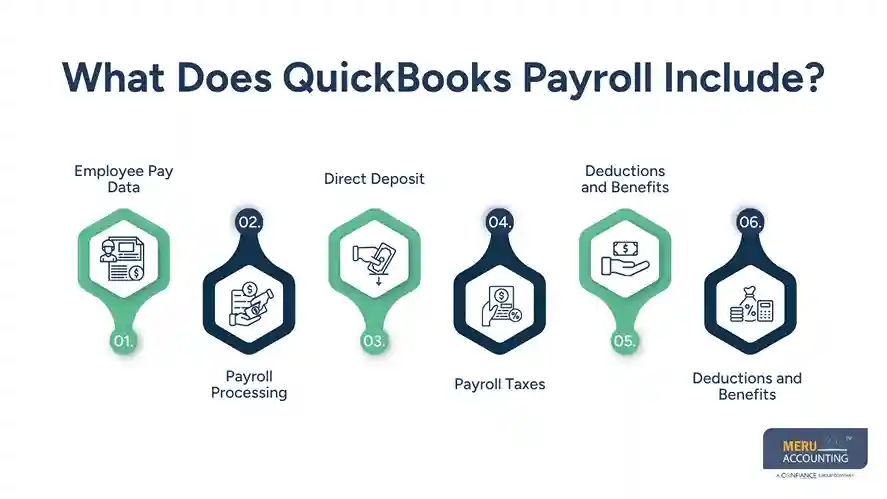
Payroll Taxes
Payroll can also deal with tax data tied to each pay run. This may include federal, state, and local tax items based on the firm’s setup and the payroll service used.
Deductions and Benefits
Health plans, retirement plans, wage cuts, and other deductions can affect both worker pay and the books. Each item should be linked to the right account.
Payroll Reports
Reports give the owner or bookkeeper a way to check what took place during a pay run. This is a key part of QuickBooks payroll management, since a pay run should not be viewed as done until the data has been checked.
QuickBooks Payroll Taxes and Payroll Liabilities
Payroll tax work is one area where small errors can grow fast.
When a firm runs payroll, some tax amounts are taken from worker pay. The firm may also owe its own share of payroll taxes. These amounts can sit in payroll liability accounts until they are paid.
For example, a basic flow may be:
Payroll run → wage cost → tax liability → tax payment → lower liability
This flow helps show why payroll accounting needs more than a check of net pay.
Say a firm has $20,000 in gross wages. The worker may not get $20,000 in cash because taxes and other cuts are taken out. The full wage cost still needs to be shown in the books, while the tax and other amounts need to be tracked as owed.
This is where QuickBooks for payroll can help link the pay run with the accounting side.
But the data still needs review. A liability balance that stays open for too long may point to a missed payment, a duplicate entry, a bad account, or an old balance.
As part of QuickBooks payroll management, a bookkeeper can check:
- Payroll tax liability balances
- Tax payments
- Wage costs
- Benefit and deduction accounts
- Payroll bank activity
- Payroll journal entries
- Old or unusual balances
The goal is not just to make the payroll run. The goal is to make sure the payroll run leaves clean books behind.
QuickBooks Payroll Reports for Small Businesses
Reports are useful because they give a clear view of what payroll did to the books.
A small business may use a Payroll Summary to review wages, taxes, and other pay data. A payroll tax report can help show tax amounts due. Other reports may show employee pay, deductions, benefits, or total payroll costs.
Some useful reports include:
Payroll Summary
This gives a broad view of pay for a set date range. It can help an owner check total wages and tax amounts.
Payroll Tax Liability Report
This can help show payroll tax amounts that are due or still open.
Payroll Tax Payments Report
This can be used to check tax payments made during a set period.
Employee Details Report
This gives a worker-level view of pay data and can help spot items that look out of line.
Payroll Cost Report
This can help show the full cost of payroll, not just the cash paid to workers.
Reports are most useful when they are checked against the books. For example, the wage total in a payroll report should make sense when compared with wage expense in the profit and loss report.
This is a key part of QuickBooks payroll management. A report is not just a file to save at month-end. It is a tool to find gaps before they turn into larger book issues.
optional anymore
on running the business
QuickBooks for Payroll: Common Accounting Mistakes to Avoid
Even with QuickBooks for payroll, poor setup or weak review can lead to errors. Some of the most common issues are simple ones.
Wrong Account Mapping
Payroll costs need to post to the right accounts. Wages, employer taxes, benefits, and other costs should not all be pushed into one account if the business needs a clearer view.
Ignoring Liability Balances
A payroll liability account should be checked on a set cycle. An old balance should not be left there with no clear reason.
Duplicate Tax Payments
A tax payment can be entered more than once when a firm uses both payroll records and manual bank entries. This can make both cash and liability accounts wrong.
Missing Payroll Entries
If payroll data does not post as expected, wage costs may not match the pay run. This can affect monthly reports and year-end work.
Skipping Bank Checks
Payroll-related bank activity should be matched to the payroll records. This helps find missing, duplicate, or wrong entries.
Poor Year-to-Date Data
When a firm moves payroll to QuickBooks during the year, past pay and tax data may need to be added. If that data is wrong or missing, year-to-date totals can be off.
No Month-End Review
Running payroll each week or month is not enough. A month-end check of wage costs, liabilities, tax payments, and bank data helps keep the books in line.
Meru Accounting's QuickBooks Payroll Management Services
Keeping payroll accurate is one thing; keeping the payroll records clean in QuickBooks is another. Meru Accounting provides hands-on QuickBooks payroll management support to keep payroll expenses, liabilities, payments, and reports properly recorded and up to date.
Our services include:
- Payroll accounting: Record and review wages, taxes, benefits, deductions, and payroll entries.
- Payroll liability management: Track payroll tax and other liabilities and clear old or unmatched balances.
- Reconciliation: Match payroll reports with bank activity and related accounts.
- Payroll reports: Review payroll reports and check them against the general ledger.
- Month-end payroll support: Reconcile payroll accounts and make sure payroll activity is reflected correctly in the books.
- Payroll cleanup: Fix missing, duplicate, or misposted payroll entries and handle catch-up work for prior periods.
- Tax-ready records: Keep payroll-related records organized for tax and year-end work.
We work with your existing QuickBooks setup and accounting workflow, so your payroll records stay in sync with the rest of your books. Whether you need ongoing support or help cleaning up past payroll records, Meru Accounting can handle the accounting work behind your payroll.
Our Expert Insight
One payroll issue we see often is a liability balance that looks small enough to ignore. A few hundred dollars left in a payroll tax or benefits account may seem harmless, but it can point to an old payment, a duplicate entry, or a payroll item mapped to the wrong account.
A better review is to trace the balance back to the pay runs that created it. Compare the payroll register with the related liability account and payment records, then check when the balance first appeared. This helps fix the source of the issue instead of simply posting an adjustment to make the account balance.
For businesses using QuickBooks for payroll, this kind of account-level review can make month-end and year-end close much cleaner. It also gives owners and accountants a better view of what payroll is actually costing the business.
Key Takeaways
- QuickBooks for payroll can bring pay data and payroll accounting into one workflow.
- Payroll can include pay, taxes, deductions, benefits, direct deposit, and reports, based on the plan used.
- Payroll liabilities should be checked after each pay run and at month-end.
- Payroll reports can help small firms check wages, taxes, deductions, and payroll costs.
- Bank and payroll records should be matched to find gaps or duplicate entries.
- QuickBooks payroll management includes more than running payroll. It also covers the book side of the process.
FAQs
Yes. QuickBooks payroll supports different pay types, including hourly and salaried employees, when each employee is set up correctly.
Some QuickBooks payroll plans include tax payments and filings. The exact features depend on the payroll service and plan you choose.
Past payroll data may need to be entered so year-to-date wages and taxes are correct. This is key when switching during the tax year.
Net pay is what employees get after taxes and other deductions. Payroll expense may include gross wages, employer-paid taxes, and some benefits.
Yes. Payroll software can process pay, but the books still need review, reconciliation, and cleanup to keep payroll accounts accurate.
optional anymore
on running the business