Payroll can seem done once staff gets paid. But the work does not end there. A business still needs to track tax due, check pay data, post the right entries, and make sure the books match the pay run. This is why the right payroll tax software can play a key role in a sound payroll process.
Good payroll tax software can help with tax math, pay data, tax forms, and key reports. It can also help cut down on manual work and data entry. But software does not fix bad data or wrong book entries on its own. Payroll still needs a clear check at month-end.
This blog looks at how payroll tax software works, what to look for, and how it can help with payroll and month-end work. It also shows where a payroll tax solution can fit into a wider payroll and bookkeeping process.
What You Will Learn From This Blog
- What payroll tax software does and how it works
- Key tools to look for when you pick a system
- How a payroll tax solution can help track tax data
- Common errors found in payroll tax checks
- How payroll data can be checked at month-end
- When expert payroll and book support may be useful
What Is Payroll Tax Software?
Payroll tax software is a tool that helps a firm work out, track, and report payroll tax data. It may use wage and employee data to work out tax withholdings and help track tax due.
The exact tools can vary by plan. Some tools may help with tax pay and tax file tasks. Others may focus more on tax math, reports, and data that must be sent to the right tax body.
A good system can help track items such as:
- Wages and tax withholdings
- Employer tax costs
- Federal tax data
- State and local tax data
- Taxes due and taxes paid
- Payroll tax forms
- Payroll and tax reports
The main goal is to make payroll work clearer and less prone to hand-entry errors. Still, each pay run should be checked. A tax tool can process data, but it may not know if a pay rate, tax setup, or worker record is wrong.
How Payroll Tax Software Works
Most payroll tax software starts with employee and pay data. This may include pay rate, hours, bonus pay, benefit data, and tax details. The system then uses this data to work out gross pay, tax withholdings, and net pay.
The process may look like this:
1. Employee data is set up
The firm adds key worker data, pay type, tax data, and any set deductions. This data must be kept up to date.
2. Pay data is added
Hours, salary data, bonus pay, and other pay items are added for the pay run. Some firms enter this by hand, while others use time or HR tools.
3. Taxes are worked out
The system uses the pay data and tax setup to work out the tax to hold back and the tax the firm may owe.
4. Payroll is checked and run
The pay data should be checked before the pay run is sent. A review can help spot wrong pay rates, odd tax amounts, or missed pay data.
5. Tax data is tracked
The system can then keep a record of tax due, tax paid, and tax forms. This can make later checks much clearer.
A strong payroll tax solution should fit this flow with as few gaps as possible. It should also work well with the firm’s book system so payroll data does not need to be keyed in more than once.
What to Look for in Payroll Tax Software
The best payroll tax software is not the one with the most tools. It is the one that fits the firm’s pay setup, tax needs, staff size, and book flow.
Here are key points to review before you choose one:
Tax coverage
Check if the system can handle the tax rules that apply to your staff. This may mean federal, state, and local tax needs. A firm with staff in more than one state may need more tax tools than a firm with staff in one state.
Tax filing and payment support
Some plans can help with tax pay and tax filing tasks. Others may only give the data and forms. Check what the plan does for you and what still needs to be done by your team.
Payroll reports
Good reports can help you check wages, tax withholdings, employer tax, and tax due. These reports also help with month-end book work.
Book system links
Your payroll tool should work well with your accounting system. A clean link can help move payroll data to the right accounts and cut down on repeat data entry.
Error checks
Look for tools that flag missing data, odd tax amounts, or other items that need review. These checks can help, but they should not take the place of a human review.
Data access and security
Payroll data can hold pay, tax, and worker data. Check user access, data safety, audit logs, and backup tools before you pick a system.
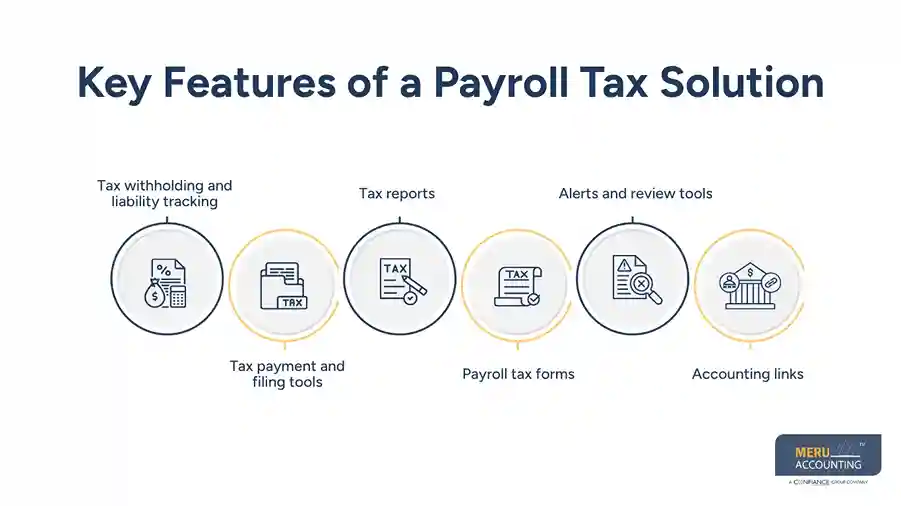
Key Features of a Payroll Tax Solution
A good payroll tax solution should do more than work out tax. It should help the firm keep a clear record from the pay run to the books.
Key features may include:
Tax withholding and liability tracking
The system should show how much tax was withheld from worker pay and how much the firm owes. This makes it easier to check tax accounts at month-end.
Tax payment and filing tools
Some systems can help send tax payments and file forms. The scope can vary by plan, state, and tax type, so firms should check the exact terms before they sign up.
Tax reports
Reports can show tax due, tax paid, wages, and other pay data. These reports can help the book team tie payroll to the general ledger.
Payroll tax forms
Year-end and other tax forms can take time to prep by hand. A tool that helps build these forms can cut down on work and help keep the data in one place.
Alerts and review tools
Alerts can help flag data that may need a check. For example, a sharp change in tax due may point to a pay data issue or a setup change.
Accounting links
A payroll tax solution should work with the firm’s book flow where able. Payroll data should map to the right wage, tax, benefit, and cash accounts.
optional anymore
on running the business
Common Payroll Tax Reconciliation Errors
Even with payroll tax software, month-end checks can show gaps. These gaps may come from data, timing, setup, or posting issues.
Tax payments do not match tax liabilities
A firm may have a tax payment in the bank that does not match the tax liability on the books. The team should check the pay date, tax date, and payment date.
Payroll entries go to the wrong account
Wages, employer tax, benefits, and tax liabilities may be posted to the wrong account. This can make the books hard to read and may lead to wrong reports.
Bank data does not match payroll
The cash paid from the bank should tie to the payroll records. A gap may come from a timing issue, a missed payment, or a wrong amount.
Duplicate payroll entries
If payroll data is sent to the books more than once, wage and tax costs may be too high. This is why the payroll report and book entry should be checked side by side.
Old tax balances stay open
A tax liability that was paid may still show as open in the books. The team should match the tax payment to the right liability and clear the old balance.
Wrong employee or tax data
A wrong tax setup, pay rate, or worker record can affect the full pay run. A payroll tax solution can help process data, but the source data still needs review.
Meru Accounting's Payroll Tax Solutions
Payroll does not end when employees get paid. The payroll data must also flow into the books, tax accounts, and bank records correctly. At Meru Accounting, we help businesses review that full process and catch issues before they affect the month-end close.
Our payroll tax support includes:
- Payroll data review: Check wages, taxes, deductions, and benefits before posting.
- Payroll accounting: Record and review payroll entries for wages, taxes, benefits, and other costs.
- Tax liability review: Compare payroll tax reports with the balances in the books.
- Payment reconciliation: Match payroll and tax payments to bank activity and book entries.
- Month-end reconciliation: Review payroll reports against the general ledger and resolve variances.
- Cleanup and catch-up: Fix old payroll errors and bring past records up to date.
- Tax-ready records: Keep payroll and tax records organized for year-end and tax work.
- Software support: Work with your existing payroll and accounting software and fit our process to your workflow.
Our team does more than check whether the numbers match. We trace differences back to the source, whether it is a missed entry, an unpaid liability, a duplicate payment, or a timing issue. This hands-on approach helps keep payroll records accurate and the books ready for close.
Our Expert Insight
A good payroll tax software setup should make the month-end close easier, not just make payroll faster. One issue we often see is a payroll tax balance that looks right in the payroll system but does not tie to the general ledger.
Before closing the month, check that payroll reports, tax liability balances, and tax payments agree. If they do not, find the source of the difference before making an adjustment. A missed entry, timing gap, or duplicate posting can each point to a different fix.
Key Takeaways
- Payroll tax software can help with tax math, pay data, reports, and tax records.
- The right system should fit the firm’s staff, tax needs, and book setup.
- A payroll tax solution can help track tax due, tax paid, and payroll tax data.
- Payroll data should be checked before and after each pay run.
- Month-end work should tie payroll reports to the general ledger and bank data.
- Software can cut down on hand work, but it does not replace a sound review process.
- Expert payroll accounting support can help find and fix gaps before they grow.
FAQs
Payroll tax software helps calculate, track, and report payroll taxes. Depending on the plan, it may also support tax payments and filings.
Yes. Many systems support payroll tax rules for multiple states, but coverage for local taxes and filings can vary by provider.
Some plans include tax payments and filings, while others only provide the tax data and forms. Check the plan details before you choose a system.
Payroll tax accounts should be reviewed at least monthly. A month-end check can catch unpaid balances, duplicate entries, and timing gaps.
Look for tax coverage, filing support, payroll reports, accounting integrations, multi-state support, and clear pricing. The system should also fit your current payroll workflow.
optional anymore
on running the business