
A shop owner checks the bank app and sees $8,400. It looks like a good month. Then three bills come in, a client has not paid a $2,000 bill, and tax is due soon. The bank sum does not show the full cash view. This is where free accounting software for small business can make daily bookkeeping much less hard.
But free does not mean that all work is done for you. A tool can log sales, sort costs, and make key reports. It cannot tell if each entry is right. The best free accounting software for small business is not just the one with a $0 plan. It is the one that fits how a firm sells, buys, bills, and keeps its finanacial records.
What You Will Learn From This Blog
- Which key features to check before you choose free accounting software for small business.
- How Wave, Zoho Books, GnuCash, and ZipBooks suit small firms.
- Why a $0 plan may still cost you in fees, add-ons, or time.
- How much day-to-day bookkeeping work free accounting software for small business can handle.
- When small business accounting services may be a good fit.
- Which tasks need a bookkeeping professional and not just a software tool.
What Free Accounting Software Includes
Think of free accounting software as a work desk for your financial records. You can put sales, costs, bills, pay data, and bank data in one place. This is much neater than using notes, sheets, and mail.
A free accounting software for small business plan may have bills, cost logs, bank links, reports, and bank checks. Yet each firm sets its own rules. One may limit users. One may limit bank links. One may charge for card payments.
So, do not ask only, “Is it free?” Ask, “What can I do with it at no cost?”
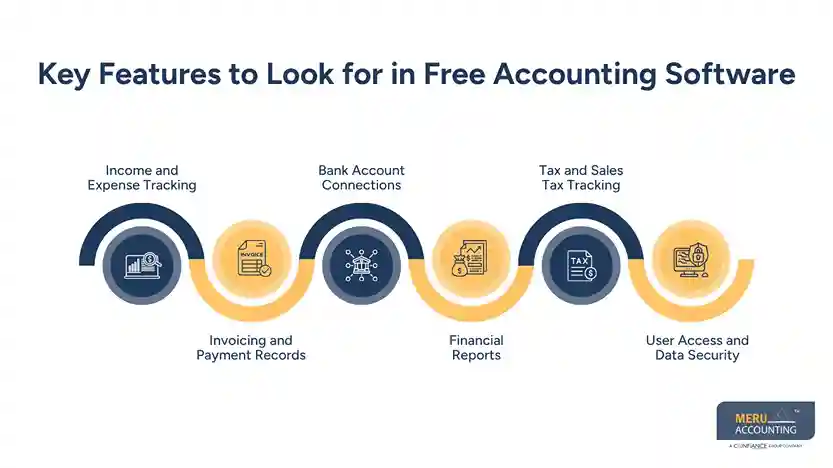
Key Features to Look for in Free Accounting Software
Income and Expense Tracking
Effective free accounting software for small business should show cash in and cash out in a clear way. Rent, ads, stock, travel, bank fees, and other costs should go to the right account.
For example, a $1,500 laptop is not the same as a $150 office buy. If both go to one cost type, the report may give a false view of the firm.
Invoicing and Payment Records
An invoice is not just a bill sent to a client. It also shows what is due, when it is due, and if it was paid.
Wave’s free Starter plan has free bills, quotes, and book records. Online pay can have a fee.
Bank Account Connections
A bank link can cut down on key-in work. But a bank feed does not mean that each entry is right.
A $900 bank entry may be a bill, loan pay, bank move, or owner draw. A user still has to check what it is and put it in the right account.
optional anymore
on running the business
Financial Reports
A list of entries has little use if it does not answer key cash and profit needs. How much did the firm make? What does it owe? What do clients owe?
Look for a profit and loss report and a balance sheet at the least. GnuCash has both, plus bank checks and other reports.
Tax and Sales Tax Tracking
Tax data needs care. A tool may log tax on a sale, but that does not mean the tax is set up in the right way.
For firms in India, Zoho Books lists GST tax reports and key GST tools in its India free plan. Tax rules can still need a pro check.
User Access and Data Security
A firm using free accounting software for small business may start with one owner and later add a bookkeeper, tax pro, or staff. This makes user access key.
Do not share one login if the tool can give each user a set role. Check how many users the free plan lets you add and what each user can see.
Best Free Accounting Software for Small Business
No one tool is best for all firms. A solo pro with 30 bills each month has a much more basic need than a firm with 500 bills, bank feeds, staff, and tax work. The best free accounting software for small business is the one that fits the real work, not the one with the most tools.
QuickBooks Online Alternatives
QuickBooks Online is a well-known tool, but it is not the only choice. A small firm can look at free tools if it wants to cut its monthly tech cost.
But look at the full workflow. A tool may be free at first and cost more once you need more users, bank links, pay tools, or more reports.
Wave
Wave has a free Starter plan for core bookkeeping and bills. It can suit a small firm that wants to send bills and track cash with no set fee for the core plan. Some other tools and pay types cost extra.
For a small firm with few bills and a low count of bank entries, Wave can be a good fit.
Zoho Books
Zoho Books is a good pick when a firm needs more than bill tools. Its India free plan lists bills, costs, bank checks, GST tax reports, profit and loss, and balance sheet tools.
Still, check the plan rules first. User and sales caps may make the free plan less fit as the firm grows.
GnuCash
GnuCash is free and open source. It uses double-entry bookkeeping, so it may fit users who know the core rules of bookkeeping.
It has tools for bills, pay due, money due from clients, bank checks, and key reports. It can suit a firm that wants more control over its financial records
ZipBooks
ZipBooks has a free Starter plan with free bills, client and vendor data, basic reports, online pay, and one bank link. Paid plans add more bank links and more tools.
It can fit a small firm looking for free accounting software for small business with web access without needing a large bookkeeping system.
How Much Does Free Accounting Software Really Cost?
Here is the part that can catch a firm off guard: the plan can cost $0, but the full use may not.
A free accounting software for small business plan may have card fees, user caps, paid add-ons, or a high time cost for the owner.
Free Plans and Hidden Costs
Read the plan page with care. Check users, bank links, bills, reports, tax tools, help, and data caps.
A free plan may work for 50 entries a month and feel less fit at 500. The cost may show up only after the firm has built a lot of data in the tool.
Transaction and Payment Fees
A client who pays a bill by card may incur a pay fee even if the book plan has no fee.
Wave, for one, keeps its free book plan separate from paid pay tools. A firm with high card sales should add such fees to its cost plan.
Add-Ons and Premium Features
Free accounting software for small business may be enough at first, but growing firms can need key tools that are only available on paid plans. More users, payroll, bank feeds, tax tools, and more reports may need a paid plan.
Zoho Books, for one, has paid plans and add-ons above its free plan.
Cost of Switching to Paid Software
Choosing free accounting software for small business can reduce costs at first, but moving to another tool later may be harder when you have years of bills, pay data, bank logs, client data, and account data.
The firm may need to move data, map each account, check old sums, and test new reports. A free start is fine, but do not let it lead to a hard move later.
Can Free Accounting Software Handle Small Business Bookkeeping?
Yes, a free accounting software for small business tool can do much of the day-to-day bookkeeping for a small firm. The key is that the user must know what each entry means.
The risk starts when users think the tool makes each choice for them. It does not. Good bookkeeping still needs sound data and sound checks.
Daily Transaction Recording
A small firm may have just a few entries each day. That makes it easy to log sales, buys, refunds, fees, and pay as they take place.
If the work is left for six months, even a small set of financial records can take a long time to review and correct.
Bank Reconciliation
Say the book shows $12,200 in the bank, but the bank file shows $11,850. That $350 gap needs a clear cause.
A bank check can find missed fees, double entries, wrong sums, or items that were not logged. GnuCash has a bank check tool for this task.
Accounts Payable and Receivable
A firm can show a good profit and still have a cash gap if clients pay late while bills fall due.
Money due from clients is shown in accounts receivable. Money due to vendors is shown in accounts payable. Both need to stay up to date.
Expense Categorization
Think of three $700 payments: rent, a laptop, and an owner draw. They may look the same in the bank log, but they are not recorded in the same way in the financial records.
The right cost type can change the profit view, asset value, tax data, and key reports. That makes clear expense categories an important feature when comparing free accounting software for small business.
Monthly Bookkeeping Tasks
At month-end, check bank links, open bills, open client dues, tax data, owner pay, loans, and key reports.
This is also where small business accounting services can add value. A pro can check entries that may look fine but do not match the overall financial records.
Free Accounting Software vs. Professional Bookkeeping
Software and bookkeeping do not do the same job. A tool can store, sort, and show data, while a book pro can review that data and spot issues. Free accounting software for small business can handle many basic tasks, but it cannot judge why an entry was made or if it fits the overall financial records.
Area | Free Accounting Software | Professional Bookkeeping |
Daily Records | Records sales, costs, bills, and payments based on the data entered. | Checks records and makes sure entries are placed in the right accounts. |
Bank Checks | Imports bank data and can match some transactions. | Reviews bank data, finds gaps, and checks unmatched entries. |
Expense Records | Lets users sort costs into account types. | Checks if costs are placed in the right account and treated in the right way. |
Bills and Client Dues | Tracks bills to pay and money due from clients. | Reviews open bills and dues and checks for missed or wrong entries. |
Tax Work | May record tax data and create tax reports. | Reviews tax entries and can deal with tax work that needs more skill. |
Payroll | Some tools may offer payroll as a paid add-on. | Checks payroll entries and related book records. |
Loans and Assets | Can record loan or asset data when set up right. | Reviews loan, asset, and pay entries and makes needed book changes. |
Year-End Work | Creates reports from the data in the system. | Reviews the accounting records and makes year-end entries where needed. |
Error Checks | Can flag some missing or odd data. | Looks at the complete accounting records and finds errors that a tool may miss. |
Time Cost | Saves key-in time but still needs user input and checks. | Takes book work off the owner’s task list and gives more time for core work. |
Best Fit | Small firms with straightforward accounting needs and few entries. | Firms with more entries, tax needs, or less time for book work. |
What Business Owners Can Handle Themselves
- Log sales, costs, bills, payments, and bank data.
- Handle basic entries when the accounting data is well organized.
- Work well with a low number of daily entries.
- When paired with basic bookkeeping knowledge, free accounting software for small business can save time on routine entries and recordkeeping.
- Seek review when an entry is hard to post.
Tasks That Need Professional Review
- Review payroll and tax work.
- Check loan, stock, and asset data.
- Review odd or hard-to-post entries.
- Check year-end financial records and key reports.
- Small business accounting services can review such work.
- Owners can still keep basic daily tasks in-house.
Common Bookkeeping Errors to Watch for
- A bill may be logged twice.
- A bank fee may be left out.
- Home and work costs may get mixed.
- A client bill may be marked as paid too soon.
- Small errors can change profit and tax data.
- Even with free accounting software for small business, incorrect entries or missed transactions can affect the bank balance shown in the financial records.
When Bookkeeping Becomes too Time-Consuming
- Bills stay open for too long.
- Bookkeeping takes up each weekend.
- Daily entries start taking too much time.
- The owner spends less time on core work.
- Small business accounting services may be a better use of the owner’s time.
Why Choose Meru Accounting?
- Experienced Accounting Professionals: Meru Accounting provides skilled professionals for bookkeeping, account checks, bank reconciliation, and routine accounting work.
- Complete Accounting Support: Get bookkeeping, accounts payable, accounts receivable, payroll, tax, and financial reporting services in one place.
- Wide Software Expertise: Work with QuickBooks, Xero, Zoho Books, NetSuite, Odoo, and Power BI based on your business needs.
- Accurate and Organized Records: Keep sales, expenses, bills, payments, and bank entries properly recorded for a clear view of your finances.
- Flexible Service Options: Choose the accounting support that fits your business, from basic bookkeeping to more complex accounting tasks.
- US Accounting Knowledge: Businesses can receive services based on US GAAP and IRS-related accounting needs, with records kept in line with the required accounting process.
- More Time for Business Work: With Meru Accounting handling routine accounting tasks, business owners can spend more time on sales, customers, and daily business needs.
Our Expert Perspective
A free tool is a good place to start, but the price should not be the only point of choice. What matters more is whether the tool keeps clean books as sales, bills, bank entries, and tax work grow. Free accounting software for small business can do the basic work well, while small business accounting services can take care of checks, hard entries, and book clean-up when the work goes past the owner’s skill or time.
Key Takeaways
- Free accounting software for small business can suit firms with low to mid book needs.
- Do not judge a tool only by its $0 plan. Check bank links, users, reports, tax tools, and fees.
- A bank feed can cut key-in work, but each entry still needs a check.
- Free tools can do basic bookkeeping work, but they do not replace bookkeeping skill.
- Bank checks and month-end checks are still key.
- Small business accounting services can take on review, clean-up, tax work, and other tasks as books grow.
- The best set-up is one that gives the owner control while also giving the books a sound pro check.
FAQs
Wave, Zoho Books, GnuCash, and ZipBooks are good free options, but the best choice depends on your books, users, bank needs, and tax needs.
Yes, free accounting software can handle basic sales, costs, invoices, bank checks, and reports for many small businesses.
Look for income and cost tracking, invoices, bank links, reports, tax tools, user access, and data security.
Free software can cut basic bookkeeping work, but a bookkeeper can review entries, fix errors, and handle tasks that need accounting skill.
A small business should consider small business accounting services when its books grow, bank checks fall late, or book work takes too much owner time.
optional anymore
on running the business



