A project can bring in $500,000 and still leave you with less profit than planned. Labor costs may run higher than expected, a subcontractor may send a larger bill, or material prices may rise during the job. Construction financial management software helps you track these changes as they happen, so you can see where your money is going and address cost issues before they eat into your profit margin.
For small and mid-sized contractors, the right software can make financial management much easier. It can keep project costs, bills, payments, cash flow, and revenue in one place while giving you a clear view of each project and the business as a whole. This means less time sorting through numbers and more time using them to make sound business decisions.
What You Will Learn From This Blog
In this blog, you will learn:
- What construction financial management software does
- Why small and mid-sized firms need better money control
- Key tools to look for in a system
- How software helps with job cost work
- Common tools used by contractors
- When construction business accounting software may be enough
- How an accounting team can help keep the books in shape
What Is Construction Financial Management Software?
Construction financial management software is a tool that helps a construction firm track and manage its money. It can bring job costs, bills, sales, pay, cash flow, and key reports into one system.
A key point is job-level data. A firm may have ten jobs at once, and each job can have its own labor, stock, sub costs, bills, and sales. The right system can help link those costs to the right job.
For example, a $20,000 bill from a sub may need to sit with one job, not just show as a firm cost. The same is true for stock, crew time, and other job costs. This gives the owner a clearer view of job profit.
Construction financial management software can also help with:
- Job cost tracking
- Budgets and cost plans
- Bills and vendor pay
- Client bills and cash due
- Payroll data
- Bank feeds and bank match
- Cash flow views
- Job and firm reports
This makes it more than a tool for basic books. It can help tie daily money work to each job and to the firm as a whole.
optional anymore
on running the business
Why Small and Mid-Sized Contractors Need Better Financial Management
Small firms may start with basic books and a few sheets. That can work when there are only a few jobs and less spending. As the firm grows, that same setup can make it hard to see where cash goes.
One job may have high labor cost. Another may have a rise in stock cost. A third may have bills that are due but not yet paid by the client. If these items are not tied to the right job, the owner may not know the true job margin.
Good construction financial management software helps bring these parts into view.
It can help a firm:
Track job cost: See how much has gone to labor, stock, subs, and other costs.
Watch cash flow: Know what cash is due in and what cash must go out.
Cut data gaps: Keep key data in one place and limit the need for manual entry.
See job profit: Check the gap between job sales and job costs.
Keep books in line: Match bank data, post bills, and keep key reports up to date.
For a small or mid-sized contractor, this view can be key. You may not need a large set of tools, but you do need the right data at the right time.
Key Features to Look for in Construction Financial Management Software
Not all tools offer the same mix of job and money tools. When you review construction financial management software, look for tools that fit how your firm runs jobs.
Job Cost Tracking
The system should let you tag costs to a job and, where needed, to a phase or cost type. This can help you see where a job is on track or off plan.
Budget vs. Actual Cost
A good system should let you set a job budget and then check it against real costs. This can help flag cost gaps before they grow.
Accounts Payable
You should be able to log bills, track due dates, and see what you owe each vendor or sub. This can help you plan cash and avoid late pay.
Accounts Receivable
The system should help track client bills, due dates, and cash that is still due. This is key when a firm has many jobs in play.
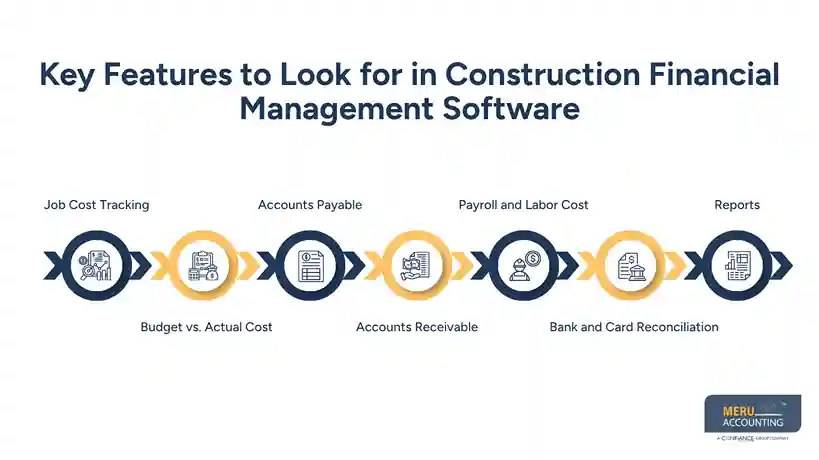
Payroll and Labor Cost
Labor can be a large job cost. Your system should help link pay data to the right job when your setup calls for it.
Bank and Card Reconciliation
Bank and card data should be easy to match and check. Clean match work helps keep job and firm reports on track.
Reports
Look for reports that show job cost, job profit, A/P, A/R, cash flow, and key firm data. The goal is not to have the most reports. It is to have the right ones.
How Construction Financial Management Software Helps With Job Costing
Job cost is one of the main areas where construction financial management software can add value.
Say a contractor has a $250,000 home build. The first plan may set $70,000 for labor, $90,000 for stock, $50,000 for subs, and $40,000 for other costs.
As the job moves on, the firm can post each cost to the right job. The owner can then check the real cost against the plan.
If stock cost is far above plan, the owner can look into why. If labor hours rise, the issue can be checked before the job ends. If a sub bill was posted to the wrong job, it can be fixed before it skews the job report.
This is where construction business accounting software can also play a role. A good system can help keep the core books clean while job data gives the owner more detail on each job.
The key is good setup. Cost types, job names, classes, phases, and account links should fit the way the firm tracks work. A tool alone will not fix poor data or weak book rules.
Common Financial Software Used by Contractors
Contractors use a mix of tools based on firm size, job type, and workflow. Some firms use a core accounting tool with job cost tools. Others use a full build-focused system.
Common options include QuickBooks, Xero, and Zoho Books, along with tools built for the build trade.
QuickBooks is used by many small firms for books, bills, client bills, bank links, and reports. With the right setup, it can also support job cost work.
Xero is a cloud-based tool that can work well for firms that want online books, bank links, bills, and reports.
Zoho Books can also help firms manage core books, bills, sales, bank data, and reports.
The best choice depends on the size of the firm, number of jobs, job cost needs, team size, and work flow. Construction business accounting software should not be picked only by price. It should fit the firm’s day-to-day work.
Accounting Services for Construction Businesses
Construction accounting can get messy fast when project costs, vendor bills, payroll, and customer payments all move at once. Meru Accounting gives contractors an experienced accounting team to handle that work and keep the numbers in order. We help you stay on top of your books, see project results more clearly, and spend less time dealing with day-to-day accounting.
How Meru Accounting Supports Your Construction Business
Bookkeeping & Daily Accounting
- Bookkeeping and transaction entry
- Bank and credit card reconciliation
- Accounts payable and accounts receivable
- Bill, invoice, and payment tracking
Job & Project Accounting
- Job cost tracking
- Labor, material, and subcontractor costs
- Project income and expense tracking
- Budget vs. actual reporting
Reporting & Ongoing Support
- Monthly close support
- Financial reports
- Payroll accounting support
- Book cleanup and catch-up
- Tax-ready books and records
Our team works with QuickBooks, Xero, and Zoho Books, so you can keep the tools that fit your business. From routine bookkeeping to project-level accounting, Meru helps turn your accounting data into clean, useful numbers you can trust.
Our Expert Insight
We often see contractors focus too much on the cash balance. A strong bank balance does not always mean a project is profitable. You may have paid for labor and materials before billing the client, or have unpaid bills that have not yet hit the job cost report.
That is why we look at job costs, billings, contract value, and work in progress (WIP) together. This can show when a job is running over budget or when billing is falling behind the work completed.
Good construction financial management software can make this review easier, but the real value comes from clean data and the right accounting process.
Key Takeaways
- Construction financial management software helps contractors track job and firm money in one place.
- Job cost tools can help show labor, stock, sub, and other costs by job.
- Small and mid-sized firms need clear data as the number of jobs grows.
- Look for tools for job cost, A/P, A/R, cash flow, bank match, payroll, and reports.
- Construction business accounting software can support core books, but job cost needs should also be reviewed.
- Good software still needs clean data, clear rules, and a sound workflow.
- An accounting team can help keep books clean and make reports more useful.
FAQs
Pricing varies by the number of users, jobs, features, and level of support. Small contractors may find basic plans that fit their needs, while larger firms may pay more for job costing, project tracking, and advanced reports.
Yes. QuickBooks can handle core accounting, such as income, expenses, bills, invoices, and bank reconciliation. The right setup is important when you also need job costing and project-level reports.
A contractor should review the profit and loss statement, balance sheet, cash flow, accounts receivable, accounts payable, and job cost reports. WIP reports can also help spot billing or margin issues on active jobs.
It may be time when you’re managing several jobs, using spreadsheets to track costs, or spending too much time pulling data from different systems. Growth is often the point when better financial tools start to pay off.
Look for job costing, project tracking, A/P and A/R, payroll support, bank feeds, financial reports, and integrations with the tools you already use. Make sure it can track costs by job and give you a clear view of project profit.
optional anymore
on running the business