A customer pays an invoice, a vendor sends a bill, and a new expense hits the company card. Each event adds to your financial records, but keeping everything up to date shouldn’t mean hours of data entry or waiting until the end of the month. Cloud based accounting software for small business makes it easier to keep track of these changes as they happen.
With bank feeds, online invoicing, expense tracking, and shared access, business owners and accountants can work with the same financial data from different locations. This changes more than how books are stored. It changes how businesses handle daily accounting tasks, track cash flow, and stay on top of payments without relying on scattered files or manual updates.
What You Will Learn From This Blog
- What cloud accounting software does and how it works.
- How it changes daily tasks such as invoicing, bank matching, and expense tracking.
- The key differences between cloud and desktop accounting.
- Which accounting tasks can be automated and which still need review.
- Common issues businesses may face when moving their books online.
- How to choose small business cloud accounting solutions that fit your needs.
What Is Cloud Based Accounting Software for Small Businesses?
Cloud-based accounting software is an online tool that stores and manages financial data on remote servers. Instead of keeping all records on one computer, users can access their books through a web browser or app with an internet connection.
For example, a small business owner can check unpaid invoices from home while a bookkeeper reviews bank activity from another location. Both can work with the same set of records, based on the access rights set for each user.
Most cloud accounting tools offer features such as:
- Bank feeds: Import bank and card transactions into the accounting system.
- Invoicing: Create invoices, send them to clients, and track due dates.
- Expense tracking: Record business costs and store receipt details.
- Bank reconciliation: Match recorded entries with bank statement activity.
- Financial reports: Review income, costs, cash flow, and profit.
- User access: Let owners, staff, and accountants work with shared records.
Cloud software also gets updates from the provider, so users don’t need to install each new version by hand. The exact tools and limits vary by provider and plan.
optional anymore
on running the business
How Does Cloud Accounting Change Day-to-Day Financial Management?
The biggest change is that daily accounting work can move from separate files and delayed updates to a shared online system. Here’s how this affects common tasks.
1. Accessing Financial Records From Anywhere
With desktop accounting, users may need the office computer or a remote access setup to view their books. Cloud accounting lets approved users sign in from different places.
An owner can check a sales report before a meeting, while a bookkeeper can review entries from another location. This can help teams keep work moving when they don’t share the same office.
Still, access should be based on job roles. Not every staff member needs to view payroll data, bank details, or all financial reports.
2. Recording Transactions as They Happen
Cloud accounting can pull bank and card activity into the system through bank feeds. This cuts down on the need to enter each transaction by hand.
For example, when a business buys office supplies with its company card, the charge may appear in the accounting system once the bank feed updates. A bookkeeper can then review the payee, amount, and account category.
This does not mean every imported entry is ready to post. Staff should check unclear charges, split costs, and unusual payments before they are marked as final.
3. Automating Bank Reconciliation and Transaction Matching
Bank reconciliation is a key part of keeping accurate books. It helps confirm that the transactions in the accounting system agree with the bank statement.
Cloud tools can suggest matches between bank feed entries and recorded payments or expenses. For example, a $500 bank payment may match an invoice payment already entered in the books.
This can speed up the review process, but a suggested match still needs to be checked. Duplicate entries, bank fees, timing gaps, and partial payments can cause errors if users accept matches without review.
4. Creating and Tracking Invoices
Small businesses often need to send invoices, track due dates, and follow up on unpaid bills. Cloud accounting makes it easier to handle these tasks in one system.
Users can create an invoice, email it to a client, and check its status later. Some tools also send payment reminders and allow online payment options.
For example, if a client has not paid within 30 days, the owner can view the open invoice and send a follow-up. This helps the business stay on top of accounts receivable and plan its cash needs.
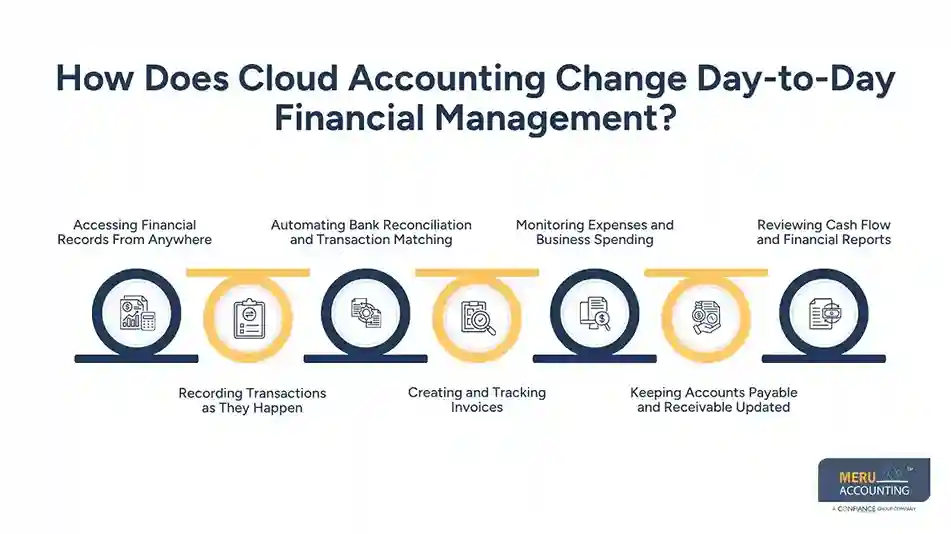
5. Monitoring Expenses and Business Spending
Cloud accounting helps owners keep business costs in view. Staff can record expenses, attach receipt images, and assign costs to the right accounts.
Some tools can also link to expense apps or company cards. This can reduce the time spent collecting paper receipts and sorting costs at month-end.
For example, a business owner may notice that software costs have risen over the past three months. A review of the expense report can help find unused plans or price changes.
6. Keeping Accounts Payable and Receivable Updated
Cloud accounting can give owners a clearer view of money coming in and going out. Accounts payable reports show bills that need to be paid, while accounts receivable reports show what clients still owe.
This helps a business plan payment dates and follow up on late invoices. It can also help avoid missed bill due dates and give owners a better view of short-term cash needs.
However, the reports are only useful when bills, payments, credit notes, and invoices are entered on time.
7. Reviewing Cash Flow and Financial Reports
In the past, a small business owner may have had to wait until month-end for a report. Cloud accounting can make key figures easier to review during the month.
A profit and loss report can show income and costs, while a cash flow report can help track cash coming in and going out. A balance sheet gives a view of assets, debts, and owner equity.
These reports help owners ask better questions. For example, sales may be rising, but is cash also coming in on time? Are costs growing faster than income? Such checks can help owners make sound business choices.
Cloud Accounting vs. Traditional Accounting: What Changes in Daily Operations?
Both cloud and desktop accounting tools can manage core financial tasks. The main differences relate to access, updates, teamwork, and data handling.
Area | Cloud Accounting | Desktop Accounting |
Access | Online access from approved devices | Often tied to a set computer or network |
Data storage | Stored on provider-hosted servers | Often stored on a local computer or server |
Updates | Managed by the software provider | May need manual updates |
Teamwork | Multiple users can work with shared records | Sharing may need extra steps |
Bank feeds | Often built into the software | May be limited by the tool or setup |
Backups | May include provider-managed backups | Often needs a local or separate backup plan |
Internet | Usually needs an internet connection | Core work may be done offline |
Cloud accounting can make daily work easier for teams that need shared access and frequent updates. Desktop tools may still suit firms that prefer local data storage or have a setup built around offline work.
The right choice depends on the business, its staff, data needs, and work habits.
Which Accounting Tasks Can Small Businesses Automate With Cloud Software?
Cloud tools can take care of many repeat tasks, but they don’t remove the need for sound accounting review.
Task | What Software Can Do | What Still Needs Review |
Bank feeds | Import bank activity | Check missing or duplicate entries |
Transaction matching | Suggest links between entries | Confirm the right match |
Invoicing | Create and send invoices | Check prices, terms, and client details |
Payment reminders | Send notices based on set rules | Handle disputes and late payments |
Expense tracking | Capture receipts and sort costs | Confirm business use and account codes |
Recurring bills | Create bills on set dates | Check changes in amount or terms |
Financial reports | Build reports from recorded data | Review accuracy and explain trends |
For example, software may suggest that a meal charge is a travel cost. But the bookkeeper must check the receipt and business purpose before posting it to the right account.
Automation works best when the business has clear rules, clean records, and a regular review process.
Common Challenges of Moving Small Business Accounting to the Cloud
Moving from desktop tools, spreadsheets, or paper records to cloud software can improve daily work. But the shift needs a clear plan.
1. Moving Old Financial Data
Old records may have missing entries, duplicate accounts, or errors. Moving them as they are can carry these issues into the new system.
Before the move, review account balances, open invoices, unpaid bills, and bank records. Keep copies of key reports and past tax records.
2. Choosing the Wrong Software
Not all tools offer the same features. A small firm may not need a high-cost plan with tools it won’t use, while a growing firm may soon outgrow a basic plan.
List your needs before you choose. Check bank links, invoice tools, user limits, reports, and add-on costs.
3. Data Security and User Access
Cloud tools hold key business data, so access must be well managed. Use strong passwords, multi-factor sign-in, and role-based access where offered.
Also, check the provider’s data backup, privacy, and recovery terms. Don’t share one login across the whole team.
4. Staff Training and New Workflows
A new system can cause delays if staff don’t know how to use it. Set clear rules for how to name files, record costs, review bank matches, and handle bills.
Short training sessions and written steps can help staff learn the new process and reduce errors.
Meru Accounting's Small Business Cloud Accounting Solutions
Keeping your books up to date takes more than good software. It takes experienced accountants who know how to manage transactions, resolve discrepancies, and keep financial records ready for review. Meru Accounting provides small businesses with dedicated accounting support to handle these tasks without the cost of hiring a full in-house team.
Our accountants bring multi-industry experience and hands-on knowledge of different accounting workflows. We offer support for:
- Bookkeeping: Daily transaction recording, expense tracking, and account maintenance.
- Bank Reconciliation: Matching bank and credit card activity and resolving discrepancies.
- Accounts Payable and Receivable: Managing vendor bills, customer invoices, and outstanding payments.
- Catch-Up and Cleanup: Bringing overdue books up to date and correcting past errors.
- Payroll Accounting Support: Recording payroll expenses and related entries.
- Financial Reporting: Preparing income statements, balance sheets, and cash flow reports.
Whether you need ongoing bookkeeping or help managing complex accounting tasks, Meru provides flexible support built around your business. With our small business cloud accounting solutions, you get skilled accounting professionals, organized financial records, and more time to focus on running your business.
Our Expert Insight
One area small businesses should pay close attention to is month-end transaction cut-off. Just because a transaction appears in a cloud accounting system doesn’t mean it belongs to the current reporting period.
For example, a business may receive a supplier invoice in July for work completed in June. Recording it in July without checking the service date can understate June expenses and overstate July costs. The same issue can occur with customer deposits, prepaid expenses, and bills received after month-end.
We recommend reviewing transactions by their actual service or purchase dates, not just the dates they appear in the bank feed. This helps keep expenses, revenue, and monthly reports in the right period. It also makes financial comparisons more useful when owners review business performance or prepare for tax filing.
Key Takeaways
- Cloud accounting gives approved users online access to shared financial records.
- Bank feeds and automation can cut down on manual data entry.
- Invoice and bill tracking can help owners manage cash flow.
- Automated matches and reports still need human review.
- Data security, staff training, and clean records matter during setup.
- The right cloud system should fit the size, needs, and plans of the business.
- Skilled accounting support can help keep cloud records accurate and useful.
FAQs
Costs depend on the software, plan, number of users, and add-on features. Basic plans may cover invoicing and expense tracking, while higher tiers may include inventory, payroll integrations, and advanced reports.
Many platforms can track sales tax and calculate tax on invoices based on set rates. However, tax rules vary by state and product type, so businesses should review tax settings and confirm that collected amounts match their filing requirements.
Yes. Many cloud platforms let businesses track income, expenses, and transactions by location or class. This helps owners compare performance across branches without maintaining separate accounting files.
A growing business may need more users, advanced inventory tools, project tracking, or detailed financial reports. Owners should review plan limits and integration options before upgrading or moving to a more advanced system.
Yes. It can organize income, expenses, payroll entries, and other financial data into reports that support tax preparation. However, the records still need to be reviewed for correct classifications, missing transactions, and tax adjustments before filing.
optional anymore
on running the business