Inventory management software for retail store use helps owners track goods they buy, sell, and keep in stock. Wrong stock counts can lead to lost sales, extra orders, and cash tied up in goods that do not sell. The right tool tracks stock changes and shows staff what is in hand.
A small shop may need basic stock records, while a large store may need barcode scans, supplier data, and links to online sales. Before you buy inventory management software for retail store use, check your stock levels, daily sales, budget, and number of stores.
A well-set retail inventory management system can link stock data with sales and accounts. This guide covers key features, core needs, setup steps, and ways to track results so you can pick the right tool for your store.
What You Will Learn From This Blog
- Key features of inventory management software for retail store use.
- The main things to check before you pick a stock tool.
- How to set up a retail inventory management system.
- How to track stock, sales, and costs.
- Daily steps to keep stock records clear and correct.
Introduction to the Inventory Management Software
Inventory management software for retail store use tracks goods that come in, go out, and stay in stock. It can update stock after a sale, flag low stock, and show which goods sell well. This cuts the need for paper logs and long sheets.
A retail inventory management system can link stock data with a point-of-sale (POS) tool, an online shop, and accounting software. For example, when a shop sells five units, the stock count can drop by five if the sale is logged and the link works well.
The main goal is to keep stock data close to the real count on the shelf. Staff must still log returns, damaged goods, and stock moves with care. No tool can fix data that was not entered.
optional anymore
on running the business
Key Features of Inventory Management Software for Retail Stores
Real-Time Stock Tracking and Inventory Updates
Inventory management software for retail store use can show stock changes as sales and stock moves take place. Staff can check stock before they promise an item to a buyer or place a new order.
Barcode Scanning and SKU Management
Barcode scans speed up checkout and stock counts. A stock-keeping unit (SKU) gives each item or variant its own code, such as a shirt in a set size and color. This helps staff tell similar goods apart.
Purchase Order and Supplier Management
The tool can store supplier names, order dates, costs, and delivery status. A retail inventory management system with order records shows what is due and helps stop staff from placing the same order twice.
Low-Stock Alerts and Reorder Points
Low-stock alerts warn staff when an item hits a set level. Set reorder points based on sales speed, supplier lead time, and safety stock. Do not use one rule for all goods.
Sales, POS, and E-commerce Integration
Links with POS and online sales tools can update stock after each sale. Inventory management software for retail store use should keep stock levels in line across sales channels that share the same goods.
Multi-Store Inventory Tracking
Retailers with many stores need to view stock at each site and log goods moved between stores. A retail inventory management system with this feature shows where spare stock is held before staff place a new order.
Inventory Reports and Demand Forecasting
Reports show fast- and slow-selling goods, stock value, and sales trends. Forecasts can guide order plans, but staff should also check seasonal shifts, local events, and past sales before buying more stock.
Essential Requirements for a Retail Inventory Management System
Store Size, Product Volume, and SKU Requirements
List the number of stores, products, and product types the tool must track. A shop with 300 items may need fewer features than a chain with thousands of SKUs across many sites.
Integration With POS and Accounting Software
Check that the tool can share sales, returns, and stock costs with your current POS and accounting tools. A retail inventory management system should record refunds and returns in a way that keeps stock and sales data in line.
User Access, Data Security, and Permissions
Give each staff member access based on their role. Cashiers may log sales, while managers approve stock changes. Use strong passwords and remove access when staff leaves.
Hardware, Cloud Access, and Mobile Compatibility
Check if the tool works on your computers, phones, barcode scanners, and printers. Cloud access lets staff view stock at more than one site. Check internet needs, backup plans, and offline use before you buy.
Budget, Pricing, and Scalability
Compare the full cost, not just the monthly fee. Setup, staff training, data import, extra stores, user seats, and links to other tools may raise costs as the shop grows.
How to Choose the Right Inventory Management Software for Retail Store
Compare Features With Daily Store Needs
List the stock tasks that take the most time or cause errors. Inventory management software for retail store use should meet these needs first, rather than offer paid features your team may never use.
Check Ease of Use and Staff Training Needs
Ask staff to test common tasks, such as receiving goods, making a return, and checking stock. Clear screens and simple steps can cut errors during busy hours.
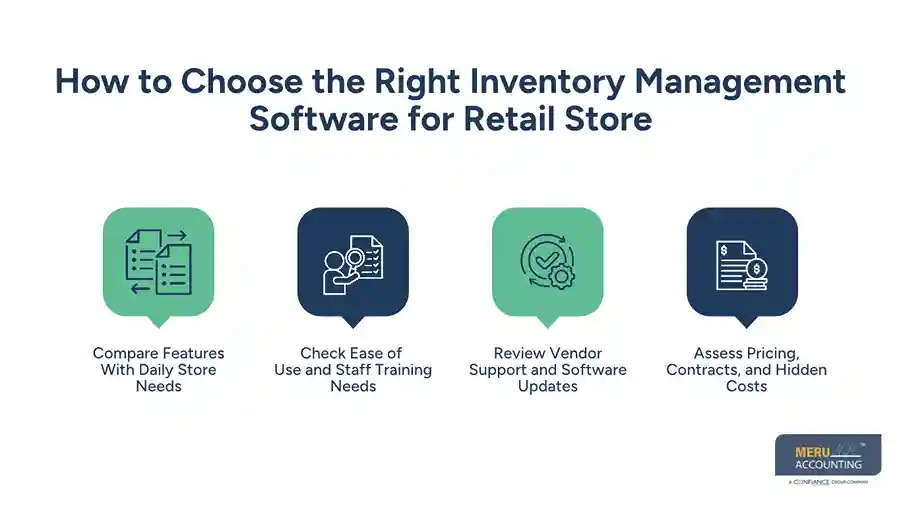
Review Vendor Support and Software Updates
Ask how the vendor deals with faults, data loss, and software updates. Check support hours, reply times, training guides, and how to export your data if you change tools later.
Assess Pricing, Contracts, and Hidden Costs
Read the contract for setup fees, renewal terms, user limits, and fees for reports or links. Ask for a full quote based on your store count and product volume before you buy.
Step-by-Step Setup Guide for a Retail Inventory Management System
Review Current Inventory and Stock Records
Count the goods on hand and check them against your current records. Note damaged goods, old stock, open orders, and goods in storage so the new system starts with sound data.
Clean Product Data and Assign SKUs
Remove duplicate records and fix errors in product names, prices, sizes, and units in your inventory management software for retail store use. Give each item or variant a unique SKU, then test a few records to make sure staff can find the right goods.
Set Up Suppliers and Purchase Rules
Add supplier names, order terms, lead times, and contact details. Set rules for who can place or approve orders, and note the usual order size for key items.
Configure Stock Alerts and Reorder Levels
Set a reorder point for each item based on sales and the time needed for new goods to arrive. If a shop sells four units a day and a supplier takes five days to ship, it may need at least 20 units to cover that wait, plus a safety buffer.
Connect POS, E-commerce, and Accounting Tools
Link the stock tool to your sales counter, website, and accounting software as needed. Test sales, refunds, and returns to check that each record goes to the right place and stock counts change as planned.
Import Stock Data and Test the System
Load the clean product list and opening stock count. Check sample items against real stock, test reports, and fix errors before staff use the tool for live sales.
Train Staff and Launch the Software
Show staff how to scan goods, log returns, receive orders, and report damaged items. Start with one store if you can, check early errors, and expand once key tasks work well.
How to Measure Retail Inventory Management Performance
Inventory Turnover Rate
Inventory turnover shows how often stock is sold and replaced over a set period. Divide the cost of goods sold by the average stock value for that period. Then check the result based on the type of goods you sell.
Stockout Rate and Overstock Levels
Track how often buyers cannot find an item and how much stock stays unsold. Frequent stockouts may point to poor order plans, while excess stock can tie up cash and raise storage costs.
Inventory Accuracy
Compare the stock count in your inventory management software for retail store use with the goods on the shelf. Any gap may point to missed scans, unlogged returns, theft, or errors when goods arrive.
Sell-Through Rate
Sell-through shows how much of the stock bought for sale has sold in a set period. If 100 units arrive and 70 sell, the rate is 70%, as long as both figures use the same time frame and stock basis.
Carrying Costs and Shrinkage
Carrying costs include storage, insurance, handling, and cash tied up in stock. Shrinkage is the gap between expected and actual stock due to loss, damage, theft, or record errors.
Best Practices for Managing Retail Inventory After Setup
Schedule Regular Stock Counts
Count high-value and fast-selling items more often than goods with low sales or low risk. Check each count against system records and find the cause of any gap before you change the numbers.
Review Sales Trends and Seasonal Demand
Check sales by week, month, and season to spot shifts in demand. Use past data as a guide, but also factor in local events, new goods, price changes, and supplier delays.
Maintain Supplier Records
Keep current records of costs, lead times, delivery dates, and order issues. Review supplier results from time to time so you can plan for delays and compare terms before large orders.
Audit Inventory Reports and User Access
Review stock changes, refunds, and manual edits to find errors or odd activity. Remove access that staff no longer need and keep regular data backups so the store can restore records after a fault.
How Meru Accounting Provides Retail Accounting Services
Stock data is useful only when it matches sales and accounts records. Meru Accounting provides accounting and bookkeeping services for retail firms. These cover sales, costs, supplier bills, and account records.
A retail inventory management system shows owners their stock levels, while sound accounts show the cost of goods sold, gross profit, and cash tied up in stock. Meru Accounting also provides accounts payable and receivable, payroll, and other accounting services for firms that need help with daily finance tasks.
Retail owners should check that stock values, returns, discounts, and supplier bills are logged in the right period. When stock and accounts do not match, check the cause before you change the financial reports.
Our Expert Perspective
The best tool is not always the one with the most features. Inventory management software for retail store use should fit daily tasks and give staff clear rules for each stock move. First, fix product data and stock counts, then add links and reports. A sound setup is more useful than a long list of features built on poor records.
Key Takeaways
- Choose inventory management software for retail store needs based on stock volume, store count, budget, and daily tasks.
- Check links with POS, online sales, and accounting tools before you buy.
- Clean product data and count stock before you load records.
- Set reorder points based on sales speed, supplier lead time, and safety stock.
- Track turnover, stockouts, stock accuracy, sell-through, and shrinkage.
- Check stock reports often and train staff to log each sale, return, and stock move.
- Choose a retail inventory management system that can grow with your store without extra costs you do not need.
FAQs
Key features include real-time stock tracking, barcode scans, SKU management, purchase orders, low-stock alerts, sales links, and stock reports.
Pick a system that fits your store size, product volume, budget, POS links, ease of use, and growth plans.
Stock tracking, low-stock alerts, and set reorder points warn staff when goods need to be ordered.
Yes, multi-store tracking and e-commerce links let retailers track stock across branches and online sales channels.
Setup means counting stock, cleaning product data, assigning SKUs, adding supplier details, setting reorder levels, linking sales tools, testing records, and training staff.
optional anymore
on running the business