A busy sales month can leave a WooCommerce store with more than just orders to process. Supplier bills, stock returns, payment fees, and new purchases all add to the work behind the scenes. Without proper WooCommerce inventory management, it can be hard to tell how much stock you have, what it cost, and how much your store actually earned.
Month-end close brings these records together. It helps you check stock counts, match sales with payments, review purchases, and confirm the value of unsold goods. In this guide, we’ll walk through each step so you can close your books with accurate inventory records and a clear picture of your store’s monthly performance.
What You Will Learn From This Blog
- How WooCommerce inventory records affect month-end accounting.
- Which sales, purchase, and stock records to gather before closing.
- How to complete a month-end inventory close step by step.
- How to work out ending stock value and cost of goods sold (COGS).
- Which common stock and accounting errors can affect your reports.
- When to seek expert help with WooCommerce inventory and accounting.
What Is WooCommerce Inventory Management and How Does It Affect Month-End Accounting?
WooCommerce inventory management is the process of tracking product stock, stock changes, and item availability in your online store. WooCommerce has built-in tools to track stock levels, set low-stock alerts, and manage product variations. You can also allow backorders and set stock rules for each product.
But stock tracking and financial accounting are not the same thing.
For example, when a customer buys a product, WooCommerce can reduce the stock count once the order reaches the right status. Your books must also record the sale, payment, sales tax, and cost of the item sold.
Each stock change can affect your books:
- Sales: Reduce stock and add sales income.
- Purchases: Add stock and raise the value of inventory.
- Returns: May add stock back and change the refund amount.
- Damaged goods: Reduce the value of stock you can no longer sell.
- Shipping costs: May add to the cost of goods when they relate to bringing stock to your store.
This is why you should not rely on WooCommerce stock counts alone to close your books. Your inventory records must agree with your accounting records.
optional anymore
on running the business
What Records Should You Gather Before Closing the Month?
Before you start your month-end close, gather the records that show what came in, what went out, and what you still own. Having these files ready can save time and help you spot missing entries.
Record | What to check |
WooCommerce sales report | Orders, sales totals, discounts, and tax |
Stock report | Opening stock, stock sold, and ending stock |
Supplier bills | Items bought, unit costs, and unpaid bills |
Purchase orders | Goods ordered and goods received |
Payment processor reports | Fees, refunds, and net payouts |
Return records | Refunded items and stock put back |
Stock adjustment logs | Damaged, lost, or missing goods |
Shipping bills | Freight and other costs tied to stock |
Bank statements | Deposits, fees, and other cash entries |
Also, check whether your store uses extra plugins for stock tracking, order sync, or warehouse control. Some tools keep their own records, so you may need to export data from more than one source.
How to Complete a Month-End Close for WooCommerce Inventory
A set process makes WooCommerce inventory management easier to review at the end of each month. Follow these steps to close your stock records and books.
Step 1: Review Stock Counts and Find Any Gaps
Start by pulling a stock report from WooCommerce. Check the quantity on hand for each product and variation. Then compare the report with a physical count or the latest count from your warehouse team.
Look for:
- Products with negative stock.
- Items that show as in stock but are sold out.
- Stock that has not moved for a long time.
- Differences between warehouse counts and WooCommerce records.
- Products with wrong SKU or variation details.
Do not change stock counts just to make the numbers match. Find the cause first. A missed order, delayed sync, or wrong stock entry may be the reason for the gap.
Step 2: Reconcile Sales With Payment Deposits
Next, compare WooCommerce sales with the reports from payment tools such as PayPal, Stripe, or other gateways.
Your sales total may not match the amount paid into your bank. Payment tools often deduct fees, refunds, and chargebacks before they send a payout.
For example, if your store makes $10,000 in sales and the payment fee is $300, the bank may show a deposit of $9,700. You should record the full sale and the fee as a separate cost.
Check that each payout is linked to the right sales period. Also, look for pending payments and failed transactions that may need review.
Step 3: Match Inventory Purchases With Supplier Bills
Review all stock purchases made during the month. Match each supplier bill with the goods you received and the amount you agreed to pay.
Check for:
- Missing supplier bills.
- Wrong item counts or unit costs.
- Goods received but not yet billed.
- Supplier credits and purchase discounts.
- Bills entered more than once.
If you receive goods in one month but get the bill in the next, make sure your books reflect the right period. Your accountant can help decide if an accrual or goods-received entry is needed.
Step 4: Calculate the Cost of Goods Sold
COGS is the direct cost of the goods your store sold during the month. It is a key part of your profit report.
Use your stock records and purchase data to work out the cost of items sold. Do not use the sales price as the cost. Use the cost of buying or making the goods, based on your chosen stock valuation method.
Review the COGS figure for large changes from past months. A sudden rise may point to wrong unit costs, missed stock entries, or a change in the product mix.
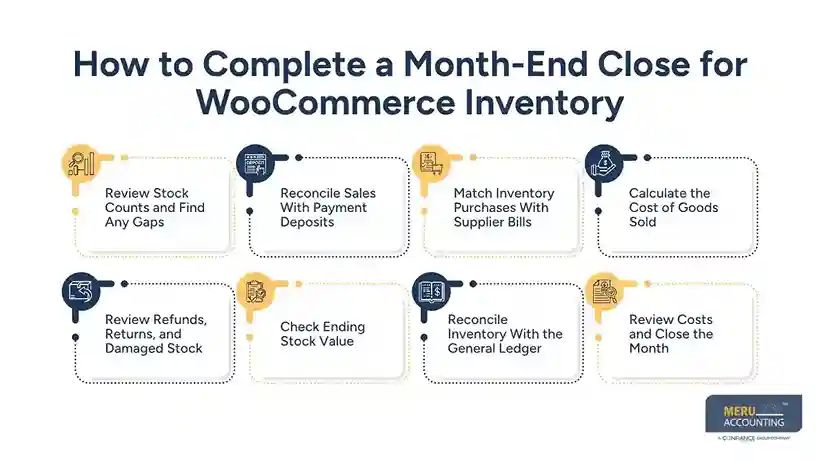
Step 5: Review Refunds, Returns, and Damaged Stock
A refund does not always mean the item can go back into sellable stock. Check each return to see if the item came back, passed review, and was added to stock.
For damaged, lost, or unsellable goods, record a stock adjustment. You may also need to write down the value of the item in your books.
Keep notes for each change. Record the item, quantity, reason, date, and value. This gives you a clear trail if you need to review the entry later.
Step 6: Check Ending Stock Value
Once you have reviewed all stock changes, work out the value of the goods left at month-end. Use the same stock valuation method from month to month unless there is a valid reason to change it.
Check that the total stock value agrees with your inventory records and the stock asset account in your books.
Step 7: Reconcile Inventory With the General Ledger
The general ledger holds the financial records for your business. Your inventory asset account should match the value of stock on hand at the end of the month, after all valid changes.
If the values do not match, review stock purchases, COGS, returns, write-offs, and manual journal entries. Do not post a balancing entry until you know why the gap exists.
Step 8: Review Costs and Close the Month
Last, review costs tied to stock, such as freight, storage, and handling. Check unpaid supplier bills and any stock-related costs that have not been entered yet.
Once all entries are checked, save your reports and close the period in your accounting system if you use period locks. This helps stop old entries from being changed without review.
How to Calculate Ending Inventory and Cost of Goods Sold for WooCommerce
Your ending stock value and COGS help show how much your store has tied up in stock and how much it spent on the goods sold.
The basic formula is:
COGS = Beginning Inventory + Purchases − Ending Inventory
For example, say your store has:
- Beginning inventory: $12,000
- Purchases during the month: $8,000
- Ending inventory: $5,000
Your COGS is:
$12,000 + $8,000 − $5,000 = $15,000
This means your store sold goods that cost $15,000 during the month.
Which Inventory Valuation Method Should You Use?
Two common methods are:
- FIFO (First In, First Out): Assumes the oldest stock is sold first. This can suit stores that sell goods with a short shelf life or older stock that needs to move first.
- Weighted Average Cost: Uses the average cost of items available for sale. This can work well when you sell many units of the same product at changing prices.
The right method depends on your stock type and accounting needs. Apply your chosen method in a steady way and ask your accountant to review any change.
Also, include costs that form part of getting stock ready for sale, where the rules allow it. These may include freight and import costs. Keep general selling costs, payment fees, and ad spend separate from inventory value.
Common Month-End Inventory Accounting Mistakes in WooCommerce Stores
Even with a sound WooCommerce inventory management process, small errors can affect your month-end reports. Watch for these common issues:
- Treating bank deposits as sales: Payment fees and refunds can make deposits lower than gross sales.
- Missing stock returns: A refund may be recorded, but the returned item may not be added back to stock.
- Ignoring damaged goods: Stock that cannot be sold should not stay at full value in your records.
- Recording all purchases as expenses: Goods held for sale are often recorded as inventory assets until sold.
- Missing stock held by a third party: Goods at a warehouse or fulfillment center may still belong to your business.
- Using old stock counts: A report pulled before all orders and returns are processed may not show the true month-end balance.
Fixing these errors as part of each close can help you keep clean books and avoid larger issues at year-end.
WooCommerce Inventory Management by Meru Accounting
Inventory records, sales data, supplier bills, and payment reports don’t always line up in an ecommerce business. The challenge is knowing which records need to be checked, how each stock movement affects the books, and what needs to be corrected before month-end. Meru Accounting helps WooCommerce businesses bring these records together through hands-on bookkeeping and inventory accounting support.
Our team can support your store with:
- Stock Reconciliation: Compare inventory reports with stock records and review quantity differences.
- Purchase and Cost Tracking: Review supplier bills, freight costs, and stock purchases to keep item costs up to date.
- COGS and Inventory Valuation: Calculate the cost of goods sold and review the value of unsold stock.
- Returns and Stock Adjustments: Account for refunds, damaged goods, write-offs, and returned items.
- Month-End Accounting: Reconcile sales, payment fees, purchases, and inventory accounts, then prepare monthly financial reports.
With experience in ecommerce accounting, we understand that a sales report alone cannot show the full financial picture of an online store. We look at how orders, payments, inventory, and costs connect so your books reflect actual business activity. Whether you need help with a few accounting tasks or want to outsource inventory management for your WooCommerce business, Meru Accounting can provide support based on your store’s needs.
Our Expert Insight
One issue WooCommerce store owners should watch for is how product bundles affect inventory and COGS. For example, if a gift set contains three products, selling one set should reduce the stock of all three items. If only the bundle SKU is tracked, the individual product counts may be overstated.
We recommend tracking the cost and stock of each item within a bundle, even when customers buy them as one product. This helps keep inventory records accurate and prevents COGS from being understated. The same check applies to product variations that share stock with individual items.
Key Takeaways
- WooCommerce stock counts do not replace full inventory accounting.
- Match sales, payouts, supplier bills, and stock records before closing the month.
- Check returns and damaged goods before you set ending stock value.
- Use a steady stock valuation method to work out COGS.
- Review the inventory asset account against your stock records.
- Get expert help when stock errors or a high order volume make month-end close hard to manage.
FAQs
Use the stock and product reports to review quantities on hand, low-stock items, and product sales. You may also need purchase, refund, and stock adjustment records to confirm the final inventory balance.
Review the order status, payment, and shipping date before recording the sale. An order paid for but not yet fulfilled may need different treatment based on your shipping terms and accounting method.
Inbound freight and costs required to bring goods to their current location may be part of inventory cost. Outbound shipping to customers is generally treated as a selling or fulfillment expense.
Stock held by a third-party logistics (3PL) provider may still belong to your business. Include it in inventory records, but reconcile warehouse reports with your own stock data to account for damaged, lost, shipped, and returned items.
Review the profit and loss statement, balance sheet, inventory valuation report, and cash flow statement. Pay close attention to COGS, inventory value, gross profit, and unpaid supplier bills to spot unusual changes.
optional anymore
on running the business