A buyer orders the last item in your online shop as a walk-in buyer picks it up in your store. Your stock sheet still shows one item, but the shelf is bare. Such errors can cost sales and trust. An inventory system for small businesses can help keep stock data in line with sales, buys, and returns.
Yet a clothes shop, an online seller, and a firm that makes desks have very different stock needs. Each needs a tool that fits its goods and workflow. The right inventory system for small businesses shows what is in stock, what to buy next, and how much cash sits in unsold goods. Real-time inventory tracking software can ease these tasks when it links with the tools a firm already uses.
What You Will Learn From This Blog
- How an inventory system for small businesses logs stock and daily changes.
- Which tools suit shops, online stores, and firms that make goods.
- How real-time inventory tracking software tracks stock across sales sites.
- How to check costs and avoid stock control errors.
What is an Inventory System for Small Business?
An inventory system for small business logs stock from the time goods reach a firm to the time they are sold or go into a new product. It gives owners one place to check stock, costs, orders, and stock levels.
Stock Records in One Place
Think of a shop that needs to check three sheets to find its phone case stock. A central tool keeps item names, codes, costs, and counts in one place. Staff can then find the right data with less effort.
Stock in and Stock out
Each sale, return, buy, and move can change stock levels. Real-time inventory tracking software logs these changes through linked tools. Staff must still log each move on time, and the tools must sync as planned.
Reorder Levels and Low Stock Alerts
A bakery that uses a set type of box cannot wait for the last box to run out. Low-stock alerts flag items that reach set limits. Buyers can then place orders before a lack of stock slows work.
Stock Costs and Business Records
Stock is cash tied up in goods, not just a count on a shelf. An inventory system for small business can track buy costs and link with book tools. This gives owners a sound base for stock value and cost of goods sold.
Reports for Better Stock Decisions
Sales reports can show why one item sells out each week while a new one sits for months. Owners can use these trends to set order sizes, cut dead stock, and plan for peak sales.
optional anymore
on running the business
Why Different Small Businesses Need Different Inventory Systems
A low price may tempt you to buy a tool that lacks key features. The right fit depends on how goods move from a vendor to a buyer or the work floor.
Retail Shops Need Quick Stock Checks
A clothes shop may sell one shirt in five sizes and four colours. Its stock tool must track each type and link till sales to stock data. This can cut errors at busy times.
E-commerce Firms Need Channel Sync
An online seller using an inventory system for small business may get orders from its own site, Amazon, and other sales sites at once. Real-time inventory tracking software can sync stock across linked sites. This can cut the risk of selling one item twice.
Manufacturers Need Material and Product Tracking
A firm that makes desks may have enough wood for ten desks but lack the screws to build them. A fit inventory system for small business makers should track raw goods, parts, work in progress, and end goods. This lets buyers spot gaps before work starts.
Wholesalers Need Bulk Stock Control
A wholesaler may buy goods in boxes but sell them as single units. The tool must track each unit type and stock at each site. It should also track lots or use-by dates when needed.
Service Firms Need Parts and Supplies
A repair firm may not sell spare parts on their own, but each job can use stock from its storeroom. An inventory system for small business should log the parts used and flag items that need to be bought again.
Key Features to Look for in an Inventory System for Small Business
A long list of tools does not mean a good fit. Choose an inventory system for small business that fixes your main stock issues and fits daily work.
Real-Time Stock Updates
Real-time inventory tracking software can update stock after a linked sale, buy, or move. Check how fast it updates, which sales sites it links to, and what it does if a sync fails.
Barcode and SKU Tracking
Barcodes speed up stock checks. SKUs give each item or type its own code. These tools make an inventory system for small businesses more useful when goods look alike, or staff must track many items.
Purchase Orders and Reorder Alerts
Buy order tools show what the firm has ordered and what the vendor has sent. Low-stock alerts flag items that need a new order. Past sales and vendor lead times help buyers choose how much to buy and when.
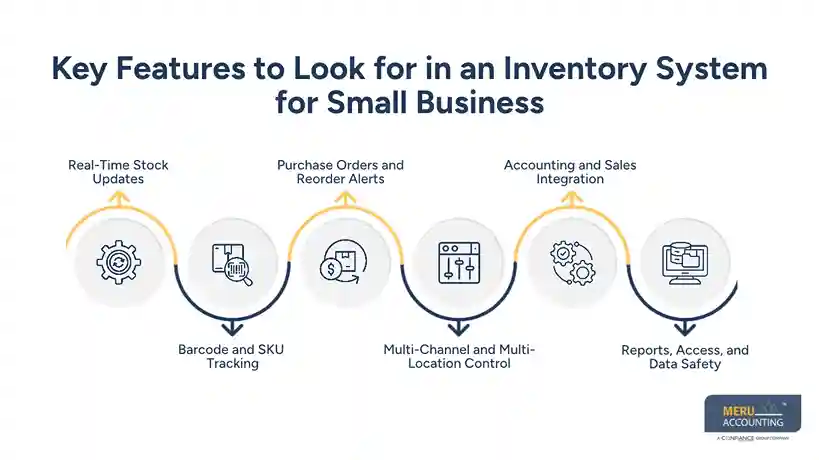
Multi-Channel and Multi-Location Control
An inventory system for small businesses with multi-site tools can track stock in a shop, storeroom, and online shop. Check if it tracks each site and syncs sales data without counting the same goods twice.
Accounting and Sales Integration
Stock data affects sales, buys, stock value, and profit. Pick a tool that links with your book tool. Check which data moves on its own and which needs manual entry.
Reports, Access, and Data Safety
Good reports show stock value, slow sales, sales trends, and low stock. Set staff access by role, check data backup tools, and make sure you can export your records if you change tools.
How to Choose the Right Inventory System for Retail, E-commerce, and Manufacturing Businesses
Start with the stock issue that costs you most. If you sell more goods than you have, check site sync first. If work stops due to a lack of parts, focus on raw stock and buy plans.
List Your Daily Stock Tasks
List how staff get goods, log sales, deal with returns, and count stock. This shows where an inventory system for small business can cut delays and which tasks it must do well.
Match Features to Your Business Type
Retail shops need an inventory system for small business that links to tills and tracks item types. Online sellers need site sync and order logs. Makers need bills of goods, raw stock logs, and tools to track each stage of work.
Test Real-Time Inventory Tracking Software
Test a sale, return, buy, and stock move to see how real-time inventory tracking software logs each change. Check the result against a real stock count. Also, see if staff can find and fix errors.
Check Ease of Use
Ask staff to add an item, log a new delivery, and fix a stock error. If these tasks take too long, staff may skip steps or enter the wrong data.
Review Growth and Supplier Needs
A tool that fits 100 items may not suit 5,000 items at many sites. Check user caps, order caps, store tools, and vendor lead-time tools before you pick a plan.
Run a Small Trial Before You Switch
Test the tool with a small set of goods before you move all stock data. Check item codes, start counts, buy costs, and reports. Fix any gaps before the full move.
How to Compare Inventory Software Costs and Pricing Models
A low monthly fee may look good until you need more users, sales sites, or paid setup. Check the full cost of use, not just the price on the vendor’s site.
Monthly or Annual Plans
Some firms charge a set fee each month or year. Others limit tools by plan. Check the users, items, orders, and sites in each inventory system for small business plan before you pick the lowest fee.
Per-User and Per-Order Fees
A fee per user can rise as your team grows. A fee per order can rise in peak sales months. Work out the likely cost for a full year to compare plans on fair terms.
Setup and Data Transfer Costs
Old sheets may have duplicate items, missing codes, or mixed unit types. Ask if the vendor charges for data moves, setup, staff training, or help to fix these records.
Integration and Add-On Charges
Barcode tools, sales site links, and extra reports may cost more. When you compare real-time inventory tracking software, add the cost of each link your firm needs to sync stock and sales data.
Cost of Errors and Lost Sales
Fees are only one part of the cost. Check the time spent on stock fixes, the value of goods that do not sell, and sales lost when an item shows as in stock but is not.
Check the Exit Terms
Before you sign a long plan, check if you can export stock data, item costs, and sales logs in a usable form. Clear exit terms make it easier to move to a new tool if your needs change.
Common Inventory Management Mistakes Small Businesses Should Avoid
Software cannot fix stock data that staff log late or rules that no one follows. Many stock issues start with gaps in daily work, not a lack of tools.
Relying on Old Stock Counts
A count from Monday may be wrong by Tuesday if staff fail to log sales, returns, and new goods. Use real-time inventory tracking software to keep data fresh. Also, count stock by hand to find gaps.
Setting Reorder Levels Without Sales Data
Buying ten extra units may seem safe, but slow sales can tie up cash in stock. Use past sales, peak seasons, and vendor lead times to set reorder levels in your inventory system for small businesses.
Ignoring Returns and Damaged Goods
A returned item may be broken or unfit for sale. Check its state before adding it back to stock. This keeps buyers from placing orders for goods that cannot ship.
Keeping Duplicate Item Records
One item listed under two names can split its stock count and sales data. Set clear SKU rules and check for duplicate records when staff add items or load new data.
Failing to Train Staff
One staff member may log a return as new stock, while another may not log it at all. Set one clear process for goods in, stock moves, returns, and error fixes.
Not Checking System Reports
Reports only help when staff review them and act on the data. Check slow sales, low stock, and odd changes in your inventory system for small businesses each week. Look into large gaps between system data and real stock counts.
How Meru Accounting Fits Into Your Inventory and Accounting Process
Stock data tells only part of the story. Buys, sales, and stock costs must also show up in the books. Meru Accounting provides bookkeeping and accounting services, accounts payable and receivable, payroll, financial reports, and virtual CFO services for firms that need clear books.
Keep Stock and Accounts in Line
Our accounting and bookkeeping services log business deals and keep books in order. Clear logs for stock buys, sales, returns, and changes make it easier to check stock costs and account balances.
Review Inventory Costs and Financial Reports
A full storeroom does not always mean a firm earns a profit. Meru Accounting provides financial reporting services that show owners their logged costs, bills, and business results. This gives them a sound base for stock plans.
Connect Software With Accounting Workflows
Firms that use QuickBooks, Xero, Zoho Books, NetSuite, or Odoo with an inventory system for small business should check how stock data moves into the books. Meru Accounting can review book tasks and flag gaps that may affect report accuracy.
Our Expert Perspective
An inventory system works best when staff log each stock move in the same way. We advise firms to test the tool with real sales, returns, and buy records before a full launch. Then, check stock gaps and book reports on set dates.
Meru Accounting provides book and report services that fit into the wider stock process. The right setup depends on the goods, the tools in use, and the level of control the firm needs.
Key Takeaways
- Pick an inventory system for small business based on your goods, sales sites, and daily stock tasks.
- Shops need quick stock checks, online sellers need site sync, and makers need raw stock and work logs.
- Real-time inventory tracking software can keep stock data fresh when linked tools and staff logs work well.
- Check setup fees, plan caps, links, training, and exit terms before you buy.
- Set clear stock rules, train staff, and count stock to find errors early.
- Link stock data with book records to check costs and prepare sound financial reports.
FAQs
The best inventory system for small business shops tracks item types, sales, returns, stock levels, and low-stock alerts in one place.
Online firms need stock tools that sync goods across web shops and sales sites to cut excess sales and order errors.
Real-time inventory tracking software updates stock logs as linked sales, buys, returns, and moves take place.
Small makers need an inventory system for small businesses that tracks raw goods, parts, work in progress, finished goods, and work needs.
Choose an inventory system for small businesses based on your goods, sales sites, stock levels, key tools, costs, and book links.
optional anymore
on running the business