Your first bookkeeping client may already have years of financial records, unpaid invoices, uncategorized transactions, and bank entries that don’t match. Your job is to bring order to those records and give the owner a clear view of the business finances. If you’re exploring how to become a virtual bookkeeper, it’s worth understanding what clients expect before you start looking for work.
The good news is that you don’t have to figure everything out at once. Start by learning the core bookkeeping tasks, then build your skills in QuickBooks and Xero. Both platforms are widely used by businesses, and knowing how they work can give you a better chance of landing your first client.
What You Will Learn From This Blog
- The key skills needed to work as a virtual bookkeeper.
- Whether you need a degree or a formal certification.
- How QuickBooks and Xero differ and which one to learn first.
- Ways to gain hands-on experience before taking paid work.
- Common mistakes to avoid when starting out.
- How to find clients and set a fair virtual bookkeeper hourly rate.
What Skills Do You Need to Become a Virtual Bookkeeper?
If you want to learn how to become a virtual bookkeeper, start with the skills that help you keep accurate books. You do not need to know every part of accounting on day one, but you must be able to handle key tasks with care.
Here are the main skills to build:
1. Basic Accounting Knowledge
Learn how debits and credits work, how to read a balance sheet, and how income and costs affect profit. You should also know the key parts of the chart of accounts and how to sort each entry.
2. Bank and Credit Card Reconciliation
Reconciliation means checking that the records in the books match the bank and card statements. You must be able to spot missing entries, double entries, and wrong amounts.
3. Accounts Payable and Receivable
You should know how to track bills due to vendors and payments due from clients. This also means keeping an eye on due dates and unpaid balances.
4. Financial Reports
Learn how to make and read the three key reports:
- Profit and Loss Statement: Shows income, costs, and net profit over a set time.
- Balance Sheet: Shows what a business owns and owes.
- Cash Flow Statement: Tracks cash coming in and going out.
5. Communication and Time Management
As a remote bookkeeper, you may work with clients in other time zones. You need to give clear updates, meet deadlines, ask for missing records, and keep client data safe.
optional anymore
on running the business
Do You Need a Degree or Certification to Become a Virtual Bookkeeper?
No. In most cases, you do not need a college degree to start a virtual bookkeeping career. Many bookkeepers learn through online courses, hands-on practice, and software training.
Still, good training can help you build trust with clients and avoid costly errors.
Learn the Basics First
Start with a course in basic accounting and bookkeeping. Learn how to record sales, track costs, match bank entries, and prepare monthly reports. Focus on real tasks rather than only reading theory.
Get a Bookkeeping Certification
A recognized course or certificate can help show that you have the skills to do the job. You can look at training from groups like the American Institute of Professional Bookkeepers (AIPB) and the National Association of Certified Public Bookkeepers (NACPB).
Check the course needs before you sign up, as some credentials may need work hours or an exam.
Learn QuickBooks and Xero
Both tools offer training and certification paths for bookkeepers. These can help you learn key features and show clients that you know how to use the software.
A certificate alone does not prove that you can manage a client’s books. You still need to know how to review entries, fix errors, and close the books each month.
QuickBooks vs. Xero: Which Should You Learn Before Taking Your First Client?
When learning how to become a virtual bookkeeper, choosing the right accounting tool is an important step. QuickBooks and Xero are both cloud-based tools that let you work with client records from any place with a secure internet link.
However, they have some key differences.
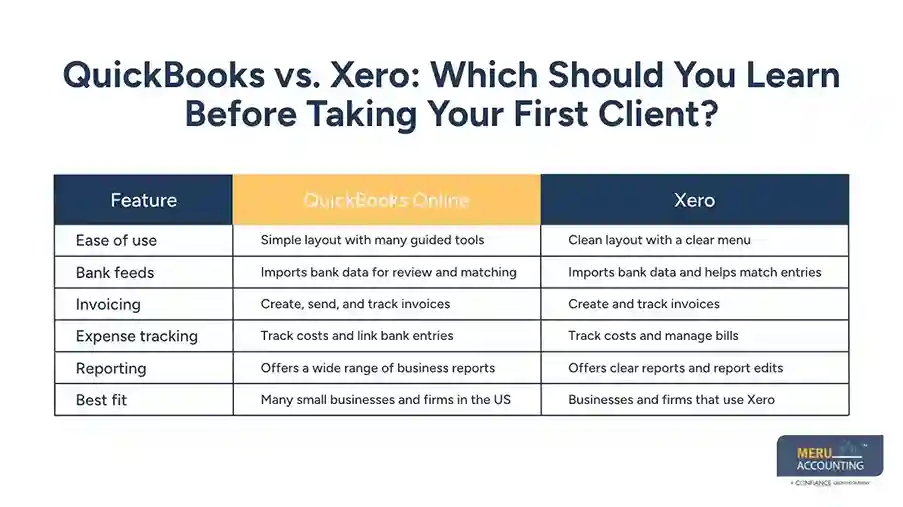
Feature | QuickBooks Online | Xero |
Ease of use | Simple layout with many guided tools | Clean layout with a clear menu |
Bank feeds | Imports bank data for review and matching | Imports bank data and helps match entries |
Invoicing | Create, send, and track invoices | Create and track invoices |
Expense tracking | Track costs and link bank entries | Track costs and manage bills |
Reporting | Offers a wide range of business reports | Offers clear reports and report edits |
Best fit | Many small businesses and firms in the US | Businesses and firms that use Xero |
Note: Features and plan limits can vary by country and subscription.
1. QuickBooks Online: What Should You Know?
QuickBooks Online is widely used by small businesses and accounting firms in the US. It offers tools for daily bookkeeping, bank matching, bill tracking, invoicing, and reports.
As a bookkeeper, you should learn how to:
- Set up a chart of accounts.
- Record sales and business costs.
- Match bank feed entries.
- Create and track invoices.
- Review bills and vendor payments.
- Run and check monthly reports.
It is a useful first choice if you plan to work with US small businesses or firms that already use QuickBooks.
2. Xero: What Should You Know?
Xero is another popular cloud accounting tool. It has a clean layout and offers features for bank matching, invoices, bills, and financial reports.
Learn how to:
- Set up a new business account.
- Add and sort bank transactions.
- Create invoices and record payments.
- Enter bills and track due dates.
- Reconcile bank accounts.
- Review profit and loss and balance sheet reports.
Xero can be a good fit if you plan to work with businesses or accounting firms that use it.
3. Which Software Should Beginners Learn First?
There is no single right answer. Your choice should depend on the type of clients you want to serve and the tools they use.
If you want to work with US small businesses, start with QuickBooks Online. If you plan to work with firms or clients that use Xero, learn Xero first.
If time allows, learn both. You do not need to master every feature at once. Start with daily entries, bank matching, bills, invoices, and reports. Then move on to month-end tasks and more complex work.
How to Become a Virtual Bookkeeper by Getting Hands-On Bookkeeping Experience
Knowing how to become a virtual bookkeeper is not enough if you have never worked with real books. Before you take a paid client, practice common tasks and learn how to check your own work.
Here are a few ways to gain useful experience.
1. Use Sample Company Accounts
Both QuickBooks and Xero offer ways to explore their tools and practice key tasks. Use sample data to learn how a business account works. Try to record sales, enter bills, and sort bank entries.
2. Practice Bank Reconciliation
Use sample bank statements and compare them with the entries in your books. Look for missing costs, duplicate payments, and entries with the wrong date or amount.
3. Build Sample Financial Reports
Create a profit and loss report and a balance sheet from sample records. Check that the figures make sense and that the reports match the entries in the books.
4. Learn Month-End Closing Tasks
Month-end work is a key part of bookkeeping. Practice checking bank accounts, reviewing unpaid bills, checking open invoices, and fixing errors before you prepare reports.
5. Build a Small Portfolio
Keep a few sample reports and task records that show what you can do. Do not use real client data without their consent. A clean sample portfolio can help you show your skills when you apply for work.
Common Mistakes to Avoid When Starting a Virtual Bookkeeping Career
New bookkeepers may know how to enter data but still make errors when they start working with clients. Avoid these common mistakes:
- Taking clients before you are ready: Practice key tasks before you offer paid services.
- Learning only one software tool: Learn the tool your target clients use, but stay open to other platforms.
- Ignoring bank reconciliation: Do not assume imported bank entries are correct. Check each match.
- Offering too many services at first: Start with tasks you can handle well, then add more as your skills grow.
- Setting very low rates: Your fees should reflect the time, skill, and care needed to keep clean books.
- Poor client communication: Set clear rules for records, updates, and work deadlines.
- Ignoring data safety: Use strong passwords, secure file sharing, and the right level of account access.
Start Your Virtual Bookkeeping Career With Meru Accounting
A bookkeeping job can involve much more than recording transactions. One client may need help with overdue invoices and vendor bills, while another may need months of unreconciled bank records cleaned up before financial reports can be prepared. Handling these different needs takes practical knowledge and a good grasp of accounting workflows.
At Meru Accounting, we support businesses and accounting firms with outsourced bookkeeping and accounting services. Our teams handle a range of tasks, including:
- Daily Bookkeeping: Recording income, expenses, sales, and business transactions.
- Bank and Credit Card Reconciliation: Matching account activity with recorded entries and resolving differences.
- Accounts Payable and Receivable: Managing vendor bills, customer invoices, payment records, and outstanding balances.
- Cleanup and Catch-Up Bookkeeping: Reviewing past records, correcting errors, and bringing overdue books up to date.
- Monthly Bookkeeping and Reporting: Maintaining financial records and preparing reports for business owners.
- Payroll Support: Helping manage payroll records and related accounting entries.
Our experience across multiple industries gives us insight into the different ways businesses manage their books and financial records. We also work with cloud accounting platforms, including QuickBooks and Xero, to support different client requirements.
If you’re developing your bookkeeping skills and want to apply them in a professional work environment, consider joining Meru Accounting. You can become part of a team that handles real bookkeeping workflows, works across different business needs, and helps clients maintain accurate financial records.
Explore career opportunities with Meru Accounting and put your bookkeeping skills to work.
Our Expert Insight
One thing beginners often overlook is that every business has its own bookkeeping setup. Two clients using QuickBooks may have very different charts of accounts, invoice workflows, payment terms, and reporting needs. The same applies to Xero.
Before taking over an account, review how the client records sales, tracks expenses, handles bank transactions, and closes each month. Check whether opening balances agree with prior financial records, whether bank and credit card accounts are reconciled, and whether unpaid invoices and bills are up to date. These checks help you spot existing issues before they affect your work.
Our advice is to learn the accounting process behind each software feature, not just where to click. A bookkeeper who understands why an entry is recorded in a certain way can adapt to different clients, spot unusual activity, and maintain more reliable financial records. That’s the skill that makes you ready to work independently.
Key Takeaways
- You do not always need a degree to become a virtual bookkeeper, but you do need sound bookkeeping skills.
- Learn bank reconciliation, bill tracking, invoicing, and financial reports.
- QuickBooks Online is a useful first choice for many US small business clients.
- Xero is also worth learning if your target clients use it.
- Practice with sample accounts before taking paid work.
- Set clear fees, protect client data, and keep up with client updates.
- Team experience can help you build skills and learn proper review steps.
FAQs
You generally don’t need a college degree. Basic accounting knowledge, bookkeeping training, and practical skills in tools like QuickBooks or Xero can help you get started.
Yes. Many employers and clients value practical bookkeeping skills and software knowledge over formal certification. However, a recognized certificate can help strengthen your profile.
Build a portfolio with sample bookkeeping work, create a professional LinkedIn profile, and look for opportunities on freelance platforms. You can also approach small businesses and CPA firms that need bookkeeping support.
A beginner serving US clients may start around 15–25 per hour. Virtual bookkeeper hourly rate should depend on skills, work scope, client needs, and level of experience.
- Is QuickBooks certification enough to get bookkeeping clients?
QuickBooks certification can help show your software knowledge, but it does not prove that you can manage a client’s books independently. You also need practical skills in reconciliation, transaction review, and financial reporting.
optional anymore
on running the business