QuickBooks manufacturing inventory errors can raise costs, delay orders, and leave a factory short of key parts when a job is due. A wrong stock count may seem small, but it can lead to missed sales, extra buys, and poor cost reports. With the right setup, QuickBooks manufacturing records can give owners a clear view of raw goods, work in progress, and finished stock. Effective controls also make it easier to spot errors before they affect cash flow or profit.
Manufacturers need more than a list of items and their prices. They need clear rules for stock entry, material use, waste, job costs, and stock counts. QuickBooks for manufacturing businesses can bring many of these records into one place, depending on the version and tools in use. The key is to set sound rules, check the data often, and match financial records with the goods on hand.
What You Will Learn From This Blog
- Why stock control matters for cost, cash flow, and order dates.
- Which stock risks can lead to loss or wrong reports.
- How QuickBooks manufacturing records can make stock checks more clear.
- How to set up item lists and bills of materials with care.
- How manufacturing cost accounting in QuickBooks tracks material, labor, and factory costs.
- When expert review may be needed to fix gaps in stock and cost records.
Why Inventory Control Matters in QuickBooks Manufacturing
Keep Stock Records Close to Actual Stock
A clear stock record shows what a plant owns, where it is kept, and how much is ready for use. QuickBooks manufacturing data must match stock on shelves, in bins, and on the shop floor to give a true view of supply.
Avoid Extra Purchases
When staff cannot trust stock counts, they may order parts that are already in the plant. QuickBooks manufacturing records can show items on hand and items due in, so buyers can check need before placing a new order.
Set the Right Sale Price
A sale price must cover the cost of the goods, labor, and a fair share of factory costs. Manufacturing cost reports in QuickBooks give managers a basis for checking unit cost and reviewing prices when material or labor rates change.
Meet Order Dates
A shortage of one low-cost part can stop a full batch. Stock alerts, clear reorder levels, and timely entries in QuickBooks inventory records can flag a gap before it delays a customer order.
Keep Reports Fit for Review
Owners need stock values they can explain and trace to source records. Regular checks of manufacturing financial reports against count sheets, bills, and work orders can reveal errors before month-end close.
optional anymore
on running the business
Common Inventory Risks That Affect Manufacturing Businesses
Wrong Item Counts
Staff may miss a receipt, record the same bill twice, or issue more parts than a job needs. These errors make the stock list wrong and can lead to needless orders or missed production dates.
Poor Bills of Materials
A bill of materials lists the parts and amounts needed to make a product. If the list is old or wrong, QuickBooks manufacturing cost records may show too much or too little material for each unit.
Untracked Waste and Scrap
Cutting, testing, damage, and failed units can all use stock without adding saleable goods. If teams do not record scrap, the gap between inventory records and actual stock grows over time.
Weak Access Rules
When all users can change item costs, stock levels, and past entries, errors may go unnoticed. Each worker should have access that fits their role, while changes to key records should be reviewed.
Wrong Cost Allocation
A plant may charge all factory costs to one product or leave out labor and overhead. QuickBooks Manufacturing Cost Accounting needs clear cost rules so product costs do not give owners a false view of profit.
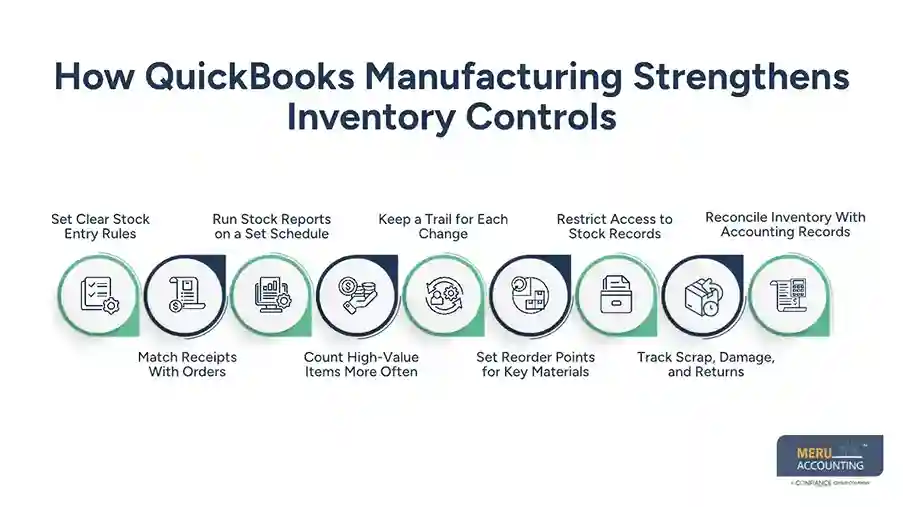
How QuickBooks Manufacturing Strengthens Inventory Controls
Set Clear Stock Entry Rules
Each receipt, issue, return, and adjustment should have a source record and a named owner. QuickBooks manufacturing entries are more useful when staff follow the same steps for each stock move.
Match Receipts With Orders
Before stock is added, staff should check the supplier bill or receipt against the purchase order and goods received. This check can catch short deliveries, wrong parts, and price gaps before payment.
Run Stock Reports on a Set Schedule
Review low-stock items, stock value, and items with unusual changes each week or month. Inventory reports in QuickBooks can flag records that need a closer look, but staff must check the cause before updating the accounting records.
Count High-Value Items More Often
A full stock count may take time, so plants can count costly or fast-moving parts more often than low-risk items. Compare each count with the recorded inventory balance and document the reason for each approved adjustment.
Keep a Trail for Each Change
Stock adjustments should state what changed, why it changed, who approved it, and which count or source record backs it. This trail makes it easier to review errors and trace loss to its cause.
Set Reorder Points for Key Materials
Set minimum stock levels for parts that are vital to daily production, based on past use and supplier lead times. Review QuickBooks manufacturing inventory records often to spot items that may run short before the next delivery arrives.
Restrict Access to Stock Records
Give staff access based on their job roles, and limit who can change item costs, stock counts, or past entries. Review key changes to reduce the risk of errors and unapproved adjustments.
Track Scrap, Damage, and Returns
Record damaged goods, production scrap, and returned materials as soon as they occur. Clear entries keep QuickBooks manufacturing stock records close to actual quantities and show where material loss needs review.
Reconcile Inventory With Accounting Records
Compare physical stock counts and inventory reports with the related general ledger balances at month-end. Investigate differences, check source documents, and approve corrections before finalizing the accounts.
Set Up Inventory Tracking and Bills of Materials Correctly
Use One Clear Item Code
Give each raw material, part, and finished good a unique code and a clear name. Avoid duplicate names for the same item, as they can split stock across two records in QuickBooks manufacturing.
Set Units of Measure With Care
A factory may buy steel by the sheet but use it by the cut piece, or buy liquid by the drum but use it by the litre. Set units and conversion rules in a way that matches the actual process, and test them before use.
Build Bills of Materials From Real Data
List each part and the amount needed for one finished unit, based on the current design or recipe. For example, a desk may need one top, four legs, eight screws, and a set amount of glue.
Review Changes Before They Go Live
When a design changes, update the bill of materials only after the right person approves it. Keep a record of the change date so staff can explain why older and newer batches used different parts.
Test the Full Stock Flow
Run a sample from purchase to receipt, material use, finished goods, and sale before rolling out new settings. Check that QuickBooks manufacturing records show the right quantities and values at each step.
Use QuickBooks Manufacturing Cost Accounting to Improve Cost Accuracy
Record Direct Material Costs
Direct material cost covers the parts and raw goods used to make a product. QuickBooks Manufacturing Cost Accounting needs current purchase prices and sound records of material issued to each job or batch.
Track Direct Labor Costs
Record the time spent on each job where the system and workflow allow it. Apply the right pay rate to those hours, and keep overtime or idle time clear so the cost report does not hide waste.
Assign Factory Overhead Fairly
Rent, power, repairs, and equipment costs may not link to one product on their own. Set a fair method, such as machine hours, for sharing these costs across jobs, and review the method when the plant changes.
Compare Planned and Actual Costs
If a product should use $18 in material but the actual cost is $22, find out why. QuickBooks Manufacturing Cost Accounting can inform this check when planned costs and actual costs are tracked on a consistent basis.
Check Stock Value at Month-End
Review the closing stock value, open work orders, and any goods that are partly made. Confirm that the accounting method and system setup fit the business and applicable reporting rules before closing the period.
Meru Accounting’s Services for Manufacturing Inventory Management
Review Stock and Cost Records
Meru Accounting provides accounting and bookkeeping services for manufacturers that need clear stock values and sound cost records. Our team can review item lists, stock entries, and account balances to find gaps that need action.
Set Up Better Review Steps
We can help set review rules for receipts, stock changes, supplier bills, and month-end checks. These steps give staff a clear process to follow and create a record for each key change.
Check Product Cost Reports
Our team can review material, labor, and overhead records to see whether product costs reflect the chosen method. QuickBooks Manufacturing Cost Accounting reviews can also flag cost gaps that need input from plant managers or other experts.
Prepare Clear Month-End Reports
We provide financial reporting and bookkeeping services that give owners a clearer view of stock value, cost trends, and open balances. Clear reports make it easier to ask the right questions before making buying or pricing decisions.
Match the Process to Your Business
Every plant has its own mix of parts, jobs, staff, and software. Meru Accounting can review the current process and set out practical steps that fit the business, its records, and the QuickBooks version in use.
Our Expert Perspective
Inventory control works best when the plant floor and finance team follow the same rules. A stock count alone will not fix a weak process if staff keep missing receipts or fail to record scrap. QuickBooks manufacturing records are only as sound as the data entered into them.
In practice, one useful step is to trace a single product from purchase to sale. Check the supplier bill, stock receipt, material issue, labor record, finished unit, and final cost. This review can reveal where quantities or costs stop matching. Fixing that gap first is often more useful than adding more reports.
Key Takeaways
- Keep QuickBooks manufacturing records in line with actual stock.
- Use unique item codes and accurate bills of materials.
- Record all receipts, issues, returns, scrap, and stock changes.
- Review high-value stock and unusual changes on a set schedule.
- Use QuickBooks Manufacturing Cost Accounting to check material, labor, and overhead costs.
- Compare planned costs with actual results and act on clear gaps.
- Set user access rules and keep proof for each stock change.
- Seek expert review when stock values or product costs do not match.
FAQs
QuickBooks manufacturing can reduce inventory risks through accurate stock records, regular stock counts, clear item codes, and timely updates for material use and finished goods.
Manufacturers can track raw materials and finished goods through inventory records, purchase entries, stock adjustments, and suitable manufacturing tools linked to their QuickBooks setup.
QuickBooks Manufacturing Cost Accounting tracks material, labor, and factory overhead costs to give manufacturers a clearer view of production costs and product profit margins.
Manufacturers should check stock receipts against purchase orders, review bills of materials, record scrap, limit access to stock data, and compare book balances with physical counts.
Manufacturers can find inventory errors by reviewing stock adjustments, checking unusual quantity changes, matching supplier bills with receipts, and reconciling inventory reports with physical stock counts.
optional anymore
on running the business