Two contractors can take on projects of the same size and still end up with very different profits. One keeps a close eye on labor hours, material orders, and job expenses. The other finds out too late that small cost changes have added up to a major loss. The difference often comes down to how well they track each job. Sage construction management gives contractors the tools to keep project costs, budgets, and financial records in view.
Rather than relying on scattered spreadsheets and end-of-month reports, contractors can use Sage to follow job costs as work moves ahead. This makes it easier to see which jobs are making money, where costs are rising, and what needs attention before the final bill comes due.
What You Will Learn From This Blog
- How Sage helps track jobs, budgets, and costs.
- Which key features can help contractors manage work.
- How to spot cost overruns and keep job costs in check.
- Ways to use project data to improve cost control.
- Common setup and data issues to watch for.
- How outsourced accounting can support Sage-based workflows.
What Is Sage Construction Management and How Does It Work?
Sage offers software tools for the construction trade. These tools help contractors manage key tasks such as job costing, project records, billing, payroll, and financial reports. The exact tools and features depend on the Sage product and plan a firm uses.
Sage construction management links job data with finance tasks. This helps teams see how much a job was set to cost, how much they have spent, and what costs may still come up. Rather than keep data in separate files, firms can use a shared system to track key job details.
For example, a contractor may set a budget for labor, tools, and raw goods before work starts. As bills, time sheets, and other costs come in, the team can post them to the right job and cost code. Managers can then check the budget against the actual cost and act if a cost starts to rise.
This process works best when each team knows what data to enter and when to review it. Project leads need to share job updates, field teams must log hours, and bookkeepers must post bills to the right jobs. Good data is key to sound cost control.
optional anymore
on running the business
Key Features of Sage Construction Management for Contractors
The right tools can help contractors keep job data in one place and make it easier to track costs. Key features may vary by Sage product, but these are some of the main areas to assess.
1. Job Costing and Budget Tracking
Job costing lets firms track costs by job, task, or cost code. Contractors can split a budget into labor, goods, tools, and sub costs. They can then compare the planned cost with the actual cost as work moves ahead.
This helps teams see which part of a job is over budget. It also gives them a better view of the cost to finish the work.
2. Project and Job Tracking
Project tracking helps teams keep key job details in order. These may include job status, work dates, task updates, and key files. When teams use Sage construction management to track job data, they can review project status with less need to chase updates across emails and sheets.
3. Accounts Payable and Receivable
Accounts payable (A/P) helps track bills owed to vendors and subs. Accounts receivable (A/R) helps track what clients owe the firm. Both are key to cash flow.
A clear view of due bills and open client bills helps firms plan cash needs and avoid late fees. It also helps them follow up on late payments.
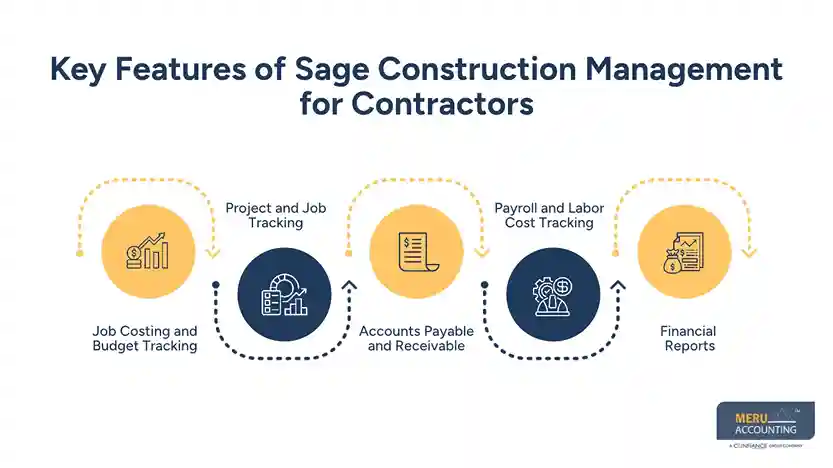
4. Payroll and Labor Cost Tracking
Labor is a major cost on many jobs. Payroll tools and time entry can help firms track hours by job, task, and worker. This makes it easier to review labor costs and check if the job is using more hours than planned.
5. Financial Reports
Reports help owners and project leads review job costs, income, cash flow, and profit. With Sage construction management, teams can use these reports to spot cost gaps and review job results. The value of each report depends on how well the team keeps the data up to date.
How Sage Construction Management Helps Contractors Control Project Costs
Keeping a job on budget takes more than a good estimate. Contractors must track each cost as it comes in and compare it with the plan. Sage construction management can help make this process clearer and give managers better data to act on.
1. Track Actual Costs Against the Project Budget
A job budget sets the cost limit for each part of the work. But costs can change as the job moves ahead. Material rates may rise, more labor hours may be needed, or a sub may charge for extra work.
By posting costs to the right job and cost code, contractors can compare actual costs with the budget. This helps them see where they stand and which cost areas need a closer look.
For example, if a job has a $40,000 labor budget but has used $25,000 before the halfway point, the team should review the hours left and the work still to be done.
2. Spot Cost Overruns Early
Late cost reviews can leave little room to fix a problem. A cost report that is checked each week can help managers spot issues while there is still time to act.
Sage construction management can help teams review budget gaps and track costs as bills and time records are posted. Managers can then check why a cost is high and decide what to do next.
The key is to review more than the total cost. A job may be within its total budget while one task is far over its own limit. A cost-by-code view can help show this gap.
3. Keep Labor Costs in Check
Labor costs can rise when work takes longer than planned. Poor crew planning, rework, missed time entries, and delays can all add to the cost of a job.
Contractors should track hours by job and task, then compare them with the labor budget. If a crew uses more hours than planned, the project lead can check the cause.
For example, a team may find that work is taking longer due to a late material order. The lead can then review the work plan and crew needs before the delay adds more cost.
4. Keep Material and Subcontractor Costs Under Control
Material prices can change between the bid and the time of purchase. Extra orders, waste, and poor stock checks can also raise costs. Subcontractor bills may add to the gap if the scope of work is not clear.
A sound cost review process should link each bill and purchase to the right job. It should also match sub bills with the agreed scope and any approved change orders.
Sage construction management can help teams keep these records in one system, based on the tools in use. This gives managers a better way to review job costs and check if they match the work done.
5. Improve Cash Flow Planning
A job can show a profit on paper and still face cash flow issues. This can happen when client payments are late, vendor bills fall due, or retainage holds back part of the cash.
Contractors should track open bills, due dates, client payments, and retainage for each job. They should also check that progress bills match the work done and the terms in the contract.
With Sage construction management, teams can use job and finance data to plan cash needs and track what is due. This can help them avoid cash gaps that slow down work or strain vendor ties.
Using Sage Construction Business Software to Improve Project Management
Cost control and project control go hand in hand. When teams have clear job data, they can plan work, track progress, and act on issues with less delay.
Sage construction business software can support this work by linking project records with cost and finance data. Here are some ways contractors can use it in their daily work.
Keep Project Data in One Place
A job may have bids, plans, bills, time sheets, change orders, and client records. If these files sit in many places, teams may use old data or miss key updates.
A shared record system can help staff find the latest job details. It also helps office and field teams work from the same set of records.
Track Job Dates and Milestones
A clear work plan helps teams know what is due and when. Project leads should track key dates, work stages, and open tasks. They should also flag delays that may affect the next stage of work.
The project tools in a Sage setup can help teams keep job status and key records up to date. Managers can then review open tasks and check if work is moving as planned.
Improve Field and Office Coordination
Field teams know what is happening on the job site. Office teams handle bills, payroll, client bills, and reports. Both sides need to share data on time.
For example, if a field lead logs extra hours but does not link them to the right job, the cost report may not show the true labor cost. A clear process for time entry and review can help prevent this gap.
Review Project Results
At set points during a job, managers should review the budget, actual costs, work done, and cost to finish. This helps them see if the job is on track.
Sage construction business software can help bring key records and reports together, based on the product and setup. But teams must still check the data and act on what the reports show.
Common Challenges Contractors May Face When Using Sage Construction Management
Sage can help bring job and finance data into a clear process, but it does not fix poor data or weak work habits on its own. Contractors should watch for these common issues.
1. Wrong Job Codes
If staff post bills, hours, or other costs to the wrong job code, reports may show a false view of job costs. Firms should set clear cost codes and train staff on how to use them.
2. Late Data Entry
Late bills and time sheets can make a job look less costly than it is. Set a daily or weekly cut-off for data entry and review open items before closing each month.
3. Poor Budget Setup
A budget with broad cost groups may hide the cause of a cost gap. Split the budget into useful groups, such as labor, materials, tools, and subcontractors.
4. Lack of Staff Training
If staff do not know how to use the system, they may skip steps or keep side records in sheets. Give each team role-based training and write down key steps for daily use.
5. Reports That Are Not Reviewed
Even good reports have little value if no one checks them. Set a weekly cost review with the project lead and bookkeeper. Track open issues, name who will fix them, and set a due date.
How Outsourced Construction Accounting Can Complement Sage Construction Management
Construction software can help track job costs and financial data, but firms still need people to review records, post costs, and close their books. This is where outsourced construction accounting can help.
An outsourced accounting team can work with a contractor’s Sage-based process and help keep financial records up to date. This gives owners and project leads more time to focus on bids, crews, clients, and job delivery.
Some key areas where accounting support can help include:
- Job cost tracking: Review labor, material, and sub costs and post them to the right jobs.
- Accounts payable: Process vendor bills, check due dates, and keep payment records in order.
- Accounts receivable: Send client bills, track open balances, and follow up on late payments.
- Payroll support: Review time records and help keep labor costs linked to the right jobs.
- Financial reporting: Prepare job cost reports, profit and loss reports, and other key records.
- Month-end close: Reconcile accounts, review open items, and keep books ready for review.
When these tasks are done on time, Sage construction management can give contractors a more useful view of job costs and cash flow. The goal is not just to keep books up to date, but to give owners sound data for better business choices.
Meru Accounting’s Sage Construction Management Services
A job cost report is only useful when the numbers behind it are accurate. Missing labor entries, misposted vendor bills, or unrecorded project expenses can give contractors the wrong idea about their margins. Meru Accounting helps construction businesses maintain accurate financial records and get a clearer picture of where each project stands.
- Job Costing and Project Expenses: Track labor, materials, equipment, and subcontractor costs against project budgets.
- Vendor Bills and Client Payments: Manage accounts payable, accounts receivable, invoice records, and payment follow-ups.
- Construction Payroll: Maintain payroll records and allocate labor costs to the right jobs.
- Financial Reporting: Prepare job cost reports, profit and loss statements, and monthly financial reports.
- Reconciliation and Bookkeeping: Reconcile bank accounts, review transactions, and keep project records up to date.
- Cleanup and Catch-Up Accounting: Correct past entries, clear backlogs, and bring financial records up to date.
Whether you need help reviewing job costs or ongoing accounting support alongside your Sage workflows, Meru provides trained accounting professionals and a quality review process to help keep your financial data reliable.
Our Expert Insight
A construction firm’s profit can vary from one job to another, even when both projects bring in similar revenue. One reason is poor overhead allocation. Costs such as office salaries, insurance, software, rent, and equipment upkeep may not be tied to a single job, but they still affect the firm’s bottom line.
Our advice is to review both job-level gross profit and overall operating expenses before judging project performance. Contractors should also use consistent cost allocation methods so they don’t overstate the profit on one job or understate it on another.
A clear split between direct job costs and business overhead gives owners a more realistic view of project margins and helps them price future bids with greater confidence.
Key Takeaways
- Sage construction management helps contractors track jobs, budgets, and financial data.
- Job costing lets teams compare planned costs with actual spending.
- Regular reviews can help spot cost overruns before they grow.
- Labor, material, and subcontractor costs need clear tracking.
- Sage construction business software can support project and finance tasks, based on the product and setup.
- Staff training and timely data entry are key to sound reports.
- Outsourced accounting can help keep books, job costs, and reports up to date.
FAQs
Sage 100 Contractor and Sage 300 Construction and Real Estate are options worth evaluating. The right choice depends on project size, accounting needs, reporting needs, and business complexity.
Yes. Depending on the product and setup, Sage can help contractors manage multiple jobs, track project finances, review job costs, and monitor performance across projects.
Yes. Sage construction products offer job costing tools that help allocate expenses to specific jobs and cost codes. Contractors can use this data to review budgets, labor costs, and project margins.
Sage construction solutions can support financial tracking of contract changes, depending on the product. Contractors should maintain clear records of approved changes, revised contract values, and related costs to avoid billing and budget gaps.
Yes. An outsourced accounting team can help maintain Sage records, reconcile accounts, process vendor bills, manage client invoices, and prepare financial reports. This can help contractors keep their books current without hiring a full in-house accounting team.
optional anymore
on running the business