Construction financial management software gives contractors a way to track project budgets, job costs, customer payments, supplier bills, and financial performance.
Unlike businesses with regular monthly sales, construction companies often receive payments in stages while paying for labor, materials, equipment, and subcontractors throughout a project. This difference can create cash shortages even when a project is expected to earn a profit.
For example, a contractor may complete 60% of a building project but receive only 40% of the agreed payment. At the same time, wages, material bills, and equipment costs remain due.
Construction financial management software records these transactions, tracks unpaid amounts, and compares actual spending with approved budgets. This gives owners and finance teams better information when planning payments and reviewing project results.
What You Will Learn From This Blog
- How construction financial management software manages project budgets and job costs.
- Which software tools offer features for construction accounting and financial reporting.
- How to compare estimated costs with actual project expenses.
- How to forecast cash flow using progress billing and payment schedules.
- How to read construction financial statements and measure project profitability.
- What to check before selecting a financial management system.
Construction Financial Management Software: Understanding its Role in Construction Businesses
Construction financial management software connects project transactions with the company’s accounting records. Construction accounting solutions allow each expense to be assigned to a project, phase, and cost code, such as concrete, electrical work, labor, or equipment rental.
For example, when a contractor receives a $12,000 concrete supplier invoice, the finance team can record it against the relevant project and cost code. The amount then becomes part of the project’s actual cost and accounts payable balance. Construction accounting solutions also allow managers to review approved purchase orders, unpaid invoices, customer receipts, and project budgets without relying on separate spreadsheets.
Essential Features of Construction Financial Management Software
Project Budgeting and Cost Estimation
Contractors prepare budgets using expected labor hours, material quantities, equipment charges, and subcontractor quotes. The system assigns these estimates to cost codes, creating a planned spending limit for each project activity. Managers can then review whether the original estimate still matches the work being done.
Job Cost Tracking and Expense Management
Job costing records every expense against the project that created it. For instance, 120 electrician hours, a $4,000 wire purchase, and an equipment rental charge can be recorded under the electrical work cost code. Construction financial management software then shows the total cost of that activity.
Cash Flow Forecasting and Management
Cash flow tools compare expected customer receipts with upcoming payments. Finance teams can enter invoice due dates, payroll dates, supplier bills, and loan payments to estimate future cash balances. This is useful when several projects require large payments during the same week.
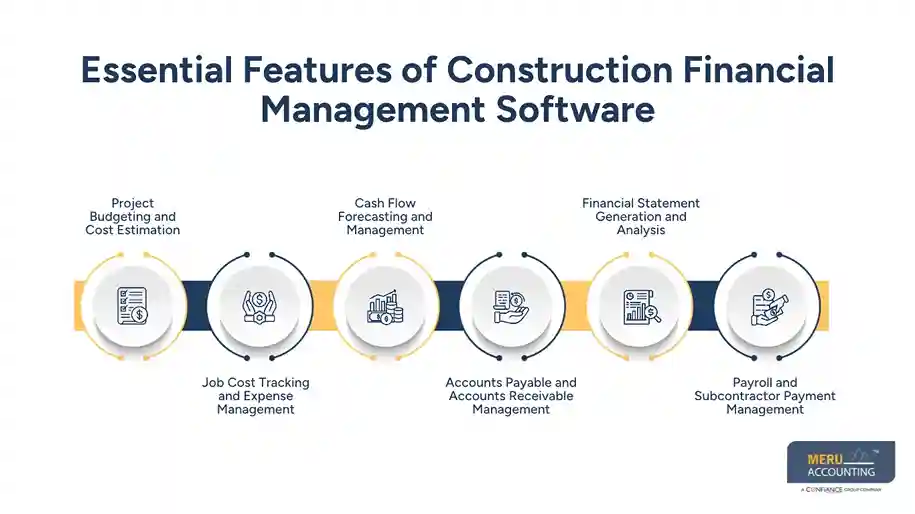
Accounts Payable and Accounts Receivable Management
Accounts payable records supplier and subcontractor bills, while accounts receivable tracks customer invoices. A finance team can review which bills are due this week and which customer invoices remain unpaid. This reduces the risk of missing payment dates or overlooking overdue balances.
Financial Statement Generation and Analysis
The system prepares income statements, balance sheets, and cash flow statements from recorded transactions. Managers can review project revenue, direct costs, operating expenses, outstanding liabilities, and available cash. Some construction systems also provide work-in-progress reports for contract performance reviews.
Payroll and Subcontractor Payment Management
Construction payroll may include hourly wages, overtime, job classifications, and project-based labor costs. The system records labor expenses against the right jobs and tracks subcontractor bills against approved agreements. These records make labor cost reviews and payment checks more accurate.
optional anymore
on running the business
Best Construction Financial Management Software for Budgeting and Financial Reporting
The best construction financial management software depends on the number of projects, accounting needs, payroll structure, and reporting requirements. These six platforms offer different options for construction firms.
QuickBooks Enterprise for Construction Accounting
QuickBooks Enterprise offers job costing, estimates, purchase orders, payroll options, and financial reports. It can suit contractors that need general accounting with project-level cost tracking. Firms with complex contract billing may need additional tools or integrations.
Sage 300 Construction and Real Estate
Sage 300 Construction and Real Estate offers job costing, general ledger, accounts payable, accounts receivable, and payroll features. It is worth considering for firms that need detailed cost records and financial reports across multiple construction projects.
Viewpoint Vista
Viewpoint Vista combines accounting, job costing, payroll, equipment management, and project financial records. Contractors can review job costs and financial data within an ERP system. It is generally more suitable for firms with larger operations and detailed reporting needs.
Foundation Software
FOUNDATION provides construction accounting, job costing, payroll, billing, and subcontractor management features. Its construction-focused accounting functions make it an option for contractors that need to track labor, project expenses, and financial records.
CMiC
CMiC combines construction accounting with project management, procurement, payroll, and financial reporting. Large contractors can use its connected records to review project budgets, contract costs, and company finances.
Procore Financial Management
Procore Financial Management offers tools for budget control, commitments, change events, invoicing, and project cost tracking. It can suit contractors who want project teams and finance teams to work with connected cost information through a construction financial management platform.
How Construction Accounting Solutions Improve Project Budgeting and Cost Control
Construction accounting solutions connect the original estimate with purchase orders, supplier bills, labor charges, and approved changes. This gives project managers a clearer view of the amount already spent and the amount still committed.
Creating Project Budgets From Estimated Costs
A contractor can prepare a $500,000 project budget with separate limits for labor, materials, equipment, and subcontractors. Each cost code receives an estimated amount, making it easier to track spending as individual work stages begin.
Comparing Budgeted Costs With Actual Project Expenses
Suppose the electrical work budget is $60,000, but posted labor and material costs reach $52,000. The remaining budget is $8,000 before considering any unpaid commitments. Construction financial management software makes this comparison easier through job cost reports.
Identifying Cost Overruns Before Project Completion
If steel prices rise or extra labor hours are needed, actual costs may exceed the original estimate. Managers can review the difference, check the reason, and decide whether to revise the budget or raise a change order with the customer.
Tracking Committed Costs and Remaining Budgets
A signed subcontract agreement or approved purchase order creates a future payment obligation. These amounts should be included in budget reviews even before the invoice arrives. This prevents managers from treating committed funds as money available for new purchases.
Using Construction Financial Management Software for Cash Flow Forecasting
Cash flow forecasting is not the same as checking project profit. A contractor may record revenue but still wait several weeks for payment. Construction accounting solutions allow finance teams to consider payment terms, expected receipts, and upcoming expenses together.
Forecasting Cash Inflows From Progress Billings
A contractor may bill a customer after completing the foundation, structure, and interior work. The finance team can enter each billing milestone and its expected payment date to estimate when cash will enter the business.
Planning Cash Outflows for Labor, Materials, and Subcontractors
Payroll may be due every week, while suppliers may require payment within 30 days. The system can list these obligations by date so managers can plan payments around expected customer receipts.
Accounting for Retainage and Delayed Customer Payments
Retainage is the amount a customer withholds until agreed contract conditions are met. If a $100,000 invoice has 5% retainage, the contractor receives $95,000 initially and records $5,000 as withheld, subject to the contract terms.
Managing Cash Flow Across Multiple Construction Projects
A company may receive $80,000 from one project while owing $55,000 to suppliers on another. Construction financial management software brings these expected receipts and payments together, allowing managers to plan the company’s cash needs.
Analyzing Construction Financial Statements to Measure Business Performance
Financial statements show whether the business earns enough revenue, controls expenses, and can meet its payment obligations. Construction accounting solutions bring recorded transactions into reports that owners can use to review financial performance.
Analyzing Income Statements for Project Revenue and Expenses
An income statement lists revenue, direct costs, operating expenses, and profit. Contractors can use construction financial management software to compare project revenue with labor, materials, equipment, and subcontractor costs and identify jobs with falling gross profit margins.
Reviewing Balance Sheets for Assets, Liabilities, and Retainage
A balance sheet shows assets, liabilities, and owner’s equity on a specific date. Contractors should review cash, customer receivables, equipment, supplier payables, loans, and retainage receivable to understand their financial position.
Evaluating Cash Flow Statements for Liquidity
The cash flow statement shows money received and paid through operating, investing, and financing activities. It can reveal whether customer receipts cover payroll and supplier bills or whether equipment purchases and loan payments are reducing available cash.
Measuring Gross Profit Margins and Project Profitability
Gross profit is revenue minus direct project costs. For example, a $200,000 contract with $150,000 in direct costs earns $50,000 in gross profit, giving a 25% gross margin before operating expenses and other costs.
How to Choose Construction Financial Management Software for Your Business
Matching Software Features With Project Volume and Business Size
A small contractor handling five projects may need job costing, billing, and basic reports. A larger firm with several divisions may need multi-entity accounting, detailed cost codes, and consolidated financial reports.
Evaluating Job Costing and Financial Reporting Capabilities
Check whether the construction financial management software tracks actual costs, approved commitments, budget changes, and remaining funds. Also confirm that it prepares income statements, balance sheets, cash flow reports, and WIP reports.
Checking Integration With Project Management and Payroll Systems
Check whether construction accounting solutions can exchange project schedules, approved invoices, labor hours, and payroll data with other systems. Poor integration may lead to duplicate entries and differences between project records and accounting reports.
Comparing Software Pricing and Implementation Requirements
Compare license fees, user charges, setup costs, training, and additional modules. Ask vendors how they will transfer existing records and whether staff can receive training before the system goes live.
Common Financial Reporting and Budgeting Mistakes in Construction Businesses
- Ignoring Purchase Commitments: Construction financial management software can track approved purchase orders and subcontract commitments alongside paid expenses to provide a more complete cost forecast.
- Using Incorrect Cost Codes: Posting labor or material expenses under the wrong project makes job cost reports unreliable, even when construction accounting solutions are used for expense tracking.
- Delaying Invoice Entries: Late supplier bills can understate project expenses and give managers an incorrect view of available funds.
- Overlooking Retainage: Failing to record withheld customer payments can create gaps between reported receivables and expected cash receipts.
- Ignoring Work-in-Progress Reports: Incorrect contract revenue and cost estimates can distort the reported profit on unfinished projects.
- Mixing Project and Company Expenses: Recording office rent or general administration costs as direct project expenses can distort individual job margins.
Why Choose Meru Accounting for Construction Accounting and Financial Reporting?
Software records transactions, but accurate financial reports also depend on correct entries and regular account reviews when using construction accounting solutions. Meru Accounting provides accounting and bookkeeping services for businesses that need organized financial records.
- Project Cost Recording: Recording labor, material, equipment, and subcontractor expenses under the correct accounts and project codes.
- Accounts Payable and Receivable: Maintaining supplier bills, customer invoices, payment dates, and outstanding balances.
- Bank Reconciliation: Comparing bank transactions with accounting entries to identify missing or duplicate records.
- Payroll Records: Recording payroll expenses and related entries for accurate financial reporting.
- Financial Reporting: Preparing income statements, balance sheets, and cash flow statements for business reviews.
Our Expert Perspective
Before selecting construction financial management software, finance teams should test it with an actual project rather than relying only on a product demonstration. Enter a supplier bill, record a change order, update a project budget, and review the WIP report. These steps show whether the system can produce useful financial information from day-to-day transactions.
Key Takeaways
- Construction financial management software records project budgets, expenses, billing, and financial reports.
- Job costing shows how labor, material, and equipment expenses affect project margins.
- Committed costs should be included when reviewing the remaining budget.
- Cash flow forecasts must account for progress billing, retainage, payroll, and supplier payments.
- Financial statements show revenue, profit, liabilities, and available cash.
- Software selection should consider project volume, reporting needs, integrations, and total costs.
- Regular bookkeeping and account reviews are necessary for reliable financial reports.
FAQs
QuickBooks Enterprise, Sage 300, Viewpoint Vista, FOUNDATION, CMiC, and Procore offer different tools for tracking project budgets, expenses, and financial performance.
It tracks progress payments, retainage, supplier bills, payroll, and subcontractor payments to forecast cash shortages and plan upcoming expenses.
Essential features include job costing, project budgeting, expense tracking, cash flow forecasting, accounts payable, accounts receivable, payroll, and financial reporting.
Construction companies can use job costing and cost code reports to compare estimated costs with actual labor, material, equipment, and subcontractor expenses.
Yes, construction financial management software can generate income statements, balance sheets, and cash flow statements using recorded financial transactions.
optional anymore
on running the business