A startup’s first few hires often bring an unexpected task: setting up payroll. You need to decide how to pay employees, handle tax forms, track paid time off, and keep proper records. With so many payroll providers on the market, choosing payroll software for startups can quickly turn into a confusing buying decision.
But you don’t need an expensive system to get payroll right. You need one that covers your current needs, fits your budget, and doesn’t make routine tasks harder than they should be. Let’s look at what matters when comparing payroll tools and where a startup can save money without cutting corners.
What You Will Learn From This Blog
- Why startups need payroll software, even with a small team.
- Which features matter most when money is tight.
- How to compare plans, fees, and extra costs.
- What types of payroll tools and services are available.
- When to review or upgrade your payroll setup.
Why Startups Need Payroll Software Even on a Tight Budget
Many founders start by tracking pay in a spreadsheet or using manual bank transfers. This may work when there are only one or two workers. But as the team grows, payroll gets harder to manage.
A payroll tool can help with these key tasks.
1. Pay Employees on Time
Payroll software helps set pay dates, track work hours, and work out gross pay and net pay. Some tools also support direct deposit, so staff can get their pay in their bank accounts on time.
This can save time for founders who handle hiring, sales, and daily tasks at the same time.
2. Reduce Payroll Errors
Manual payroll can lead to wrong pay rates, missed hours, or errors in tax amounts. Even a small mistake can cause stress for staff and lead to extra work.
Payroll software uses set pay rates and tax data to help cut down on such errors. Still, the data must be checked, as wrong staff details or pay rules can lead to wrong results.
3. Keep Tax Records in Order
US employers may need to withhold federal income tax, Social Security, and Medicare taxes from employee pay. They may also need to pay state and local payroll taxes.
The right payroll tool can help work out these amounts, create tax reports, and, based on the plan, file tax forms. This helps startups stay on top of key tax tasks.
4. Save Time as the Team Grows
As you hire more staff, payroll takes more time. A payroll tool can store staff data, track pay rates, and keep pay slips in one place.
This gives founders more time to focus on sales, product work, and growth.
optional anymore
on running the business
How to Choose Payroll Software Based on Your Startup's Budget
A low price does not always mean good value. Some tools have a low base fee but charge more for each worker, tax filing, or other key tasks.
When you compare payroll software for startups, look at the full cost and not just the price shown on the home page.
1. Compare Monthly Fees and Per-Employee Costs
Most payroll tools use one of two price plans: a flat monthly fee or a base fee plus a cost for each worker.
For a small team, both can work. But the best choice depends on how many staff you pay and how fast you plan to hire.
For example, a tool with a low base fee may cost more once you add ten or more staff. Check the price at your current team size and at the size you expect to reach in the next year.
2. Check for Setup and Extra Fees
The monthly plan may not cover every task. Some providers charge extra for:
- Payroll setup and data transfer.
- Tax filing and year-end forms.
- Same-day or off-cycle pay runs.
- State tax filing in more than one state.
- Live support or help from a payroll expert.
Ask for a full price list before you sign up. This can help you avoid costs that were not clear at first.
3. Pick Features You Will Use
Do not pay for tools that your startup does not need yet. A small team may only need pay runs, tax work, direct deposit, and basic reports.
More advanced tools, such as shift planning, benefits admin, or staff reviews, may be useful later. But they may not be worth the cost if your team does not use them.
Make a list of must-have features before you compare plans. This keeps the choice clear and helps you avoid paying for extras.
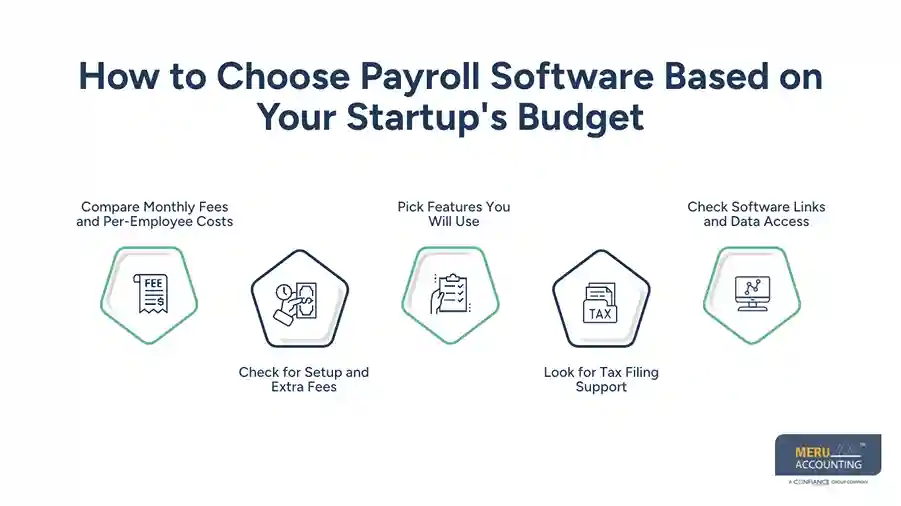
4. Look for Tax Filing Support
Payroll tax work is one area where a cheap plan can fall short. Some tools work out tax amounts but leave the filing and payment tasks to the employer.
Check if the plan supports federal, state, and local tax needs. Also ask who is in charge of filing forms and making tax payments.
Do not assume that all plans offer full tax filing. Read the terms and check which tasks are part of the price.
5. Check Software Links and Data Access
Your payroll tool should work well with the other tools you use. A link to your accounting software can help post wage costs, tax amounts, and payroll entries with less manual work.
Also check if the tool lets you export pay reports and staff data. This is useful if you switch providers in the future.
Startups Payroll Solutions for Small Business: What Options Are Available?
There is no single payroll setup that works for every startup. Your choice may depend on team size, pay rules, tax needs, and the time you can spend on payroll.
Here are three common options to review when looking for startups payroll solutions for small business.
1. Basic Payroll Software
Basic payroll tools can work well for startups with a small team and simple pay needs.
They may offer:
- Pay runs and direct deposit.
- Basic tax calculations.
- Pay slips and wage reports.
- Staff data and pay history.
These plans tend to have fewer features, so check if tax filing and support are part of the price.
2. Full-Service Payroll Software
Full-service plans can handle more payroll tasks, such as tax filing, tax payments, and year-end forms. Some also offer help with staff setup and tax notices.
This can be a good fit for startups that want to handle payroll in-house but need help with tax tasks.
The price may be higher than a basic plan, so compare the added cost with the time and work it can save.
3. Outsourced Payroll Services
With outsourced payroll, an outside team helps run payroll and manage key records. Based on the service plan, this may include pay runs, tax records, payroll reports, and help with payroll issues.
This option may suit founders who do not have the time or skills to manage payroll on their own.
When reviewing startups payroll solutions for small business, compare the cost of software with the cost of outside support. The right choice is the one that meets your needs without adding work or risk.
How to Evaluate Payroll Software Before Making a Decision
Once you have a shortlist, test each tool before you pay for a plan. A demo or trial, if offered, can help you see how the tool works in daily use.
Use these steps to make a sound choice.
1. Test the Payroll Process
Check how easy it is to add a worker, set a pay rate, enter work hours, and run payroll. The steps should be clear and easy to follow.
See if you can review pay details before you approve a pay run. This can help catch errors before money is sent.
2. Review Customer Support
A payroll issue can affect staff pay and tax tasks. Check what support the provider offers and when you can reach them.
Find out if help is offered by phone, chat, or email. Also check if you can speak with a real person when a tax or pay issue needs quick action.
3. Read User Reviews
Reviews can help you learn how a tool works after setup. Look for comments on ease of use, tax filing, support, and billing.
Do not rely on star ratings alone. Read both good and bad reviews to see if the same issues come up more than once.
4. Check Security and Data Safety
Payroll tools store private staff data, such as names, pay rates, tax details, and bank data. So, data safety should be part of your choice.
Look for data encryption, user access controls, secure login, and clear data backup rules. Ask how the provider handles data if you close your account.
5. Check the Contract Terms
Before you sign up, read the terms for billing, plan changes, and account closure. Check if there is a long-term deal or a fee to cancel.
Also ask how much notice you need to give before you switch plans or close the account.
When Should a Startup Upgrade Its Payroll Software?
The basic plan that worked for your first few staff may not work as the team grows. Review your payroll setup at key points in your growth.
You may need a better plan when:
- You hire staff in more than one state.
- You add full-time, part-time, and hourly workers.
- You offer health plans or other staff benefits.
- You need more detailed wage and tax reports.
- Manual checks take too much time each pay cycle.
- You need better links to your accounting or HR tools.
Do not upgrade just because a new plan has more features. Move to a higher plan when your needs change or your current tool can no longer handle key tasks.
Outsourced Payroll Support for Startups From Meru Accounting
Choosing payroll software is only one part of setting up a sound payroll process. You also need accurate employee records, properly recorded wages, clear tax data, and books that reflect every payroll expense. Meru Accounting helps startups manage these tasks through dedicated payroll and accounting support.
Our startups payroll solutions for small business include:
- Payroll Processing: Calculate employee pay, review payroll data, and maintain clear pay records.
- Payroll Tax Support: Help organize payroll tax records, deductions, and reports for tax filing.
- Bookkeeping: Record wages, employer taxes, and other payroll-related expenses in your books.
- Accounts Payable: Track vendor bills, payment dates, and other business obligations.
- Financial Reporting: Prepare clear reports to help founders review payroll costs, cash flow, and overall business expenses.
- Accounting Support: Maintain accurate financial records and help keep payroll entries in line with your books.
We also help startups assess their accounting and payroll workload so they can decide which tasks to manage in-house and which to outsource. This can help avoid paying for software features or internal resources they don’t yet need. With multi-industry experience and a structured review process, our team works to keep payroll records accurate and financial data organized as your business grows.
Whether you need help with payroll processing alone or want a team to manage payroll alongside your bookkeeping and accounting, Meru Accounting can build a support plan around your business needs.
Our Expert Insight
Startups should pay close attention to how payroll software handles employee changes. A new hire, a mid-month raise, unpaid leave, or a final paycheck can affect payroll calculations in different ways. Some low-cost tools offer basic pay runs but limited options for handling these changes.
Before choosing a plan, test a few common cases, such as adding a new employee halfway through a pay period or issuing a final paycheck after termination. These checks can reveal software limits that may not be clear during a sales demo. A good payroll system should handle routine changes without forcing you to rely on manual workarounds.
Key Takeaways
- Choose payroll software based on your team size, pay needs, and budget.
- Compare the full cost, not just the base monthly fee.
- Check tax filing, direct deposit, reports, and support before you buy.
- Avoid paying for features your team does not need yet.
- Review your payroll setup as your team and tax needs grow.
- Consider outside payroll support if in-house payroll takes too much time.
FAQs
Start with automated pay calculations, direct deposit, tax support, employee records, and basic payroll reports. Add benefits management and advanced HR tools as your team grows.
Yes. Founders can use payroll software or outsource payroll processing. However, they remain responsible for meeting employer tax and payroll obligations unless those duties are properly handled by an authorized provider.
Payroll software can track both, but they are not paid or reported in the same way. Employees generally receive W-2 forms, while eligible independent contractors receive 1099 forms. Choose a system that supports both payment types and keeps their records separate.
Many full-service payroll platforms calculate, file, and pay state payroll taxes. However, coverage varies by provider and plan. Check whether the software supports the states where your employees work and whether state tax registration is included.
Outsourcing may make sense when payroll involves multiple states, different worker types, frequent pay changes, or complex tax needs. It can also help when founders spend too much time on payroll instead of running the business.
optional anymore
on running the business