Meru Accounting

7 Features to Look for in Payroll Software for Hospitality Businesses

Contents
Looking for Reliable Accounting Support?

Let our experts help you simplify accounting, manage compliance and focus on growing your business.


    7 Features to Look for in Payroll Software for Hospitality Businesses

    A restaurant can have a packed dining room and still struggle to get its payroll right. Think about a server who works a double shift, a cook who picks up extra hours, or a hotel employee who fills in for another department. Each change can affect the final paycheck. That’s where payroll software for hospitality can make a real difference.

    But choosing payroll software isn’t just about finding a tool that sends paychecks on time. It should fit the way your business runs, whether you manage a single restaurant, a busy hotel, or several locations. In this blog, we’ll look at seven features worth checking before you invest in a system, along with what each one can do for your payroll process.

    What You Will Learn From This Blog

    • Why payroll can be hard to manage in hotels, restaurants, and resorts.
    • Seven key features to check before you choose payroll software.
    • How a hospitality payroll management system can help cut pay errors.
    • What to review when you compare payroll tools.
    • How expert payroll support can help your business manage pay with less stress.

    What Makes Payroll Management Different in the Hospitality Industry?

    Hospitality teams often work varied hours and shifts. Staff may work nights, weekends, split shifts, and busy holiday periods. Some work full-time, while others join for a few weeks during peak season. These work patterns can make payroll harder than it is for a business with fixed hours.

    Here are some common issues:

    • Changing work hours: Staff may work different shifts each week, so pay can change from one pay period to the next.
    • Tips and service charges: Restaurants must track tips and report them in line with tax rules. Tips also need to be kept apart from the base wage.
    • Overtime rules: Extra hours can lead to overtime pay. The right rate must be used based on work hours and wage laws.
    • More than one pay rate: An employee may work as a server on one shift and as a host on another, with a different rate for each role.
    • Seasonal hiring: Hotels and resorts may hire more staff during peak travel months, which adds new worker records and pay details.
    • Multiple work sites: Hotel groups and restaurant chains may need to track staff and labor costs at more than one site.

    These needs make payroll software for hospitality a useful tool for owners and payroll teams. The right system should fit the way staff work, not force the business to change its daily work just to run payroll.

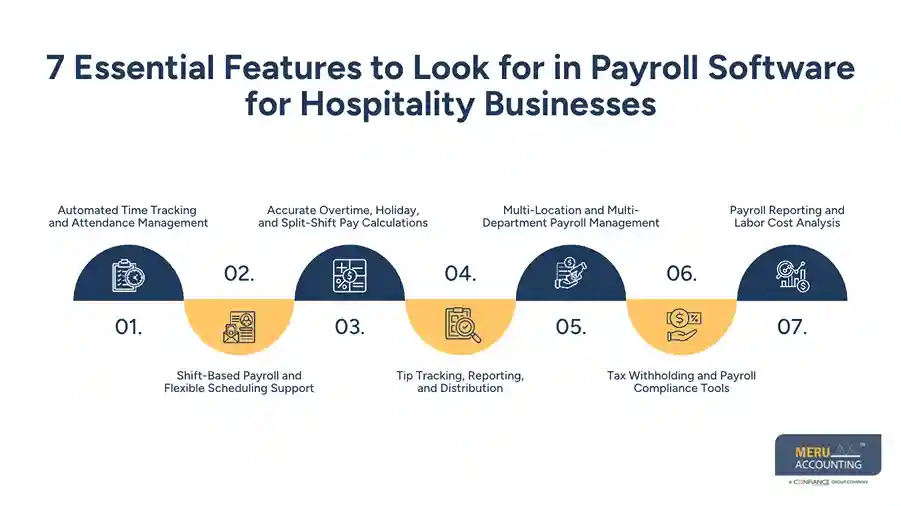
    7 Essential Features to Look for in Payroll Software for Hospitality Businesses

    The best payroll tool should do more than store staff data and send pay. It should help your team track time, apply the right pay rules, and keep clear records. Here are seven features worth checking.

    1. Automated Time Tracking and Attendance Management

    Accurate pay starts with accurate time records. If staff clock in late, leave early, or work extra hours, those changes must show in payroll.

    Look for payroll software for hospitality that can link with time clocks, mobile clock-in tools, or staff attendance systems. This can help your team move approved work hours into payroll without typing each entry by hand.

    Useful tools may include:

    • Digital clock-in and clock-out records.
    • Break and meal period tracking.
    • Alerts for missed clock-ins.
    • Manager review of time sheets.
    • Records of edits to staff hours.

    For example, a hotel may have 30 housekeepers who start work at varied times. A time tool can help the manager check each shift and approve hours before payroll runs. This lowers the risk of missed hours or wrong pay.

    2. Shift-Based Payroll and Flexible Scheduling Support

    Hospitality staff rarely work the same hours each day. A server may work a lunch shift on Monday and a late shift on Friday. A hotel worker may switch between day and night shifts based on room demand.

    Your hospitality payroll management system should support varied shifts and work schedules. It should also let managers set pay rates by role when one worker does more than one job.

    Check whether the tool can:

    • Store more than one pay rate for a worker.
    • Track day, night, and weekend shifts.
    • Link approved schedules with time records.
    • Flag schedule and time sheet gaps.
    • Handle split shifts where staff work two blocks in one day.

    This helps payroll teams match pay to the work that staff have done. It also makes it easier to review hours when a worker changes roles or shifts during a pay period.

    3. Accurate Overtime, Holiday, and Split-Shift Pay Calculations

    Overtime rules can be hard to track when staff work long or varied shifts. In the U.S., the Fair Labor Standards Act (FLSA) sets rules for overtime for covered, nonexempt workers. In general, these workers must get at least 1.5 times their regular rate for hours worked over 40 in a workweek.

    The regular rate may include some extra pay, such as certain bonuses and shift pay. This means overtime may not always be as simple as multiplying the base hourly rate by 1.5.

    When you review payroll software for hospitality, check whether it can:

    • Track hours by workweek.
    • Flag overtime hours.
    • Apply the right overtime rate.
    • Support different pay rates.
    • Keep records of holiday and shift pay.

    For example, if a nonexempt worker earns $16 per hour and works 45 hours in a workweek, the basic overtime amount is $120 for five overtime hours, before any other pay that may affect the regular rate.

    Do not assume every holiday shift has a higher pay rate under federal law. Extra holiday pay may depend on company policy, a contract, or state law.
    7 Essential Features to Look for in Payroll Software for Hospitality Businesses

    4. Tip Tracking, Reporting, and Distribution

    Tips are a key part of pay for many restaurant workers. Servers, bartenders, and other staff may earn tips in cash or through card payments. The payroll process must track these amounts and keep clear records.

    A good hospitality payroll management system should help your team:

    • Record cash and card tips.
    • Track tips by worker and pay period.
    • Keep tip records apart from base wages.
    • Support tip pool records.
    • Create reports for payroll and tax work.

    For example, a restaurant may pool tips from servers and share them with other eligible staff under its tip policy. The payroll tool should help record each worker’s share and keep a clear trail of the amounts paid.

    Tip rules can be complex. Federal and state laws set limits on tip credits and who may join a tip pool. Software can help keep records, but managers still need to set up the right rules and check that their tip policy follows the law.

    5. Multi-Location and Multi-Department Payroll Management

    Hotels, resorts, and restaurant groups may run more than one site. Each site may have its own team, pay rates, managers, and labor budget. A single worker may also move between sites.

    Look for payroll software for hospitality that lets you manage staff across sites while keeping each location’s records clear.

    Key features may include:

    • Separate payroll reports for each site.
    • Department and job-based labor tracking.
    • Role-based access for managers.
    • Shared staff records.
    • Reports that compare labor costs across sites.

    For example, a restaurant group with five locations may want to see how much each site spends on wages. A clear report can help owners spot where labor costs rise and review staff needs.

    6. Tax Withholding and Payroll Compliance Tools

    Payroll tax errors can lead to extra work, late payments, and fines. Hospitality firms must keep up with tax rules that apply to wages, tips, and worker records.

    For U.S. businesses, payroll tools should support federal income tax withholding, Social Security, Medicare, and the right state and local tax rules. They should also help with tax forms and year-end reports.

    Before you choose a tool, check whether it can:

    • Set up tax details for each worker.
    • Track taxable wages and tips.
    • Create pay stubs and tax reports.
    • Support federal and state tax filings.
    • Keep payroll records for review.

    Some providers also offer tax filing and payment services. Check what is part of the plan and what costs extra. A software tool can help with payroll tasks, but it does not remove the employer’s duty to follow tax and wage laws.

    7. Payroll Reporting and Labor Cost Analysis

    Payroll data can help owners make better choices about staffing and costs. A good system should let you see more than the total amount paid each month.

    Useful reports may show:

    • Total wages by site and department.
    • Overtime costs by pay period.
    • Tips paid to staff.
    • Hours worked by role.
    • Payroll tax costs.
    • Changes in labor costs over time.

    For example, a hotel may find that overtime costs rise each month in its housekeeping team. Managers can review room demand, shift plans, and staff levels to see if a change is needed.

    The right reports make payroll software for hospitality useful for both pay runs and day-to-day business planning.


    Good financial management isn't
    optional anymore
    Meru Accounting handles the accuracy, so you can focus
    on running the business

    How a Hospitality Payroll Management System Reduces Payroll Errors

    Manual payroll work often means moving data between time sheets, staff files, and pay records. Each extra step can lead to missed hours, wrong rates, or data entry errors.

    A well-set-up hospitality payroll management system can lower these risks in a few ways:

    • Less manual entry: Approved work hours can move from time tools into payroll.
    • Clear pay rules: Saved pay rates help reduce errors when staff change roles.
    • Better tip records: Tip reports help keep worker tips clear and easy to review.
    • Early error checks: Alerts can flag missing hours, unusual entries, or overtime.
    • Better records: Saved pay stubs and reports make it easier to review past pay runs.

    Still, automation does not mean every pay run will be right. Managers should review time sheets, pay rates, tips, and tax details before they approve payroll. A clear review process is just as important as the software itself.

    How to Choose the Right Payroll Software for Your Hospitality Business

    Before you buy a payroll tool, think about your team size, work sites, pay rules, and budget. A tool with many features may not be the best fit if your business only needs basic payroll support.

    Use these points to compare your options:

    What to check

    Why it matters

    Ease of use

    Managers should be able to review hours and run payroll without long training.

    Time tracking links

    The tool should work with your current time and attendance system.

    Tip support

    Restaurants need clear tip records and reports.

    Tax support

    Check which tax forms, filings, and payments the provider can handle.

    Multi-site access

    Larger firms need clear records for each hotel, restaurant, or site.

    Reports

    Look for wage, overtime, and labor cost reports.

    Pricing

    Review monthly fees, per-worker costs, setup fees, and extra service charges.

    Customer support

    Check when help is available and how the provider handles pay issues.

    Ask for a demo before you make a choice. Use real work cases, such as a server who earns tips, a worker with two pay rates, or a team member who works at two sites. This will show whether the system can handle your daily payroll needs.

    Payroll Services for Hospitality Businesses by Meru Accounting

    A hotel or restaurant’s payroll records can tell you more than how much the business pays its staff. They can show how labor costs vary by department, where overtime is adding to expenses, and how staffing needs affect monthly profit. Meru Accounting helps hospitality businesses manage these financial details through payroll and related accounting services.

    Our services include:

    • Hospitality Payroll Processing: Manage employee wage calculations, approved work hours, overtime records, and regular pay runs.
    • Employee Payroll Records: Maintain organized records of wages, deductions, tax details, and employee pay history.
    • Tip and Wage Reconciliation: Help review reported tips, wage records, and payroll entries to keep financial data consistent.
    • Payroll Tax Support: Assist with payroll tax calculations, records, reporting, and related filing requirements.
    • Labor Cost Reporting: Prepare payroll reports that help owners review wage expenses by department, location, or pay period.
    • Payroll Accounting and Reconciliation: Match payroll entries with accounting records, review wage expenses, and keep the books up to date.
    • Bookkeeping and Financial Reporting: Maintain accurate expense records and prepare financial reports that give owners a clearer view of business performance.

    Our accounting professionals understand that hospitality payroll involves more than processing wages. Tip records, multiple pay rates, overtime, and department-level labor costs all need careful attention. We use a structured review process to help identify inconsistencies and keep payroll and accounting records aligned.

    Whether you manage a restaurant, hotel, resort, or hospitality group, Meru Accounting can support your payroll operations while helping you maintain better control over labor expenses and financial records.

    Our Expert Insight

    A payroll detail that’s easy to overlook is how a business handles employees who move between departments. For example, a hotel employee may work at the front desk on some days and help with banquet service on others. If job codes, department records, and pay rates aren’t set up correctly, payroll reports may show labor costs in the wrong place, even when the employee’s paycheck is correct.

    We recommend checking how payroll software maps employee hours to departments and job roles before choosing a system. This matters because owners rely on these records to compare staffing costs across housekeeping, food service, front desk, and other departments. Accurate allocation gives management a more reliable picture of where labor expenses are going and makes financial reports more useful.

    Key Takeaways

    • Hospitality payroll can be complex due to varied shifts, tips, overtime, and seasonal staff.
    • Choose payroll software for hospitality that supports time tracking, more than one pay rate, and clear wage records.
    • Tip tracking and tax tools are key for restaurants and other businesses with tipped staff.
    • Multi-site reports can help hotel and restaurant groups review labor costs.
    • Automation can reduce manual work, but payroll teams should still check each pay run.
    • Compare software based on your real work needs, not just the number of features.

    FAQs

    Look for time tracking, tip reporting, overtime calculations, tax support, and multi-location payroll. The right choice depends on your staff size and pay structure.

    Yes. Many systems track cash and credit card tips, manage tip pools, and include reported tips in payroll records.

    Yes. Most modern systems can track weekly hours and calculate overtime based on set pay rules. Employers should still verify that calculations follow applicable wage laws.

    Yes. It can help manage employee records, pay rates, and payroll reports across different hotels, restaurants, or branches.

    Yes. Outsourcing can help manage payroll processing, tax records, employee pay details, and reporting without adding more in-house administrative work.

    Good financial management isn't
    optional anymore
    Meru Accounting handles the accuracy, so you can focus
    on running the business