Managing your Amazon store’s finances can get complicated without the right tools. If you’re an Amazon seller looking for a smoother, smarter way to handle bookkeeping, QuickBooks Amazon integration is your solution. Manually tracking each order, fee, and refund quickly gets messy and time‑consuming. With the right setup, Amazon data flows directly into QuickBooks. This saves you hours every week and cuts out mistakes caused by manual work. Your sales, fees, and returns show up in the right accounts automatically. And you don’t need to manage spreadsheets any longer.
In this blog, we will show you why this setup is so useful, how to make it work, and the best tools and tips to stay ahead.
Benefits of Integrating Amazon with QuickBooks for eCommerce Businesses
Online selling needs smart tools. Manual work takes time and causes errors. Amazon QuickBooks integration solves this. It joins your sales and accounting in one place. Let’s look at how it helps.
Saves Time on Daily Tasks
Integration tools sync your orders, payments, and expenses without manual work. This reduces time spent on bookkeeping and improves accuracy.
Tracks Business Growth
QuickBooks gives real-time reports that show your sales trends, profits, and weak spots. You can make quick decisions based on real numbers.
Avoids Tax Errors
Syncing your data means your tax info is always right. Clean reports make tax filing smooth and stress-free.
Helps You Focus on Sales
Time saved from manual entries means more time to focus on growing your Amazon store, ads, and product research.
Avoids Mistakes
Automation reduces errors. You won’t face missing orders, wrong amounts, or unrecorded refunds. Your QuickBooks and Amazon stay in sync.
Benefits of Amazon QuickBooks Integration for Sellers
Amazon QuickBooks integration helps sellers run smooth operations. No matter the size of your business, the benefits are real.
Simple Record Keeping
All Amazon data goes straight to QuickBooks. Sales, refunds, and fees are recorded without manual steps. This keeps your records clean.
Better Cash Flow Control
QuickBooks shows what you earn and spend. You can plan better and avoid cash shortages during slow sales periods.
Sync Inventory in Real-Time
Many tools update your stock levels in both Amazon and QuickBooks. This avoids overselling or stock-outs.
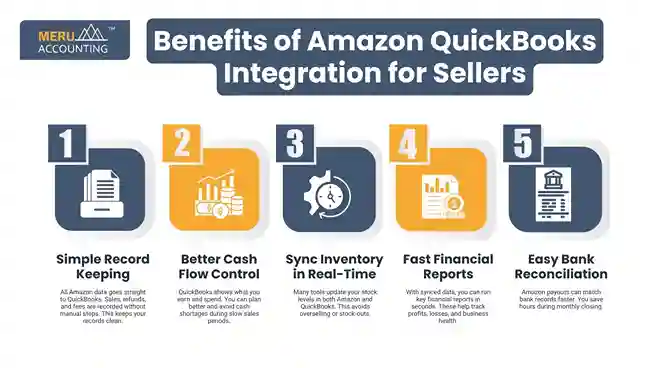
Fast Financial Reports
With synced data, you can run key financial reports in seconds. These help track profits, losses, and business health.
Easy Bank Reconciliation
Amazon payouts can match bank records faster. You save hours during monthly closing.
How QuickBooks Amazon Seller Integration Works
Understanding how QuickBooks Amazon seller integration works helps you use it better. Here’s the process in simple steps.
Data Connection
First, you connect your Amazon account to QuickBooks. You may use a third-party app to do this. Once connected, data starts flowing.
Transaction Sync
Sales, fees, taxes, and refunds from Amazon are pulled into QuickBooks. This data is placed in the right accounts.
Report Creation
Once the data is in, QuickBooks builds useful reports. You get insight into your sales, expenses, and profits.
Real-Time Updates
Sales made on Amazon are reflected quickly in QuickBooks. This keeps your books fresh with the latest data.
Cloud Sync
QuickBooks Online allows you to check your books from any device. You stay in control even when you’re away from your office.
Top Tools and Apps for Seamless QuickBooks Amazon Integration
Here are some top-rated tools that make Amazon QuickBooks integration efficient and reliable:
1. A2X
Designed specifically for Amazon sellers, A2X auto-imports Amazon settlements into QuickBooks. It’s known for accuracy and audit-ready data.
2. Webgility
Great for multi-channel sellers. Webgility syncs orders, fees, and inventory across Amazon, eBay, and Shopify with QuickBooks.
3. OneSaas (by Intuit)
A good choice for sellers with simple needs. It works well for syncing basic order data and expenses.
4. Link My Books
This UK-based tool is gaining popularity. It ensures VAT compliance and smooth integration with QuickBooks.
5. Connex for QuickBooks
Ideal for large sellers needing custom rules and complex workflows.
Each tool has its strengths. Choose one based on your store size, transaction volume, and accounting goals.
Tips for Successful Amazon QuickBooks Integration
Using integration tools the right way can make a big difference. Here are smart tips to help you avoid mistakes.
Choose the Right Integration Tool
Different apps offer different features. Pick one based on your business size, sales volume, and budget. Read reviews and compare options.
Use Chart of Accounts
Set up a clear chart of accounts in QuickBooks. Group sales, fees, and refunds into proper categories. This helps in tracking income and spending.
Set Rules for Data Sync
Some apps allow rules for syncing. For example, skip low-value orders or group daily sales. This keeps your QuickBooks tidy.
Run Test Sync First
Start with a test batch of orders. Review how they show up in QuickBooks before syncing all your data. It prevents setup issues.
Check Data Weekly
Even with auto-sync, you should review your records weekly. Catching small issues early helps you avoid large errors later. It keeps your data neat and your reports accurate.
Common Challenges and How to Overcome Them
While QuickBooks Amazon integration offers real benefits, sellers still face issues. Here are the top problems and how to fix them:
1. Duplicate Entries
Some entries may appear twice in your books. This often happens when both systems sync the same data. Turn off manual inputs and check integration settings often to avoid it.
2. Incorrect Mapping
Wrong account links can place your transactions in the wrong category. Review your chart of accounts each month to fix mapping errors.
3. Inventory Sync Errors
If inventory numbers don’t match, the integration may have gaps. Tools like Webgility help manage stock updates better and reduce mismatch risk.
4. Delayed Settlement Data
Amazon pays sellers every two weeks. This delay makes daily tracking hard. A2X solves this by grouping payouts and matching them in QuickBooks for smooth records.
5. Connector Downtime
Third-party tools sometimes crash or pause. Stay in touch with support teams and sign up for alerts to react fast when issues arise.
Advanced Tips and Tricks to Maximize Your QuickBooks Amazon Seller Integration
Once you’re comfortable with the basics, try these tricks to get more from QuickBooks Amazon seller integration.
1. Automate Reports for Decision Making
Use QuickBooks to schedule profit and loss statements, balance sheets, and sales reports for regular email delivery.
2. Create Custom Rules
Set rules for categorizing Amazon, fees, or tax withholding. This minimizes manual corrections.
3. Use Classes and Tags
You can group your sales by product category, region, or ad campaign. Tags help you run detailed performance reports. With QuickBooks Amazon seller integration, this becomes even more powerful.
4. Reconcile Weekly
Don’t wait for the month-end. Weekly reconciliations help catch errors early.
5. Link Multiple Marketplaces
If you sell on other platforms, integrate them into QuickBooks too for a complete view of finances.
At Meru Accounting, we make QuickBooks Amazon integration simple and smooth. Our team knows how Amazon sellers work. Every Amazon store is different. We build a setup in QuickBooks that fits your needs and product type. We don’t just install apps. Our trained experts guide you through the full process.
FAQs
- Can I integrate Amazon with QuickBooks without a third-party app?
No, QuickBooks doesn’t offer native Amazon integration. You’ll need a connector tool like A2X or Webgility.
- Which version of QuickBooks works best with Amazon?
QuickBooks Online works best due to app compatibility. Desktop versions work but may need manual uploads.
- Is the integration safe and secure?
Yes, reliable apps use bank-level security. Always choose verified and reviewed tools.
- How often does the data sync?
Most apps sync daily or after every settlement. You’ll catch small errors early and keep your books clean.
- Can I track multiple Amazon stores with QuickBooks?
Yes. Many integration tools allow syncing data from multiple Amazon marketplaces into a single QuickBooks account.
- What if I face sync errors?
Check the app’s settings and contact support. Regular reconciliation and monitoring help catch sync issues early.