A design project can look profitable on paper while rising costs eat into the fee. An architect may finish drawings on time, pay consultants, and send invoices, yet still face cash shortages because client payments arrive late. QuickBooks for architects brings project income, costs, bills, and payments into a single accounting process, making it easier to spot such gaps before month-end.
For a firm handling homes, offices, and commercial sites, QuickBooks for architects can turn daily entries into useful financial records. The result depends on the setup, the quality of the data, and regular reviews. The right Architecture firm accounting software must also match the firm’s billing terms, project size, and reporting needs.
What You Will Learn From This Blog
- How QuickBooks for architects fits project-based accounting.
- Which records to set up before entering transactions.
- Ways to track project costs, staff time, and fee income.
- Methods to manage invoices and overdue client payments.
- What to check when choosing Architecture firm accounting software.
- Which reports to review before closing each month.
- How Meru Accounting provides bookkeeping and reporting services.
Understanding QuickBooks for Architects and Its Core Features
Project-Based Records
QuickBooks for architects can group estimates, invoices, and expenses under one project in eligible plans. An owner can review a job’s income and costs without sorting through every firm-wide transaction. Intuit lists project tracking in QuickBooks Online Plus and Advanced, so check plan access first.
Income and Expense Tracking
Record design fees, consultant bills, travel, printing, and software costs under clear accounts. Keep transactions organised and assign each cost to the correct category. Separate direct project costs from office expenses to review project profitability.
Estimates and Actual Costs
QuickBooks for architects can compare planned costs with actual spending in eligible plans. For example, a firm may budget $6,000 for consultants but spend $7,500 after design changes. That $1,500 gap calls for a review of the scope, extra work, and fee terms.
Client Billing
Create invoices for design stages, approved extra services, or agreed monthly fees. Architecture firm accounting software should keep each invoice linked to the right client and project. Clear records make it easier to check what has been billed, paid, or left open.
Financial Reports
Use Profit and Loss, Balance Sheet, and Accounts Receivable Aging reports to review the firm’s finances. QuickBooks for architects can also show project results where the plan offers those reports. Read the figures together; a profitable job does not always mean the firm has enough cash in the bank.
optional anymore
on running the business
Setting Up QuickBooks for an Architecture Firm
Create a Chart of Accounts
Set up accounts for design income, consultant fees, staff costs, rent, insurance, travel, and office supplies. Keep names clear and avoid needless duplicate accounts. QuickBooks for architects will only produce useful reports when entries follow a consistent structure.
Add Clients and Projects
Create a customer record for each client and a separate project record for each job. Use a simple code or naming rule to tell similar projects apart. Architecture firm accounting software works better when every invoice and expense is linked to the right record.
Set Up Service Items
Create items for concept design, planning, technical drawings, site visits, and project review. Match each item to the fee terms in the client contract. This saves time when preparing invoices and makes the service description clear to the client.
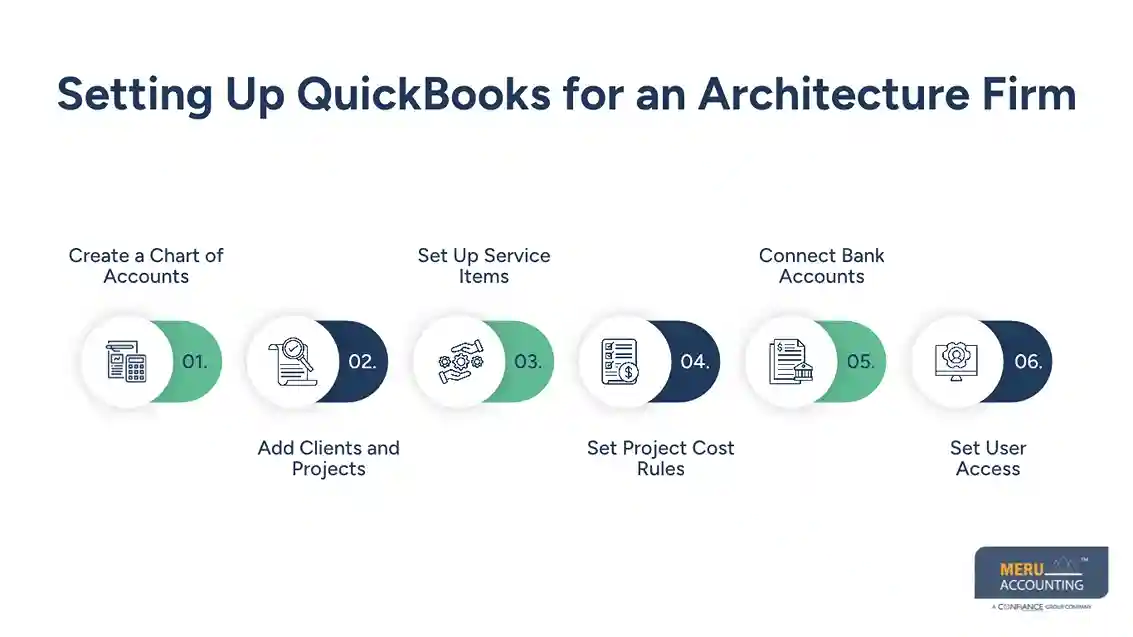
Set Project Cost Rules
Decide which costs belong to a project and which belong to the whole firm. A structural engineer’s bill may be a direct project cost, while office rent is usually an overhead cost. QuickBooks for architects needs the same rules across all jobs to make comparisons fair.
Connect Bank Accounts
Connect eligible bank feeds and review imported entries before adding them to the accounting records. Check the amount, date, payee, and account code. Architecture firm accounting software can import transactions, but it cannot confirm that every entry has been classified correctly.
Set User Access
Give staff access based on their duties and set clear rules for approving bills and invoices. Keep contracts, receipts, and supplier bills in a secure record system. A clear review process reduces errors and makes month-end checks easier.
Tracking Architecture Project Costs and Profitability
Record Direct Costs
Enter consultant fees, travel, permits, printing, and other job costs against the right project. Mark costs as billable only when the contract allows the firm to charge them to the client. QuickBooks for architects can then show a more accurate view of job spending.
Track Staff Time
Staff hours are a real cost, even when no supplier bill arrives. Record time by project and use a suitable method to estimate or calculate labour costs. Check whether the selected plan or connected app offers the time and cost reports your firm needs.
Compare Budget and Actual Results
Suppose a project earns a fee of $30,000 and has planned direct costs of $8,000. Actual direct costs reach $11,000, leaving $19,000 before overhead and other expenses rather than $22,000.
Record Extra Work
Extra drawings, meetings, and revisions can raise costs beyond the original scope. Record the work and seek approval under the contract before billing it. Architecture firm accounting software records the money, but written approval sets out whether the client owes it.
Review Projects During the Month
Do not wait until a job ends to check its results. Review spending, unbilled work, and client balances at regular intervals. QuickBooks for architects becomes more useful when owners act on cost changes while the project is still active.
Managing Architectural Fees, Invoices, and Client Payments
Match Fees to the Contract
Architects may charge fixed fees, hourly rates, retainers, or milestone-based fees. The American Institute of Architects outlines these common payment methods in its guidance on charging for services. QuickBooks for architects should reflect the signed terms, not an informal billing plan.
Send Invoices on Time
Set dates for monthly bills and project milestones. Include the project name, work period, fee details, due date, and approved extra charges. Architecture firm accounting software can keep billing records in one place, while a set schedule prevents missed invoices.
Record Advances Correctly
A client may pay a retainer before the firm completes the work. Record the payment according to the contract and the firm’s accounting method rather than treating every advance as earned income. Ask an accountant to review complex cases.
Match Payments to Bills
Apply each client payment to the correct invoice. Check for short payments, bank fees, and disputed amounts before closing the entry. QuickBooks for architects can show open balances, but the result depends on correct payment matching.
Review Late Payments
Run an aging report to find invoices that remain unpaid. Follow up based on the due date and keep notes on client replies or disputes. Architecture firm accounting software makes these balances easier to review, but staff must still take action.
Architecture Firm Accounting Software: Is QuickBooks the Right Choice?
Best Fit for Smaller Firms
QuickBooks may suit firms that need bookkeeping, billing, bank reconciliation, and basic project cost records. QuickBooks for architects is worth testing against the firm’s daily tasks before a full move. Check user limits and report options before selecting a plan.
Check Project Features
Project tracking and estimate-versus-actual tools vary by plan. Architecture firm accounting software must match the level of detail your team needs for costs, fees, and staff time. Confirm each feature with the vendor before buying.
Know Its Limits
QuickBooks is an accounting system, not a full design practice platform. It may not cover drawing control, design reviews, or every project scheduling need. It may work best alongside a separate tool for design and project delivery.
Compare Total Cost
Include the subscription, user fees, connected apps, training, setup, and ongoing bookkeeping in your budget. A low monthly fee may not reflect the full cost of running the system. Architecture firm accounting software should save enough time or improve reporting enough to justify the spend.
Choose Based on Reports
If the firm needs detailed work-in-progress, staff use, or cost-to-complete reports, test those tasks before choosing. QuickBooks for architects may suit a small practice, while a larger firm may need more advanced tools. Choose based on actual needs, not the number of features in a sales page.
Preparing Month-End Financial Reports for Architecture Firms
Reconcile Bank and Card Accounts
Compare bank and card statements with the books. Check for missing entries, duplicate charges, and costs posted to the wrong period. QuickBooks for architects produces stronger reports when reconciliations are complete before review.
Review Income and Expenses
Run the Profit and Loss report and compare it with the prior month and budget. Check design fees, direct costs, payroll, rent, and other overhead. Investigate large changes rather than assuming every rise or fall is normal.
Check Client and Supplier Balances
Review unpaid invoices and supplier bills. Confirm that payments near month-end appear in the correct period and that old balances remain valid. Architecture firm accounting software gives a useful list, but each unusual balance still needs review.
Check Project Budgets
Compare current costs with the latest budget and review work completed but not yet billed. QuickBooks for architects may not calculate every work-in-progress measure a firm requires, so set a separate process when needed.
Review the Balance Sheet
Check cash, receivables, supplier balances, loans, and tax accounts. Confirm that advances and other balances are classified under the firm’s accounting method. Seek qualified advice on unusual entries or complex tax matters.
Save the Month-End Reports
Save final reports with reconciliations and notes on major changes. Record who checked the figures and when the month was closed. QuickBooks for architects is most useful when the firm follows the same review steps each month.
Why Architecture Firms Choose Meru Accounting?
Meru Accounting provides bookkeeping, reconciliation, project cost tracking, and month-end reporting services based on agreed needs.
Bookkeeping and Reconciliation
Our team records income and expenses, reviews account coding, and reconciles bank balances against available statements. We keep records organised for regular review.
Project Cost Tracking
We classify agreed project costs and prepare reports from the records supplied by the firm. QuickBooks for architects can form part of this process when its features match the firm’s needs.
Invoice and Payment Records
We maintain invoice and payment records under agreed workflows. Architecture firm accounting software can show unpaid balances when entries are complete and up to date.
Month-End Reporting
At Meru Accounting, we prepare agreed reports, review account balances, and flag items that need clarification. Our work gives firm owners a clear view of the records available for review.
Accounting Process Review
We review the firm’s setup, reporting needs, and regular bookkeeping tasks before agreeing on a service scope. Meru Accounting provides services based on the firm’s records and requirements; tax filings and specialist judgments should be assigned to suitably qualified professionals.
Our Expert Perspective
The main value of QuickBooks for architects is not the number of entries it stores. It is the ability to spot a project that is costing more than planned, a fee that has not been billed, or a client balance that is growing too old. Those signs matter most when the firm checks them throughout the month.
Architecture firm accounting software cannot replace sound contracts, complete records, or professional judgment. Owners should check the figures, ask why costs have changed, and seek qualified advice when a tax or accounting decision needs expert review.
Key Takeaways
- QuickBooks for architects can group project income, costs, invoices, and payments.
- Set up accounts and project records before entering transactions.
- Track staff time and direct costs to review job profit.
- Match invoices and payment terms to signed contracts.
- Compare Architecture firm accounting software plans before choosing one.
- Reconcile bank accounts and review project budgets every month.
- Keep source records and follow a clear review process.
FAQs
Architects use QuickBooks to track project income, record expenses, monitor budgets, and review job costs.
QuickBooks tracks project costs by grouping eligible expenses, consultant fees, and other job costs under project records.
Architecture firms should review Profit and Loss, Balance Sheet, Accounts Receivable Aging, and available project profitability reports.
QuickBooks can suit small and mid-sized architecture firms that need bookkeeping, invoicing, project cost tracking, and financial reports.
Architecture firms can create invoices, record client payments, track overdue balances, and review unpaid bills in QuickBooks.
optional anymore
on running the business