
A WooCommerce store can show $50,000 in sales and still leave the owner unsure about actual profit. Where did the money go? Payment fees, shipping, ads, refunds, stock purchases, software costs, and taxes can all reduce the amount left after sales. This is where the best accounting software for WooCommerce becomes useful.
The goal is not just to move WooCommerce orders into an accounting system. The real value comes from turning those orders, costs, fees, and payments into financial data that can be checked and used for tax work.
For US businesses, the IRS says a business expense generally needs to be both ordinary and necessary to qualify as a deductible business expense. Good records also need to support the income and expenses reported on a tax return.
What You Will Learn From This Blog
- What to look for when choosing the best accounting software for WooCommerce.
- Which store costs need close attention during tax review.
- How QuickBooks Online, Xero, Zoho Books, and other platforms can connect with WooCommerce.
- How WooCommerce accounting solutions can provide data for tax planning.
- Which accounting and tax features are worth comparing before choosing a platform.
- Why accurate records matter when preparing business tax information.
Choosing the Best Accounting Software for WooCommerce
Imagine checking your WooCommerce dashboard and seeing $80,000 in sales. Now compare that number with your bank deposits. They may not match. Payment fees, refunds, taxes, and timing differences can change the final amount.
This is why choosing the best accounting software for WooCommerce should start with how money moves through your store, not with a list of features.
Match the Software to Your Store
A store selling 20 products does not have the same accounting needs as one handling thousands of orders each month. Consider order volume, inventory, payment methods, sales channels, and tax needs before choosing a platform.
Check the WooCommerce Connection
A connection should do more than import total sales. Check whether it can handle orders, refunds, fees, customers, products, taxes, and other data your store needs.
Review Tax Needs
Tax work can become difficult when sales are spread across locations or channels. Your accounting setup should keep tax-related data clear, while the actual tax treatment should be checked against the rules that apply to your business.
Look at Reconciliation
Suppose WooCommerce shows $10,000 in sales, but your payment account shows a lower payout. The difference may come from processing fees or refunds. Reconciliation makes these gaps easier to find.
Think About Growth
Your accounting needs can change as your store grows. More orders, new products, additional payment gateways, and other sales channels can make a basic setup harder to manage.
What Should the Best Accounting Software for WooCommerce Include?
The best accounting software for WooCommerce should answer more than one question. It should show what you sold, what customers paid, what you spent, what you still owe, and where your profit came from.
WooCommerce Integration
Your store and accounting system should exchange the data needed for daily bookkeeping. Look at the exact fields that sync rather than assuming every WooCommerce connector works in the same way.
Sales and Payment Tracking
A $100 customer order may become a $97 bank deposit after a payment fee. The accounting system should make it possible to see the sale, fee, and deposit instead of treating them as one unexplained amount.
Expense Categorization
An ad payment, shipping bill, software subscription, and professional fee are different types of costs. Clear categories make your financial reports easier to read and review.
Inventory and Cost Tracking
Sales alone do not show product profit. If an item sells for $40 and costs $25 to buy, the $15 difference is more meaningful than the $40 sale by itself.
Tax Reporting
Tax reports should give you usable information for review. They should also fit the way your business tracks sales tax, expenses, income, and other tax-related items.
Financial Reporting
Profit and loss reports can show whether rising sales are also producing higher profit. Balance sheets and other reports add another view of the store’s financial position.
How WooCommerce Accounting Solutions Handle Tax Deductions
A WooCommerce store can have dozens of expenses in a single month. WooCommerce accounting solutions can put those costs into clear accounts, but they do not decide whether every cost is deductible.
Tracking Deductible Business Expenses
A store may pay for advertising, software, shipping, professional services, supplies, and other business costs. The best accounting software for WooCommerce can organize these expenses by category, making it easier to review deductible costs before tax filing.
Recording Payment Processing Fees
Payment fees are easy to miss because they may be taken out before money reaches the bank. Recording the fee separately gives you a clearer picture of both sales and payment costs.
Tracking Shipping and Fulfillment Costs
Consider a store that pays for postage, packing material, third-party fulfillment, and delivery services. Keeping these costs visible can show how much revenue is being used to get products to customers.
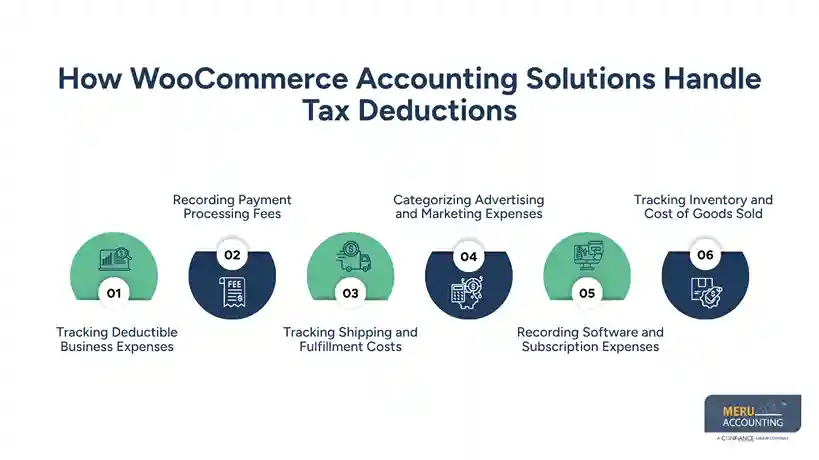
Categorizing Advertising and Marketing Expenses
A WooCommerce store may run search ads, social ads, email campaigns, influencer promotions, or other marketing activity. Separate records make it easier to see total marketing spend and review the related tax treatment.
Recording Software and Subscription Expenses
Hosting, plugins, accounting tools, email platforms, security tools, and other subscriptions can create many small charges. Choosing the best accounting software for WooCommerce can make recurring subscription expenses easier to record and categorize throughout the year.
Tracking Inventory and Cost of Goods Sold
Buying stock and recording the cost of products sold are not always the same accounting event. Inventory needs to be recorded using the accounting and tax method that applies to the business.
Best Accounting Software for WooCommerce: Key Tools to Consider
There is no single platform that will suit every WooCommerce seller. The best accounting software for WooCommerce depends on the store’s size, sales process, inventory needs, payment setup, and reporting requirements.
QuickBooks Online
QuickBooks Online is a common option for ecommerce businesses and can connect with WooCommerce through QuickBooks Connector. The connection can move selected sales, order, product, customer, and inventory data between the systems.
Xero
Xero offers ecommerce apps that connect WooCommerce with Xero. Depending on the app, the connection can handle sales, payments, fees, and other transaction data.
Zoho Books
Zoho Books can connect with WooCommerce through extensions available through the Zoho Marketplace. Available functions can include orders, customers, payments, products, and inventory data.
Other WooCommerce-Compatible Accounting Platforms
Other accounting platforms may connect through third-party apps or middleware. Before choosing one, check what data moves across the connection and how refunds, fees, taxes, and inventory are treated.
Compare Before You Connect
Two platforms may both say they integrate with WooCommerce while working in very different ways. Compare the sync method, account mapping, transaction detail, reconciliation process, reports, and total cost.
optional anymore
on running the business
How WooCommerce Accounting Solutions Support Tax Planning
Tax planning becomes harder when you only look at your numbers once a year. WooCommerce accounting solutions can keep financial information available throughout the year, giving you a better base for review.
Monitoring Taxable Profit
Sales may rise while profit stays flat because advertising, shipping, or stock costs also rise. Regular profit reports can show these changes before tax preparation begins.
Organizing Expenses Throughout the Year
It is easier to review a $500 software expense in the month it occurs than to search through twelve months of bank transactions later. Categorization through the best accounting software for WooCommerce keeps the records easier to review.
Preparing Financial Information for Estimated Taxes
Current income and expense figures can give your tax adviser useful information when estimated tax payments need to be reviewed. The figures should be based on properly recorded transactions.
Identifying Missing Transactions
A payment deposit that does not match store sales can point to a missing fee, refund, or transaction. Finding these differences during the year can prevent a long list of questions at tax time.
Finding Incorrect Categories
A $2,000 marketing payment recorded under office supplies can distort more than one report. The best accounting software for WooCommerce can make unusual or incorrectly classified transactions easier to identify.
Best Accounting Software for WooCommerce: Tax Features Compared
When comparing the best accounting software for WooCommerce, do not stop at the integration badge. Ask what happens after the order enters the accounting system.
Sales Tax Tracking
Sales tax should not simply disappear into total sales. Your setup should show the tax collected and keep it separate where required for reporting and review.
Expense and Deduction Tracking
Look for expense categories, bank feeds, receipt storage, transaction rules, and reports. These features can make it easier to review costs before tax information is prepared.
Tax-Ready Reports
A report is only as useful as the transactions behind it. Check whether the system can provide clear sales, expense, tax, and transaction reports that your accountant can review.
Profit and Loss Reporting
A profit and loss report can reveal changes that may otherwise be hidden behind strong sales. If sales rise by 20% but expenses rise faster, the report makes that change visible.
Transaction Reconciliation
Reconciliation brings store, payment, and bank data together for comparison. It can reveal missing deposits, duplicated entries, fees, refunds, and other differences.
Best Accounting Software for WooCommerce: Comparison Checklist
Before selecting the best accounting software for WooCommerce, use the checklist below to compare what each platform can actually do.
Feature | What To Check |
WooCommerce connection | Orders, products, refunds, payments |
Payment tracking | Payouts, fees, and deposits |
Expense tracking | Clear accounts and receipt records |
Inventory | Stock and cost of goods sold |
Tax data | Sales tax and account mapping |
Reporting | Profit and loss, balance sheet, tax reports |
Reconciliation | Bank and payment matching |
Scalability | More orders, products, and channels |
Integration cost | App or connector charges |
Accountant access | Easy review and report sharing |
The best accounting software for WooCommerce should fit your actual workflow. A long feature list means little if the system cannot correctly capture the transactions your store creates every day.
Partner With Meru Accounting For WooCommerce Accounting
Meru Accounting provides accounting and bookkeeping services for businesses that sell through WooCommerce and other ecommerce channels. Our team can review sales, expenses, payment fees, inventory costs, and reports so the accounting data is ready for tax review.
WooCommerce Data Review
At Meru Accounting, we review sales, payments, expenses, and other key data to identify gaps that may need attention before tax work begins.
Expense Classification
Costs such as software, advertising, shipping, and payment fees can be recorded under suitable accounts based on the business’s accounting setup.
Reconciliation Work
Sales and payment records can be checked against bank and payment statements to identify unmatched or missing transactions.
Inventory Accounting
Inventory purchases and product costs can be reviewed so stock and cost of goods sold are recorded under the selected accounting method.
Tax-Ready Financial Data
Meru Accounting can prepare organized financial reports and accounting data for business owners and tax professionals to review.
Our Expert Perspective
A WooCommerce store can have strong sales and still have unclear profit. The gap often comes from small items that occur after the customer clicks “buy”: payment fees, refunds, shipping, ads, stock costs, and software charges.
That is why the best accounting software for WooCommerce should be judged by the quality of the financial data it creates, not just by how quickly it imports orders.
One point should also stay clear: accounting software does not decide whether an expense qualifies for a tax deduction. The IRS rules and the facts of the business determine the tax treatment, while the accounting system provides the records needed for review.
Key Takeaways
- The best accounting software for WooCommerce should connect sales, payments, expenses, inventory, and financial reports.
- Record payment fees, refunds, shipping, advertising, software, and stock costs clearly.
- WooCommerce accounting solutions can organize financial data, but they do not decide whether an expense is tax-deductible.
- QuickBooks Online, Xero, and Zoho Books can connect with WooCommerce through available integrations.
- Regular reconciliation can reveal missing, duplicated, or incorrectly recorded transactions.
- Tax planning is easier when financial data is reviewed during the year.
- The right platform should match your store’s order volume, inventory, payment methods, and reporting needs.
FAQs
The best accounting software for WooCommerce should track sales, expenses, payment fees, inventory, taxes, and profit in one accounting system.
QuickBooks Online, Xero, and Zoho Books are accounting platforms that can connect with WooCommerce through direct or third-party integrations.
Yes, WooCommerce accounting solutions can record expenses such as advertising, shipping, software, payment fees, and other business costs for tax review.
WooCommerce accounting solutions provide current sales, expense, profit, and transaction data that can be reviewed when planning estimated taxes.
Common business costs such as advertising, shipping, payment processing fees, software, and other qualifying expenses may be deductible when they meet the applicable tax rules.
optional anymore
on running the business



