Payroll does not end when employees receive their pay. The wage cost, taxes, deductions, bank payments, and ledger entries must also line up. This is why bookkeeping and payroll software should be judged by more than its payroll screen. The right system should connect payroll with bookkeeping, provide useful reports, and make account checks easier.
For a small business, the goal is not to buy the system with the longest feature list. It is to find bookkeeping and payroll software that fits its payroll process, accounting setup, tax needs, and review work. A clear payroll-to-ledger flow can also make clearing account reconciliation easier.
What You Will Learn From This Blog
- How bookkeeping and payroll software connects payroll with accounting records.
- Which features matter when comparing software for a small business.
- What to check in common payroll and accounting software options.
- How to compare payroll bookkeeping software based on real work needs.
- How payroll clearing account reconciliation works.
- How to choose software that fits payroll and bookkeeping needs.
How to Compare Payroll Bookkeeping Software
When comparing payroll bookkeeping software, follow the complete path from payroll processing to the bank and then to the ledger.
Check Payroll to Ledger Links
Ask how payroll data reaches the general ledger. Check where wages, taxes, benefits, and deductions are posted.
The link should make it easy to trace a ledger amount back to its payroll run.
Review Tax Features
Check which federal, state, and local tax tasks the plan handles. Some businesses may need more tax features because they have employees in several locations.
Do not assume every plan includes the same tax services.
Compare Reports
Look for payroll journals, tax reports, liability reports, payment reports, and employee pay records.
Payroll bookkeeping software is more useful when these reports can be compared with the general ledger.
Check Bank and Clearing Work
Ask how payroll payments are recorded and how clearing accounts are handled. Check whether old items can be traced to a payroll run or journal entry.
This is an important test for bookkeeping and payroll software.
Review Security and User Rights
Check who can add employees, edit payroll data, run payroll, change bank details, and post accounting entries.
Access should match each person’s role.
optional anymore
on running the business
What is Bookkeeping and Payroll Software?
Bookkeeping and payroll software brings pay and book work into one system or links pay and book tools. It can track wages, taxes, cuts, benefits, pay, costs, and the related book entries.
The main value is the link between payroll and accounting records. Once payroll is run, the amounts should post to the right expense, liability, and cash accounts. This cuts repeat work and gives the accounting team a clear record to review.
Some tools join payroll and bookkeeping, while others link payroll with a separate book system. Both can work when data moves well between the two. Payroll data may include gross pay, tax withheld, cuts, tax paid by the firm, benefits, and net pay. Each item must go to the right book account.
Payroll bookkeeping software can cut manual work by moving these figures directly into the accounting records. Account maps also matter as they tell the system where each pay item should go. For example, wages can go to a wage cost account, while tax held back can go to a payroll tax debt account.
For small firms, payroll bookkeeping software can keep pay data and book records linked while giving the team key reports and a clear audit trail. The right bookkeeping and payroll software depends on team size, pay types, tax needs, and report needs.
A firm with many pay groups may need more control than a small team with one pay run. The system should also keep records of pay runs, edits, reports, and book entries. This lets the team trace figures when pay and book totals do not match. For US firms, the software should also fit record-keeping needs for work and tax records.
Key Features to Look for in Bookkeeping and Payroll Software
The best bookkeeping and payroll software should make daily payroll work easier while keeping accounting records clear and accurate. These are the main features to check before you choose a system.
Bookkeeping and General Ledger Management
Look for a clear link between each payroll run and the general ledger. Wages, taxes, benefits, and other payroll costs should post to the right accounts.
This makes it easier to check payroll entries during the month-end close.
Payroll Processing and Tax Calculations
The system should work out gross pay, deductions, taxes, and net pay based on staff data. Businesses should also check which federal, state, and local tax tasks are part of the system.
Tax tools should fit the firm’s work sites and payroll needs.
Payroll Reporting and Compliance
Reports should show wages, taxes, deductions, due amounts, and payment data. These figures can then be checked against the accounting records.
Reliable payroll bookkeeping software should make payroll reports easy to review and export.
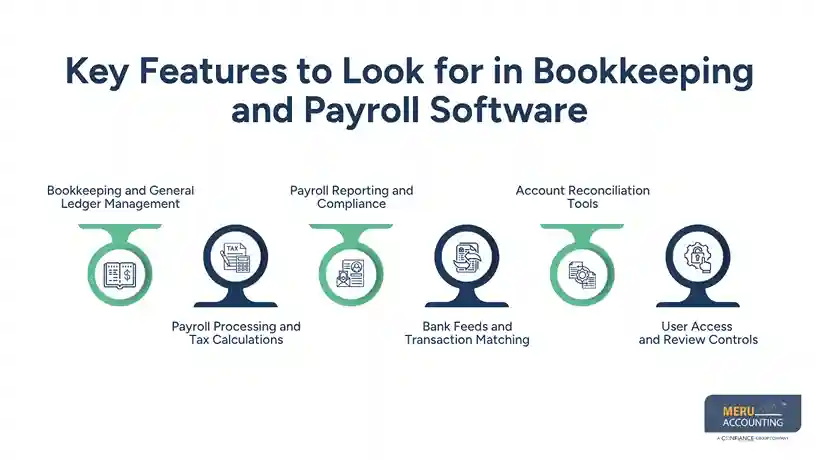
Bank Feeds and Transaction Matching
Bank feeds bring bank data into the accounting system. Matching tools can link payroll payments with records already recorded in the system. This cuts down on repeat entry and makes it easier to check payroll payments against clearing account entries.
Account Reconciliation Tools
The system should let users compare payroll reports, bank data, journal entries, and account balances.
For bookkeeping and payroll software, good tools for this check are useful when an account has an amount that does not match.
User Access and Review Controls
Check if users can have set access levels. Payroll work, staff data, bank details, and book entries may not need to be open to all users.
Clear user rights add a key check to the review process.
Best Bookkeeping and Payroll Software Options for Small Businesses
The best software depends on how a business handles accounting and payroll. A firm may want one connected system, while another may prefer a payroll tool linked to its existing accounting system.
QuickBooks
QuickBooks is a common choice for small businesses looking for bookkeeping and payroll software within the same product family. Its payroll tools include payroll reports, direct deposit, and tax services.
It can suit firms that want payroll activity closely linked with their accounting records.
Xero
Xero can be a useful choice for businesses that already use Xero for accounting. In the US, Xero introduced payroll powered by Gusto in 2026, with payroll data flowing into the Xero general ledger.
Businesses should check the features and availability that apply to their plan and location.
Gusto
Gusto is mainly focused on payroll and employee services and can connect with accounting platforms such as QuickBooks and Xero.
It can suit a business that wants a payroll-focused system while keeping its main bookkeeping work in another platform.
How the Options Differ
QuickBooks may suit businesses wanting accounting and payroll close together. Xero may fit firms already using Xero for their accounting system.
Gusto can make sense when payroll is the main need and accounting will remain in a separate system.
What to Check Before Buying
Look beyond the monthly price. Check employee fees, tax services, reports, integrations, user limits, support, and account mapping.
Also ask how the system handles corrections, payroll journals, bank payments, and clearing accounts.
Best Fit Depends on the Business
A five-person firm may need a simpler setup than a 50-person firm with several pay groups or benefits.
The best bookkeeping and payroll software should match the business’s actual payroll and bookkeeping process.
How to Compare Payroll Bookkeeping Software
When comparing payroll bookkeeping software, follow the complete path from payroll processing to the bank and then to the ledger.
Check Payroll to Ledger Links
Ask how payroll data reaches the general ledger. Check where wages, taxes, benefits, and deductions are posted.
The link should make it easy to trace a ledger amount back to its payroll run.
Review Tax Features
Check which federal, state, and local tax tasks the plan handles. Some businesses may need more tax features because they have employees in several locations.
Do not assume every plan includes the same tax services.
Compare Reports
Look for payroll journals, tax reports, liability reports, payment reports, and employee pay records.
Payroll bookkeeping software is more useful when these reports can be compared with the general ledger.
Check Bank and Clearing Work
Ask how payroll payments are recorded and how clearing accounts are handled. Check whether old items can be traced to a payroll run or journal entry.
This is an important test for bookkeeping and payroll software.
Review Security and User Rights
Check who can add employees, edit payroll data, run payroll, change bank details, and post accounting entries.
Access should match each person’s role.
Clearing Account Reconciliation in Payroll: Process and Best Practices
A payroll clearing account is often used as a temporary holding account for payroll-related amounts. Once payments and entries are matched, the account should normally clear.
If it does not, the difference should be investigated before an adjustment is posted.
Start With the Payroll Register
Begin with the payroll register for the pay date. Check wages, deductions, taxes, benefits, and net pay.
These figures give you the base for the reconciliation.
Check the Journal Entry
Review the payroll journal in your bookkeeping and payroll software and confirm that wage costs and liabilities reached the correct accounts.
A missing or duplicate journal can leave the clearing account out of balance.
Match the Bank Payment
Find the payroll payment in the bank feed or statement and match it with the payroll record.
A short timing gap may be normal, but an old unmatched payment needs review.
Find Unmatched Items
List the items still in the clearing account and sort them by date, amount, or pay run.
Common causes include duplicate entries, missing payments, wrong account mapping, and different posting dates.
Fix the Root Cause
Do not create an adjustment only to make the account show zero. First identify why the difference exists.
For example, a duplicate payroll journal should be corrected rather than hidden with another entry.
Set a Regular Review Cycle
Review the clearing account after each pay run and during month-end close.
Regular checks make it easier to find errors before they affect later reports.
How to Choose the Right Bookkeeping and Payroll Software for Your Business
Choosing bookkeeping and payroll software should start with your actual payroll and accounting needs.
Start With Your Payroll Needs
List staff numbers, pay dates, pay types, benefits, contractors, and tax locations.
Use this list when comparing software rather than choosing from features alone.
Map Your Accounting Needs
List the accounts payroll needs to affect, such as wages, tax liabilities, benefits, and cash.
This shows whether the bookkeeping and payroll software fits your chart of accounts.
Check Reconciliation Work
Ask how the system handles payroll journals, bank feeds, payments, and clearing accounts.
For payroll bookkeeping software, a clear reconciliation process can be more useful than extra features.
Review Total Cost
Compare the full cost, including employee fees, tax services, add-ons, users, and setup.
Also consider the time your team spends on payroll entry and corrections.
Check Support and Data Access
Check how the bookkeeping and payroll software handles support and whether payroll and accounting data can be exported.
This matters if the business later changes systems or needs to review an old payroll record.
Meru Accounting's Payroll And Bookkeeping Services
Payroll Data Review
Meru Accounting provides payroll accounting services that include review of payroll data, pay records, reports, and related accounting entries.
Payroll to Ledger Review
At Meru Accounting, we provide services that connect payroll work with accounting records, including review of wage costs, payroll liabilities, bank payments, and ledger entries.
Clearing Account Checks
Meru Accounting provides services for reviewing payroll clearing accounts and open items to identify the reason for a balance before correction.
Payroll Reports
We provide services for reviewing payroll reports against accounting data, including pay totals, tax amounts, deductions, and related entries.
Bookkeeping Review
Meru Accounting provides bookkeeping services for firms that need regular checks on their accounting records, including payroll data as part of the book close.
Software and Service Fit
Software can handle many payroll and bookkeeping tasks, but setup and review still matter. Meru Accounting provides services for firms that need accounting work alongside their payroll system.
Our Expert Perspective
The right bookkeeping and payroll software should be judged by how well it fits the business, not by the number of features it lists. Before choosing a system, test a sample pay cycle from payroll processing through the bank payment, journal entry, liabilities, and clearing account.
Automation can reduce manual entry, but key payroll totals and unusual items still need human review. An open clearing balance may point to a missing payment, duplicate entry, timing issue, or wrong account setup, so it should be treated as a control.
The final choice should match the staff size, payroll process, accounting setup, and level of internal review, while the total cost should include software fees, setup time, tax work, support, add-ons, and the cost of correcting errors.
Key Takeaways
- Bookkeeping and payroll software should link payroll data with the general ledger.
- Check payroll tax tools, reports, bank links, account maps, user rights, and reconciliation tools.
- Compare QuickBooks, Xero, and Gusto based on your real business needs.
- Payroll bookkeeping software should make payroll data easy to track in the accounting records.
- Check payroll clearing accounts after pay runs and at month-end close.
- Find the cause of an unmatched balance before you post a fix.
- Choose software based on workflow, cost, reports, and need for account checks.
FAQs
QuickBooks, Xero, and Gusto are common options, but the best bookkeeping and payroll software depends on payroll needs, accounting setup, reporting, and cost.
Payroll software can send wages, taxes, deductions, and other payroll data to the accounting system for recording in the general ledger.
A payroll clearing account is a temporary account used to track payroll-related payments until they are matched with the related accounting entries.
Compare the payroll register, journal entries, bank payments, and clearing balance to find and resolve any unmatched transactions.
Payroll bookkeeping software should include payroll processing, tax calculations, accounting links, payroll reports, bank matching, and reconciliation tools.
optional anymore
on running the business