


Choosing the right accounting software can save your business time, money, and effort.
Wave Apps is a popular choice for small businesses because it is a Free accounting software with many features that help manage finances.
On the other hand, paid accounting software offers advanced tools for businesses that need more control and customization.
This guide will compare Wave Apps and paid accounting software in detail, so you can decide which one is right for you.
What is Wave Apps?
Wave Apps is a cloud-based tool built for small firms and freelancers. It is free software that helps with bills, expense tracking, and basic accounts. As it works fully online, you can log in from any device and handle your money from anywhere. This makes it a good fit for those who want to start fast without paying for software. Wave Apps has a clean and simple setup, so you can get started in minutes. It works well for small teams that do not need advanced tools. The app also gives clear reports that help track income and costs in a neat way.
What is Paid Accounting Software?
Paid accounting software has a monthly or yearly fee. Common examples are QuickBooks, Xero, FreshBooks, and Zoho Books. These tools give more features such as payroll, stock tracking, and custom reports, making them ideal for medium or large firms that need strong money control. Paid tools can also link with CRM, payment systems, and online store tools to make work easier. They offer strong data safety and better backup options, which help protect key business data. Most paid tools also give fast and direct help to solve any issues with ease.
Main Difference Between Wave Apps and Paid Accounting Software
- Wave Apps is free to use, while paid accounting software requires a subscription.
- Paid software usually includes advanced features and automation.
- Wave Apps is simple and user-friendly for small businesses, while paid software suits companies with complex needs.
- Support options and integrations are generally better in paid tools.
Advantages of Wave Apps
Free to Use
The biggest advantage of Wave Apps is that it is a Free accounting software with no monthly fees.
Easy to Learn
Its clean and simple design makes it easy for beginners to understand.
Cloud-Based Access
No downloads or installations are required — just log in and work.
Built-in Invoicing
Send professional invoices directly from the platform.
Receipt Scanning
Capture and upload receipts instantly from your phone.
Perfect for Small Scale
Best suited for freelancers, consultants, and very small businesses.
Advantages of Paid Accounting Software
Advanced Features
Handles payroll, inventory, tax reports, and custom analytics.
Better Customer Support
Offers live chat, phone support, and dedicated account managers.
Wide Integrations
Connects with CRMs, e-commerce platforms, payment gateways, and more.
Automation
Automates invoice reminders, expense categorization, and bank reconciliation.
Scalability
Grows with your business as your needs expand.
Limitations of Wave Apps
Limited Advanced Tools
No in-depth inventory or payroll for all countries.
Basic Reporting Only
Reports are simple and not highly customizable.
Slower Support
Support is mostly email-based and can be slower than paid tools.
Not Ideal for Complex Businesses
May not handle advanced accounting needs.
Limitations of Paid Accounting Software
Cost
Monthly or yearly subscriptions can be expensive.
Complexity
Some software may have a steep learning curve.
Paying for Unused Features
Small businesses might not use all the included tools.
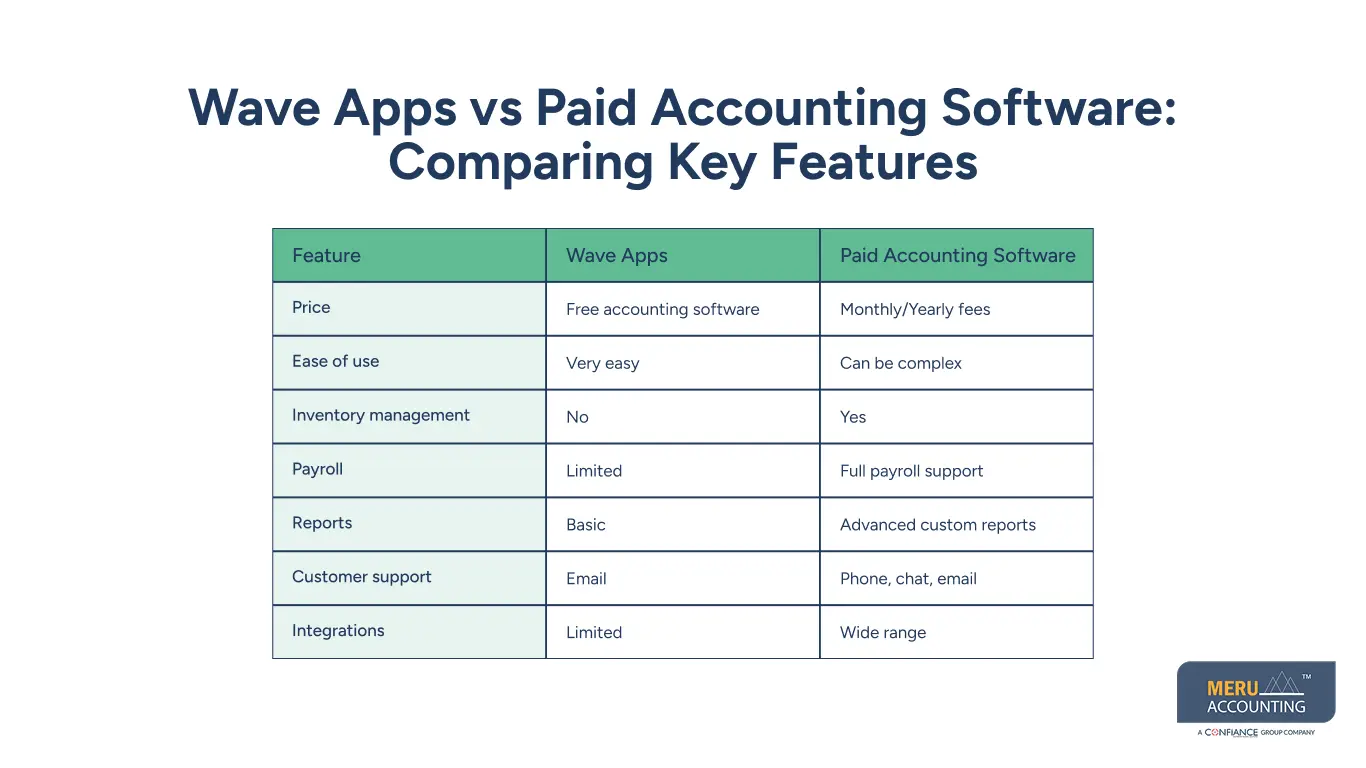
Wave Apps vs Paid Accounting Software: Comparing Key Features
Feature | Wave Apps | Paid Accounting Software |
Price | Free accounting software | Monthly/Yearly fees |
Ease of use | Very easy | Can be complex |
Inventory management | No | Yes |
Payroll | Limited | Full payroll support |
Reports | Basic | Advanced custom reports |
Customer support | Phone, chat, email | |
Integrations | Limited | Wide range |
When to Choose Wave Apps
For Freelancers and Solopreneurs
Perfect for sending invoices and tracking small-scale expenses.
For Startups on a Budget
No subscription cost means more money for other priorities.
For Service-Based Businesses
Best for consultants, coaches, and small service providers.
For Businesses with Few Transactions
Ideal if your monthly transactions are minimal.
When to Choose Paid Accounting Software
For Medium and Large Businesses
Handles complex needs like payroll, tax filing, and inventory.
For Product-Based Companies
Tracks stock, suppliers, and purchase orders.
For Multi-Location Operations
Manages accounts across different branches.
For Businesses Needing Deep Insights
Advanced analytics and forecasting help make better decisions.
Additional Comparison Factors
Security
Both options use encryption, but paid software may offer more backup and recovery tools.
Mobile Access
Wave Apps has a mobile app for invoicing and expenses; paid software offers more mobile features.
Data Migration
It’s possible to switch from Wave Apps to paid software as your business grows.
Customization
Paid software allows more customization in invoices and reports than Wave Apps.
Common Mistakes When Choosing Accounting Software
The Role of Automation in Accounting
Time-Saving Benefits
Automation takes care of repeat jobs like bank match and pay alerts, saving hours each month.
Reducing Human Error
Letting the tool do the math helps you avoid costly slips.
Better Cash Flow Management
Auto alerts for due bills can help keep your cash steady.
Payroll Automation
Paid tools often run payroll on their own, cutting down on hand work.
Expense Categorization
Automation can sort costs into groups without you typing each one.
How Customer Support Impacts Your Choice
Speed of Response
Paid tools may reply in minutes; Wave Apps replies can take more time.
Types of Support
Wave Apps uses email; paid tools may give phone, chat, or on-site help.
Learning Resources
Paid tools offer video guides, docs, and live talks to help you learn fast.
Dedicated Account Managers
Some paid plans give you a set manager for quick fixes.
Multi-Language Support
Paid tools often work in many tongues, great for global teams.
Cost Analysis Over Time
User Experience Differences
Compliance and Tax Filing Support
Tax Calculation Tools
Paid tools have built-in tax calculators for many regions.
Wave Apps Tax Features
Wave Apps has basic tax tracking but may not cover hard tax rules.
Local Compliance
Paid tools update with local tax laws to help avoid fines.
Audit-Ready Reports
Some paid tools can make audit-ready reports in seconds.
Filing Assistance
Some paid tools let you file taxes right from the app.
Future Trends in Accounting Software
AI-Powered Accounting
AI is now used to predict cash flow and spot strange transactions fast.
Cloud-First Platforms
Cloud tools like Wave Apps are now common in the industry.
Mobile-First Features
More apps are built to work best on phones and tablets.
Blockchain in Accounting
Future tools may use blockchain for safer records.
Voice Command Integration
Some apps test voice commands to add data and run reports.
Final Tips Before Choosing
Make a Feature List
Write down the features you must have before comparing options.
Test Before Buying
Use free trials of paid software to see if it works for your business.
Plan for 2–3 Years Ahead
Choose software that will work as your business grows.
Check Hidden Costs
Even Free accounting software can have charges for certain services.
Train Your Team
Make sure your staff knows how to use the software effectively.
Wave Apps works best for freelancers, startups, and small service firms. Paid accounting tools are better for medium to large firms with complex needs. The right choice depends on your budget, needed features, and growth plans. At Meru Accounting, we help you pick the right software, set it up, and manage it with ease. Our team works with both free and paid options to fit your needs. With our help, you save time, improve accuracy, and focus on growing your business.


