
Not all tax returns follow the same path. One client may have a simple W-2, while another may bring in rental income, business expenses, investment gains, and a stack of supporting documents. For tax firms handling a large client base, this mix makes cloud based tax software for tax preparers an important part of running an organized practice.
But more features don’t always mean a better fit. The software you choose should match the type of returns you handle, the size of your team, and the way you work with clients. Let’s look at what matters when comparing tax platforms and how to find one that can support your firm’s needs.
What You Will Learn From This Blog
- What cloud tax software is and how it works.
- Why tax preparers need cloud tools to manage many client returns.
- Which key features matter when choosing tax software.
- How to compare online tax filing software for tax professionals.
- How to deal with common issues when handling many tax returns.
- What to check before you choose a cloud tax tool.
What Is Cloud Based Tax Software for Tax Preparers?
Cloud based tax software for tax preparers is an online tool that lets tax teams prepare, review, store, and file tax returns through a web-based system. Unlike desktop tools, it does not rely on one office computer to store all work files. Users can sign in through a secure web browser and access the tools based on their user rights.
These tools may support tax return prep, tax form entry, e-filing, client records, file sharing, and status tracking. Some also offer links to accounting tools, payment systems, and client portals.
For tax firms that serve many clients, cloud software can bring key tasks into one workspace. A tax preparer can review client data, while a senior staff member checks the return before it goes out for filing.
Still, cloud access does not mean every tool has the same level of support. Some tools focus on basic tax returns, while others offer more features for firms that handle both personal and business tax work.
optional anymore
on running the business
Why Do Tax Preparers Need Cloud-Based Software to Manage Multiple Client Returns?
As a tax firm grows, so does the amount of data it needs to track. Using emails, paper files, and separate tools can make it hard to keep each client record in order. Cloud tax tools help bring this work into a clearer and easier-to-track process.
Here are some key ways they can help:
1. Keep Client Files in One Place
Tax teams deal with W-2s, 1099s, bank records, receipts, and other tax papers. Cloud tools can help store these files under the right client record. This cuts the need to search through long email chains or local folders.
2. Work With Staff From Different Locations
Tax firms may have staff who work from home or in more than one office. Cloud access lets approved users work on client files without being tied to one device. This can also help senior staff review work done by other team members.
3. Track Return Status
A firm may have returns at many stages, from data entry to review and filing. Status tools can help staff see which returns need more data, which are ready for review, and which have been filed.
4. Cut Repeated Work
Some tools can import data, fill in common fields, and run checks for missing or mismatched details. This can reduce manual work, though tax staff still need to check the data before filing.
Key Features to Look for in Cloud Based Tax Software for Tax Preparers
When you compare cloud based tax software for tax preparers, focus on features that solve real work issues. A long list of tools does not always mean a better fit for your firm.
1. Multi-Client Management
The software should let you set up and manage many client files without mixing up their tax data. Look for clear client records, search tools, file tags, and easy access to past returns.
2. Tax Return Prep and E-Filing
Check which tax forms the tool supports. If your firm handles both personal and business tax returns, make sure the software can meet those needs. Also, check whether it supports e-filing for the tax forms and regions you serve.
3. Secure File Storage and Client Portals
Tax records hold private data, so file safety matters. Look for data encryption, multi-factor login, user access rules, secure file sharing, and regular data backups.
A client portal can also help clients send tax papers without using normal email. This gives the firm a clearer way to collect and track files.
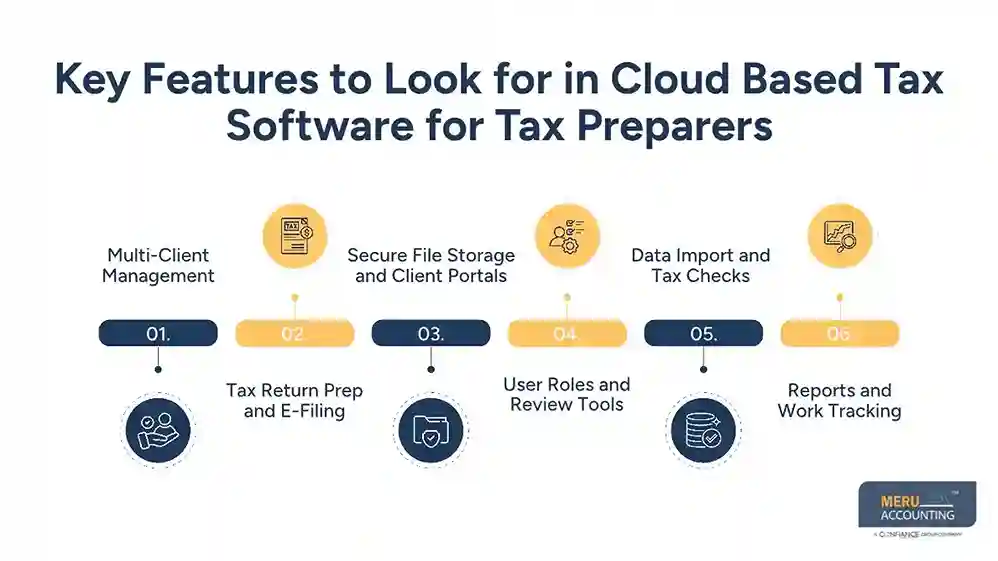
4. User Roles and Review Tools
Not every staff member needs the same level of access. Good tax software should let firm owners set user roles. It should also support review steps so a senior tax pro can check a return before it is filed.
5. Data Import and Tax Checks
Data import tools can help move details from tax forms and other records into the right fields. Some tools can also flag missing data, math errors, or details that need review. These checks can save time, but they do not take the place of a trained tax preparer’s review.
6. Reports and Work Tracking
Look for reports that show return status, work in progress, pending client files, and filed returns. These tools help firm owners plan staff work and spot delays before they affect filing dates.
How to Evaluate Online Tax Filing Software for Tax Professionals
Choosing online tax filing software for tax professionals takes more than a price check. You need to see how well the tool fits your daily work and the type of clients you serve.
Use these points when you compare your options.
1. Check Tax Form Support
Make sure the tool supports the tax forms your clients need. For a US tax firm, this may include Form 1040, 1065, 1120, 1120-S, and other forms based on the work you do. Check for state return support as well.
2. Review Software Links
Your tax tool may need to work with accounting software, payroll tools, document storage, or payment systems. Check which links are built in and which need extra setup. This can help avoid extra data entry.
3. Test the User Setup
If many staff members work on returns, check how the tool handles user access. See if you can assign work, set review rights, and track changes made to a client file.
4. Check Data Safety
Ask how the vendor stores and protects tax data. Review its access rules, backup plan, breach response, and data recovery terms. For US tax firms, also check how the tool supports IRS data safety rules and other rules that apply to your work.
5. Compare the Full Cost
Do not look at the base price alone. Some vendors may charge extra for more users, e-filing, state returns, data storage, or added features. Check the full cost based on your client count and work needs.
6. Ask for a Demo
A demo lets you test the tool before you buy it. Try a full workflow, from adding a client and sharing files to preparing, reviewing, and filing a return. This can show you if the tool is easy for your team to use.
Common Challenges When Managing Multiple Client Tax Returns and How to Address Them
Even with good software, tax firms can face issues when handling many returns at once. The right work steps and tools can help reduce these problems.
Missing Client Documents: A return may get held up when a client has not sent all tax papers. Use a file list and send clear requests for any missing records.
Data Entry Errors: Manual entry can lead to wrong figures or missed details. Use import tools where they fit, then match the data with the source papers before filing.
Missed Filing Dates: A high workload can make it hard to track due dates. Use a return tracker with clear task owners and review dates. Set alerts for key dates.
Poor Team Coordination: Two staff members may work on the same file without knowing what the other has done. Use task roles, review steps, and clear notes to track each change.
Data Safety Risks: Shared files and open user access can put client data at risk. Use strong login rules, set user rights, and remove access when a staff member leaves the firm.
Meru Accounting’s Tax Filing Services for Individuals and Businesses
A growing tax practice needs more than software to keep its client work moving. It also needs people who understand tax records, return preparation, and the level of care each filing requires. Meru Accounting brings years of experience in accounting and tax support, helping businesses and CPA firms manage tax work with skilled accounting professionals.
Our tax preparation and filing support covers key tasks such as:
- Individual Tax Return Preparation: Organizing income records, deductions, credits, and supporting documents for individual tax returns.
- Business Tax Preparation: Supporting tax work for businesses, including the preparation of relevant financial records and tax data.
- Tax Data Review: Checking client records and supporting documents for missing details, errors, and items that need further review.
- Tax Document Management: Organizing client tax files and keeping supporting records ready for the preparation and review process.
- Tax Preparation Support for CPA Firms: Providing dedicated professionals to help CPA firms manage additional client work and busy-season workloads.
Whether your firm needs help with a high volume of client returns or ongoing preparation support, we can fit into your existing workflow. Our team works with your instructions and review process, so you can take on more tax work without adding the same level of in-house staffing costs.
Our Expert Insight
One feature worth checking before choosing tax software is its ability to track changes to a return. Clients may send corrected 1099s, updated income details, or new expense records after the initial data entry. Your software should make these changes easy to spot and show who made each update.
We also recommend checking how the platform handles rejected e-file submissions. Your team should be able to see the rejection reason, make the needed corrections, and track the return until it is accepted. Remember, IRS acceptance only confirms that a return passed the e-file checks; it does not mean the figures are free of errors.
In our experience, a good tax system should make it easy to review changes, trace source documents, and catch issues before filing. These checks matter just as much as speed when handling multiple client returns.
Key Takeaways
- Cloud tax tools help firms manage client files and tax returns in one place.
- Pick software that fits your client count and tax form needs.
- Check file safety, user roles, data import, and review tools.
- Test the full workflow before you buy a plan.
- Use clear work steps to track missing files and due dates.
- Have a trained tax pro review each return before filing.
FAQs
Look for support for the tax forms you handle, bulk client management, secure document access, e-filing, and clear review workflows. Also, check whether the software can handle your firm’s client volume during peak tax season.
Yes, many professional tax platforms support both. However, coverage varies by product. Check for forms such as 1040, 1065, 1120, and 1120-S, as well as state return support, before choosing a plan.
Yes. Cloud-based platforms let authorized users sign in through a web browser from different locations. Access depends on the vendor’s security settings, user permissions, and internet connection.
Most vendors offer data import tools or conversion support. Before switching, check which client details, prior-year returns, tax forms, and supporting records can be moved. Keep secure backups and verify imported data before using it to prepare new returns.
Yes. It can help small CPA firms manage client records, prepare returns, and coordinate staff without relying on a single office computer. Many platforms offer plans based on users or return volume, making it easier to choose a setup that fits the firm’s needs.
optional anymore
on running the business



