
Small business tax filing software can make tax work clearer, faster, and easier to manage. Small firms often deal with sales, costs, payroll, bank data, forms, and tax due dates at the same time. Good software can bring much of that data into one place and guide the owner through key filing steps.
Still, software does not replace sound records or tax judgment. The IRS says businesses must keep records that clearly show income and expenses and that support the amounts reported on tax returns.
For that reason, the best tax software for small businesses should be seen as a filing tool, not as a way to avoid tax review. The right system can cut manual work while giving owners a clear path from tax data to a filed return.
What You Will Learn From This Blog
- Why small firms use tax tools for filing and record work.
- Which features matter when choosing tax software.
- How small business tax filing software can reduce data entry and filing errors.
- How tax tools can fit into a wider tax work plan.
- When a tax pro may still be the better choice.
- How to get more value from tax software each year.
Why Small Businesses Need Tax Filing Software
Less Manual Data Work
Small firms may have many sales and cost entries each month. Entering each item by hand can take time and may lead to missed data. Small business tax filing software can bring data into a set tax flow and reduce repeat entry.
Better Record Access
Tax work is easier when small business tax filing software keeps income, costs, assets, and payments easy to find. The IRS notes that good records must support income, expenses, and credits shown on a return.
Easier Form Review
Tax forms can be hard to read when a firm has more than one income source or tax need. A good tool can ask clear questions and place data in the right areas. The IRS notes that commercial tax software often uses a question-and-answer format.
Clear Tax Tasks
A filing tool can show which fields are done and which still need data. Such prompts can give an owner a clear work path and reduce the risk of leaving key fields blank.
Better Filing Control
Tax work should not end when a return is sent. Owners need proof of filing, payment details, and copies of key forms. Good tax software can keep these items in one place for later review.
Key Features To Look For In Small Business Tax Filing Software
Business Type Support
Tax rules can vary by business type. A sole owner, partnership, S corporation, and C corporation may face different forms and tax steps. Small business tax filing software should fit the firm’s tax structure before any data is entered.
Income and Expense Entry
The tool should make it easy to add sales, fees, rent, wages, supplies, and other costs. It should also make clear where each amount goes so the owner can review the source before filing.
Bank and Data Links
Some tax tools can link with accounting or bank data. Such links can cut the need to type the same figures more than once. Yet each imported entry should still be checked before use.
Error Checks
Tax software should check for missing fields, math issues, and other common errors. These checks are useful, but they do not prove that every tax item is right. The filer remains in charge of the final return.
E-Filing Options
Many business tax forms can be filed by electronic means through IRS systems. The IRS says e-file options are available for many business and self-employed returns.
Data Safety
Tax files contain bank data, income data, and other private details. Check how the provider stores data, protects access, handles backups, and lets you recover your records before buying a plan.
How Small Business Tax Filing Software Makes Filing Easier
One Place For Tax Data
A good system can bring key tax data into one work area. Instead of searching through email, sheets, bank files, and paper notes, the owner can review data in a clearer way.
Guided Tax Steps
Tax filing can feel hard when a form has many fields. A guided tool can ask one question at a time and show what data is needed. That makes the work easier for owners who do not file tax returns often.
Faster Data Checks
Software can flag gaps before a return is sent. For example, a tool may show that an income field is empty or that a total does not match. Such checks can save time during the final review.
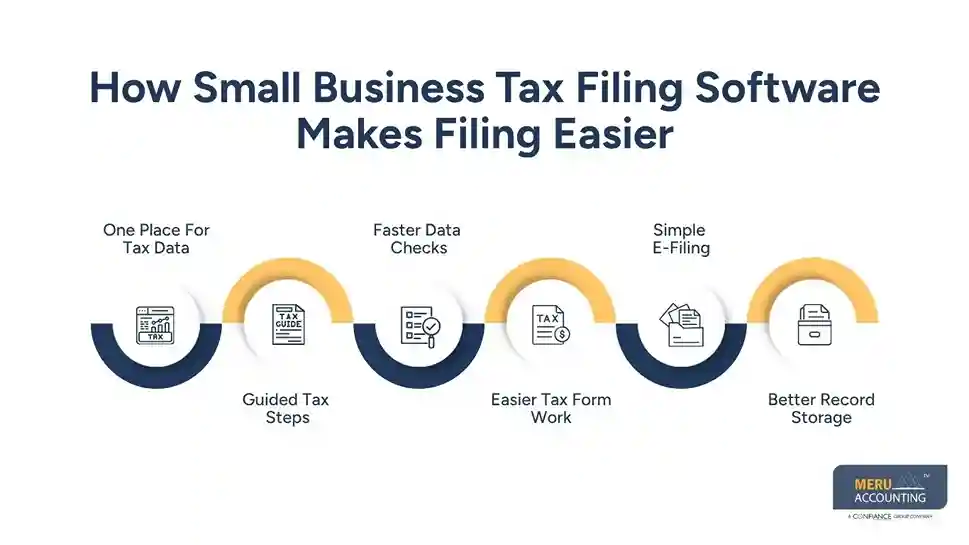
Easier Tax Form Work
Tax forms often draw data from many parts of a firm’s records. Small business tax filing software can map entered data to the right tax forms. The owner can then review the form before sending it.
Simple E-Filing
Electronic filing can reduce paperwork and make filing status easier to track. IRS systems also send filing notices after certain e-filed returns are received.
Better Record Storage
A useful tax tool can keep copies of filed returns, reports, and key tax data. Such records matter if the owner needs to check an old return, answer a tax query, or work with a tax pro later.
Benefits Of Using Tax Software For Small Businesses
Saves Time
Small business tax filing software can cut repeat data entry and guide the owner through key steps. Tax software for small businesses can cut repeat data entry and guide the owner through key steps.
Cuts Basic Entry Errors
Wrong totals, blank fields, and missed data can slow tax work. Software may flag some basic issues before filing, giving the owner a chance to fix them.
Gives Better Tax Visibility
A good tool can show income, costs, deductions, and tax data in a clear view. That view can make it easier to spot missing records before the filing stage.
Makes Filing More Convenient
Owners can work on returns from a computer without printing large sets of forms. IRS guidance notes that electronic filing can replace many manual steps used with paper returns.
Keeps Past Data Handy
Prior-year data can be useful when preparing a new return. Some tools may let users carry forward certain details, which can reduce repeat work.
Fits Small Teams
A small firm may not have a full tax team. Tax software for small businesses can give owners and staff a set process for collecting and checking tax data before a return is filed.
How To Choose The Right Small Business Tax Filing Software
Check Your Tax Needs
Start with the type of return your firm files. Do not choose small business tax filing software only because it has a low price. Check whether it covers your business type, forms, state needs, and filing method.
Compare Total Cost
Look at more than the base plan. Some products charge extra for state returns, forms, live help, filing, or other services. Compare the full cost based on your actual tax needs.
Review Ease Of Use
A good tool should be clear from the first screen. Check whether menus are easy to follow and whether the system explains tax terms in plain words.
Check Tax Pro Access
Some owners can use small business tax filing software on their own, while others need expert review. Look for tax software for small businesses that offers access to a tax pro if your return has issues that need human judgment.
Check Filing And Form Limits
A low-cost plan may not include every form you need. Review form limits, state filing rules, business returns, payroll forms, and information returns before you sign up.
Review Security And Records
Ask how your data is stored and how long you can access your files. IRS guidance says electronic records must meet the same core record rules as paper records and must provide a complete and accurate record.
Best Small Business Tax Filing Software Options To Consider
Different small firms have different tax needs, so no single tool is right for every business. When reviewing small business tax filing software, compare the type of return, ease of use, tax forms, filing cost, record tools, and level of expert help available.
QuickBooks Tax Tools
QuickBooks tax tools may suit firms that already keep their income and expense data in QuickBooks. Using related accounting data can reduce the need to move figures by hand when tax work begins. Small business tax filing software works best when the records used for filing are kept current throughout the year.
TurboTax
TurboTax can be considered by owners who want a guided filing process. The software asks questions and uses the answers to build the return. Tax software for small businesses can be useful for owners with fairly simple tax needs who prefer to handle routine filing work on their own.
H&R Block
H&R Block offers options for people who want software-based tax preparation along with access to tax professionals through certain services. Such a mix can suit owners who want to prepare much of the return themselves but may need expert input for a question or issue.
TaxAct
TaxAct is another option worth reviewing when comparing tax filing tools. Business owners can assess its available products based on their business type and return needs. Small business tax filing software should always be checked against the exact forms a business must file.
FreeTaxUSA
FreeTaxUSA may be worth considering for owners who want a simple online filing process and a lower-cost option. The right fit depends on the type of business return and state filing needs. Tax software for small businesses should be judged by total filing cost rather than the advertised base price alone.
optional anymore
on running the business
Tips For Getting More From Small Business Tax Filing Software
Keep Records Up To Date
Do not wait until tax time to sort your records. Record sales, costs, payroll, and other business activity during the year. The IRS notes that records should support the income and costs shown on tax returns.
Keep Business And Personal Costs Apart
A separate business account can make tax review much easier. It also makes it easier to trace the source of income and the reason for each business cost.
Check Imported Data
Small business tax filing software can reduce manual entry, but imported information should still be checked before filing. Check dates, amounts, account types, and categories before using the data for a tax return.
Save Proof For Deductions
A deduction should have support behind it. The IRS says taxpayers may need receipts, bills, canceled checks, or other proof to support certain expenses.
Review Before Filing
Do not click the final filing button as soon as the software says the return is ready. Read the return, compare key figures with your financial records, and check major income and cost items.
Keep A Tax Calendar
Tax work includes more than one annual return. Some firms may have estimated tax, payroll tax, sales tax, or information return duties. A tax calendar can keep these dates in view.
How Meru Accounting Can Help With Small Business Tax Filing
- Meru Accounting reviews financial records and prepares key tax data for filing.
- Our team keeps income, expenses, and payments organized for tax review.
- Meru Accounting manages tax filing based on business structure and filing needs.
- Our team organizes payroll records and related tax data for filing.
- Meru Accounting checks key figures and records before tax submission.
- Our year-round support keeps bookkeeping, payroll, and tax records ready.
- Our experts identify missing records and flag areas that need further review.
- Meru Accounting provides ongoing accounting guidance to keep tax work on track.
Our Expert Perspective
- Small business tax filing software works best when financial records are clean and current.
- Small business tax filing software can handle routine tasks, but complex tax matters may need expert review.
- Review income, expenses, bank data, payroll, and tax payments before using tax software for small businesses.
- Tax software for small businesses should not replace a careful review of imported data.
- Check dates, amounts, categories, deductions, and missing entries before submitting a return.
- Keep receipts, invoices, bank records, and filed returns for future tax needs.
- Start early with small business tax filing software so record gaps can be found before deadlines.
- Use tax software for small businesses as part of the filing process, not as a full tax review.
Key Takeaways
- Small business tax filing software can reduce manual tax work.
- Good records remain the basis of a sound tax return.
- Choose software that fits your business type and tax forms.
- Check form limits, state fees, filing costs, and support options.
- Review all imported data before using it for tax work.
- Keep receipts and other proof for key business costs.
- Use e-file options when they fit your tax return.
- Do not treat software checks as a full tax review.
- Ask a tax pro when your tax needs are complex.
- Keep copies of filed returns and key tax records.
FAQs
The best small business tax filing software depends on your business type, tax needs, forms, budget, and required support.
Small business tax filing software collects tax data, prepares forms, checks common errors, and may allow electronic filing.
Yes, eligible businesses can use tax software to prepare and electronically file certain federal and state tax returns.
Small business tax filing software costs vary based on the provider, business type, forms, state returns, and added services.
Tax software for small businesses may suit simple returns, while complex tax needs may require review from a tax professional.
optional anymore
on running the business



