Construction accounts payable software helps firms track bills, pay subcontractors, and check costs for each job. A single site may have plumbers, roofers, electricians, and many other trade firms. Each may have its own rates, due dates, bills, and terms. When staff use sheets and email to track these tasks, they may miss due dates, pay the same bill twice, or lose track of funds held back until the work is done.
For example, a contractor gets a $20,000 bill from a subcontractor, with 10% retainage. The team must check the bill, confirm the work, record the $2,000 holdback, and review the lien waiver before it pays the rest. Construction accounts payable software keeps these steps in order and logs each action.
The best accounts payable software for construction companies should fit the firm’s daily work, not just offer many tools. This blog reviews six key tools, shows how they handle AP tasks, and lists what to check before you choose one.
What You Will Learn From This Blog
- How construction accounts payable software tracks bills and payments.
- Why firms need clear AP records and job cost reports.
- How to track subcontractor bills, retainage, and lien waivers.
- How six AP and construction accounting tools compare.
- How to pick a tool that fits your jobs and budget.
- How Meru Accounting provides accounting services for construction firms.
What is Construction Accounts Payable Software?
Construction accounts payable software is a tool that tracks bills, money owed, and payments to subcontractors and vendors. It can link bills to jobs, cost codes, orders, and approval steps.
Bill Capture and Record Keeping
The tool stores vendor bills in one place. Staff can check the amount, due date, and job details without searching through emails. Some tools can read data from bills, but staff must check the entries before approval.
Job Cost Tracking
Construction accounts payable software can link each bill to a job or cost code. For example, a $4,500 plumbing bill can be linked to the right site. This lets the team check costs against the job budget.
Payment Scheduling
AP tools show which bills are due, approved, or still under review. This helps finance teams plan cash needs and set payment dates based on the terms of each deal.
Approval Workflows
A site manager may need to check the work before the firm pays a bill. The tool can send the bill to the right person and save the approval record.
Retainage and Waiver Records
Some construction accounts payable software can track holdbacks and store lien waiver files with payment records. Features vary by tool and plan, so check if these tasks are built in or need a separate tool.
Why Construction Firms Need Better Accounts Payable Management
Construction bills often need more than a quick check. Staff may need to review work done, approved changes, contract terms, and cash on hand before they pay a vendor.
Many Vendors and Subcontractors
A single site may use firms for concrete, roofing, plumbing, and electrical work. Construction accounts payable software keeps their bills in one place and links each cost to the right job.
Different Payment Terms
One vendor may ask for payment in 15 days, while another may allow 30 days. A clear list of due dates helps staff plan payments and avoid late fees or disputes over missed dates.
Risk of Duplicate Bills
A vendor may send the same bill by email and through a job portal. Without a clear review process, both copies may be set for payment. Duplicate checks and clear vendor records can cut this risk.
Cash Flow and Budget Gaps
A job may show a profit while cash is tied up in unpaid client bills or retainage. Construction accounts payable software shows open bills and due payments, which helps managers plan cash needs.
Missing Records During Disputes
A bill may be on hold if the work is not done or the amount does not match the deal. Keeping the bill, approval, and payment history in one place gives staff clear facts to check when a dispute comes up.
How Construction Accounts Payable Software Simplifies Subcontractor Payments
Subcontractor payments often depend on work done, bill amounts, and contract terms. Construction accounts payable software sets out these checks in one clear process instead of leaving each step to email and spreadsheets.
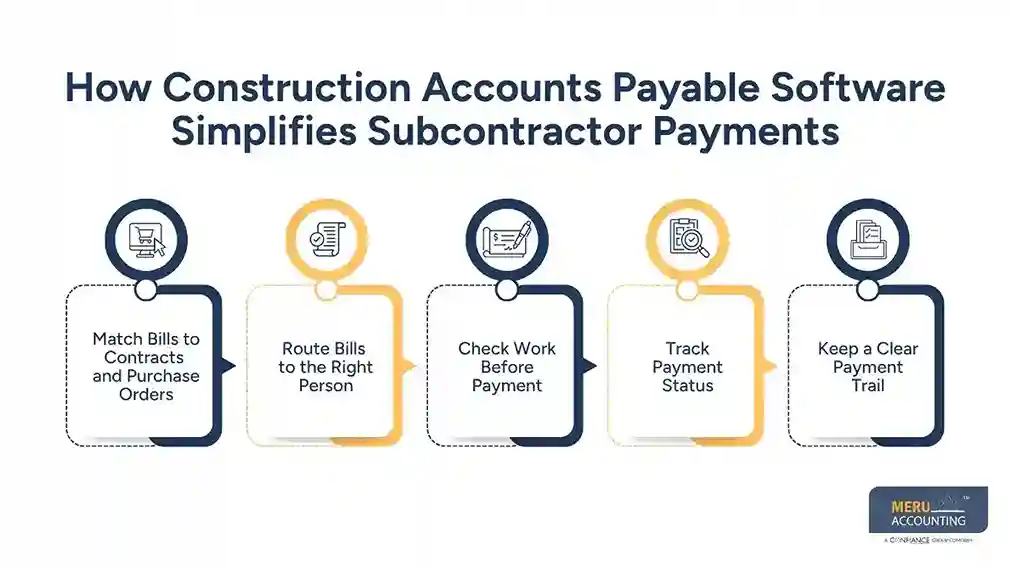
Match Bills to Contracts and Purchase Orders
Staff can check a bill against the agreed price, purchase order, or work order. If a subcontractor bills more than the agreed sum, the team can flag the gap before payment.
Route Bills to the Right Person
The tool can send a bill to the site manager or project lead for review. Once the work and amount are approved, the bill moves to the accounts team for payment.
Check Work Before Payment
A roofer may bill $12,000 after one stage of a job is done. The site lead can check the work against the deal and approve the amount before the finance team pays it.
Track Payment Status
Construction accounts payable software can show if a bill is new, under review, approved, due for payment, or paid. Staff can then give a clear answer when a subcontractor asks about a bill.
Keep a Clear Payment Trail
The tool can store bills, approval notes, payment dates, and job details. These records help when a vendor questions a sum or the firm checks costs after a job ends.
How to Manage Retainage and Lien Waivers With AP Software
Retainage and lien waivers need care because contract terms and state laws can vary. Construction accounts payable software can keep the records in order, but staff must still check the rules for each job.
Record Retainage Rates
Retainage is money held back from a payment until set terms are met. If a bill is $20,000 and the retainage rate is 10%, the firm holds back $2,000. The amount due is $18,000 before any other changes or cuts.
Track Held and Released Amounts
A tool with retainage features can show how much is held for each job and subcontractor. Staff can check the contract and work status before they release the balance.
Collect Lien Waivers
A lien waiver gives up certain lien rights to the extent set out in the form. Teams using construction accounts payable software should check the waiver type, amount, and pay period before they use it.
Link Waivers to Payments
Some tools let staff attach waiver files to bills or payment records. The best accounts payable software for construction companies should show which waivers are on file and which still need review.
Check Contract Terms and Local Rules
Waiver rules and payment dates vary by state and contract. Use the right form and seek legal advice if the effect of a waiver or the terms of a payment are not clear.
optional anymore
on running the business
Best Accounts Payable Software for Construction Companies: Top Tools Compared
The best accounts payable software for construction companies depends on job size, accounting needs, and the level of control the firm needs over bills and payments. The six tools below cover job workflows, accounting, and AP tasks.
Procore
Procore offers tools for construction project management, including finance tasks that link job records with accounting work. It may suit firms that want office and site teams to share job data.
When you review Procore as construction accounts payable software, ask which plan covers bill review, subcontractor payments, retainage, and lien waiver tracking.
Sage Intacct Construction
Sage Intacct Construction offers accounting and finance tools for construction firms. It may suit firms that need job cost reports, approval rules, and a clear view of costs across many jobs.
The best accounts payable software for construction companies should fit current finance tasks. Ask for a demo of bill approval, retainage records, and links to job systems.
FOUNDATION Software
FOUNDATION is construction accounting software with tools for job costs, payroll, and accounts payable. It may suit firms that want a system built for construction rather than a basic bill pay tool.
Check how it records vendor bills, cost codes, retainage, and waiver files for the jobs your firm runs.
BILL
BILL focuses on accounts payable and receivable tasks, such as bill approval and payment steps. It may suit firms that want to cut manual data entry and set clear approval rules.
Before you choose BILL as construction accounts payable software, check if you need another tool or manual steps for retainage, lien waivers, and job cost reports.
Autodesk Construction Cloud
Autodesk Construction Cloud links project teams through tools for job and cost control. It may suit firms that want finance tasks tied to job data and site records.
Check which AP and accounting tools are in your chosen plan. Ask about bill review, links to other systems, and subcontractor files.
QuickBooks Online
QuickBooks Online offers basic accounting tools for vendor bills, payment records, and finance reports. It may suit small contractors with few jobs and simple accounting needs.
The best accounts payable software for construction companies must also meet their job cost needs. Check if QuickBooks Online needs extra tools to track complex retainage, lien waivers, and multi-step approvals.
No tool suits every firm. Ask each vendor to show how a sample bill moves from receipt to approval and payment. Check what happens if the amount is wrong or a key file is missing.
How to Choose the Right Construction Accounts Payable Software for Your Business
The right tool should fit how your team buys goods, checks work, approves bills, and pays vendors. Review daily tasks before you compare brands. Ask each vendor to show the features your team will use.
Compare Features and Pricing
List the tools you need, such as bill capture, job cost codes, approval rules, and payment reports. Check the full cost, including setup, user fees, staff training, payment fees, and add-ons.
Check Subcontractor Payment Workflows
Ask the vendor to show how a bill moves from receipt to payment. Test a case where the amount is wrong, the work is not done, or a manager rejects the bill.
Review Retainage and Lien Waiver Support
Do not assume all construction accounts payable software tracks holdbacks and waivers in the same way. Check how the tool records retainage, tracks releases, stores files, and flags missing records.
Assess Integration With Existing Accounting Systems
If you already use accounting software, check if the new tool can share vendor data, bills, cost codes, and payment records. Ask how often data is updated between connected systems and how the tool handles errors.
Consider Business Size and Project Volume
A small trade firm may need simple bill approval and job cost reports. A large contractor may need more approval steps and reports across many sites. Choose construction accounts payable software that fits your work now and can grow with your firm without adding needless cost.
Why Choose Meru Accounting for Construction Accounting?
Software records bills, but sound books still need correct entries, regular checks, and clear records. Meru Accounting provides bookkeeping and accounting services for firms that need better control over bills, costs, and financial reports.
Clear Accounts Payable Records
Our team can record vendor bills, check entries, and keep payment records in order. This gives owners a clear view of which bills are due and which need action.
Job Cost and Expense Tracking
Meru Accounting provides accounting services that group costs by job and type. When paired with construction accounts payable software, these records help owners check actual costs against the job budget.
Regular Account Review
Routine checks can flag duplicate entries, missing bills, and gaps in the books. Firms can review these issues before they cause bigger problems.
Useful Financial Reports
Clear books give owners a better view of costs, unpaid bills, and cash needs. These reports can guide choices about job spending and bills due soon.
Accounting Work That Fits Your Business
We can review your current accounting process, the tools you use, and the tasks that take the most time. This gives your firm a clear base for an accounting plan that fits its needs.
Our Expert Perspective
Good AP control starts before a bill reaches the payment stage. Teams should set clear rules for who checks the work, who approves the bill, and which files must be on hand before payment. Even the best accounts payable software for construction companies cannot fix poor records or unclear roles on its own. Clear steps, sound books, and regular checks make the tool more useful.
Key Takeaways
- Construction accounts payable software keeps bills, due dates, approvals, and payment records in one place.
- Job cost codes link bills to jobs and help teams check costs against budgets.
- Retainage and lien waiver features vary by tool, so check the exact features before you buy.
- The best accounts payable software for construction companies depends on job size, budget, and accounting needs.
- Check contract terms and local laws before you release retainage or rely on a lien waiver.
- Meru Accounting provides bookkeeping and accounting services to keep bills, costs, and finance records in order.
FAQs
Procore, Sage Intacct Construction, and other AP tools may suit firms based on their payment needs, job size, and accounting tasks.
It can record retainage rates, track held funds, and show when money is due for release under the contract terms.
Yes, some tools collect and store lien waivers and link them to subcontractor bills and payment records.
Contractors can set approval steps, match bills to job records, track due dates, and check key files before payment.
Look for job cost tracking, bill approval, payment dates, retainage tracking, lien waiver records, and links to your accounting system.
optional anymore
on running the business